
OSCAL PowerMax 3600
OSCAL PowerMax 3600 Solar Generator User Manual
Model: PowerMax 3600 | Brand: EcoVolt
1. Safety Information
Please read and understand all safety instructions before operating the OSCAL PowerMax 3600 Solar Generator. Failure to follow these instructions may result in electric shock, fire, or serious injury.
- Do not expose the unit to rain or moisture.
- Ensure proper ventilation during use to prevent overheating.
- Keep out of reach of children and pets.
- Do not disassemble, repair, or modify the unit. Contact qualified service personnel for assistance.
- Avoid using the unit in extreme temperatures or direct sunlight for prolonged periods.
- The unit features an advanced eight-layer safety BMS with protections against overcharge, over-discharge, over-voltage, over-current, short-circuit, and temperature fluctuations. In case of an overload (e.g., exceeding 6000W peak), the unit will automatically shut down to protect itself and connected devices.
2. Product Overview
The OSCAL PowerMax 3600 is a high-capacity portable power station designed to provide reliable power for various applications, including home emergencies, camping, RVs, and outdoor work. It features a robust LiFePO4 battery and multiple output options.

Figure 1: OSCAL PowerMax 3600 Solar Generator with included solar panels.
Key Features:
- High Capacity & Output: 3600Wh battery capacity with 3600W continuous output (6000W peak).
- Fast Charging: 0-100% in 1.2 hours via 1800W AC input or 1.96 hours with combined AC and solar input.
- Long-Lasting LiFePO4 Battery: Durable and stable LiFePO4 batteries supporting 3,500+ charge cycles, ensuring a service life of up to 10 years.
- EPS Uninterruptible Power Supply: Automatically switches to battery backup within 5-8 ms during power outages.
- APP Control: Monitor power usage and execute remote commands via a smartphone application.
- Portability: Equipped with sturdy handles and wheels for easy movement.

Figure 2: The PowerMax 3600 features an extendable handle and wheels for enhanced portability.
3. Setup
3.1 Unboxing and Initial Inspection
Upon receiving your PowerMax 3600, carefully unpack all components and inspect for any damage. The package includes:
- PowerMax 3600 Power Station
- 2x 200W Solar Panels
- AC Charging Cable
- Car Charging Cable
- Solar Charging Cable
- User Manual
- Warranty Card

Figure 3: Included components in the PowerMax 3600 package.
3.2 Initial Charging
Before first use, fully charge your PowerMax 3600. The unit can be charged via AC wall outlet, solar panels, or a car charger.
- AC Charging: Connect the AC charging cable to the unit's AC input port and then to a standard wall outlet. The unit supports 1800W fast charging, reaching 0-100% in approximately 1.2 hours.
- Solar Charging: Connect the solar charging cable from the solar panels to the unit's solar input port. The PowerMax 3600 supports up to 1200W solar input.
- Car Charging: Use the provided car charging cable to charge the unit from your vehicle's 12V outlet.

Figure 4: Charging options and speeds for the PowerMax 3600.
4. Operating Instructions
4.1 Powering On/Off
Press and hold the main power button on the front panel to turn the unit on or off. The display screen will illuminate, showing battery percentage and other relevant information.
4.2 Output Ports
The PowerMax 3600 offers a variety of output ports to power different devices:
- AC Outlets: 4 AC outlets (3000W continuous, 6000W peak) for household appliances like refrigerators, air conditioners, and power tools.
- USB-A Ports: 4 USB-A ports for charging smartphones, tablets, and other USB-powered devices.
- USB-C Ports: 2 100W USB-C ports for fast charging compatible devices.
- DC Outputs: Includes a 12V car charger port and two DC5521 outputs for various DC devices.
- Anderson Output: A 12.6V/30A Anderson output for specific high-power DC applications.
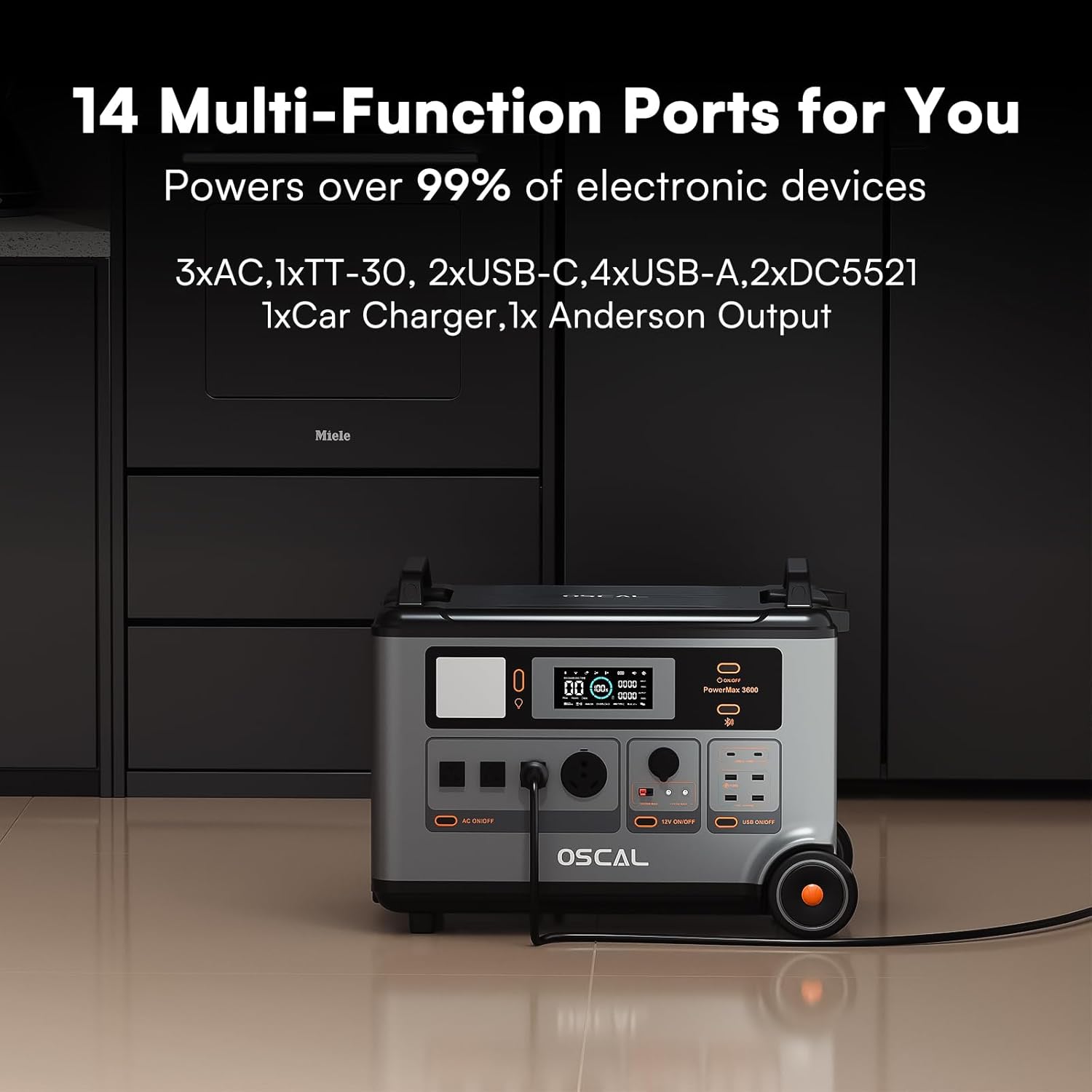
Figure 5: The PowerMax 3600 features 14 multi-function ports.
4.3 EPS Uninterruptible Power Supply
The EPS (Emergency Power Supply) function ensures uninterrupted power for critical devices. In the event of a power outage, the PowerMax 3600 automatically switches to battery power within 5-8 milliseconds, preventing data loss or interruption for connected electronics.

Figure 6: EPS mode provides seamless power during outages.
4.4 APP Control
Download the OSCAL application on your smartphone to effortlessly pair and control the portable power station. The app allows you to monitor power usage, adjust charging speeds, and execute remote commands.

Figure 7: Monitor and control your PowerMax 3600 via the OSCAL smartphone app.
4.5 Integrated Light
The unit includes an integrated light on the front panel, useful for emergencies or low-light conditions. Press the light button to cycle through brightness settings or activate SOS mode.
Video 1: Demonstration of the OSCAL PowerMax 3600 Solar Generator's features, including the integrated light.
5. Maintenance
5.1 Battery Care
The PowerMax 3600 utilizes a LiFePO4 battery, known for its longevity and stability. To maximize battery lifespan:
- Store the unit in a cool, dry place away from direct sunlight.
- Recharge the unit every 3-6 months if not in regular use to maintain optimal battery health.
- Avoid fully discharging the battery frequently.
5.2 Cleaning
Wipe the exterior of the unit with a soft, dry cloth. Do not use abrasive cleaners or immerse the unit in water.
6. Troubleshooting
6.1 Overload Protection
If the total power draw from connected devices exceeds 6000W (peak), the PowerMax 3600's safety BMS will automatically shut down the unit. Disconnect some devices and restart the unit to resume operation.
6.2 Unit Not Charging
- Ensure all charging cables are securely connected.
- Verify the power source (wall outlet, solar panels, car charger) is functioning correctly.
- Check the display for any error codes or indicators.
6.3 No Output from Ports
- Ensure the specific output section (AC, DC, USB) is activated via its respective button on the front panel.
- Check if the total power draw exceeds the unit's capacity.
Video 2: Overview of the OSCAL PowerMax 3600 Generator's features and functionality.
7. Specifications
| Brand | EcoVolt |
| Model Name | PowerMax 3600 |
| Battery Type | LiFePO4 |
| Battery Capacity | 3600Wh |
| Rated Output | 3600W (6000W Peak) |
| AC Input | 1800W (1.2H Full Charge) |
| Solar Input | 1200W Max |
| AC Outlets | 4 (100-120Vac, 50Hz/60Hz) |
| USB-A Outputs | 4 (1x 12V Max, 3x 18W Max) |
| USB-C Outputs | 2 (100W Max per port) |
| DC Outputs | Car Charger (12V/10A), 2x DC5521 (12V/3A), Anderson (12.6V/30A) |
| Dimensions | 23.2"L x 13.8"W x 17.5"H |
| Net Weight | 97lb / 44.45kg |
| Color | Black |

Figure 8: The PowerMax 3600's capacity can be expanded with additional batteries (sold separately).
8. Warranty and Support
The OSCAL PowerMax 3600 Solar Generator comes with a 5-year warranty. For any technical support, warranty claims, or inquiries, please refer to the contact information provided in your user manual or visit the official EcoVolt website.
Related documentsPowerMax 3600


Ask a question about this manual
Ask about setup, troubleshooting, compatibility, parts, safety, or missing instructions. Manuals+ will review the question and use this page’s manual context to help answer it.