
1. Product Overview
This Duotipa TFT LCD Display Touchscreen Digitizer Assembly is designed as a replacement component for damaged or malfunctioning screens on compatible Redmi Note 14 models. It aims to restore the visual display and touch functionality of your device.
The assembly features high brightness, high resolution, and high color saturation for an optimal viewing experience, along with sensitive touch response. Please note that this replacement screen does not support fingerprint recognition functionality.
2. Compatible Models
This replacement screen is compatible with the following smartphone models:
- Redmi Note 14 4G (Model: 24117RN76G)
- Redmi Note 14 5G (Model: 24094RAD4G)
Please verify your phone's model number before purchasing and attempting installation.

3. Package Contents
The package includes the following items:
- 1x TFT LCD Display Touchscreen Digitizer Assembly
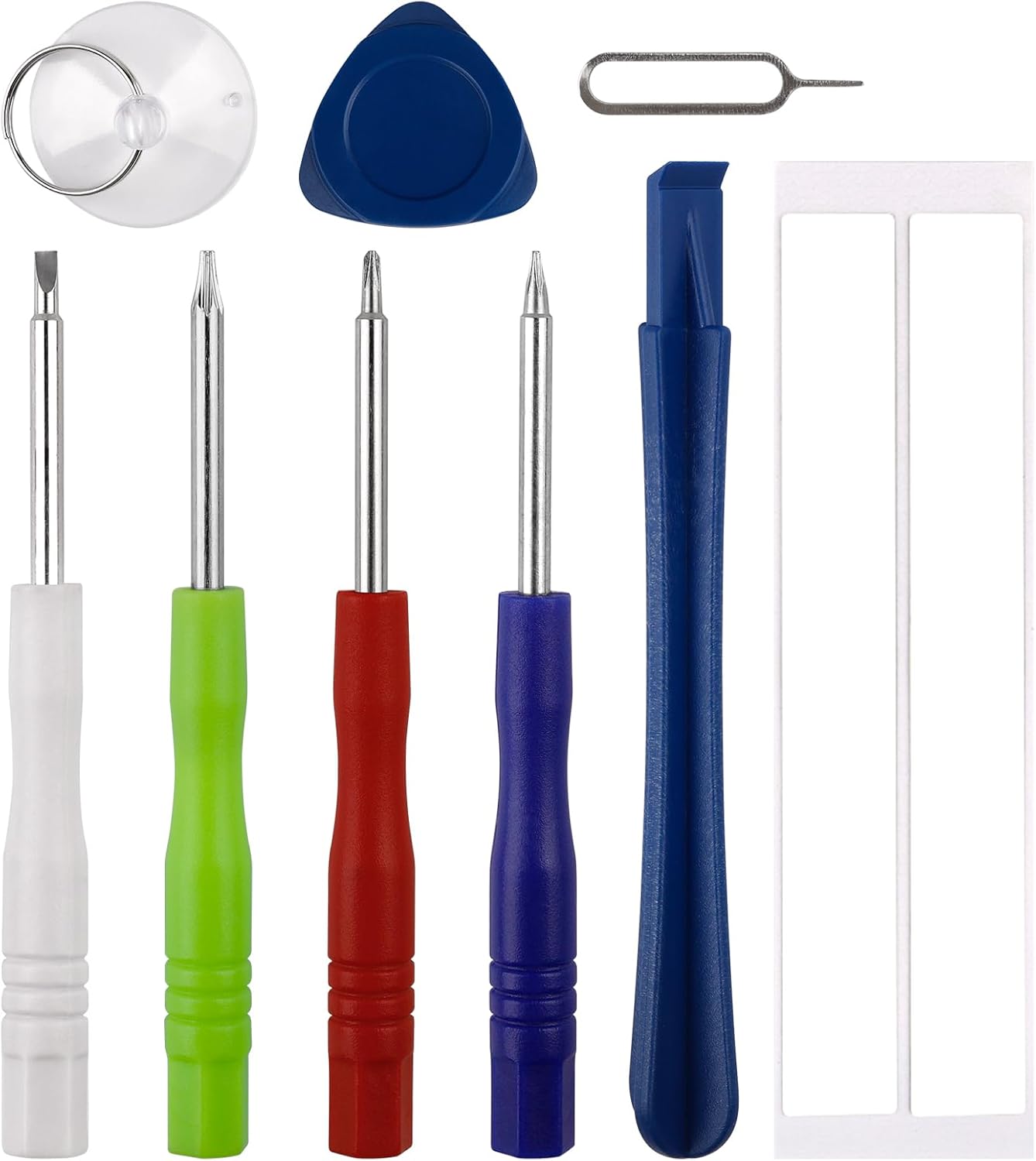
- 1x Basic Repair Tools Kit
4. Setup and Installation
Replacing a smartphone screen requires technical skill and careful handling. It is highly recommended to seek professional assistance for installation to avoid damage to your device or the new screen. If you choose to proceed with self-installation, please follow these guidelines:
- Preparation: Before beginning, search for and watch installation video guides specific to the Redmi Note 14 4G/5G on online platforms like YouTube. Familiarize yourself with the entire process.
- Power Off: Ensure your phone is completely powered off. Disconnect the battery cable before proceeding with any component removal or installation.
- Pre-Installation Test: Before applying any adhesive or fully assembling the phone, connect the new display's flex cable to the motherboard and test its functionality (display, touch response). Only proceed with full installation if the test is successful and without issues.
- Screw Management: Use the correct screwdriver from the provided kit. Keep track of all screws, noting their original positions. Screws have different sizes and lengths; inserting them into incorrect positions can cause damage to the screen or internal components.
- Flex Cable Handling: Exercise extreme caution when handling the flex cables. Do not pull, bend sharply, or apply excessive force to the flex cables, as this can result in a black screen, blurred display, or complete display failure.
Disclaimer: This product does not include a printed instruction manual. The repair process is complex, and we are not responsible for any damage incurred during the installation process.


5. Operating the Display
Once correctly installed, the Duotipa TFT LCD Display will function as the primary visual output and touch input interface for your Redmi Note 14 4G/5G. It is designed to provide a responsive touch experience and clear visual display, restoring the phone's normal operational functions.
The display supports standard smartphone gestures and interactions. If you experience any issues with touch responsiveness or display quality after installation, refer to the Troubleshooting section.
6. Maintenance
To ensure the longevity and optimal performance of your new display, follow these maintenance guidelines:
- Cleaning: Use a soft, lint-free cloth, slightly dampened with water or a screen-safe cleaner, to gently wipe the screen surface. Avoid harsh chemicals or abrasive materials.
- Protection: Consider using a screen protector to guard against scratches and minor impacts.
- Handling: Avoid dropping the phone or subjecting it to strong impacts, as this can damage the display.
- Temperature: Do not expose the phone to extreme temperatures, which can affect display performance and lifespan.
7. Troubleshooting
This replacement display is intended to resolve common screen-related issues. Refer to the table below for potential problems and their solutions.

| Problem | Possible Cause | Solution |
|---|---|---|
| Screen is black, blurred, or not displaying | Flex cable improperly connected, damaged, or pulled during installation. | Carefully re-check the flex cable connection to the motherboard. Ensure it is seated correctly and not damaged. If damaged, the screen may need replacement. |
| Touch function failure or unresponsiveness | Flex cable issue, software glitch, or screen defect. | Ensure flex cable is properly connected. Restart the phone. If the issue persists after re-checking connections, the screen may be defective. |
| Display issues (e.g., lines, discoloration, missing pixels) | Screen defect or damage during installation. | If these issues appear immediately after installation, it may indicate a defective screen or damage during the process. Contact customer support if within warranty. |
| Screen does not fit correctly | Incorrect model purchased or frame damage on the phone. | Verify the screen's compatibility with your specific Redmi Note 14 model. Inspect the phone's frame for any deformation that might prevent proper seating. |
8. Specifications
| Feature | Detail |
|---|---|
| Screen Size | 6.67 inches |
| Display Type | TFT LCD |
| Resolution | 1080x2400 pixels |
| Item Weight | 5.6 ounces |
| Package Dimensions | 7.28 x 4.72 x 0.79 inches |
| Fingerprint Support | No |
9. Warranty Information
This Duotipa TFT LCD Display Touchscreen Digitizer Assembly comes with a 6-month warranty from the date of purchase. The warranty covers manufacturing defects and functional failures under normal use.
The warranty is void if there is any evidence of human-induced damage or physical damage to the screen, including but not limited to cracks, liquid damage, or damage caused by improper installation. If the screen is not functioning properly due to a covered defect, we will replace it with a new one.
10. Customer Support
For any questions, concerns, or issues regarding your order or the product, please contact our customer service team. You can reach us by sending an e-mail via the Amazon messaging system.
We aim to respond to all inquiries within 24 hours.