
1. Introduction
This instruction manual provides essential information for the RXCWWZQQ P150-2874V6.0 4K WiFi TV Motherboard. It covers product specifications, installation procedures, operational guidelines, maintenance tips, and troubleshooting steps. Please read this manual thoroughly before installation and use to ensure proper function and safety.
2. Safety Information
- Always disconnect the TV from the power supply before attempting any installation, repair, or maintenance.
- Only qualified technicians should perform motherboard replacement or repair. Improper installation can lead to damage to the TV or personal injury.
- Handle the motherboard by its edges to avoid touching sensitive components and to prevent electrostatic discharge (ESD) damage.
- Ensure all connections are secure and correctly oriented before reapplying power.
- Keep the motherboard away from liquids, excessive heat, and direct sunlight.
3. Product Overview
The RXCWWZQQ P150-2874V6.0 is a 4K WiFi TV motherboard designed for compatible display equipment. It features a 4-core processor, 1.5G CPU speed, 8G RAM, integrated WiFi, 2 tuners, and 1 CI slot, providing a comprehensive solution for TV repair and functionality restoration. This board is designed to reduce crashes, lagging, and extend the life of your television.

Figure 3.1: Front view of the RXCWWZQQ P150-2874V6.0 TV Motherboard, showing various components and connectors.

Figure 3.2: RXCWWZQQ P150-2874V6.0 Motherboard with yellow arrows indicating the ribbon cable connector and antenna input ports.

Figure 3.3: RXCWWZQQ P150-2874V6.0 Motherboard highlighting the antenna input connectors.
4. Specifications
It is crucial to verify the specific LED backlight voltage and power requirements of your TV panel against the motherboard's specifications. Multiple variants of the P150-2874V6.0 board exist with differing LED output specifications. Refer to the labels on your existing board and the new board for compatibility.
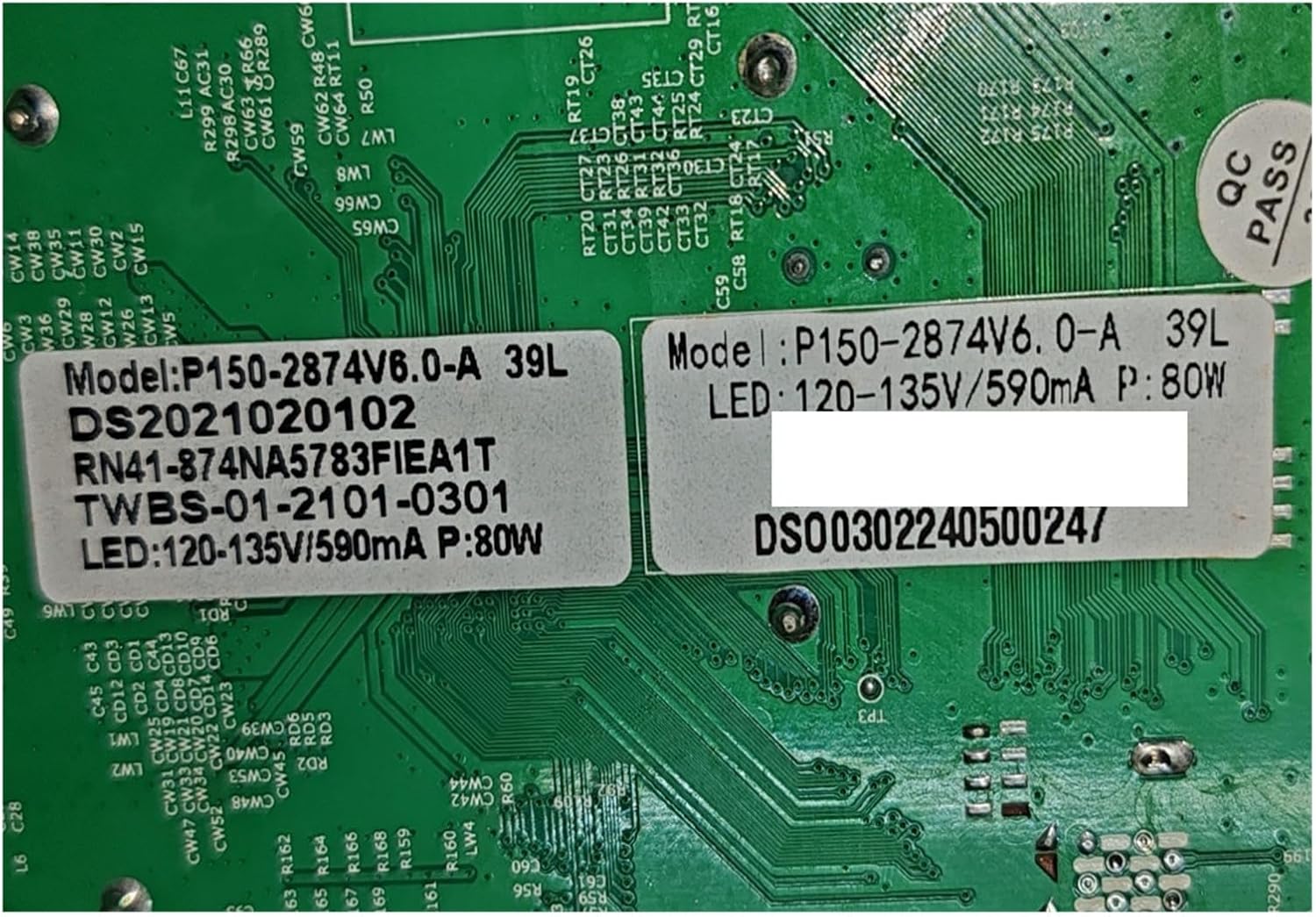
Figure 4.1: Example label for P150-2874V6.0-A 39L variant, showing LED: 120-135V/590mA, P: 80W.

Figure 4.2: Example label for P150-2874V6.0-A 63L variant, showing LED: 72-93V/600mA, P: 68W.

Figure 4.3: Example label for a test sample variant, showing 1.5G+8G and LED: 137-166V/600mA.
| Feature | Description |
|---|---|
| Model Number | P150-2874V6.0 |
| Processor | 4 Core, 1.5G CPU |
| RAM | 8GB |
| Display Resolution Support | 4K |
| Connectivity | Integrated WiFi Network |
| Tuners | 2 |
| CI Slot | 1 |
| Compatible Equipment Style | Display Equipment (TV) |
| LED Backlight Output (Variant 39L) | 120-135V / 590mA (80W) |
| LED Backlight Output (Variant 63L) | 72-93V / 600mA (68W) |
| Item Weight | 1.76 ounces (approx. 50g) |
| Package Dimensions | 0.39 x 0.39 x 0.39 inches (approx. 1x1x1 cm) |
5. Installation Guide
5.1. Before You Begin
- Ensure the new motherboard's model number and LED backlight specifications (voltage, current, power) precisely match your original TV motherboard and panel requirements. Incompatibility can cause severe damage.
- Gather necessary tools: screwdrivers, anti-static wrist strap, plastic prying tools.
- Work in a clean, well-lit, and static-free environment.
5.2. Replacement Steps
- Disconnect Power: Unplug the TV from the wall outlet.
- Remove Back Cover: Carefully remove the screws securing the TV's back cover and detach it.
- Locate Motherboard: Identify the existing motherboard. It is typically the largest circuit board with numerous connectors.
- Disconnect Cables: Systematically disconnect all cables connected to the old motherboard. This includes power cables, ribbon cables (LVDS), antenna cables, HDMI, USB, and speaker cables. Take photos or make notes of each connection for reassembly.
- Remove Old Motherboard: Unscrew the mounting screws holding the old motherboard in place and carefully lift it out.
- Install New Motherboard: Place the new RXCWWZQQ P150-2874V6.0 motherboard into position, ensuring it aligns with the mounting holes. Secure it with the screws.
- Reconnect Cables: Reconnect all cables to their corresponding ports on the new motherboard. Refer to your notes or photos. Pay close attention to the ribbon cable (LVDS) and antenna connections as shown in Figure 3.2 and 3.3.
- Test Functionality: Before replacing the back cover, temporarily plug in the TV and power it on to verify basic functionality (power, display, sound, input recognition). If issues arise, refer to the Troubleshooting section.
- Reassemble TV: Once confirmed working, disconnect power, replace the TV's back cover, and secure it with screws.
6. Operation
After successful installation, the TV should power on and function as expected. The integrated WiFi allows for network connectivity, and the multiple tuners and CI slot support various broadcast and encrypted content options. Refer to your TV's original user manual for specific operating instructions related to its interface and features.
7. Maintenance
- Cleaning: Keep the TV's interior free from dust accumulation. Use compressed air to gently clear dust from the motherboard and vents periodically. Ensure the TV is unplugged before cleaning.
- Ventilation: Ensure the TV's ventilation openings are not blocked to prevent overheating, which can shorten the lifespan of electronic components.
- Software Updates: If your TV's software supports updates via the internet, ensure it is kept up-to-date to benefit from performance improvements and bug fixes.
8. Troubleshooting
If you encounter issues after installing the motherboard, refer to the following table for common problems and potential solutions.
| Problem | Possible Cause | Solution |
|---|---|---|
| TV does not power on | Loose power connection, faulty power supply, incorrect motherboard installation. | Check all power cable connections. Ensure the power supply unit is functional. Re-verify motherboard installation. |
| No display/blank screen | Loose or incorrectly connected LVDS cable, incompatible LED backlight specifications, faulty panel. | Ensure the LVDS cable is securely connected at both ends. Crucially, verify LED backlight voltage/current compatibility. |
| No signal from inputs (HDMI, Antenna) | Loose input cables, incorrect input selection, faulty tuner/port. | Check all input cable connections. Ensure the correct input source is selected on the TV. |
| WiFi not working | Loose WiFi antenna connection, software issue, faulty WiFi module. | Ensure the WiFi antenna cables are securely connected to the motherboard. Check TV network settings. |
| Sound issues | Loose speaker cables, incorrect audio settings, faulty audio circuit. | Verify speaker cable connections. Check TV audio settings. |
If problems persist after attempting these solutions, it is recommended to consult a professional TV repair technician.
9. Warranty and Support
For warranty information or technical support regarding the RXCWWZQQ P150-2874V6.0 TV Motherboard, please contact your original seller or the manufacturer. Keep your purchase receipt as proof of purchase. Do not attempt unauthorized repairs as this may void any applicable warranty.