
1. Introduction
Thank you for choosing the Uniclife 20-Position Key Cabinet. This manual provides essential information for the safe and efficient use of your new key cabinet. Please read these instructions thoroughly before installation and operation, and retain them for future reference.
2. Safety Information
- Indoor Use Only: This key cabinet is designed for indoor installation and use only. Do not install or use outdoors.
- Ensure the cabinet is securely mounted to a stable wall surface to prevent accidental falls.
- Keep the combination code confidential and store it in a safe place, separate from the cabinet.
- Do not force the lock mechanism. If you encounter resistance, recheck the combination.
3. Package Contents
Verify that all items listed below are included in your package:
- Uniclife 20-Position Key Cabinet (Model Uniclife-3500-BL)
- 20 Key Tags (in 4 assorted colors)
- 20 Number Stickers
- Mounting Hardware (Screws and Wall Anchors)
- Instruction Manual

4. Setup and Installation
The key cabinet is designed for wall-mounted installation. Follow these steps for secure mounting:
- Choose a Location: Select a suitable indoor wall location that is sturdy and can support the weight of the cabinet and its contents.
- Mark Drilling Points: Hold the cabinet against the wall at the desired height and use a pencil to mark the positions of the preformed mounting holes on the back of the cabinet.
- Drill Holes: Using an appropriate drill bit for your wall type, drill pilot holes at the marked locations.
- Insert Wall Anchors: If drilling into drywall or hollow walls, insert the provided wall anchors into the pilot holes until they are flush with the wall surface.
- Mount the Cabinet: Align the cabinet's mounting holes with the drilled holes (and anchors, if used). Insert the screws through the cabinet and into the wall, tightening them until the cabinet is firmly secured. Do not overtighten.


5. Operating Instructions
5.1. Setting and Resetting the Combination Lock
The key cabinet features a 3-digit resettable combination lock. The initial factory code is "000".
- Open the Cabinet: Ensure the lock is set to the current combination (default "000") and turn the knob to open the cabinet door.
- Locate the Control Lever: Inside the cabinet, on the back of the lock mechanism, you will find a small control lever.
- Set the Lever: Push the control lever from position 'A' to position 'B'.
- Set Your New Code: While the lever is in position 'B', scroll the three digits on the front of the lock to your desired new combination.
- Return the Lever: Pull the control lever back from position 'B' to position 'A' to complete the code resetting process.
- Test the New Code: Close the cabinet door, scramble the digits, and then enter your new combination to ensure it opens correctly.
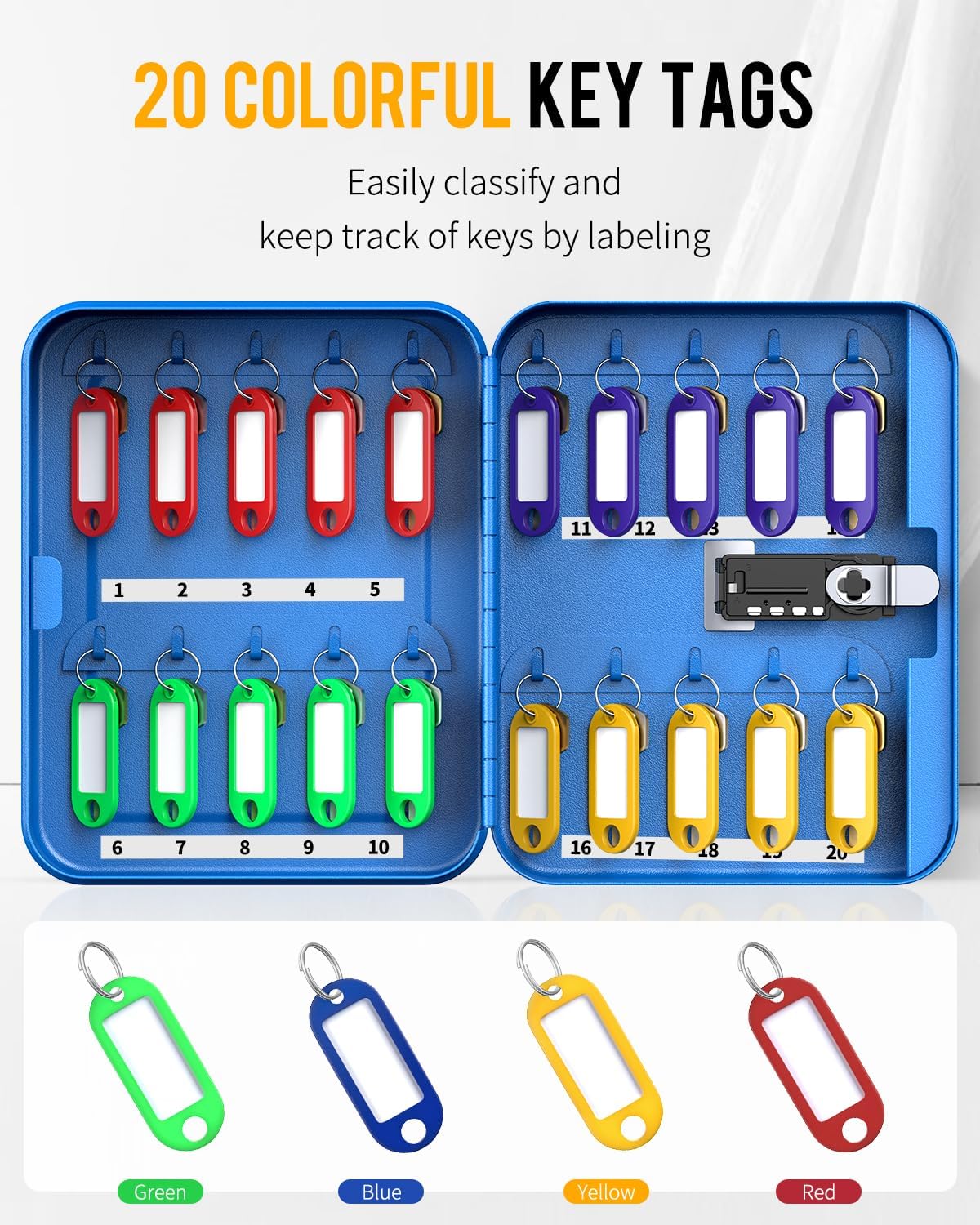

5.2. Organizing Keys with Tags and Stickers
The cabinet comes with 20 colorful key tags and number stickers to help you organize your keys efficiently.
- Attach Key Tags: Each flexible key tag includes a removable paper insert. Remove the key ring, slide out the paper, write your key identification (e.g., "Office", "Car 1"), and then reinsert the paper and key ring.
- Apply Number Stickers: Use the provided number stickers (1-20) to label the key hooks inside the cabinet. This allows for numerical organization and quick identification.
- Hang Keys: Hang your keys on the corresponding numbered hooks. The cabinet's design ensures keys are neatly arranged.


6. Maintenance
- Cleaning: Wipe the cabinet exterior with a soft, damp cloth. Avoid abrasive cleaners or solvents that could damage the finish.
- Lock Care: The combination lock is designed for durability. Do not apply lubricants or harsh chemicals to the lock mechanism.
- Regular Checks: Periodically check the wall mounting screws to ensure they remain tight and secure.
7. Troubleshooting
| Problem | Possible Cause | Solution |
|---|---|---|
| Cabinet will not open. | Incorrect combination entered. | Verify the combination. Ensure each digit is aligned correctly. |
| Combination cannot be reset. | Control lever not fully in position 'B'. | Ensure the internal control lever is pushed completely to position 'B' before setting the new code, and then returned to 'A'. |
| Keys do not fit properly. | Large key fobs or multiple keys on one hook. | This cabinet is optimized for standard keys and smaller fobs. Consider using fewer keys per hook or a larger capacity cabinet if needed. |
8. Specifications
| Feature | Detail |
|---|---|
| Brand | Uniclife |
| Model Name | Uniclife-3500-BL |
| Capacity | 20 Key Positions |
| Lock Type | 3-Digit Resettable Combination Lock |
| Material | Alloy Steel |
| Color | Blue |
| Product Dimensions | 2.8"D x 6.4"W x 7.9"H |
| Item Weight | 2 Pounds |
| Mounting Type | Wall Mount |
9. Warranty and Support
For warranty information or technical support, please refer to the contact details provided with your purchase or visit the official Uniclife website. Keep your purchase receipt as proof of purchase for any warranty claims.
Uniclife Store: Visit the Uniclife Store on Amazon