
Important Safety Instructions
- Read these instructions carefully.
- Keep these instructions for future reference.
- Heed all warnings.
- Follow all instructions.
- Do not use this apparatus near water.
- Clean only with a dry cloth.
- Do not block any ventilation openings. Install in accordance with the manufacturer's instructions.
- Do not install near any heat sources such as radiators, heat registers, stoves, or other apparatus (including amplifiers) that produce heat.
- Do not defeat the safety purpose of the polarized or grounding-type plug. A polarized plug has two blades with one wider than the other. A grounding-type plug has two blades and a third grounding prong. The wide blade or the third prong are provided for your safety. If the provided plug does not fit into your outlet, consult an electrician for replacement of the obsolete outlet.
- Protect the power cord from being walked on or pinched, particularly at plugs, convenience receptacles, and the point where they exit from the apparatus.
- Only use attachments/accessories specified by the manufacturer.
- Unplug this apparatus during lightning storms or when unused for long periods of time.
- Refer all servicing to qualified service personnel. Servicing is required when the apparatus has been damaged in any way, such as power-supply cord or plug is damaged, liquid has been spilled or objects have fallen into the apparatus, the apparatus has been exposed to rain or moisture, does not operate normally, or has been dropped.
Package Contents
Verify that all items listed below are included in your package. If any items are missing or damaged, please contact customer support.

This image displays the complete packing list for the U`King RGBW 4-in-1 LED Par Stage Lights, including the light unit, remote control, power cord, mounting bracket, screws, and the user manual.
- RGBW Stage Lights: 16 units
- Remote Control: 16 units
- Power Cord: 16 units
- Bracket: 32 units
- Screw: 32 units
Product Overview
The U`King RGBW 4-in-1 LED Par Stage Light is designed for versatile lighting applications, featuring 14 LED beads with RGBW color mixing. It supports multiple control modes including DMX512, remote, sound-activated, and automatic operation.
Physical Features and Dimensions

This diagram illustrates the physical dimensions of the U`King LED Par Light, including its diameter, depth, and height when mounted on its adjustable bracket. Key features like the high-brightness LED beads, integrated cooling fan, and 360-degree adjustable angle are also highlighted.
- Dimensions (L x W x H): 8.18" x 3.78" x 8.66"
- Light Source: 14 LED beads
- Adjustable Angle: 360 degrees with included bracket
- Cooling: Integrated cooling fan
Connections and Controls

This image details the rear panel of the U`King LED Par Light, showing the power input and output connections, the LCD display for menu navigation, and the DMX In/Out ports for professional control.
- Power Input/Output: Standard power connectors for daisy-chaining multiple units.
- DMX In/Out: 3-pin DMX connectors for DMX512 control.
- LCD Display: Digital display for menu navigation and mode selection.
- Control Buttons: Menu, Up, Down, Enter buttons for local control.
Setup
Mounting
The U`King LED Par Light can be mounted in various configurations:
- Floor Mount: Use the adjustable bracket to position the light on a flat surface.
- Wall Mount: Secure the bracket to a wall using appropriate hardware (not included).
- Truss Mount: Attach the bracket to a lighting truss using clamps (not included).
Ensure the mounting surface or structure can safely support the weight of the light fixture. Adjust the angle of the light using the side knobs on the bracket.
Power Connection
Connect the provided power cord to the "POWER IN" port on the rear of the light fixture and then to a standard 110V AC power outlet. Multiple units can be daisy-chained using the "POWER OUT" port to connect to the next fixture's "POWER IN" port. Ensure the total power consumption does not exceed the circuit's capacity.
DMX Connection (Optional)
For DMX512 control, connect a DMX controller to the "DMX IN" port of the first light fixture using a 3-pin DMX cable. To control multiple lights, connect the "DMX OUT" of the first fixture to the "DMX IN" of the second, and so on.
Operating Modes
The U`King RGBW 4-in-1 LED Par Stage Light offers several operational modes, controllable via the onboard LCD display and buttons, or the included remote control.
This video demonstrates the various operating modes of the U`King RGBW 4-in-1 LED Par Stage Lights, including remote control, automatic, voice control (sound-activated), DMX control, monochrome color display, gradient color changes, and jump mode.
Remote Control Operation

This image displays the layout of the remote control, detailing each button's function for easy adjustment of lighting effects and modes.
- ON/OFF: Powers the unit on or off.
- Auto Mode: Activates automatic program sequences.
- Jump Change: Cycles through colors with abrupt transitions.
- RGB Monochrome Choice: Selects individual Red, Green, or Blue colors.
- White/Amber/Cyan/Purple Monochrome Choice: Selects individual White, Amber, Cyan, or Purple colors.
- Strobe Mode: Creates a flashing light effect.
- DMX Mode: Switches to DMX control.
- Function Select (MENU): Accesses the light's internal menu.
- Flash Mode (FLASH): Activates a flash effect.
- Sound Active (SOUND): Enables sound-activated lighting effects.
- Up/Down Arrows: Adjust speed for jump/flash modes and sound sensitivity.
DMX512 Control
The fixture supports 2 DMX modes (4-channel and 8-channel). Refer to the DMX channel chart in the full user manual for detailed channel assignments and values.
To activate DMX mode, select it via the remote or the onboard LCD menu. Set the DMX address for each fixture.
Sound-Activated Mode
In sound-activated mode, the light reacts to ambient sound, changing colors and patterns in sync with music or other audio. Adjust sensitivity using the remote or menu.
Automatic Mode
The automatic mode cycles through pre-programmed light shows without external input.
Master-Slave Mode
Connect multiple fixtures via DMX cables. Set one fixture as the "Master" and others as "Slave" units. The slave units will mirror the master's operation.
Monochrome Mode
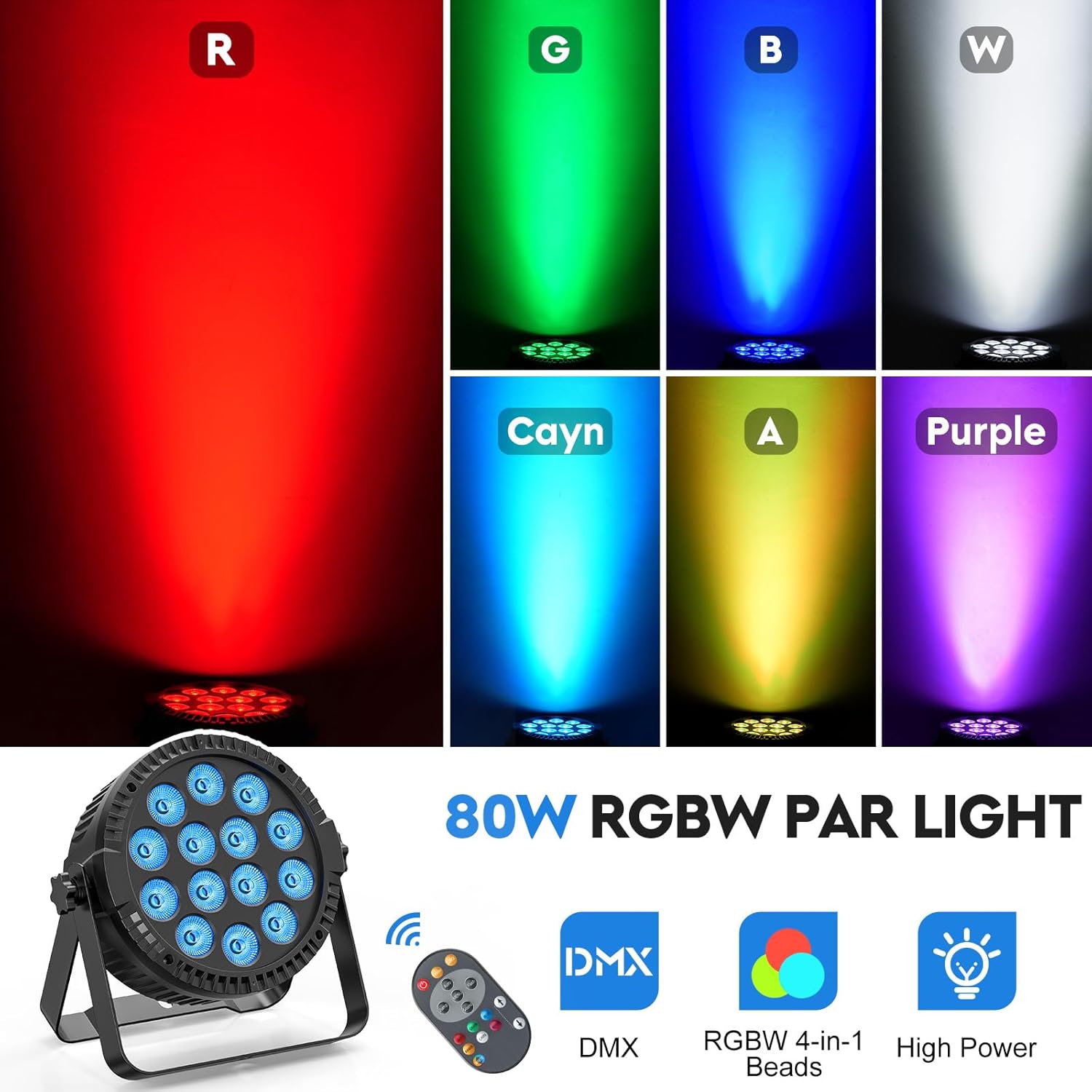
This image demonstrates the monochrome color output capabilities of the light, showcasing distinct Red, Green, Blue, White, Cyan, Amber, and Purple beams.
Select individual colors (Red, Green, Blue, White, Amber, Cyan, Purple) for a static wash effect.
Gradient Mode
The gradient mode smoothly transitions between different colors, creating a flowing light effect.
Strobe Mode
The strobe mode produces rapid flashes of light, adjustable in speed.
Jump Mode
Jump mode changes colors instantly, creating dynamic and abrupt shifts in lighting.
Maintenance
Cleaning
- Disconnect the power before cleaning.
- Use a soft, dry cloth to wipe the exterior of the fixture.
- Do not use abrasive cleaners or solvents.
- Periodically clean the lens to ensure optimal light output.
Storage
- Store the fixture in a cool, dry place away from direct sunlight and extreme temperatures.
- If storing for extended periods, consider using the original packaging or a protective case.
Troubleshooting
| Problem | Possible Cause | Solution |
|---|---|---|
| Light does not turn on. | No power supply. | Check power cord connection and power outlet. Ensure the ON/OFF switch on the remote or unit is active. |
| Remote control not working. | Remote battery low or depleted. Obstruction between remote and light. | Replace remote battery. Ensure clear line of sight to the light's IR receiver. |
| DMX control not functioning. | Incorrect DMX cabling. Incorrect DMX address. Light not in DMX mode. | Verify DMX cable connections (3-pin). Ensure DMX addresses are correctly set and unique for each fixture. Confirm the light is set to DMX mode via its menu. |
| Light is overheating. | Blocked ventilation. | Ensure the cooling fan and vents are clear of obstructions. Operate in a well-ventilated area. |
Specifications
| Feature | Detail |
|---|---|
| Model Number | ZQ01424 |
| Light Source Type | Light Emitting Diode (LED) |
| Number of Light Sources | 14 |
| Light Color | RGBW 4-in-1 Bead |
| Maximum Compatible Light Source Wattage | 80 Watts |
| Voltage | 110 Volts (AC) |
| Power Source | Corded Electric |
| Material | Acrylonitrile Butadiene Styrene (ABS) |
| Finish Type | Polished |
| Mounting Type | Floor Mount, Wall Mount, Truss Mount |
| Special Features | Dimmable |
| Control Modes | DMX512 (4/8 channel), Remote, Sound Activated, Automatic, Master-Slave, Jump, Strobe, Gradient, Color Selection |
| Lifespan | 50,000 Hours (LED beads) |
Warranty and Support
Manufacturer's Warranty
This U`King product is covered by a 1-year manufacturer's warranty from the date of purchase. This warranty covers defects in materials and workmanship under normal use. It does not cover damage caused by misuse, accident, unauthorized modification, or improper installation.
Customer Support
For technical assistance, troubleshooting, or warranty claims, please contact U`King customer support. Refer to the contact information provided with your purchase or visit the official U`King website.
For more information, visit the U`King Store on Amazon.

