
1. Introduction
Thank you for choosing the Elitech WMT-20 Bluetooth Wireless Meat Thermometer. This manual provides detailed instructions for the proper setup, operation, and maintenance of your device. Please read this manual thoroughly before use to ensure optimal performance and longevity of your thermometer.
The Elitech WMT-20 is designed to help you achieve perfectly cooked meats every time, whether grilling, smoking, or oven cooking. Its dual probe design and Bluetooth connectivity allow for convenient and precise temperature monitoring.
2. Product Overview
2.1 Components
- Digital Display Unit (Base)
- 2 Temperature Probes
- User Manual
2.2 Key Features
- Dual Probe Design: Monitor two food items or ambient/internal temperatures simultaneously.
- Bluetooth Connectivity: Wireless monitoring via a smartphone app (ToGrill).
- Digital LCD Display: Clear display of current temperature readings for both probes.
- High-Temperature Stainless Steel Probes: Durable construction for various cooking methods.
- Ceramic Handle: Withstands extreme heat up to 300°C (572°F).
- Magnetic Attachment: Base unit can be attached to metal surfaces like ovens or refrigerators.
- App-Controlled Presets: Pre-set temperatures for various meat types and doneness levels.
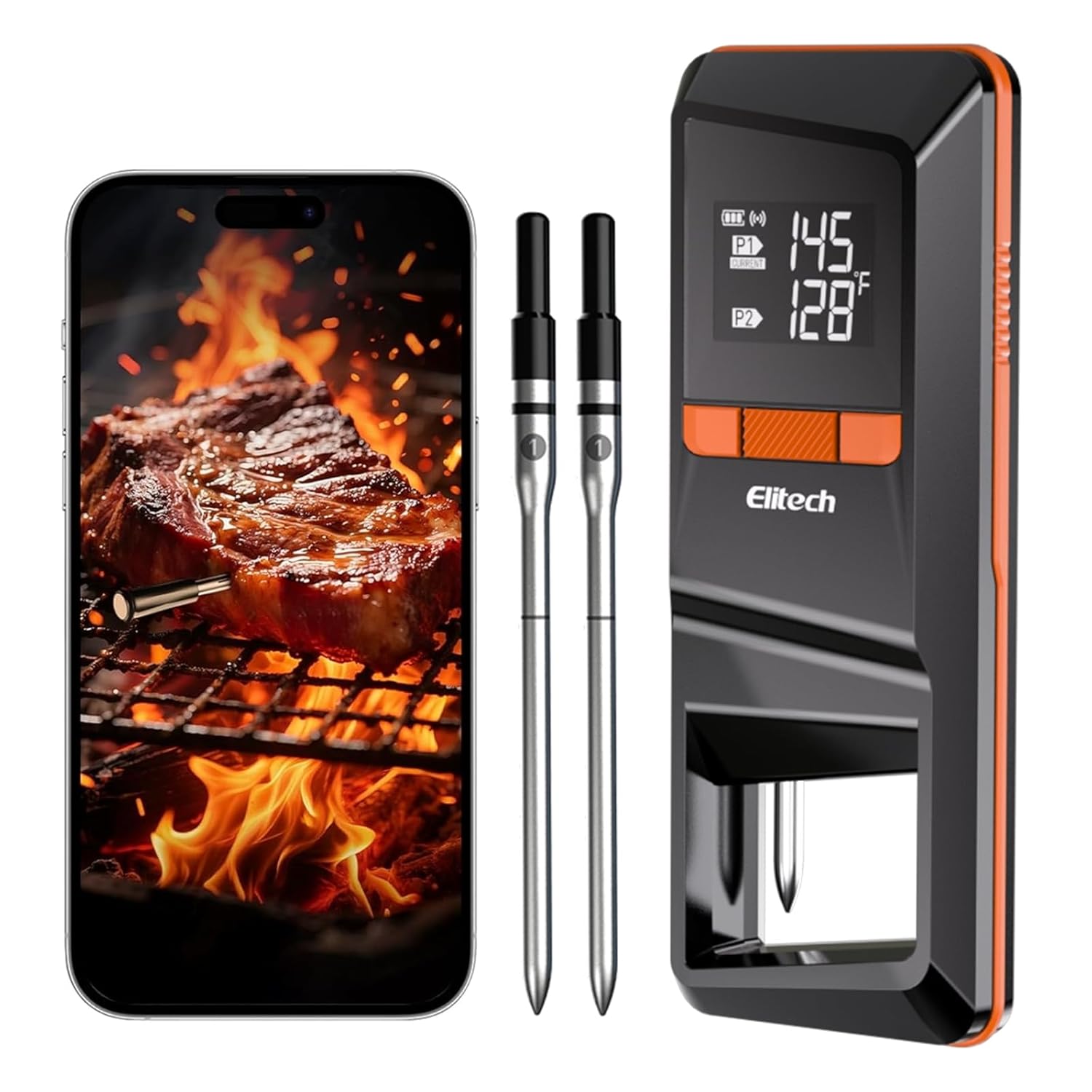
Image 2.2.1: The Elitech WMT-20 thermometer base unit, two probes, and a smartphone showing the accompanying app.

Image 2.2.2: Detailed view of the probe's construction, highlighting the ceramic handle, ambient sensor, safety line, and internal temperature sensor. The ceramic handle withstands heat up to 300°C/572°F, the ambient sensor measures 50-300°C/122-572°F, and the internal sensor measures 0-100°C/32-212°F.
3. Setup
3.1 Battery Installation
- Open the battery compartment on the back of the digital display unit.
- Insert the provided batteries, ensuring correct polarity.
- Close the battery compartment securely.

Image 3.1.1: The Elitech WMT-20 thermometer base unit, showing the probes and the location for battery installation.
3.2 App Download and Device Pairing
The Elitech WMT-20 connects to your smartphone via the 'ToGrill' app for enhanced monitoring and control.
- Download the App: Scan the QR code provided in the manual or on the device packaging, or search for 'ToGrill' in the App Store (iOS) or Google Play Store (Android).
- Enable Permissions: Open the 'ToGrill' app and grant necessary permissions, such as Bluetooth access.
- Power On Device: Take the probes out of the base unit. Press and hold the power button on the digital display unit to turn it on.
- Pairing: In the app, select 'Add Device' or 'Search for devices'. The app will guide you through the pairing process. Press the pairing/stop alarm button on the device when prompted. A 'beep' sound indicates successful pairing.
Video 3.2.1: This video demonstrates the process of installing batteries, downloading the 'ToGrill' app, and pairing the Elitech WMT-20 thermometer with a smartphone. It shows the steps for initial setup and connectivity.
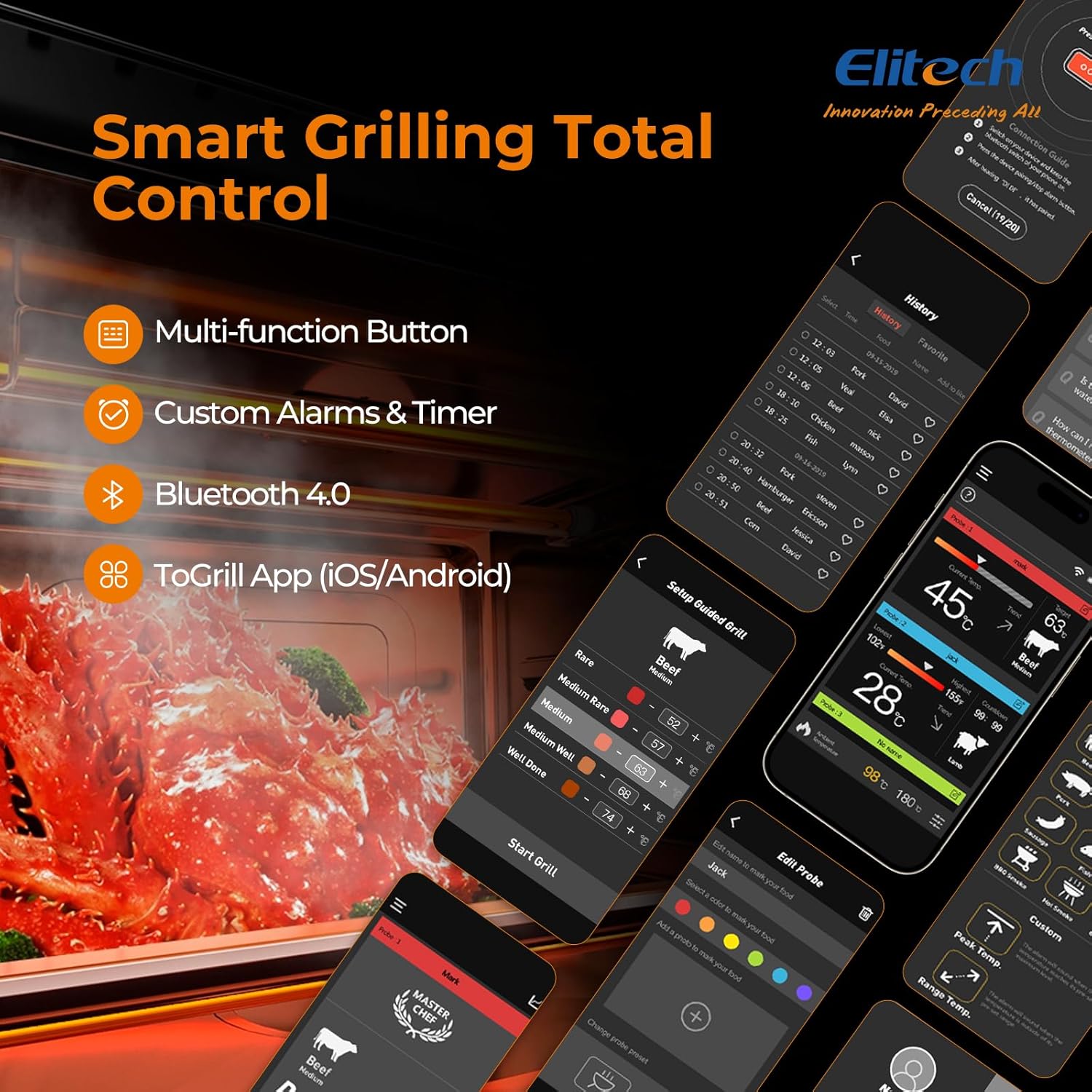
Image 3.2.2: The 'ToGrill' app interface, illustrating the selection of meat types, doneness levels, and real-time temperature monitoring.
4. Operating Instructions
4.1 Probe Insertion
Proper probe insertion is crucial for accurate temperature readings.
- Insert the probe into the thickest part of the meat, avoiding bones or gristle.
- Ensure the probe is inserted up to the safety line (the black part of the probe) to protect the electronic components and ensure accurate internal temperature measurement.
- For ambient temperature monitoring, place a probe in the cooking environment (grill, oven, smoker) without it touching the food or direct flame.

Image 4.1.1: A meat probe correctly inserted into a piece of meat on a grill, demonstrating proper placement for internal temperature measurement.
4.2 Using the ToGrill App
The 'ToGrill' app provides comprehensive control and monitoring features:
- Real-time Monitoring: View current temperatures for both probes on your smartphone.
- Pre-set Temperatures: Select from a variety of pre-set temperatures for different meat types (Beef, Pork, Chicken, Lamb, Fish, etc.) and doneness levels (Rare, Medium, Well Done).
- Custom Alarms & Timer: Set custom target temperatures and timers for personalized cooking. The app will alert you when the target temperature is reached.
- Cooking History: Track and review past cooking sessions.

Image 4.2.1: A visual guide to recommended internal temperatures for various meat types and doneness levels, as available within the 'ToGrill' app.
4.3 Temperature Monitoring
Once probes are inserted and the device is paired, you can monitor temperatures:
- The digital display unit shows real-time temperatures for both Probe 1 (P1) and Probe 2 (P2).
- The 'ToGrill' app provides a more detailed interface, including temperature trends, target temperatures, and alerts.
Video 4.3.1: This video illustrates the use of the Elitech WMT-20 thermometer during cooking, demonstrating how to monitor temperatures and utilize the app's features for various dishes.
5. Maintenance
5.1 Cleaning
- After each use, allow the probes to cool completely.
- Hand wash the probe tips with warm, soapy water. Do not immerse the entire probe or the digital display unit in water.
- Wipe the digital display unit with a damp cloth. Keep the display unit away from water.
- The probes are not dishwasher safe.
5.2 Storage
- Ensure probes are clean and dry before storing.
- Return the probes to their designated slots in the digital display unit for safe storage. This also helps the unit automatically shut down, saving energy.
- Store the thermometer in a cool, dry place.
6. Troubleshooting
If you encounter issues with your Elitech WMT-20, please refer to the following common solutions:
- No Power/Display: Check if batteries are correctly installed and have sufficient charge. Replace batteries if necessary.
- Connectivity Issues: Ensure Bluetooth is enabled on your smartphone and the device is within range. Restart both the thermometer and the app. Re-pair the device if needed.
- Inaccurate Readings: Ensure the probe is inserted correctly into the thickest part of the meat, avoiding bones. Verify that the probe tip is not touching direct flame.
- App Not Responding: Close and reopen the 'ToGrill' app. Ensure your phone's operating system is up to date.
For further assistance, please contact Elitech customer support.
7. Specifications
| Feature | Detail |
|---|---|
| Model Number | WMT-20 |
| Package Dimensions | 8.54 x 3.7 x 1.34 inches |
| Item Weight | 8.15 ounces |
| Brand | Elitech |
| Special Features | Auto Shutdown, Bluetooth Wireless, Dual Probe, LCD Display |
| Color | Black |
| Included Components | 2 Temperature Probes, Digital Display Unit |
| Outer Material | Metal, Plastic |
| Specification Met | CE, FDA, RoHS |
| Display Type | LCD Digital |
| Connectivity Technology | Bluetooth, Wireless |
| Product Care Instructions | Do Not Put Probe Directly In Flame, Hand Wash Only, Keep Display Unit Away From Water |
8. Warranty and Support
Elitech products are designed for quality and reliability. For information regarding warranty coverage, product registration, or technical support, please visit the official Elitech website or contact their customer service department directly.
Please retain your purchase receipt as proof of purchase for any warranty claims.


