1. Introduction
The EMPIRE GAMING RF908 is a versatile rechargeable wireless gaming mouse designed for performance and comfort. It features a 10,000 DPI adjustable sensor, 8 programmable buttons, and offers three connection modes: 2.4GHz WiFi, Bluetooth, and wired via USB-C. The mouse includes an RGB magnetic charging station for convenient power management and customizable RGB lighting. It is compatible with PC, Mac, and various consoles.
2. Package Contents
Verify that all items are present in the package:
- RF908 Wireless Mouse
- Magnetic Charging Station
- USB-C Cable
- 2.4GHz USB Receiver
- User Manual
3. Product Overview
Familiarize yourself with the components of your RF908 gaming mouse and charging station.

Image 3.1: Overview of the RF908 mouse, magnetic charging station, and 2.4GHz USB receiver. The image also indicates the mouse's battery life and an additional USB port on the charging station.
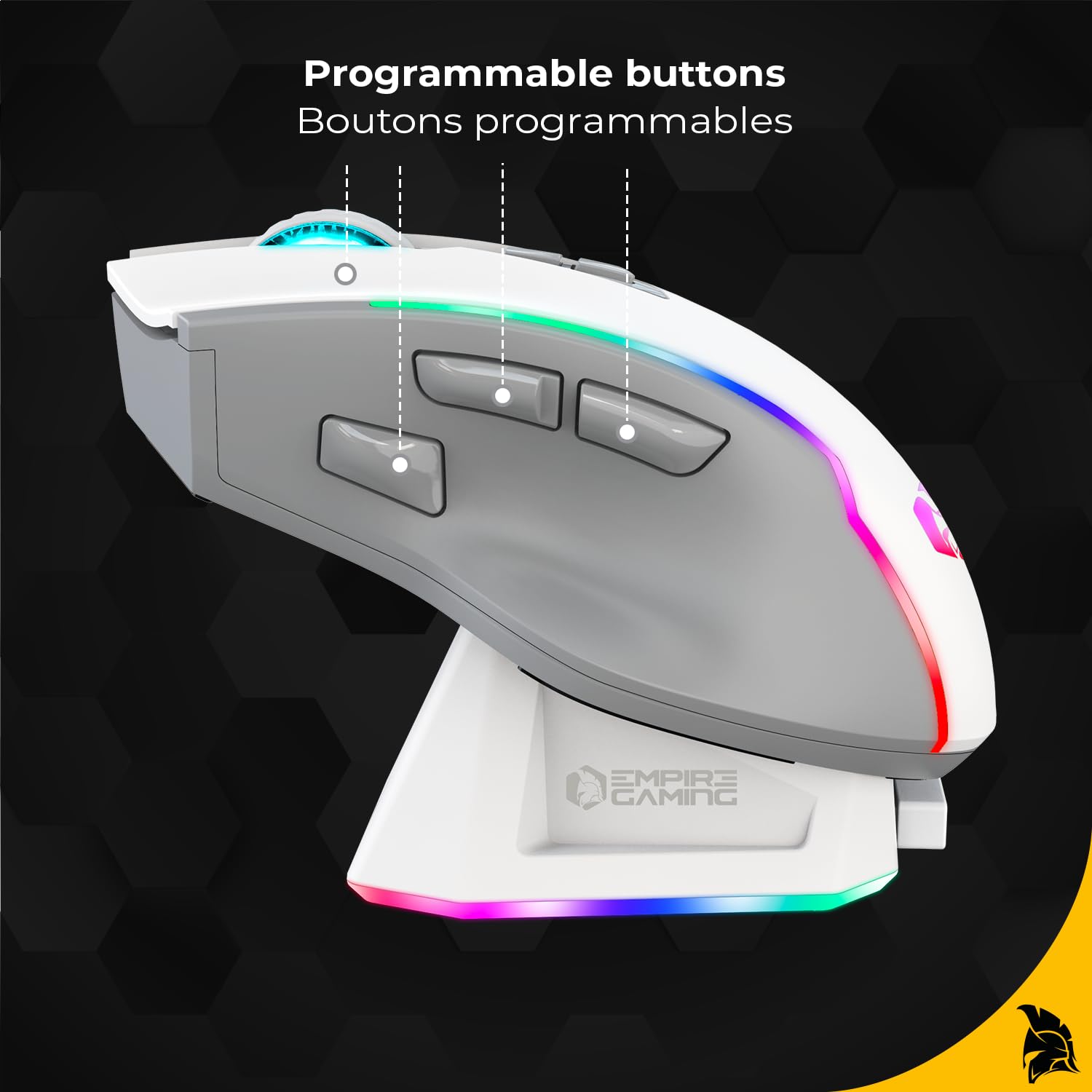
Image 3.2: Top view of the RF908 mouse, highlighting the scroll wheel and two primary programmable buttons located behind it.

Image 3.3: Side view of the RF908 mouse, illustrating the ergonomic design and the three programmable thumb buttons.

Image 3.4: Bottom view of the RF908 mouse, showing the ON/OFF switch, the WiFi and Bluetooth mode selection button, the optical sensor, and the storage slot for the 2.4GHz USB receiver.

Image 3.5: Front view of the RF908 mouse, indicating the USB-C port for wired connection and recharging.
4. Setup
4.1 Initial Charging
Before first use, fully charge the RF908 mouse. Connect the USB-C cable to the magnetic charging station and a power source (e.g., computer USB port or USB wall adapter). Place the mouse onto the magnetic charging station. The RGB lighting on the mouse and station will indicate charging status. Alternatively, connect the USB-C cable directly to the mouse for charging.

Image 4.1: The magnetic charging station for the RF908 mouse, featuring RGB lighting and contact points for charging.
4.2 Connecting the Mouse
The RF908 mouse supports three connection modes:
4.2.1 2.4GHz Wireless Mode
- Locate the 2.4GHz USB receiver stored in the bottom compartment of the mouse.
- Plug the USB receiver into an available USB port on your computer or console.
- Turn on the mouse using the ON/OFF switch on the bottom.
- Press the mode selection button on the bottom of the mouse until the indicator light shows 2.4GHz mode (usually green).
- The mouse should automatically connect.
4.2.2 Bluetooth Mode
- Turn on the mouse using the ON/OFF switch.
- Press the mode selection button on the bottom of the mouse until the indicator light shows Bluetooth mode (usually blue).
- On your device (PC, Mac, smartphone, tablet), go to Bluetooth settings and search for new devices.
- Select "RF908" from the list of available devices to pair.
4.2.3 Wired Mode
- Connect the USB-C cable to the front port of the mouse.
- Connect the other end of the USB-C cable to an available USB port on your computer or console.
- The mouse will automatically switch to wired mode and begin charging.
5. Operating Instructions
5.1 DPI Adjustment
The mouse features an adjustable sensor with up to 10,000 DPI. Use the dedicated DPI cycle button (typically located behind the scroll wheel) to cycle through preset DPI levels. The RGB lighting may change to indicate the current DPI setting.
5.2 Programmable Buttons
The RF908 mouse has 8 programmable buttons. These buttons can be customized using the dedicated software available for download from the official EMPIRE GAMING website. The software allows you to assign macros, key functions, and other commands to each button.
5.3 RGB Lighting Customization
The mouse features dynamic RGB backlighting. The lighting effects, colors, and brightness can be customized through the EMPIRE GAMING software. This allows for personalization to match your gaming setup.

Image 5.1: Rear view of the RF908 mouse, showcasing its customizable RGB backlighting.
5.4 Software Installation
To unlock the full customization potential of your RF908 mouse, download and install the dedicated software from the official EMPIRE GAMING website. The software allows for:
- Configuring programmable buttons.
- Adjusting DPI profiles.
- Customizing RGB backlight effects.
Visit www.empiregaming.com/support (example link, please refer to actual product documentation for correct URL) for software downloads and updates.
6. Maintenance
6.1 Cleaning
To clean the mouse, use a soft, dry cloth. For stubborn dirt, a slightly damp cloth can be used, ensuring no liquid enters the mouse. Avoid using harsh chemicals or abrasive materials.
6.2 Battery Care
The RF908 mouse has a built-in rechargeable Lithium Ion battery. To prolong battery life:
- Avoid fully discharging the battery frequently.
- Store the mouse in a cool, dry place when not in use for extended periods.
- Charge the mouse regularly, especially if it has been unused for a long time.
7. Troubleshooting
7.1 Mouse Not Responding
- Ensure the mouse is turned ON.
- Check battery level and charge if necessary.
- For 2.4GHz mode, ensure the USB receiver is securely plugged in and the mouse is set to 2.4GHz mode. Try a different USB port.
- For Bluetooth mode, ensure Bluetooth is enabled on your device and the mouse is paired. Try re-pairing.
- For wired mode, ensure the USB-C cable is securely connected to both the mouse and the device.
- Try restarting your computer/device.
7.2 Lag or Disconnections
- Ensure the mouse is within range of the USB receiver (for 2.4GHz) or your Bluetooth device.
- Minimize interference from other wireless devices (e.g., Wi-Fi routers, cordless phones).
- Ensure the mouse is fully charged.
- Update mouse drivers or software if available.
7.3 Charging Issues
- Ensure the USB-C cable is properly connected to both the charging station/mouse and the power source.
- Verify the power source is active.
- Clean the charging contacts on both the mouse and the charging station.
- Try a different USB-C cable or power adapter.
8. Specifications
| Feature | Detail |
|---|---|
| Model Name | RF908 |
| Connectivity Technology | 2.4GHz WiFi, Bluetooth, USB-C (Wired) |
| Movement Detection Technology | Optical |
| DPI Sensitivity | Up to 10,000 DPI (Adjustable) |
| Programmable Buttons | 8 |
| Polling Rate | 1000Hz |
| Battery Type | Lithium Ion (Rechargeable) |
| Battery Life | Up to 70 hours (approx.) |
| Special Features | RGB Lighting, Magnetic Charging Station, Soundless, Ergonomic Design |
| Compatible Devices | PC, Mac, Gaming Consoles, Smartphone, Tablet |
| Material | Plastic, Metal |
| Item Weight | 220 g |
| Package Dimensions | 19 x 13.5 x 5.4 cm |
9. Warranty and Support
For warranty information and technical support, please refer to the documentation included with your product or visit the official EMPIRE GAMING website. Keep your proof of purchase for warranty claims.


