
Flysky FS-G11P
Flysky FS-G11P Radio Transmitter User Manual
Model: FS-G11P | Brand: Flysky
1. Introduction
This manual provides comprehensive instructions for the setup, operation, and maintenance of your Flysky FS-G11P Radio Transmitter and FS-R11P Receiver Combo. Please read this manual thoroughly before using the product to ensure safe and optimal performance. The FS-G11P is an advanced 2.4GHz 11-channel radio system designed for various RC models, offering precise control and a rich feature set.
2. Safety Information
Always operate the FS-G11P according to these instructions to prevent operational errors that could lead to damage or injury. Ensure all connections are secure and batteries are properly installed before use. Keep the device away from water and extreme temperatures. This product is recommended for users 14 years and up.
3. Package Contents
Upon opening the package, verify that all the following items are included:
- 1x FS-G11P Transmitter
- 1x FS-R11P Receiver
- 1x User Manual
- 1x Rubberized Grip
- 1x Protective Film
- 1x Type-C Charging Cable
- 2x Machine Screws
- 1x Handle
- 1x Large Tension Spring
- 1x Small Tension Spring
- 1x Storage Box

Image: Contents of the Flysky FS-G11P package, including the transmitter, receiver, and various accessories.
4. Product Overview
4.1 Transmitter Components and Controls
The FS-G11P transmitter features an ergonomic design with various controls for precise operation.

Image: Front and top view diagram of the FS-G11P transmitter, highlighting the display, K1-K4 buttons, power button, steering wheel, TR1-TR3 trims, SW1-SW4 switches, VR1-VR2 knobs, and K5-K7 buttons.

Image: Side view diagram of the FS-G11P transmitter, detailing the throttle trigger, trigger size and tension adjustments, steering wheel tension adjustment, USB Type-C port, 3.5mm Audio Jack (DSC), and battery compartment.
4.2 FS-R11P Receiver Overview
The FS-R11P is an 11-channel receiver compatible with the FS-G11P transmitter, utilizing the ANT protocol for stable communication.

Image: Diagram of the FS-R11P receiver, illustrating its various channel ports (CH1-CH11), BIND connector, SENS connector, SERVO connector, LED, Antenna, BIND button, VCC/BVD, and Signal Pin. A table of receiver specifications is also included.
5. Initial Setup
5.1 Powering the Transmitter
The FS-G11P supports flexible power options, including 2S LiPo batteries (JST/balanced plug) or dual 2600mAh 18650 batteries.
- Open the battery compartment cover on the bottom of the transmitter.
- Insert the chosen battery type, ensuring correct polarity for 18650 cells or proper connection for LiPo packs.
- Close the battery compartment cover securely.

Image: Illustration of the versatile power supply options for the FS-G11P, showing compatibility with both 18650 batteries and 2S lithium batteries, along with various plug types.
5.2 Charging the Transmitter
The transmitter can be charged via its Type-C smart hub connection.
- Connect the provided Type-C charging cable to the Type-C port on the transmitter.
- Connect the other end of the cable to a suitable USB power source.
- The display will indicate charging status.

Image: The multi-functional Type-C data interface of the FS-G11P, illustrating its use for firmware updates, model data backup, 2S lithium battery charging, and USB emulator functions.
6. Operation
6.1 Display and Interface
The FS-G11P features a 3.5-inch IPS high-brightness display, ensuring clear visibility even in direct sunlight.

Image: The FS-G11P's 3.5-inch 320x480 full-dot array color IPS high-brightness non-touch display, highlighting its 2000 nits peak brightness for excellent clarity in sunlight.
6.2 Binding Process
To establish communication between the transmitter and receiver, a binding process is required. The FS-G11P supports two pairing modes: Routine and Fast, selectable based on application scenarios.
- Ensure both transmitter and receiver are powered off.
- Press and hold the BIND button on the receiver while powering it on. The receiver's LED will flash rapidly.
- Power on the transmitter. Navigate to the binding menu on the display.
- Select your desired RF System (e.g., ANT 2 Way) and pairing mode (Routine/Fast).
- Initiate the binding process from the transmitter. The receiver's LED will turn solid when binding is successful.

Image: Display screens illustrating the 'Routine' and 'Fast' pairing modes for seamless switching and low latency, enhancing anti-interference performance through adaptive frequency hopping and spread spectrum technology.
6.3 Channel Configuration and Model Management
The FS-G11P supports up to 11 channels and can manage up to 40 model groups.
- Use the display and navigation buttons (K1-K4, five-way switch) to access the channel settings.
- Configure individual channel functions, trims, and endpoints as needed for your model.
- To manage models, navigate to the 'Select Model' menu to create, load, or delete model profiles.

Image: Display screens demonstrating the multi-channel capabilities (up to 11 channels) and the ability to manage up to 40 distinct model groups, providing extensive customization for diverse model applications.
6.4 Advanced Features
Adjustable Controls
The transmitter features an adjustable trigger with customizable return force and position, and a handwheel with physically adjustable travel distance for maximum flexibility.

Image: Detailed views of the FS-G11P's adjustable trigger, allowing for changes in return force and position, and the handwheel with physically adjustable travel distance for enhanced user comfort and control.
Throttle Channel Options
Flexible throttle channel curve settings are available with three throttle curve modes and five adjustable throttle points for precise control.

Image: Display screens showcasing the flexible throttle channel options, including ST Exp, Exp.F (CRV), and Exp.B (ARC) modes, with adjustable throttle points for fine-tuning control.
Telemetry and Sensor Integration
The FS-G11P supports real-time GPS telemetry (speed, altitude, coordinates) and is compatible with multiple i-BUS devices for advanced model diagnostics and performance monitoring (voltage, temperature).

Image: A selection of i-BUS compatible sensors, including those for height, voltage, temperature, speed, and GPS, demonstrating the system's extensive sensor integration capabilities.

Image: A display screen showing comprehensive GPS features, including real-time feedback for height, speed, latitude, longitude, and gyroscope data.
7. Compatibility
The FS-G11P is compatible with various ANT multi-function receivers, including those with light control, ESC 2-in-1, and gyroscope functions. Built-in parameters of the remote control can be set, and ANT protocol receivers come standard with BVD (Battery Voltage Detection).
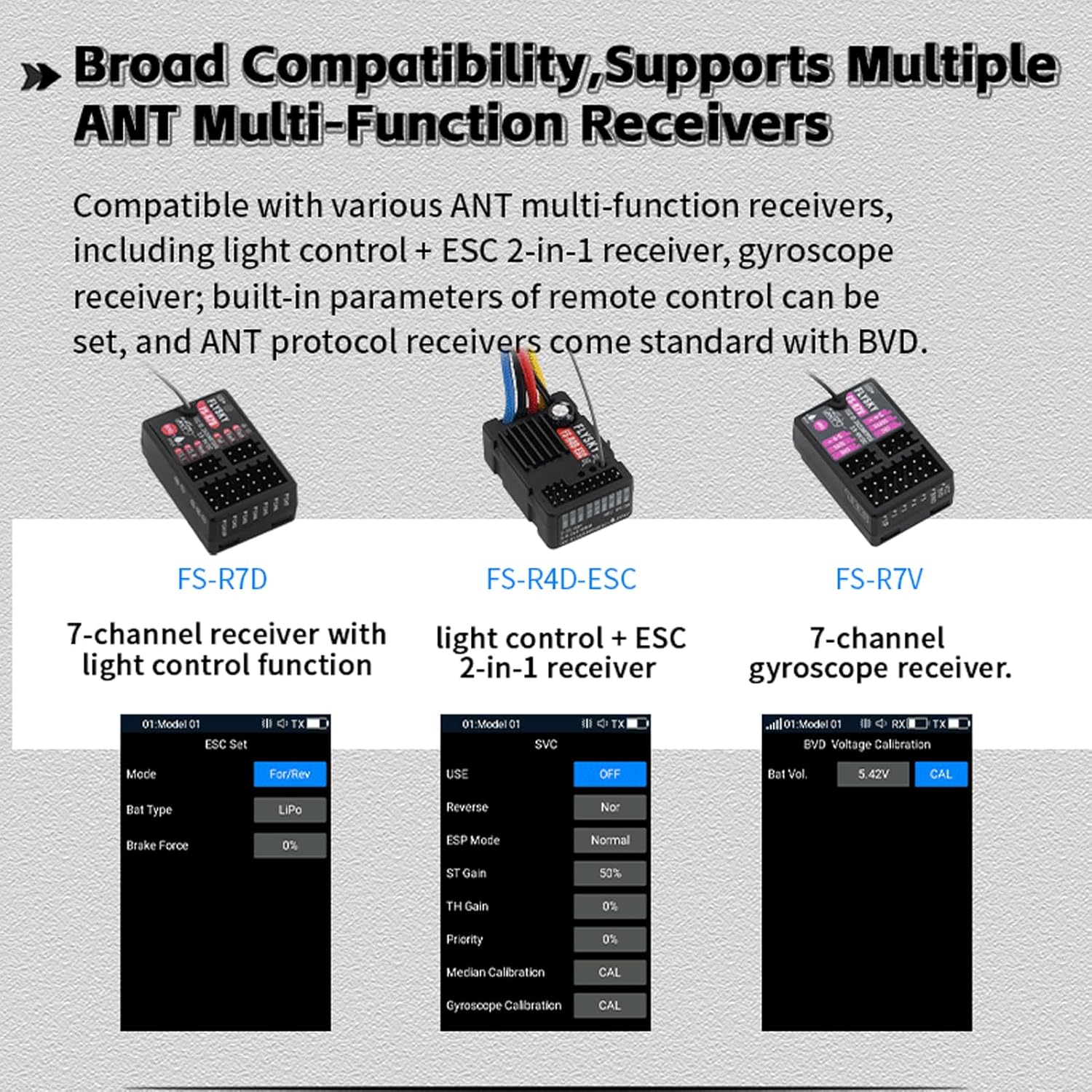
Image: Examples of compatible ANT multi-function receivers: FS-R7D (7-channel with light control), FS-R4D-ESC (light control + ESC 2-in-1), and FS-R7V (7-channel gyroscope receiver). Display screenshots show receiver settings for each type.
8. Maintenance
To ensure the longevity and optimal performance of your FS-G11P transmitter and receiver:
- Keep the device clean and free from dust and debris. Use a soft, dry cloth for cleaning.
- Avoid exposing the device to extreme temperatures, humidity, or direct sunlight for prolonged periods.
- Store the transmitter and receiver in a dry, cool place, preferably in the provided storage box.
- Regularly check all connections for security and signs of wear.
- Ensure batteries are charged before each use and stored properly when not in use.
9. Troubleshooting
This section addresses common issues you might encounter.
| Problem | Possible Cause | Solution |
|---|---|---|
| Transmitter does not power on. | Low or dead battery; incorrect battery installation. | Charge the battery or replace it. Ensure correct polarity and secure connection. |
| No control response from model. | Not bound; receiver not powered; incorrect channel settings. | Perform binding process. Check receiver power. Verify channel assignments and settings. |
| Short control range or signal loss. | Interference; damaged antenna; low transmitter/receiver battery. | Operate in an open area away from interference. Check antennas for damage. Ensure batteries are fully charged. |
| Display is dim or unreadable in sunlight. | Extreme glare. | While the display is anti-glare, direct extreme sunlight can still affect visibility. Try to shade the display or adjust your viewing angle. |
10. Technical Specifications
| Feature | Specification |
|---|---|
| Product Model | FS-G11P |
| Compatible Receiver | FS-R11P and other receivers with ANT protocol |
| Compatible RC Model | Cars or boats |
| Number of Channels | 11 |
| Number of Bands | 133 |
| RF | 2.4GHz ISM |
| Maximum Power | < 20dBm (e.i.r.p.) (EU) |
| RF Protocol | ANT |
| Resolution | 4096 |
| Data Connector | USB Type-C, 3.5mm Audio Jack (DSC), SD card slot |
| Input Power | 6.5V-8.4V DC (18650*2PCS/2S LiPo) |
| Distance | No less than 300m (Ground distance without interference) |
| Antenna | Two built-in antennas |
| Display | 3.5 inch 320*480 full dot color non-touch IPS screen |
| Firmware Update | Supported |
| Temperature Range | -10°C ~ +60°C |
| Humidity Range | 20% - 95% |
| Color | Black |
| Language | Chinese or English |
| Weight | 371g |
| Dimensions | 150.0*120.8*191.2mm |
| Charging Jack | Yes (Type-C Port) |
| Certifications | CE, FCC ID: 2A2UNR11P00 |
Receiver Specifications (FS-R11P):
| Feature | Specification |
|---|---|
| Product Model | FS-R11P |
| Compatible Transmitter | FS-G11P and other transmitters with ANT protocol |
| Compatible RC Model | Cars or boats |
| Number of Channels | 11 |
| RF | 2.4GHz ISM |
| Maximum Power | < 20dBm (e.i.r.p.) (EU) |
| RF Protocol | ANT |
| Resolution | 4096 |
| Data Output | PWM/PPM/i-BUS/S.BUS |
| Operating Voltage | 3.5-9V DC |
| Distance | No less than 300m (Ground distance without interference) |
| Antenna | External single antenna |
| Display | LED |
| Firmware Update | Supported |
| Temperature Range | -10°C ~ +60°C |
| Humidity Range | 20% - 95% |
| Color | Black |
| Weight | 10g |
| Dimensions | 37.0*25*13.3mm |
| Waterproof | IPX4 |
| Certification | CE, FCC ID: 2A2UNR11P00 |
11. Warranty and Support
Specific warranty information for the Flysky FS-G11P is typically provided with your purchase documentation or can be found on the official Flysky website. For technical support, firmware updates, or service inquiries, please refer to the contact information provided by your retailer or visit the official Flysky support channels.
You can visit the official Flysky store for more information: Flysky Store on Amazon
Related documentsFS-G11P


Ask a question about this manual
Ask about setup, troubleshooting, compatibility, parts, safety, or missing instructions. Manuals+ will review the question and use this page’s manual context to help answer it.