
InMotion True Wireless Earbuds
InMotion True Wireless Earbuds User Manual
Model: True Wireless Earbuds
Introduction
Thank you for choosing the InMotion True Wireless Earbuds. These earbuds are designed to provide a seamless audio experience with true wireless freedom, comfortable fit, and intuitive controls. Please read this manual carefully before using your earbuds to ensure proper operation and to maximize their lifespan.
What's in the Box
- True Wireless Earbuds (Left and Right)
- Charging Carry Case
- USB-C Charging Cable
- Small, Medium, and Large Ear Pads (Suction Tips)
- User Manual
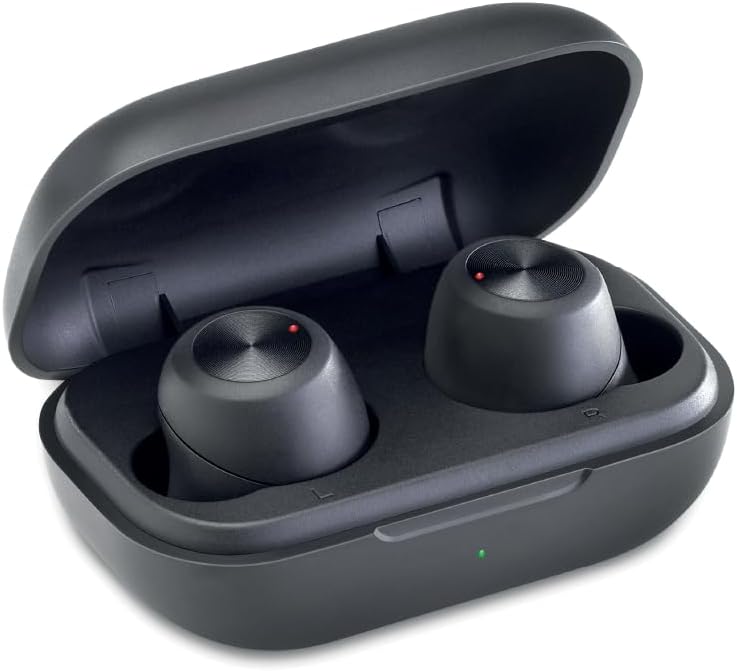
Image: The InMotion True Wireless Earbuds resting inside their open charging case, showing the compact design and charging indicators.
Setup
1. Charging the Earbuds and Case
Before first use, fully charge the earbuds and the charging case. Place the earbuds into the charging case. Connect the USB-C charging cable to the charging port on the case and the other end to a USB power source. The charging indicator on the case will show charging status. A full charge takes approximately 2 hours for the case and earbuds.
2. One-Step Pairing
- Ensure the earbuds are charged.
- Open the charging case. The earbuds will automatically enter pairing mode.
- On your device (smartphone, tablet, laptop), go to Bluetooth settings and turn on Bluetooth.
- Look for "InMotion Earbuds" or "True Wireless Earbuds" in the list of available devices and select it to connect.
- Once connected, you will hear a confirmation tone, and the earbuds will be ready for use.
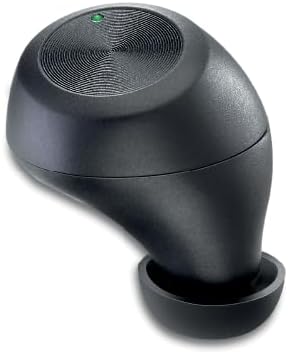
Image: A single InMotion True Wireless Earbud, showcasing its ergonomic design and the touch control surface.
3. Choosing the Right Ear Tips
The earbuds come with small, medium, and large suction tips. For optimal sound quality and comfort, choose the ear tips that provide the best seal in your ear canal. A good seal helps with noise isolation and bass response.
Operating Instructions
Basic Functions
- Power On/Off: Earbuds power on automatically when removed from the case and power off when placed back into the case.
- Play/Pause: Tap the touch control surface on either earbud once.
- Next Track: Double-tap the touch control surface on the right earbud.
- Previous Track: Double-tap the touch control surface on the left earbud.
- Answer/End Call: Tap the touch control surface on either earbud once during an incoming call.
- Reject Call: Press and hold the touch control surface on either earbud for 2 seconds during an incoming call.
- Voice Assistant: Triple-tap the touch control surface on either earbud to activate your device's voice assistant (Siri, Google Assistant, etc.).
The earbuds provide up to 4 hours of continuous use on a single charge, with additional charges available from the portable charging case.
Maintenance
- Cleaning: Regularly clean the earbuds and charging case with a soft, dry, lint-free cloth. Do not use harsh chemicals or abrasive materials.
- Ear Tips: Remove and clean the ear tips periodically with mild soap and water. Ensure they are completely dry before reattaching them to the earbuds.
- Storage: When not in use, store the earbuds in their charging case to protect them and keep them charged. Store in a cool, dry place away from extreme temperatures.
- Avoid Water: These earbuds are not waterproof. Avoid exposure to water, rain, or excessive moisture.
Troubleshooting
| Problem | Possible Solution |
|---|---|
| Earbuds not pairing |
|
| No sound from one earbud |
|
| Earbuds not charging |
|
| Poor sound quality |
|
Specifications
| Feature | Detail |
|---|---|
| Model Name | True Wireless Earbuds |
| Connectivity Technology | Wireless (Bluetooth) |
| Bluetooth Version | 5.2 |
| Wireless Range | Up to 10m |
| Earbud Battery Capacity | 45mAh |
| Charging Case Battery Capacity | 400mAh |
| Play Time | Up to 4 hours per charge |
| Charge Time | Approx. 2 hours |
| Ear Placement | In Ear |
| Form Factor | In Ear |
| Impedance | 16 Ohm |
| Color | Black |
| Item Weight | 2.89 ounces |
| Manufacturer | InMotion |
Warranty and Support
InMotion products are designed for reliability and performance. For warranty information or technical support, please refer to the contact details provided with your product packaging or visit the official InMotion website. You can also reach out to the seller, InMotion Accessories, through the Amazon platform for assistance.
For more information, visit the InMotion Store on Amazon.
Ask a question about this manual
Ask about setup, troubleshooting, compatibility, parts, safety, or missing instructions. Manuals+ will review the question and use this page’s manual context to help answer it.