
1. Introduction
This manual provides comprehensive instructions for the installation, operation, maintenance, and troubleshooting of the RXCWWZQQ TPD.MT9602.PC823(T) 4K TV Motherboard. This component is designed as a compatible replacement part for various display equipment, aiming to restore or enhance TV functionality. Please read this manual thoroughly before proceeding with any installation or repair to ensure proper handling and safety.
2. Safety Information
- Electrical Hazard: Always disconnect the TV from the power source before attempting any installation or repair. Failure to do so can result in electric shock or serious injury.
- Static Discharge: Electronic components are sensitive to electrostatic discharge (ESD). Use an anti-static wrist strap and work on an anti-static mat to prevent damage to the motherboard and other components.
- Professional Installation Recommended: Installation of TV motherboards requires technical knowledge and experience. If you are unsure about any step, consult a qualified technician.
- Handle with Care: Avoid touching the integrated circuits and connectors directly. Hold the board by its edges.
- Ventilation: Ensure adequate ventilation around the TV after installation to prevent overheating.
3. Product Overview
The TPD.MT9602.PC823(T) is a 4K three-in-one TV motherboard designed for compatibility with various display equipment. It integrates essential functions to manage audio, video, and power, serving as the central control unit for your television. This specific variant is identified as 108W 0T noCI NO PFC.
Key features include:
- 4K Resolution Support: Capable of processing and displaying ultra-high-definition content.
- Integrated Design: Combines multiple functions into a single board for streamlined performance.
- Multiple Interfaces: Features 8 distinct interfaces for various connections, ensuring broad compatibility.
- Enhanced Stability: Designed to reduce crashes or lagging phenomena, safeguarding the viewing experience.
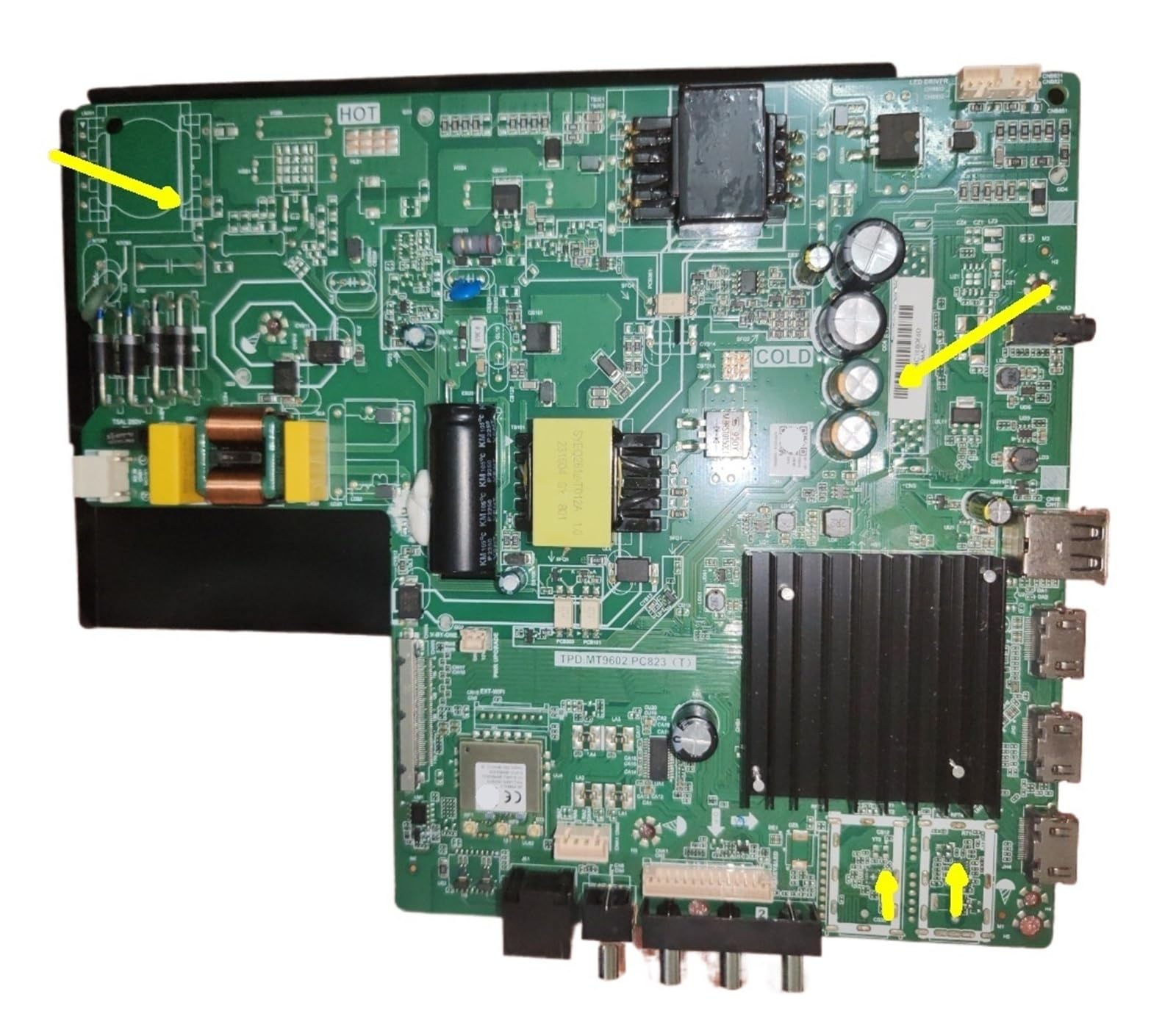
Figure 3.1: Top-down view of the RXCWWZQQ TPD.MT9602.PC823(T) 4K TV Motherboard. This image displays the overall layout of the circuit board, including the main processor, memory modules, power regulation components, and various input/output ports. Key areas such as 'HOT' and 'COLD' zones are visible, indicating thermal management design.

Figure 3.2: Angled view of the RXCWWZQQ TPD.MT9602.PC823(T) 4K TV Motherboard. This perspective provides a clearer look at the connectivity options, including multiple USB ports and HDMI inputs located along the right edge of the board, as well as coaxial cable inputs at the bottom right.
4. Setup and Installation
This section outlines the general steps for replacing a TV motherboard. Specific procedures may vary depending on your TV model. Always refer to your TV's service manual for detailed instructions.
- Preparation:
- Ensure the TV is unplugged from all power sources.
- Gather necessary tools: screwdrivers, anti-static wrist strap, anti-static mat.
- Work in a clean, well-lit area.
- Accessing the Motherboard:
- Carefully remove the back cover of your television. Note the location and type of all screws.
- Locate the existing motherboard.
- Disconnecting the Old Motherboard:
- Before disconnecting, take photos of all cable connections for reference.
- Gently disconnect all cables, ribbons, and connectors from the old motherboard. Pay attention to locking mechanisms on ribbon cables.
- Remove the screws securing the old motherboard to the TV chassis.
- Carefully lift out the old motherboard.
- Installing the New Motherboard:
- Align the new RXCWWZQQ TPD.MT9602.PC823(T) motherboard with the mounting holes in the TV chassis.
- Secure the new motherboard with the appropriate screws. Do not overtighten.
- Refer to your photos and carefully reconnect all cables, ribbons, and connectors to their corresponding ports on the new motherboard. Ensure all connections are firm and correctly oriented. Verify the 8 different interfaces clearly before connecting.
- Reassembly and Testing:
- Before replacing the back cover, temporarily plug in the TV and perform a basic power-on test to ensure functionality.
- If the TV powers on and displays an image, disconnect power again and reattach the back cover.
- Perform a full functional test, checking all inputs and features.
5. Operating
The RXCWWZQQ TPD.MT9602.PC823(T) motherboard is an internal component of your television. Its operation is integrated into the TV's overall system. Once correctly installed, the motherboard functions automatically to process video, audio, and control signals, enabling the TV's normal operation. There are no direct user-operable controls on the motherboard itself.
For specific operating instructions related to your television's features (e.g., input selection, picture settings, smart TV functions), please refer to your television's user manual.
6. Maintenance
Proper maintenance of the motherboard ensures its longevity and reliable performance. As an internal component, direct user maintenance is minimal.
- Dust Prevention: Dust accumulation can lead to overheating and component failure. Periodically (e.g., once a year), with the TV unplugged, carefully remove the back cover and use compressed air to gently clean dust from the motherboard and other internal components. Ensure the air is dry and do not spray too closely.
- Avoid Liquids: Never expose the motherboard or the TV's internal components to liquids. Moisture can cause short circuits and permanent damage.
- Temperature Control: Ensure the TV is operated in an environment with adequate airflow and within recommended temperature ranges to prevent overheating of the motherboard. Avoid blocking ventilation slots on the TV casing.
- Professional Inspection: If you notice any unusual behavior from your TV (e.g., flickering, sound issues, unexpected shutdowns), it may be beneficial to have a qualified technician inspect the motherboard and other components.
7. Troubleshooting
If you encounter issues after installing the new motherboard, consider the following troubleshooting steps:
- No Power:
- Check if the power cable is securely connected to both the TV and the wall outlet.
- Verify that all power supply connections to the motherboard are correctly seated.
- Ensure the power button on the TV or remote is functioning.
- No Picture/Sound:
- Confirm all video and audio cables (HDMI, AV, etc.) are properly connected to the motherboard and external devices.
- Check if the correct input source is selected on the TV.
- Inspect ribbon cables (e.g., LVDS cable to the display panel) for proper connection and damage.
- Intermittent Issues/Crashes:
- Ensure all screws securing the motherboard are tightened appropriately.
- Check for any loose connections or partially seated cables.
- Verify that the TV's ventilation is not obstructed, as overheating can cause instability.
- Incorrect Display/Resolution:
- Ensure the TV's display settings are configured correctly for the connected input source.
- If applicable, check for firmware updates for your TV model (usually done via USB or network connection, referring to your TV's specific instructions).
If problems persist after performing these checks, it is recommended to contact a qualified technician or the product seller for further assistance.
8. Specifications
| Feature | Detail |
|---|---|
| Model Number | TPD.MT9602.PC823(T) |
| Variant | 108W 0T noCI NO PFC |
| Compatibility | Compatible Audio & Video Equipment (Display Equipment) |
| Resolution Support | 4K |
| Integrated Functions | Three-in-one (Audio, Video, Control) |
| Interfaces | 8 different interfaces |
| Package Dimensions | 0.39 x 0.39 x 0.39 inches |
| Item Weight | 1.76 ounces |
| Assembly Required | No (as a single component) |
| Number of Pieces | 1 |
9. Warranty and Support
Warranty information for the RXCWWZQQ TPD.MT9602.PC823(T) 4K TV Motherboard is not provided within this manual. For details regarding warranty coverage, return policies, or technical support, please contact the seller or manufacturer directly. Keep your purchase receipt as proof of purchase.