
1. Setup and Installation
This ceiling fan features an innovative snap-in blade design, simplifying the installation process. Detailed instructions and installation videos are provided to assist with setup.
1.1 Safety Precautions
- Always turn off the main power breaker before beginning any installation or maintenance to prevent electrical shock.
- Ensure all wiring connections are secure and comply with local electrical codes.
1.2 Tools Required
- Power Drill
- Screwdriver
- Ladder
- Wire Stripper
- Electrical Tape or Wire Nuts
1.3 Component Overview
Familiarize yourself with the components included in the package:

Figure 1: Main product view of the Surtime 36-inch black ceiling fan with RGB light and remote control.
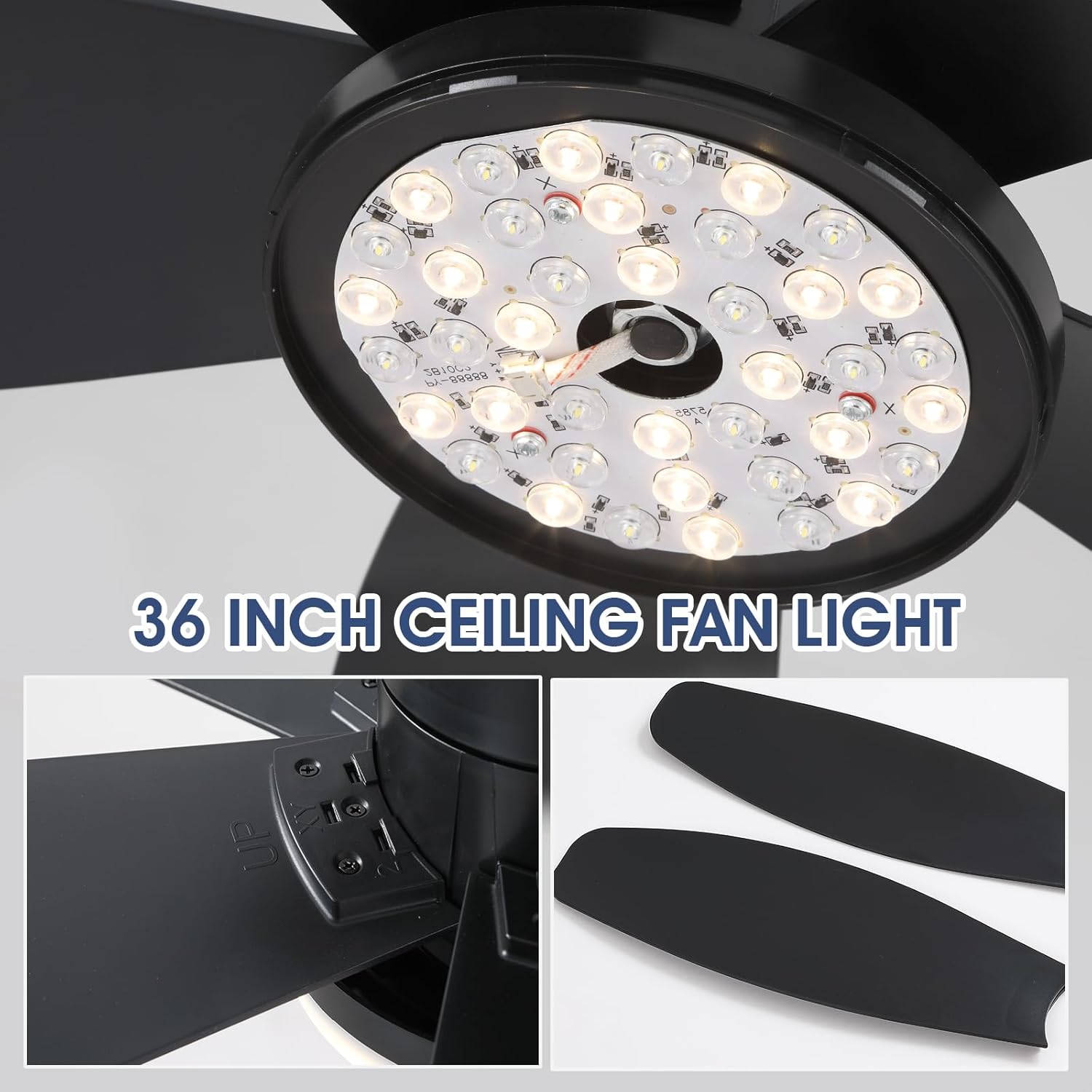
Figure 2: Detailed view of the 36-inch ceiling fan light kit and fan blades. The blades are reversible, offering a white or wood-grain finish.
1.4 Wiring Connections
Ensure proper wiring connections for safe and effective operation:
- Connect the green wire to the ground wire.
- Connect the white wire from the fan to the white wire from the ceiling.
- Connect the black wire from the fan to the black wire from the ceiling.
- Connect the blue wire from the fan to the red wire from the ceiling (for the remote control box).

Figure 3: Product dimensions and electrical specifications, including voltage (90-265V), color temperature (3000K-6500K), wattage (36W), material (Acrylic), and speeds (6 speeds).
2. Operating Instructions
The Surtime ceiling fan offers convenient control via both a remote control and a mobile application.
2.1 Remote and APP Control
- Adjust fan speed (6 levels).
- Control 7-color RGB lights and brightness.
- Set 2-hour or 4-hour timers.
- Toggle positive and reversible steering for seasonal use.

Figure 4: Remote control layout with functions for fan speed, light color temperature (3000K-6500K), timer, and forward/reversal modes.
2.2 Lighting Features
- RGB Lighting System: Features 7 colors with multiple dynamic modes (static, gradient, strobe, etc.).
- Dimmable Light: Adjust brightness levels to your preference.
- Color Temperature: Choose between 3000K (Warm Light), 4500K (Natural Light), and 6000K (White Light).
- Smart Memory Function: The fan saves your preferred brightness and color settings. To activate, turn off the lights for at least 10 seconds. Turning on the light within 10 seconds will change the color temperature.

Figure 5: Visual representation of the dimmable and 3CCT (Correlated Color Temperature) RGB light functions, showcasing various light options.
2.3 Reversible DC Motor
The high-quality DC motor ensures quiet operation and provides two modes for year-round comfort:
- Summer Season (Downdraft Mode): Creates a cooling effect by pushing air downwards.
- Winter Season (Updraft Mode): Promotes air circulation to keep the room warm by drawing cool air up and pushing warm air down.

Figure 6: Illustration of the reversible motor's functionality, showing how it creates downdraft for cooling in summer and updraft for circulating warm air in winter.
2.4 Adjustable Fan Speeds
Select from 6 different wind speeds to suit various scenarios and comfort levels:
- 1-2 Gear: Comfortable Wind
- 3-4 Gear: Comfortable Wind
- 5-6 Gear: Stronger Wind

Figure 7: Visual guide to the 6 adjustable fan speeds, indicating suitable settings for various comfort needs.
3. Maintenance
Regular maintenance ensures the longevity and optimal performance of your ceiling fan.
- Cleaning: Periodically wipe down the fan blades and motor housing with a soft, damp cloth. Avoid using harsh chemicals or abrasive cleaners.
- Connection Check: Annually inspect all electrical connections and mounting hardware to ensure they are secure.
- Blade Balance: If the fan wobbles, check that all blade screws are tightened and the blades are properly balanced.
4. Troubleshooting
If you encounter issues with your ceiling fan, refer to the following common troubleshooting steps:
- Fan Not Operating: Ensure the power supply is on at the main breaker and the wall switch. Check all wiring connections.
- Light Not Working: Verify the light is turned on via the remote or app. Check the light kit connections.
- Remote Control Issues: Ensure batteries are correctly installed and not depleted. Try re-pairing the remote with the fan if necessary (refer to specific pairing instructions in the included manual).
- Excessive Noise/Wobbling: Confirm all fan blade screws are tight. Check that the mounting bracket is securely fastened to the ceiling.
5. Specifications
| Feature | Detail |
|---|---|
| Brand | Surtime |
| Model Name | 36IN-6666-Black-RGB |
| Size | 36IN |
| Color | 36IN-Black-RGB |
| Material | Acrylic |
| Style | Modern |
| Room Type | Bedroom, Game Room, Kids Room, Living Room, Patio |
| Indoor/Outdoor Usage | Indoor, Outdoor (Note: not waterproof) |
| Power Source | DC |
| Special Features | 7 Color RGB Lights, App Operable, Dimmable Light, Light Memory Function, Timer |
| Theme | Rainbow |
| Included Components | Ceiling Fan Kit, Instruction Manual, Remote Control |
| Number of Items | 1 |
| Mounting Type | Ceiling Mount |
| Assembly Required | No |
| Recommended Uses | Air Circulation, Cooling |
| Product Dimensions | 36 x 36 x 15 inches |
| Item Weight | 5.95 pounds |
6. Warranty and Support
Surtime ceiling fans come with a worry-free 1-year warranty on quality-related issues. If you encounter any problems or require support, please do not hesitate to contact us.


