
1. Introduction
This manual provides detailed instructions for the LIGE Smart Watch EF12-D. Please read this manual carefully before using the device to ensure proper operation and to maximize its features. This smartwatch is designed for men, featuring a 1.75-inch HD screen, Bluetooth call functionality, a powerful 1000mAh battery, flashlight, and comprehensive health monitoring capabilities.

Figure 1.1: LIGE Smart Watch EF12-D showcasing its design and various watch faces.
2. Package Contents
Upon opening the package, verify that all the following items are included:
- 1 x LIGE Smart Watch EF12-D
- 3 x Straps (steel and silicone options)
- 1 x Regulator (for steel strap adjustment)
- 1 x Magnetic Charging Cable
- 1 x User Manual
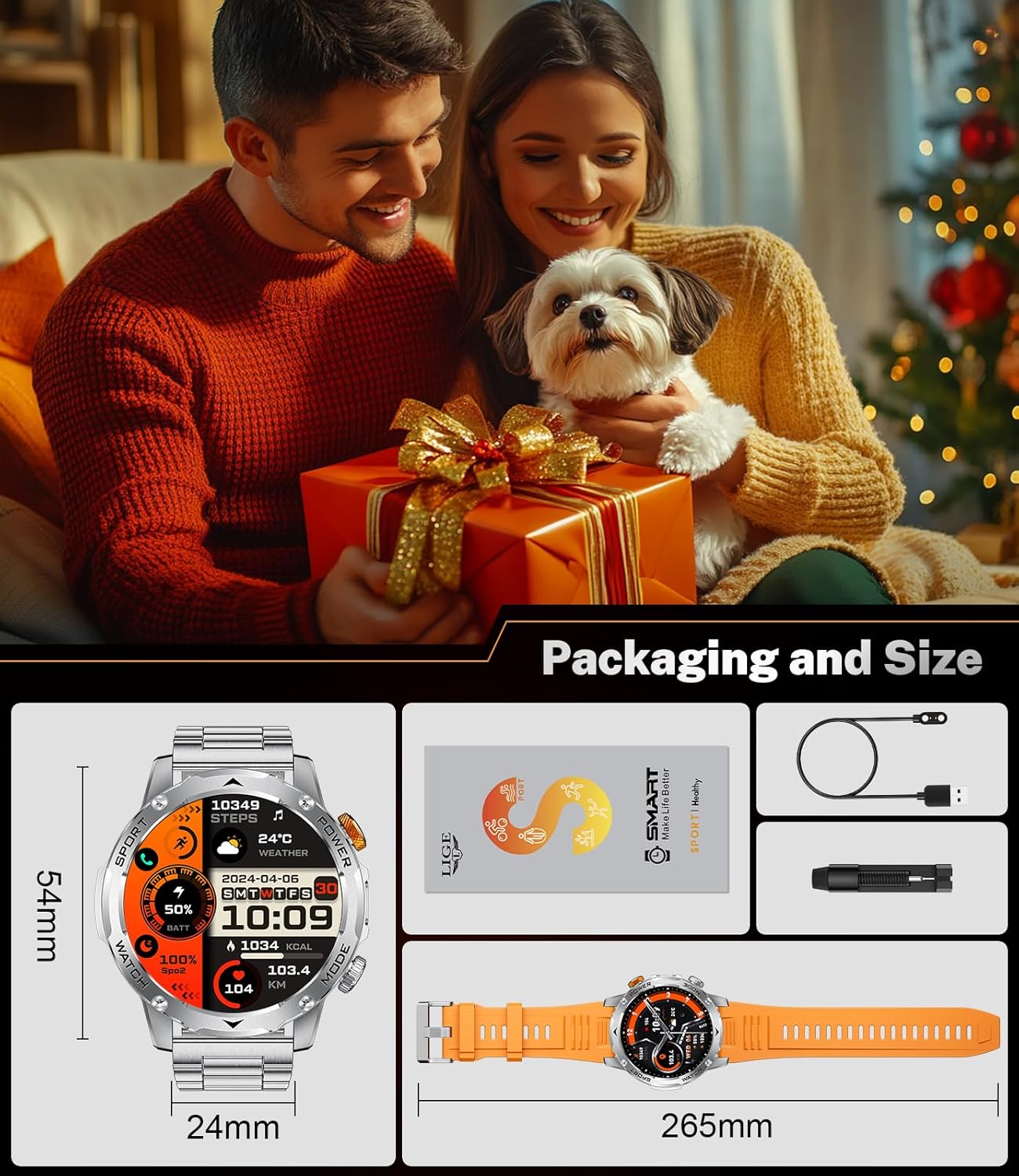
Figure 2.1: Included items in the LIGE Smart Watch EF12-D retail package.
3. Setup Guide
3.1 Initial Charging
Before first use, fully charge your smartwatch. Connect the magnetic charging cable to the charging points on the back of the watch and plug the USB-A end into a compatible power adapter (not included). A full charge typically takes approximately 2 hours. The 1000mAh battery provides extended usage, lasting 10-15 days in normal mode and over 40 days in power-saving mode.
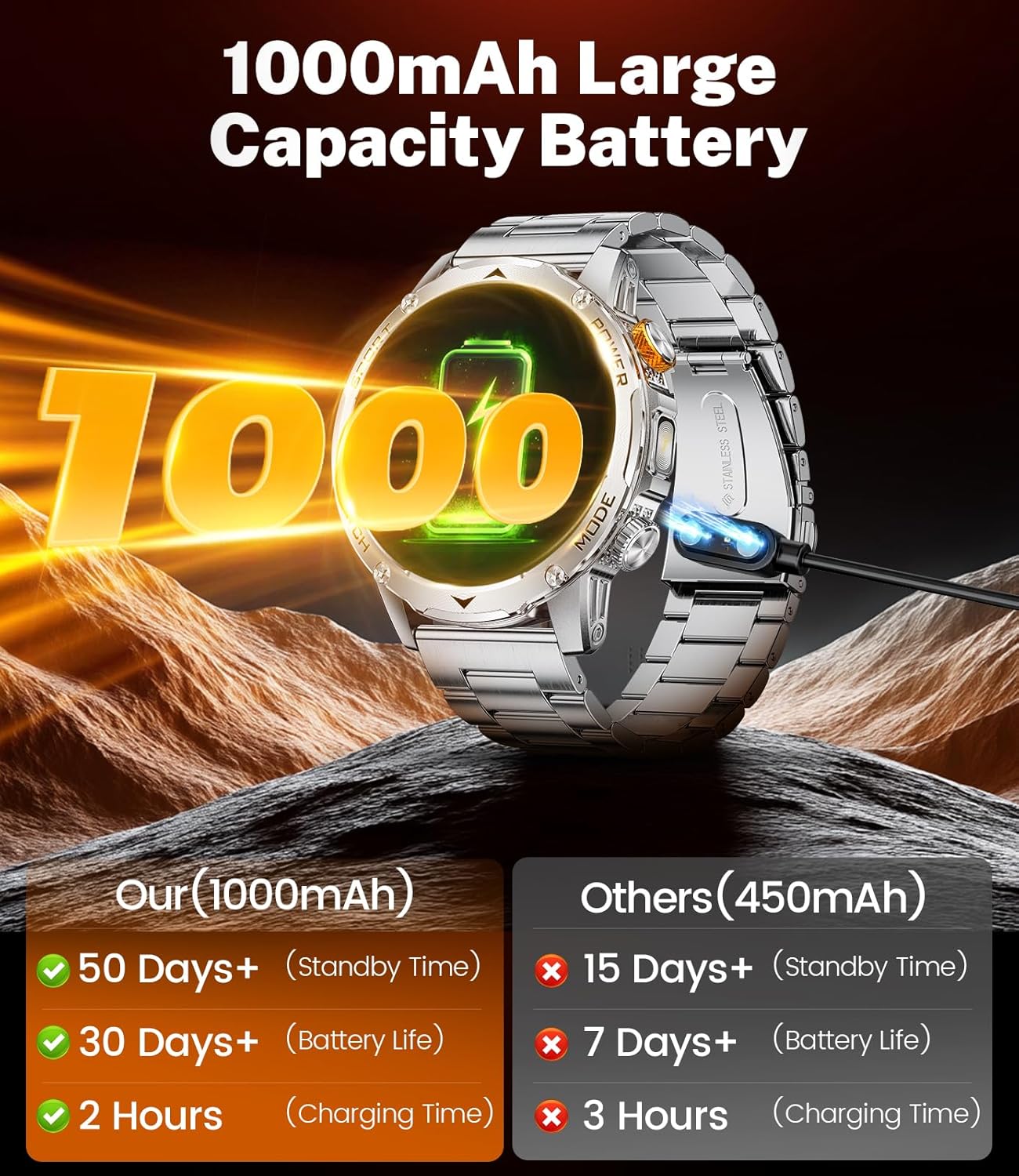
Figure 3.1: The smartwatch connected to its magnetic charging cable, illustrating its large battery capacity.
3.2 App Installation and Pairing
To unlock the full functionality of your LIGE Smart Watch, download and install the FitCloudPro application on your smartphone. The app is compatible with Android 5.1+ and iOS 9.0+ devices.
- Scan the QR code in the manual or search for "FitCloudPro" in your phone's app store.
- Install and open the app.
- Enable Bluetooth on your smartphone.
- In the FitCloudPro app, navigate to the device section and search for your smartwatch.
- Select the EF12-D from the list to pair. Follow any on-screen prompts to complete the connection.
Note: Ensure the watch is sufficiently charged during the pairing process. Grant necessary permissions (Bluetooth, location, notifications) to the app for optimal performance.
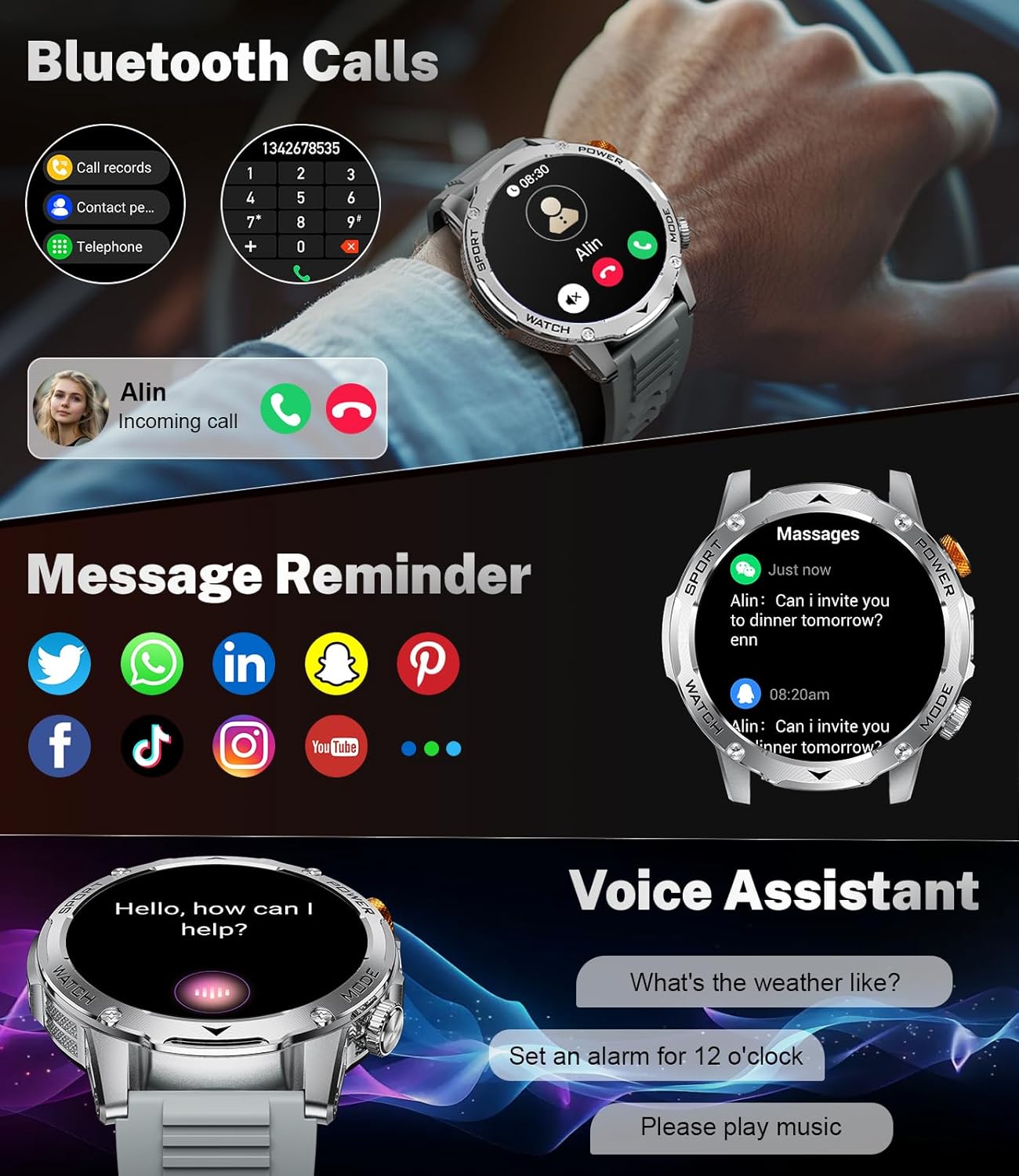
Figure 3.2: The smartwatch's interface for Bluetooth calls and message notifications.
3.3 Strap Installation
The LIGE Smart Watch EF12-D comes with three interchangeable straps: one steel strap for business use and two silicone straps for casual or sport use. To change a strap, locate the quick-release pins on the back of the strap. Pull the pin inwards and gently remove the strap. Align the new strap with the watch lugs, insert one end of the pin into the lug hole, then pull the pin inwards to slide the other end into the opposite lug hole. Release the pin to secure the strap.
4. Operating the Smartwatch
4.1 Display and Navigation
The smartwatch features a 1.75-inch HD touchscreen with a 360x360 resolution. Navigate the interface using touch gestures:
- Swipe Up/Down: Scroll through menus or notifications.
- Swipe Left/Right: Access different function screens (e.g., health data, sports modes, quick settings).
- Tap: Select an item or open an application.
- Press Side Buttons: The physical buttons on the side provide quick access to specific functions or return to the home screen. The orange crown can also be rotated to navigate certain menus.

Figure 4.1: The smartwatch's 1.75-inch HD display and its integrated flashlight feature.
4.2 Customization
Personalize your smartwatch experience:
- Watch Faces: Choose from over 100 watch faces available through the FitCloudPro app. You can also upload your favorite photos to create custom watch faces.
- Brightness: Adjust screen brightness from the quick settings menu or within the watch settings.

Figure 4.2: A selection of personalized watch faces available for the LIGE Smart Watch.
4.3 Communication Features
With its built-in speaker and microphone, the smartwatch allows for convenient communication:
- Bluetooth Calls: Make and answer calls directly from your watch when connected to your phone. Access call records and store contacts.
- Message Reminders: Receive notifications for SMS, Facebook, WhatsApp, Twitter, TikTok, and other apps directly on your watch.
- Voice Assistant: Use the integrated voice assistant to perform tasks like checking the weather, setting alarms, or playing music.

Figure 4.3: Users engaging in Bluetooth calls directly from the smartwatch.

Figure 4.4: The smartwatch receiving notifications from various social media and messaging applications.

Figure 4.5: Demonstrating the voice assistant feature on the LIGE Smart Watch.
4.4 Flashlight Feature
The smartwatch includes a high-brightness flashlight on its side, providing instant illumination. It supports multiple lighting modes:
- Constant-On Mode: Provides continuous light.
- Warning Mode: Flashing light for signaling.
- SOS Mode: Emits an SOS signal in Morse code for emergencies.
Access the flashlight from the quick settings or by programming one of the side buttons for quick access.

Figure 4.6: The integrated LED flashlight on the smartwatch, useful for various situations.
5. Health Monitoring
The LIGE Smart Watch EF12-D continuously monitors various health metrics to help you maintain a healthy lifestyle:
- Heart Rate Monitoring: Tracks your heart rate throughout the day, providing real-time data and historical trends in the app.
- Blood Oxygen (SpO2) Monitoring: Measures your blood oxygen saturation levels.
- Sleep Monitoring: Analyzes your sleep patterns, including deep sleep, light sleep, and awake time, to help you understand and improve your sleep quality.
- Stress Level Monitoring: Provides insights into your stress levels.
All health data is synchronized with the FitCloudPro app, allowing for detailed analysis and tracking over time.

Figure 5.1: Overview of 24-hour health monitoring features including heart rate, blood oxygen, sleep, and breathing exercises.

Figure 5.2: Real-time heart rate monitoring on the smartwatch, providing workout intensity guidance.

Figure 5.3: Sleep monitoring interface showing deep sleep, light sleep, and awake time.
6. Sports Modes
The smartwatch offers over 100 sports modes to track your physical activity, including:
- Running
- Cycling
- Swimming
- Hiking
- Yoga
- And many more.
During workouts, the watch tracks key metrics such as calories burned, steps taken, and distance covered. This data is recorded and can be reviewed in the FitCloudPro app to monitor your progress.

Figure 6.1: The smartwatch's interface for tracking various sports activities.

Figure 6.2: A variety of sports modes available on the smartwatch for comprehensive activity tracking.
7. Durability and Waterproofing
The LIGE Smart Watch EF12-D is built with military-grade durability, designed to withstand harsh conditions. Its high-strength materials have passed various tests, including drilling, crushing, exposure to hot steam, salt spray, and liquid contamination.
The watch also features an IP68 waterproof rating, providing excellent protection against water for daily life activities such as hand washing, sweat, and rain. It is not recommended for hot water activities, diving, or prolonged submersion.

Figure 7.1: The smartwatch's military-grade ruggedness and resistance to extreme conditions.

Figure 7.2: Key military standards met by the smartwatch, including IP68 waterproof and anti-impact.
8. Maintenance
To ensure the longevity and optimal performance of your LIGE Smart Watch, follow these maintenance guidelines:
- Cleaning: Regularly wipe the watch screen and body with a soft, dry cloth. For stubborn smudges, a slightly damp cloth can be used, followed by immediate drying. Clean the charging contacts periodically to ensure good connection.
- Strap Care: Clean silicone straps with mild soap and water. For the steel strap, use a soft brush to remove dirt from crevices. Ensure straps are completely dry before reattaching.
- Charging: Always use the provided magnetic charging cable. Avoid exposing the charging contacts to water or corrosive liquids. Do not overcharge the battery; disconnect once fully charged.
- Storage: When not in use for extended periods, store the watch in a cool, dry place away from direct sunlight and extreme temperatures.
9. Troubleshooting
If you encounter issues with your LIGE Smart Watch, refer to the following common problems and solutions:
| Problem | Possible Cause / Solution |
|---|---|
| Watch does not turn on | Battery may be depleted. Connect to charger for at least 30 minutes. |
| Cannot pair with phone | Ensure Bluetooth is enabled on both devices. Make sure the watch is within range. Restart both the watch and phone. Check app permissions. |
| Notifications not appearing | Verify notification permissions are granted to the FitCloudPro app in your phone's settings. Ensure the app is running in the background. Check watch's 'Do Not Disturb' mode. |
| Inaccurate health data | Ensure the watch is worn snugly on your wrist, not too tight or too loose. Clean the sensor on the back of the watch. Avoid excessive movement during measurements. |
| Battery drains quickly | High screen brightness, frequent use of features like calls or continuous health monitoring can increase battery consumption. Adjust settings or use power-saving mode. |
| Charging issues | Ensure the magnetic charging cable is properly aligned with the watch's charging contacts. Check if the USB power source is working correctly. Clean charging contacts. |
| Watch is unresponsive or laggy | Restart the watch. If the issue persists, perform a factory reset via the watch settings (note: this will erase all data). |
For further assistance, please refer to the FitCloudPro app's help section or contact LIGE customer support.
10. Specifications
| Feature | Detail |
|---|---|
| Model Number | EF12-D |
| Brand | LIGE |
| Screen Size | 1.75 Inches |
| Screen Resolution | 360x360 (HD) |
| Battery Capacity | 1000 mAh |
| Typical Usage Battery Life | 10-15 days |
| Power Saving Mode Battery Life | Over 40 days |
| Charging Time | Approx. 2 hours |
| Waterproof Rating | IP68 |
| Connectivity | Bluetooth 5.2 |
| Operating System | AsteroidOS |
| Memory Storage Capacity | 128 MB |
| GPS | No GPS |
| Item Weight | 10.5 ounces |
| Package Dimensions | 8.07 x 3.78 x 0.94 inches |
11. Warranty and Support
LIGE provides quality products and customer support. For any warranty claims, technical assistance, or product inquiries, please contact the seller or LIGE customer service directly. Keep your purchase receipt as proof of purchase for warranty purposes.
Manufacturer: LIGE
Date First Available: May 27, 2025


