
Introduction
This manual provides comprehensive instructions for the operation, maintenance, and troubleshooting of your LIGE Military Smart Watch (Model: FV14-A1-US). Designed for durability and versatility, this smartwatch features a 2.01-inch HD display, robust military-grade construction, and a long-lasting 700mAh battery. It supports Bluetooth calling, over 100 sports modes, and various health monitoring functions, making it suitable for both outdoor adventures and daily use.
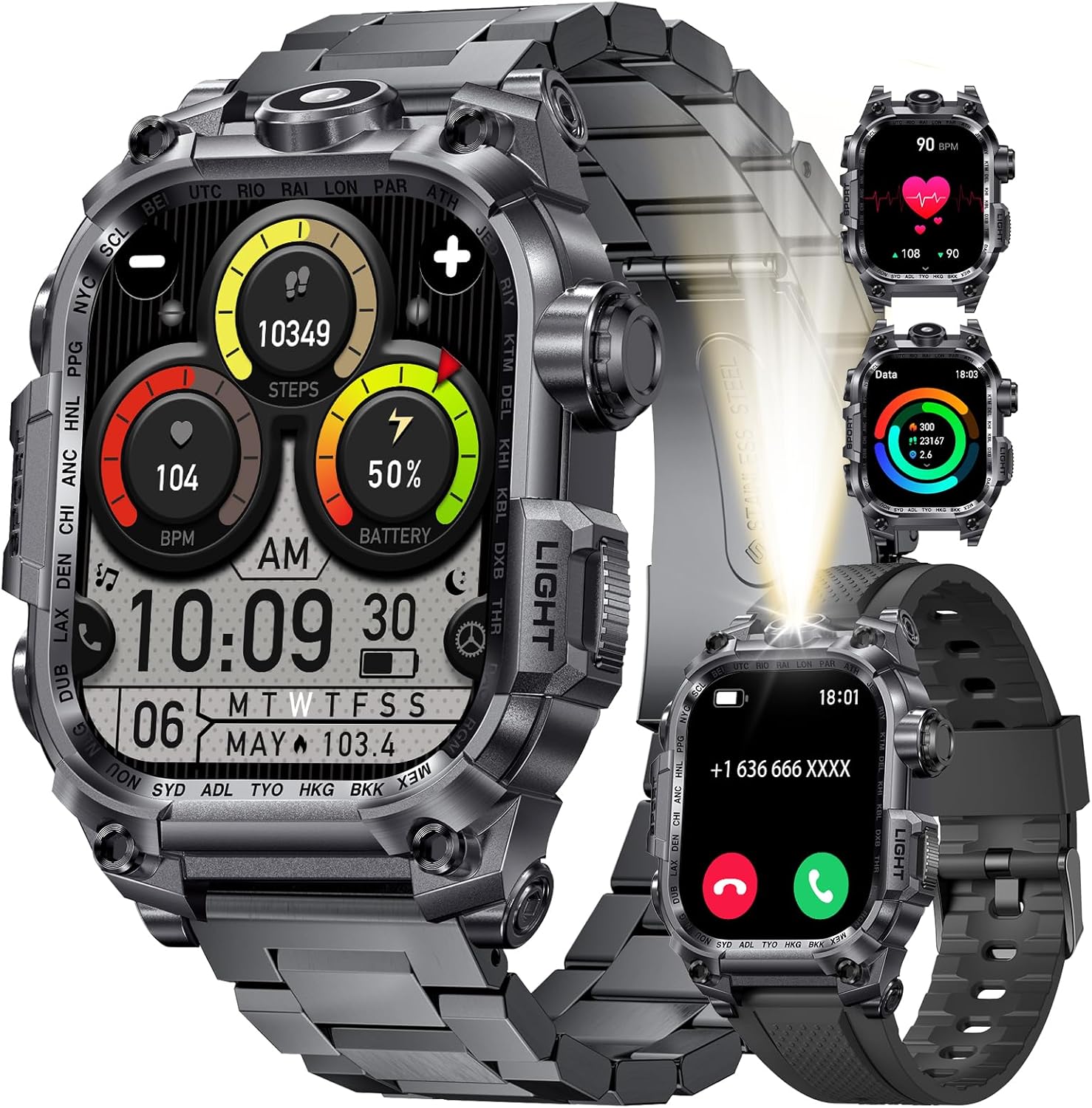
Image: The LIGE Military Smart Watch, showcasing its rugged design and digital display with various health metrics and time.
What's in the Box
Upon opening the package, please verify that all the following items are included:
- LIGE Military Smart Watch (FV14-A1-US)
- Two (2) Watch Straps
- Magnetic Charging Cable
- Strap Installation and Removal Tools
- User Instructions Manual (this document)
Setup Guide
1. Charging the Smart Watch
Before initial use, fully charge your smartwatch. Connect the magnetic charging cable to the charging points on the back of the watch and plug the USB end into a compatible power adapter (not included) or a computer USB port. A full charge typically takes approximately 2.5 hours.

Image: Illustration of the smartwatch being charged with the magnetic cable, highlighting its 700mAh battery capacity and estimated usage times.
2. App Installation and Pairing
To unlock the full functionality of your LIGE Smart Watch, you need to install the companion application on your smartphone.
- Download the App: Scan the QR code provided in the watch's on-screen instructions or search for "FitCloudPro" in your smartphone's app store (Google Play Store for Android, Apple App Store for iOS). Alternatively, you can download the app from the official link: FitCloudPro App Download.
- Enable Bluetooth: Ensure Bluetooth is enabled on your smartphone.
- Open FitCloudPro: Launch the FitCloudPro app and follow the on-screen prompts to create an account or log in.
- Add Device: In the app, navigate to the "Device" or "Add Device" section. The app will search for nearby smartwatches. Select "I121" (or the corresponding device name) from the list to initiate pairing.
- Confirm Pairing: A pairing request will appear on your smartphone. Confirm the pairing. On some devices, a pop-up may ask to allow access to contacts and call history; accept these permissions for full functionality.
- Enable Call Function: After successful pairing, go to your phone's Bluetooth settings and locate "I121_Audio" (or similar). Connect to this profile to enable Bluetooth call functionality directly from your watch.

Image: Step-by-step visual guide for downloading the FitCloudPro app, enabling Bluetooth, pairing the watch, and connecting for call audio.
3. Strap Installation and Removal
Your LIGE Smart Watch comes with tools to assist in changing the watch straps. Align the spring bars of the strap with the lug holes on the watch body and gently push the pin to secure it. Use the provided tools for easier installation and removal.
Operating Instructions
Basic Navigation
- Touchscreen: Swipe left/right, up/down to navigate through menus and functions. Tap to select.
- Side Buttons: The watch features multiple physical buttons for quick access to functions like power on/off, back, and specific modes (e.g., Sport, Light). Refer to the watch's on-screen prompts for specific button assignments.

Image: Close-up of the smartwatch display, emphasizing its 2.01-inch HD large screen with high resolution and full-screen touch capabilities.
Key Functions
LED Flashlight
The smartwatch integrates a powerful LED flashlight. Activate it via the dedicated "LIGHT" button on the side of the watch or through the quick settings menu on the display. This feature is useful for illuminating your path in low-light conditions, providing a convenient hands-free light source.

Image: The smartwatch highlighting its LED flashlight function, alongside illustrations of its dust-proof, IP68 waterproof, and anti-impact capabilities.
Bluetooth Calling and Notifications
Once paired with your smartphone and the call audio function is enabled (as described in Setup), you can make and receive calls directly from your watch. The watch also displays incoming call alerts, SMS messages, and notifications from various social media applications (e.g., WhatsApp, Facebook, Instagram, Twitter).

Image: Visual representation of the smartwatch's ability to answer/make calls, interact with a smart voice assistant, and display instant message reminders from various apps.
Sports Modes
The watch supports over 100 sports modes, including running, swimming, cycling, hiking, and more. Select your desired activity from the "Sport" menu to begin tracking. The watch will automatically record data such as exercise duration, calories burned, step count, and distance in real-time. Swipe through the display to view different metrics during your workout.
Note: The data provided by the fitness tracker is for reference only and should not be used for professional medical diagnosis.

Image: A person climbing while wearing the smartwatch, with an overlay showing various sports modes and tracked metrics like distance, steps, calories, and heart rate.
Health Monitoring
The LIGE Smart Watch can monitor various health metrics. Access these functions through the health monitoring section on the watch or within the FitCloudPro app:
- Heart Rate: Real-time heart rate monitoring.
- Blood Oxygen (SpO2): Measures blood oxygen saturation levels.
- Blood Pressure: Provides estimated blood pressure readings.
- Sleep Tracking: Monitors sleep patterns and quality.
Important: The health data provided by this device is for general fitness and wellness purposes only. It is not intended for medical use, diagnosis, treatment, or prevention of any disease. Consult a medical professional for any health concerns.

Image: Visuals demonstrating the smartwatch's capability to monitor heart rate, blood oxygen, and blood pressure, with a user wearing the watch during physical activity.
Other Multifunctional Features
Your LIGE Smart Watch offers a range of additional features to enhance your daily life:
- Music Control: Control music playback on your smartphone (play, pause, skip tracks).
- Remote Camera Control: Use your watch as a remote shutter for your smartphone's camera.
- Alarm Clock: Set alarms directly from the watch or app.
- Weather Forecast: Get real-time weather updates.
- Sedentary Reminder: Alerts you to move after periods of inactivity.
- Hydration Reminder: Reminds you to drink water.
- Find Phone/Watch: Helps locate your paired device.
- Calculator: Basic calculator function.
- Voice Assistant: Interact with your smartphone's voice assistant.
- Customizable Watch Faces: Personalize your watch face through the FitCloudPro app.

Image: A collage showing the smartwatch's camera control, music control, drinking reminders, alarm, and weather display features.
Maintenance
Water Resistance (IP68)
The LIGE Smart Watch is IP68 waterproof, meaning it is resistant to dust and can withstand immersion in water up to 1.5 meters for up to 30 minutes. This makes it suitable for daily activities like hand washing, rain, and shallow swimming. However, it is not suitable for hot water, saunas, diving, or sea use, as steam and saltwater can damage the device. Avoid pressing buttons underwater.

Image: The smartwatch submerged in water, illustrating its IP68 waterproof rating and suitability for activities like swimming, rain, showering, and hand washing.
Cleaning and Care
- Regularly clean the watch and strap with a soft, damp cloth.
- Avoid using harsh chemicals, abrasive cleaners, or solvents.
- Ensure the charging contacts are clean and dry before charging.
Battery Care
- To prolong battery life, avoid extreme temperatures.
- Charge the watch regularly, do not let the battery completely drain for extended periods.
- The 700mAh high-performance battery provides extended usage, reducing the need for frequent recharging.
Troubleshooting
| Problem | Possible Cause | Solution |
|---|---|---|
| Watch does not turn on. | Low battery. | Charge the watch for at least 30 minutes before attempting to turn it on. |
| Cannot pair with smartphone. | Bluetooth is off; app not running; watch not discoverable; incorrect device selected. | Ensure Bluetooth is on. Restart the FitCloudPro app. Restart both watch and phone. Make sure you select "I121" in the app. |
| Bluetooth call function not working. | "I121_Audio" not connected in phone's Bluetooth settings. | Go to your phone's Bluetooth settings and manually connect to "I121_Audio" after pairing the main device. |
| Notifications not received. | App permissions not granted; notification settings off in app/phone. | Check app permissions for notifications. Ensure notification alerts are enabled in the FitCloudPro app settings for specific applications. |
| Inaccurate health data. | Watch not worn correctly; movement during measurement. | Ensure the watch is snug on your wrist. Remain still during measurements. Remember, data is for reference only. |
Specifications
| Feature | Detail |
|---|---|
| Model Number | FV14-A1-US |
| Display Size | 2.01 Inches |
| Screen Resolution | 320*390 Pixels |
| Battery Capacity | 700 mAh (Nonstandard Battery, included) |
| Charging Time | Approx. 2.5 hours |
| Connectivity | Bluetooth 5.2 |
| Operating System | AsteroidOS |
| Memory Storage Capacity | 256 MB |
| Water Resistance Rating | IP68 |
| Item Weight | 9.9 ounces |
| Package Dimensions | 8.07 x 3.78 x 0.94 inches |
| Compatibility | Android 4.4 or iOS 9.0 and above (Smartphones only) |
| Special Features | LED Flashlight, Weather Forecast, Stopwatch, Timer, Music Control, Pedometer, Find Phone, Alarm Clock, Camera Control, Calculator, Drinking Water Reminder, Sedentary Reminder, Do Not Disturb Mode, Activity Tracker, 100+ Sports Modes, Fitness Tracker, Stress Tracker, Sleep, Calorie Counter, Answer/Dial Calls, Messaging Notification, Voice Assistant, Multi-Language. |
Warranty and Support
LIGE is committed to providing excellent products and customer service. Your LIGE Military Smart Watch comes with the following support:
- 24-Hour Online Service: Customer support is available 24 hours a day to assist with any inquiries or issues.
- 6 Months Returns Service: Refer to your purchase platform's return policy for details on eligibility and process.
- 2 Years Guarantee: The product is covered by a 2-year guarantee from the date of purchase.
If you experience any damage issues, usage problems, or are not 100% satisfied, please contact the LIGE Customer Service Team directly for assistance.

Image: Graphic detailing LIGE's 24-hour online service, 6 months returns service, and 2 years guarantee, with a prompt to contact customer service.
Product Video Overview
Video: An official product video showcasing the LIGE Military Smart Watch's features, including its rugged design, display, and various functionalities.

