
OLIGHT I1R 2 Pro
OLIGHT I1R 2 Pro Eos 180 Lumens EDC Rechargeable Keychain Flashlight User Manual
Model: I1R 2 Pro | Brand: OLIGHT
1. Introduction
Thank you for purchasing the OLIGHT I1R 2 Pro Eos. This compact and powerful keychain flashlight is designed for everyday carry, offering convenience and reliable illumination. This manual provides essential information for the safe and effective use of your device.
2. Product Overview
2.1 Components
- OLIGHT I1R 2 Pro Eos Flashlight
- USB-C Charging Cable (typically included)
- Keychain Ring
2.2 Key Features
- High Performance: Utilizes a CSP LED with a TIR optic lens, delivering a maximum output of 180 lumens and a beam distance of up to 48 meters.
- Compact Design: Measures 2.02 inches in length and weighs 0.78 ounces, making it ideal for keychain carry.
- USB-C Rechargeable: Features a modern USB-C charging port for convenient and fast recharging.
- Dual Output Modes: Offers two brightness levels (5 lumens and 180 lumens) controlled by a simple twist mechanism.
- Durable Construction: Made from aluminum with an IPX8 waterproof rating, ensuring resilience in various conditions.
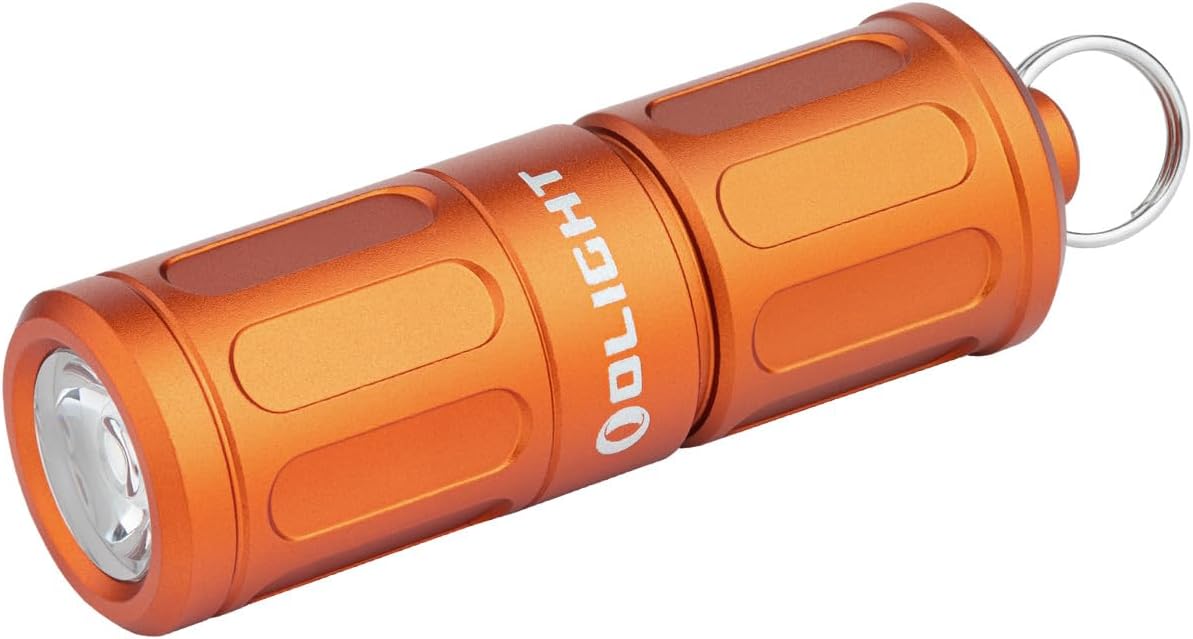
Figure 1: The OLIGHT I1R 2 Pro Eos Keychain Flashlight in orange.

Figure 2: Demonstrating the twist operation for activating the flashlight and changing brightness modes.
3. Setup
3.1 Initial Charge
Before first use, fully charge the flashlight. The device is equipped with a built-in rechargeable lithium-ion battery.
- Unscrew the head of the flashlight to reveal the USB-C charging port. The head remains captive and does not detach completely.
- Connect the provided USB-C charging cable to the flashlight's port and to a USB power source (e.g., computer, wall adapter).
- The indicator light will show charging status. A full charge typically takes approximately 100 minutes.
- Once fully charged, disconnect the cable and securely screw the flashlight head back into place to ensure water resistance.

Figure 3: The flashlight connected to a USB-C charger, illustrating the charging process.
4. Operation
The OLIGHT I1R 2 Pro Eos features a simple twist operation for activation and mode selection.
- To turn on Low Mode (5 Lumens): Gently twist the head of the flashlight clockwise until the light activates at 5 lumens. This mode is suitable for close-range illumination.
- To turn on High Mode (180 Lumens): Continue twisting the head clockwise further. The flashlight will switch to its maximum output of 180 lumens, providing brighter and wider illumination.
- To turn off: Twist the head counter-clockwise until the light turns off.
Note: The flashlight remembers the last used mode (Low or High) if turned off and on within a short period.
5. Maintenance
- Cleaning: Use a soft, clean cloth to wipe the flashlight body. Do not use harsh chemicals or abrasive materials.
- O-ring: Periodically check the O-ring for wear and tear. Replace if damaged to maintain water resistance. Lubricate with silicone grease if necessary.
- Charging Port: Keep the USB-C charging port clean and free of debris. Ensure the head is fully tightened after charging to protect the port.
- Storage: Store the flashlight in a cool, dry place when not in use for extended periods.
6. Troubleshooting
| Problem | Possible Cause | Solution |
|---|---|---|
| Flashlight does not turn on. | Low battery or loose connection. | Charge the flashlight. Ensure the head is fully tightened. |
| Light output is dim. | Low battery or incorrect mode. | Charge the flashlight. Twist the head further to activate High mode. |
| Charging not working. | Cable or power source issue, or dirty port. | Try a different USB-C cable or power source. Clean the charging port gently. |
| Water ingress. | O-ring damaged or head not fully tightened. | Ensure the head is fully tightened. Inspect and replace the O-ring if damaged. |
7. Specifications
| Feature | Detail |
|---|---|
| Max Output | 180 Lumens |
| Max Throw | 48 Meters |
| Low Mode Output | 5 Lumens (Runtime: 12 hours) |
| High Mode Output | 180 Lumens (Runtime: 23 minutes) |
| Battery Type | Built-in 130mAh Lithium-Ion |
| Charging Type | USB-C |
| Full Charge Time | Approx. 100 minutes |
| Water Resistance | IPX8 (Note: Product specifications also listed "Not Water Resistant" in one instance, but features indicate IPX8. Please refer to official OLIGHT documentation for definitive rating.) |
| Material | Aluminum |
| Dimensions (L x D) | 2.02" x 0.64" (51.3mm x 16.2mm) |
| Weight | 0.78 oz (22g) |

Figure 4: Comparison of the I1R 2 Pro with the previous I1R 2 model, highlighting improved features like USB-C charging and higher output.

Figure 5: Detailed specifications table for the OLIGHT I1R 2 Pro Eos, showing lumen output, runtime, and beam distance for both high and low modes.
8. Warranty and Support
For warranty information, technical support, or to view official product videos, please visit the official OLIGHT website or contact their customer service. Keep your purchase receipt for warranty claims.
Official OLIGHT Store: OLIGHT Store on Amazon
Related documentsI1R 2 Pro


Ask a question about this manual
Ask about setup, troubleshooting, compatibility, parts, safety, or missing instructions. Manuals+ will review the question and use this page’s manual context to help answer it.