
1. Introduction
This user manual provides essential information for the proper use, care, and maintenance of your COACH Warner Signature Coated Canvas Leather Backpack, Model CW211. Please read this manual thoroughly to ensure optimal performance and longevity of your product.
2. Product Overview
The COACH Warner Signature Coated Canvas Leather Backpack, Model CW211, is a stylish and functional accessory designed for daily use, commuting, school, and travel. It features a durable denim signature PVC coated canvas combined with navy leather accents, and an embossed COACH logo on the front.
Key features include:
- Spacious main compartment with magnetic flap and drawstring closure.
- A4 size compatibility for documents and devices.
- Multiple exterior and interior pockets for organized storage.
- Adjustable shoulder straps for comfortable carrying.
- Gunmetal hardware for a refined finish.

Figure 2.1: Front view of the COACH Warner Signature Coated Canvas Leather Backpack, Model CW211. This image displays the main flap, buckle detail, and the two front magnetic pockets, highlighting the signature pattern and leather trim.
3. Setup
Your COACH backpack is ready for use upon unpacking. The primary setup involves adjusting the shoulder straps for a comfortable fit.
- Unpack: Carefully remove the backpack from its packaging.
- Adjust Shoulder Straps: Place the backpack on your back. Locate the adjustable buckles on each shoulder strap. Pull the loose ends of the straps to tighten, or lift the buckles and pull the straps through to loosen, until the backpack rests comfortably on your shoulders and back. Ensure even weight distribution.

Figure 3.1: This image shows the COACH Warner backpack being worn by a model, demonstrating how it sits on the back. A close-up detail of the adjustable shoulder strap and its buckle mechanism is also visible, illustrating the strap adjustment feature.
4. Operating Instructions
Understanding the various compartments and closures will help you maximize the utility of your backpack.
4.1 Main Compartment Access
- Open Flap: Lift the front flap. It is secured by a magnetic snap closure.
- Loosen Drawstring: The main compartment is further secured by a drawstring. Pull the drawstring ends to loosen the opening.
- Close Compartment: After placing items inside, pull the drawstring ends to tighten the opening, then secure the front flap with the magnetic snap.
4.2 Exterior Pockets
The backpack features two front pockets, each secured by a magnetic flap. These are suitable for quick-access items like keys, a small wallet, or a phone.
4.3 Interior Pockets
Inside the main compartment, you will find:
- One zipper pocket for securing valuables.
- One gusseted open pocket, ideal for larger items or a tablet.
- Two additional open pockets for smaller accessories.
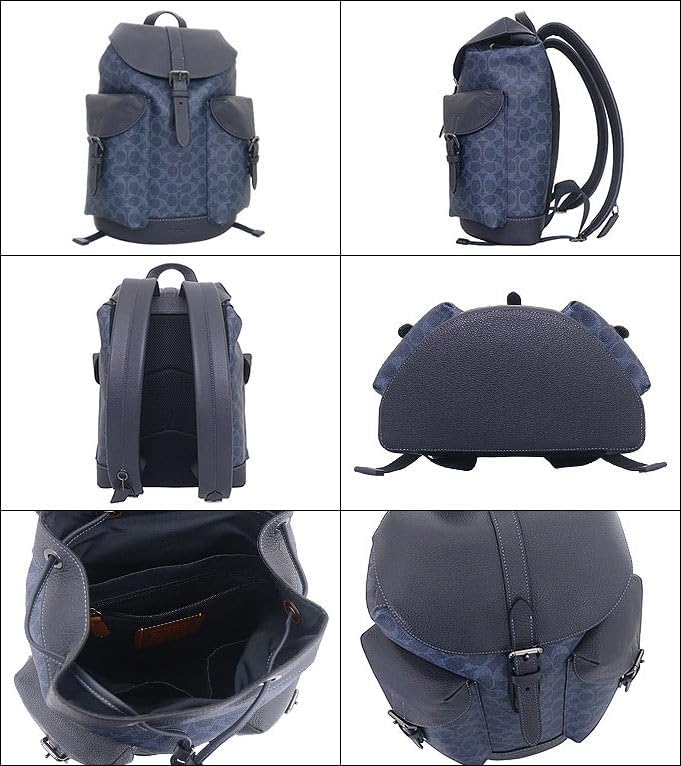
Figure 4.1: This collage displays various angles of the COACH Warner backpack, including the front, side, back, and bottom. A detailed view of the open interior reveals the zipper pocket, gusseted open pocket, and other organizational features.
5. Maintenance
Proper care will help preserve the appearance and extend the life of your COACH backpack.
5.1 Cleaning
- Coated Canvas: For the signature coated canvas, wipe with a soft, damp cloth. Avoid abrasive cleaners or solvents, as these can damage the material.
- Leather Trim: For leather components, use a specialized leather cleaner and conditioner. Apply sparingly with a soft cloth and buff gently. Test on an inconspicuous area first.
- Interior: For the interior lining, use a lint roller or a damp cloth with mild soap to clean any spills or dust. Allow to air dry completely.
- Hardware: Wipe metal hardware with a dry, soft cloth to remove fingerprints and smudges.
5.2 Storage
When not in use, store your backpack in a cool, dry place away from direct sunlight and extreme temperatures. Stuff the backpack with tissue paper or a soft cloth to help maintain its shape. Use the provided dust bag, if available, to protect it from dust and scratches.
5.3 General Care
- Avoid overfilling the backpack, as this can strain seams and zippers.
- Protect from sharp objects that could puncture or scratch the materials.
- Keep away from excessive moisture and humidity. If it gets wet, blot dry immediately with a clean cloth and allow to air dry naturally.
6. Troubleshooting
Here are solutions to common issues you might encounter:
- Strap Slippage: If shoulder straps tend to loosen, ensure they are threaded correctly through the buckles. If the issue persists, check for wear on the strap material or buckle mechanism.
- Stains on Canvas: For stubborn stains on the coated canvas, try a very mild soap solution on a damp cloth. Rub gently. Do not use harsh chemicals.
- Leather Scratches: Minor scratches on leather can sometimes be buffed out with a leather conditioner. For deeper scratches, professional repair may be required.
- Zipper Issues: If a zipper snags, try rubbing a pencil lead or a small amount of lubricant (like zipper wax) along the teeth. Avoid forcing the zipper.
7. Specifications
| Feature | Detail |
|---|---|
| Model Number/Name | FCW211 CW211 / WARNER BP SIG |
| Color | Denim x Midnight Navy QBN2V |
| Hardware Color | Gunmetal |
| Dimensions (W x H x D) | 31 cm x 43 cm x 17.5 cm |
| Handle Drop | Approx. 20 cm |
| Shoulder Strap Length | Approx. 52 - 92 cm (adjustable) |
| Weight | 1350 g |
| Closure | Flap with magnetic snap + Drawstring |
| Exterior Pockets | Flap magnetic pocket x 2 (front) |
| Interior Pockets | Zipper pocket x 1, Gusseted open pocket x 1, Open pocket x 2 |
| Material | PVC Coated Canvas x Leather |
| A4 Size Compatible | Yes |
8. Warranty and Support
This COACH backpack is a parallel import product, directly sourced from authorized overseas retailers. All products are genuine and of assured quality. Please note that due to variations in manufacturing periods and countries of origin, internal tag designs or logo markings may differ. As a parallel import, direct manufacturer warranty support in your region may not be available. For any product-related inquiries, please refer to the retailer from whom the product was purchased.