
1. Important Safety Information
Please read and understand this entire manual before attempting to assemble, operate, or install the product. Failure to follow these instructions may result in electric shock, fire, or serious personal injury.
- Ensure all electrical connections comply with local codes and ordinances, as well as the National Electrical Code (NEC).
- Consult a qualified electrician if you are unfamiliar with electrical wiring.
- Before installation, disconnect power by turning off the circuit breakers at the main fuse box.
- Use only replacement parts specified by the manufacturer.
- Do not install the fan in a location where blades could strike objects or people.
- The mounting structure must be capable of supporting the weight of the fan (approximately 14.06 lbs).
2. Package Contents
Verify that all components listed below are included in your package. If any parts are missing or damaged, contact customer service before proceeding with installation.
- Motor Housing Assembly
- Fan Blades (5)
- Light Kit Assembly (Caged Design)
- Remote Control with Wall Mount Bracket
- Down Rods (4-inch and 8-inch)
- Mounting Bracket
- Hardware Pack (screws, washers, wire nuts, etc.)
- Instruction Manual

Image 2.1: Overview of the Fanbulous 52-inch farmhouse ceiling fan and its main components, including the motor housing, blades, light kit, remote, and down rods.
3. Installation Instructions
This section provides step-by-step guidance for installing your ceiling fan. It is recommended to have two people for installation.
3.1 Mounting the Fan
- Turn off power at the circuit breaker.
- Secure the mounting bracket to the ceiling junction box. Ensure the junction box is securely fastened to the building structure and can support the fan's weight.
- Attach the selected down rod (4-inch or 8-inch) to the motor housing.
- Carefully lift the fan assembly and hang it from the mounting bracket.
3.2 Electrical Wiring
Connect the fan's electrical wires to the household wiring according to the wiring diagram provided in the separate wiring guide. Use the included wire nuts to secure connections.
3.3 Attaching Fan Blades
Attach each of the five fan blades to the motor housing using the provided screws. Ensure all screws are tightened securely.
3.4 Installing the Light Kit
Connect the light kit wiring to the fan's light wiring. Secure the light kit assembly to the bottom of the motor housing. Install three E12 base bulbs (not included) into the sockets.

Image 3.1: Illustration of the installation process, highlighting the ease of assembly and the method for removing the light cover for bulb replacement or cleaning.

Image 3.2: Diagram showing the product dimensions (52" diameter, 13"/17" height depending on downrod) and various installation options, including low ceiling (4-inch downrod), high ceiling (8-inch downrod), and sloped ceiling (up to 15 degrees).
4. Operating Instructions
Your Fanbulous ceiling fan is operated using the included remote control.
4.1 Remote Control Functions
The remote control allows for comprehensive operation of the fan and light.
- ALL OFF: Turns off both the fan and light.
- LIGHT ON/OFF: Toggles the light on or off.
- FAN ON/OFF: Toggles the fan on or off.
- 1-6 Fan Speed: Adjusts fan speed from 1 (lowest) to 6 (highest).
- Forward/Reverse: Changes the direction of blade rotation.
- 1H/2H/4H Timer: Sets the fan to turn off automatically after 1, 2, or 4 hours.
- Mute Button: Silences remote control beeps.
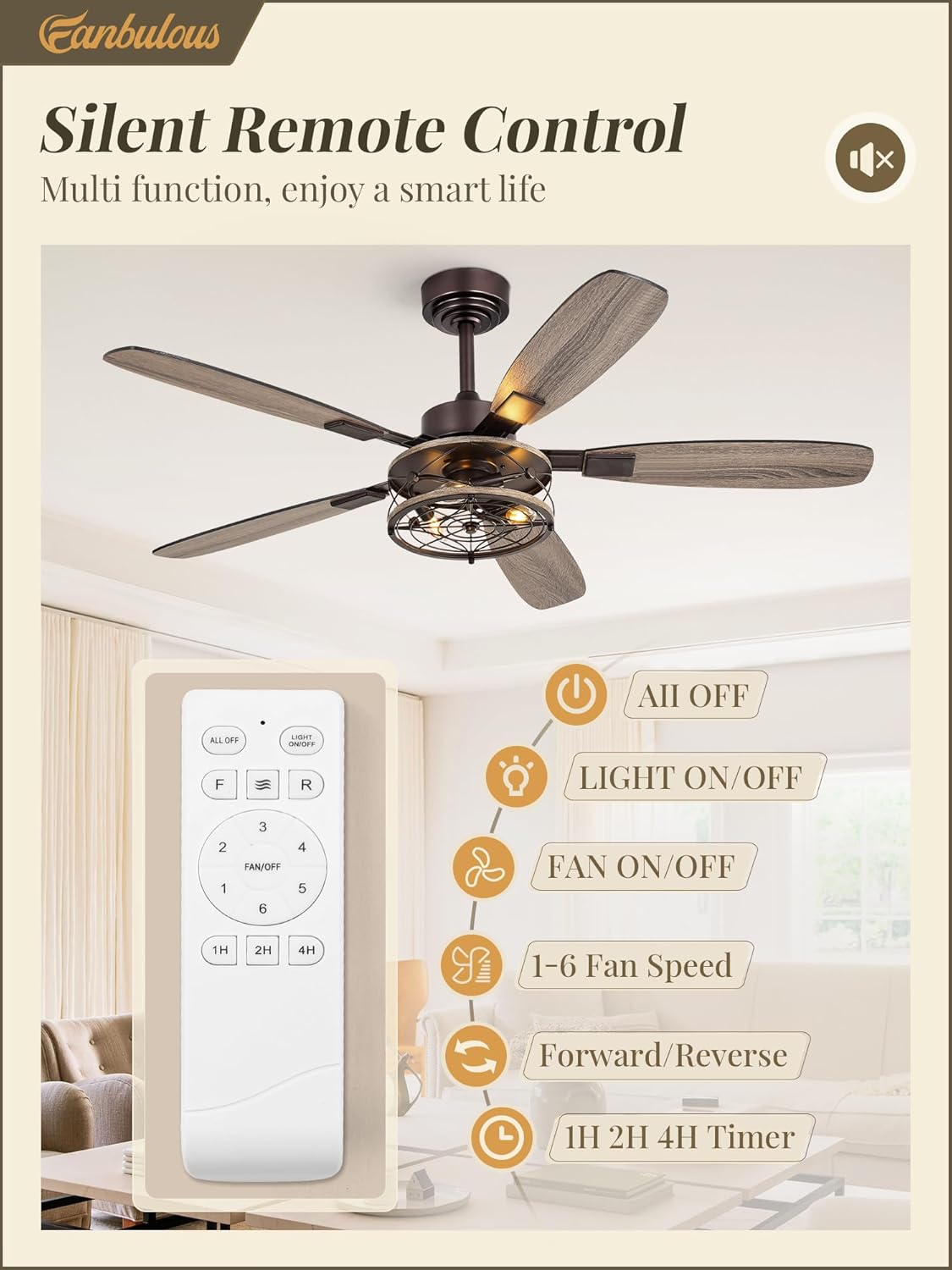
Image 4.1: Diagram illustrating the various buttons and functions of the multi-function remote control, including power, light control, fan speed, direction, and timer settings.

Image 4.2: Depiction of the remote control being used both as a handheld device and mounted on the wall using the included bracket, showing the corresponding functions.
4.2 Reversible Motor Function
The fan features a reversible DC motor for year-round comfort.
- Summer Mode (Downward Airflow): Blades rotate counter-clockwise to create a downward breeze, providing a cooling effect.
- Winter Mode (Upward Airflow): Blades rotate clockwise to draw air up towards the ceiling, circulating warm air throughout the room.

Image 4.3: Visual representation of the reversible DC motor's function, showing downward airflow for cooling in summer and upward airflow for circulating warm air in winter.

Image 4.4: Explanation of the 6-speed settings, categorizing them into soft wind (1-2), natural wind (3-4), and cool wind (5-6), along with the 1/2/4H timer function.
5. Maintenance
Regular maintenance ensures optimal performance and longevity of your ceiling fan.
5.1 Cleaning
- Before cleaning, ensure the power is turned off at the circuit breaker.
- Use a soft, damp cloth to wipe down the fan blades and motor housing.
- Do not use abrasive cleaners or solvents, as these can damage the finish.
- The light kit's caged design allows for easy cleaning; the cover can be lifted sideways for access.
5.2 Bulb Replacement
The light kit uses three E12 base bulbs. To replace bulbs:
- Turn off power to the fan at the circuit breaker.
- Carefully lift the light kit cover sideways to access the bulbs.
- Unscrew the old bulbs and screw in new E12 base bulbs.
- Replace the light kit cover.

Image 5.1: Close-up views highlighting the closed caged design of the light kit, the replaceable E12 bulb bases, and the quiet operation of the DC motor.
6. Troubleshooting
If you experience issues with your fan, refer to the following common problems and solutions.
| Problem | Possible Cause | Solution |
|---|---|---|
| Fan does not start | No power to the fan; Loose wire connections; Remote control battery low. | Check circuit breaker; Verify all wire connections are secure; Replace remote control batteries (2 AAA included). |
| Light does not work | Bulbs are faulty or loose; Light kit wiring issue. | Replace bulbs or ensure they are screwed in tightly; Check light kit wiring connections. |
| Fan wobbles | Loose blade screws; Improperly balanced blades; Loose mounting bracket. | Tighten all blade screws; Use a balancing kit (not included) to balance blades; Ensure mounting bracket is securely fastened. |
| Remote control not responding | Batteries are dead; Remote not paired with fan. | Replace batteries; Refer to the remote control pairing instructions in the full manual. |
| Fan is noisy | Loose screws; Motor issue. | Check and tighten all screws; If noise persists, contact customer service. |
7. Specifications
| Feature | Detail |
|---|---|
| Brand | Fanbulous |
| Model Name | F-HL52OB-1D03 |
| Size | 52 Inch |
| Color | Oil Bronze |
| Style | Farmhouse |
| Electric Fan Design | Ceiling Fan |
| Power Source | DC Motor |
| Product Dimensions | 52"D x 15"W x 52"H |
| Room Type | Bedroom, Kitchen, Living Room, Study Room |
| Special Feature | Timer |
| Recommended Uses | Air Circulation |
| Wattage | 35 watts |
| Finish Type | Metal |
| Voltage | 120 Volts |
| Included Components | 5 Blades, Light Kit, Remote |
| Indoor/Outdoor Usage | Indoor |
| Control Method | Remote |
| Efficiency | Efficient |
| Number of Power Levels | 6 |
| Item Weight | 14.06 pounds |
| Batteries | 2 AAA batteries (included) |
8. Warranty and Support
Fanbulous provides the following support for your product:
- Motor Warranty: 5-year support.
- Other Parts Warranty: 2-year limited support.
- Customer Service: 24-hour customer service is available to assist with any problems or questions regarding your product.
For assistance, please refer to the contact information provided on the product packaging or the official Fanbulous website.

Image 8.1: Icons representing customer service, product functionality, and design versatility, indicating support and product attributes.


