
Prichor RC-92T
Prichor RC-92T Ceiling Fan Remote Control User Manual
Model: RC-92T
1. Introduction
This manual provides instructions for the installation, operation, and maintenance of your Prichor RC-92T Ceiling Fan Remote Control. This remote is designed to control the speed of your ceiling fan and the brightness of its light fixture. Please read this manual thoroughly before use to ensure proper function and safety.

Figure 1: Front view of the Prichor RC-92T Remote Control.
2. Compatibility
The Prichor RC-92T remote control operates at a frequency of 315MHz and is specifically designed as a replacement for certain ceiling fan remotes. It is not a universal remote.
2.1 Compatible Remote Models
This remote is compatible with the following Harbor Breeze and similar remotes. Verify the FCC ID/Model number on the back of your original remote matches one of the listed models:
- A25-TX005-R
- A25-TX001-R1
- A25-TX013
- ZJF-RT01A
- RRTX001R
If your original remote's FCC ID/Model number is not listed above, or if its operating frequency is different, this remote may not be compatible. For different models, a complete kit including a receiver might be required.

Figure 2: Reference for compatible and incompatible remote models based on FCC ID/Model numbers.
2.2 Fan and Light Bulb Compatibility
The RC-92T remote is compatible with most downrod-style ceiling fans. It is not recommended for use with wall-mounted or exhaust-type fans.
For lighting control, this remote supports:
- Halogen and Incandescent Lamps
- Dimmable LED Lamps
- Dimmable CFL Lamps
Non-dimmable LED/CFL lamps will only support ON and OFF functions, not dimming.

Figure 3: Visual guide for compatible fan and light bulb types.
3. Package Contents
Please check the package for the following items:
- RC-92T Remote Control (x1)
- Wall Mount Bracket (x1)
- Screws (x2)
- User Manual (x1)

Figure 4: Contents included in the Prichor RC-92T package.
4. Setup
4.1 Battery Installation
The RC-92T remote requires one 12V battery (not included). To install the battery:
- Open the battery compartment cover on the back of the remote.
- Insert one 12V battery, ensuring the polarity (+/-) matches the diagram inside the compartment.
- Close the battery compartment cover securely.
4.2 Setting the D/CFL Switch
On the back of the remote, inside the battery compartment, locate the D/CFL switch. This switch adjusts the dimming mode for different bulb types:
- D (Dimming): For incandescent, halogen, and dimmable LED/CFL bulbs.
- CFL (Compact Fluorescent Lamp): For non-dimmable CFL bulbs (light will only turn ON/OFF).
Set the switch according to your light bulb type before proceeding.

Figure 5: Location of the D/CFL switch for light bulb type selection.
4.3 Pairing Instructions (Learning Function)
To pair your RC-92T remote with your ceiling fan receiver:
- Ensure the power to your ceiling fan is OFF at the wall switch or circuit breaker.
- Restore power to the fan. Within 30 seconds of restoring power, press and hold the 'LEARN' button on the back of the remote control (located inside the battery compartment) for approximately 3-5 seconds.
- The fan light should blink or the fan should turn on, indicating successful pairing.
- Test the remote's functions (fan speeds, light ON/OFF/dimming) to confirm successful pairing.

Figure 6: Location of the 'LEARN' button on the back of the remote for pairing.
4.4 Wall Mount Installation
The included wall mount bracket allows for convenient storage of your remote.
- Choose a suitable location on a wall.
- Use the provided screws to secure the wall mount bracket to the wall.
- Slide the remote control into the bracket for storage.
5. Operating Instructions
The RC-92T remote control features dedicated buttons for fan speed and light control.
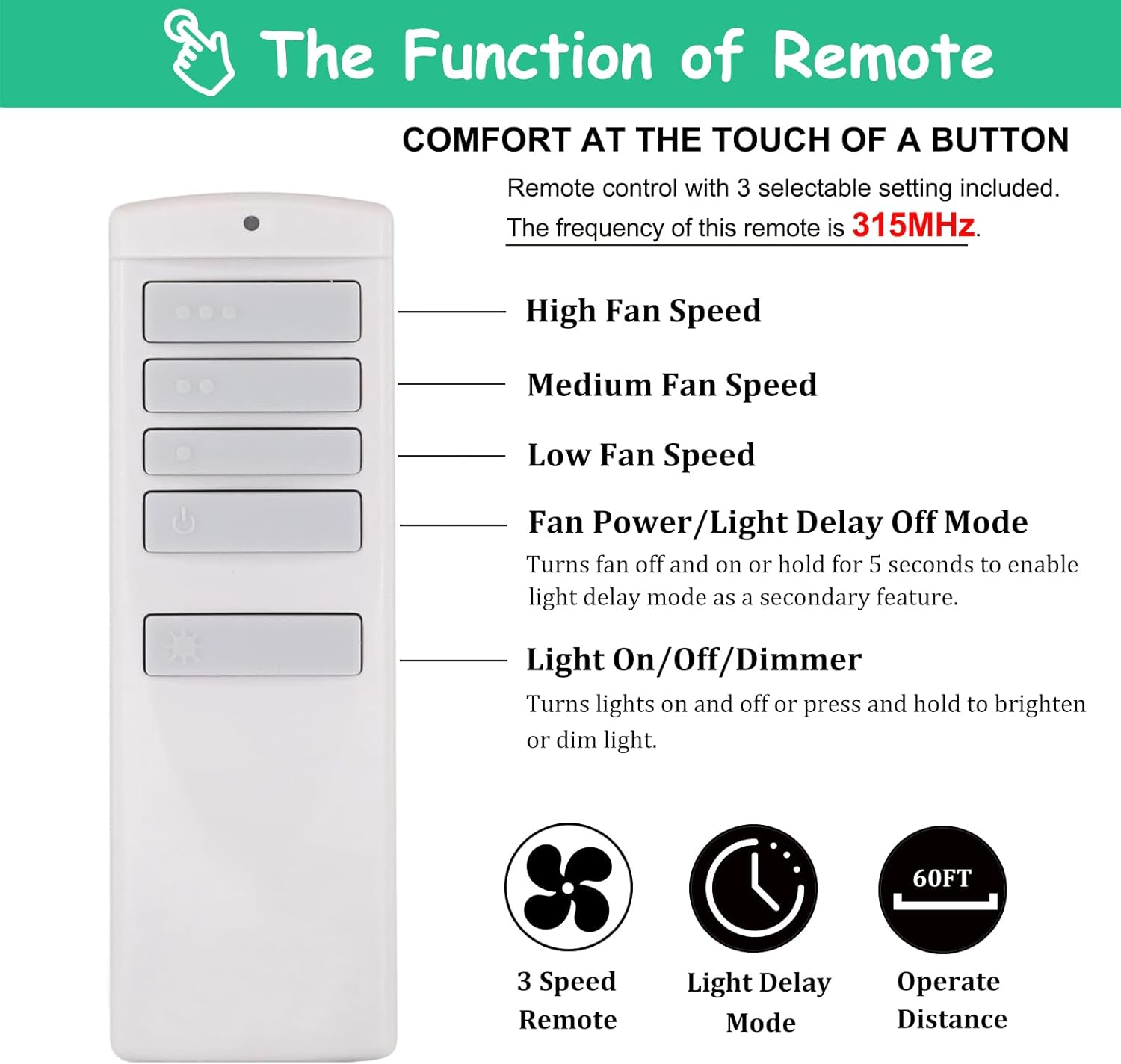
Figure 7: Overview of remote control buttons and their functions.
5.1 Fan Speed Control
Use the top four buttons to control the fan speed:
- HI (•••): Sets the fan to high speed.
- MED (••): Sets the fan to medium speed.
- LOW (•): Sets the fan to low speed.
- OFF (Power Symbol): Turns the fan off.
5.2 Light Control (ON/OFF/Dimmer)
Use the bottom button (Sun/Lightbulb symbol) to control the light:
- Press briefly: Toggles the light ON or OFF.
- Press and hold: Dims or brightens the light. Release the button when the desired brightness is reached. This function requires dimmable bulbs and the D/CFL switch set to 'D'.
5.3 Light Delay Off Mode
The 'OFF' button (Power Symbol) also functions as a light delay off mode. To activate:
- Press and hold the 'OFF' button for approximately 5 seconds. The fan will turn off, and the light will remain on for a short period before turning off automatically.
6. Troubleshooting
If you encounter issues with your remote control, refer to the table below for common problems and solutions.
| Problem | Possible Cause | Solution |
|---|---|---|
| Remote not responding | Dead or incorrectly installed battery. Remote not paired. | Replace battery, ensuring correct polarity. Re-pair the remote following Section 4.3. |
| Fan works, but light does not respond | Light bulb is faulty. Wall switch is off. Wiring issue. | Check/replace light bulb. Ensure wall switch is ON. Consult a qualified electrician if wiring is suspected. |
| Light does not dim | Non-dimmable bulbs. D/CFL switch set incorrectly. | Ensure you are using dimmable bulbs. Set the D/CFL switch to 'D' (refer to Section 4.2). |
| Remote range is poor | Obstructions. Low battery. Interference. | Ensure clear line of sight. Replace battery. Minimize other 315MHz devices nearby. |
7. Specifications
| Feature | Detail |
|---|---|
| Model Number | RC-92T |
| Operating Frequency | 315MHz |
| Fan Speeds | 3 (High, Medium, Low) |
| Light Control | ON/OFF/Dimmer |
| Power Source | 1 x 12V battery (not included) |
| Product Dimensions | 1.46 x 0.47 x 4.53 inches (3.7 x 1.2 x 11.5 cm) |
| Item Weight | 1.44 ounces (40.8 grams) |
8. Care and Maintenance
8.1 Cleaning
To clean your remote control, wipe it with a soft, dry cloth. Do not use abrasive cleaners, solvents, or harsh chemicals, as these can damage the surface or internal components.
8.2 Battery Replacement
Replace the 12V battery when the remote's indicator light becomes dim or the remote stops responding. Always dispose of old batteries responsibly according to local regulations.
9. Warranty and Support
For warranty information or technical support, please refer to the documentation provided with your purchase or contact Prichor customer service through the retailer where the product was purchased. Keep your purchase receipt as proof of purchase.
Related documentsRC-92T


Ask a question about this manual
Ask about setup, troubleshooting, compatibility, parts, safety, or missing instructions. Manuals+ will review the question and use this page’s manual context to help answer it.