
1. Product Overview
The WISCENT WTB-791 is a versatile portable CD player designed for various audio playback needs. It integrates multiple functions including CD playback, FM radio, Bluetooth connectivity, USB MP3/WMA playback, and AUX input. This device is suitable for music enjoyment, language learning, and other audio applications.

Image: Overview of the WISCENT WTB-791 Portable CD Player highlighting its multi-functional capabilities and connectivity options.
Key Features:
- CD Player: Supports CD, CD-R/RW, MP3-CD, and audiobooks with top-loading mechanism. Features include track navigation, stop, and repeat functions.
- FM Radio: Integrated FM radio with a telescopic antenna, capable of storing up to 30 preset stations.
- Bluetooth Input: Allows wireless audio streaming from Bluetooth-enabled devices such as smartphones and tablets. Note: This device supports Bluetooth input only and does not support Bluetooth headphones.
- USB Playback: Play MP3/WMA audio files directly from a USB flash drive (up to 64GB, FAT32 format only).
- AUX Input: Connect external audio devices via a 3.5mm AUX cable for wired playback.
- Headphone Output: A 3.5mm headphone jack is available for private listening.
- Equalizer Modes: Five preset EQ modes for music: ROCK, POP, FLAT, CLASS, JAZZ.
- Resume Playback: Automatically resumes playback from the last stopped position on a disc.
- Remote Control: Includes a remote control for convenient operation (requires 2 AAA batteries, not included).
- Power Options: Operates via AC power cord or 4 UM2-C batteries (not included).
2. Safety Information
Please read and understand all safety instructions before using this product. Keep this manual for future reference.
- Do not expose the unit to rain or moisture to prevent fire or electric shock.
- Do not block ventilation openings. Ensure adequate space around the unit for proper airflow.
- Avoid placing the unit near heat sources such as radiators, heat registers, stoves, or other apparatus (including amplifiers) that produce heat.
- Use only attachments/accessories specified by the manufacturer.
- Unplug this unit during lightning storms or when unused for long periods.
- Refer all servicing to qualified service personnel. Servicing is required when the apparatus has been damaged in any way, such as power-supply cord or plug is damaged, liquid has been spilled or objects have fallen into the apparatus, the apparatus has been exposed to rain or moisture, does not operate normally, or has been dropped.
- Do not mix old and new batteries, or different types of batteries.
- Dispose of batteries properly according to local regulations.
3. Setup
3.1 Unpacking
Carefully remove all components from the packaging. Ensure all items listed in the package contents are present:
- WISCENT Portable CD Player (WTB-791)
- Remote Control (AAA batteries not included)
- AC Power Cord (1.5m)
- AUX Cable
- Instruction Manual (English and Japanese)

Image: Contents of the WISCENT WTB-791 package.
3.2 Powering the Unit
The WTB-791 can be powered by either AC power or batteries.
AC Power:
- Insert the AC power cord into the AC IN jack on the back of the unit.
- Plug the other end of the power cord into a standard AC 100V (50/60Hz) wall outlet.
Battery Power:
- Open the battery compartment cover on the bottom of the unit.
- Insert 4 x UM2-C size batteries (not included), ensuring correct polarity (+/-).
- Close the battery compartment cover securely.

Image: Rear view of the unit indicating power input and dimensions.
3.3 Remote Control Battery Installation
- Open the battery cover on the back of the remote control.
- Insert 2 x AAA batteries (not included), observing correct polarity.
- Close the battery cover.
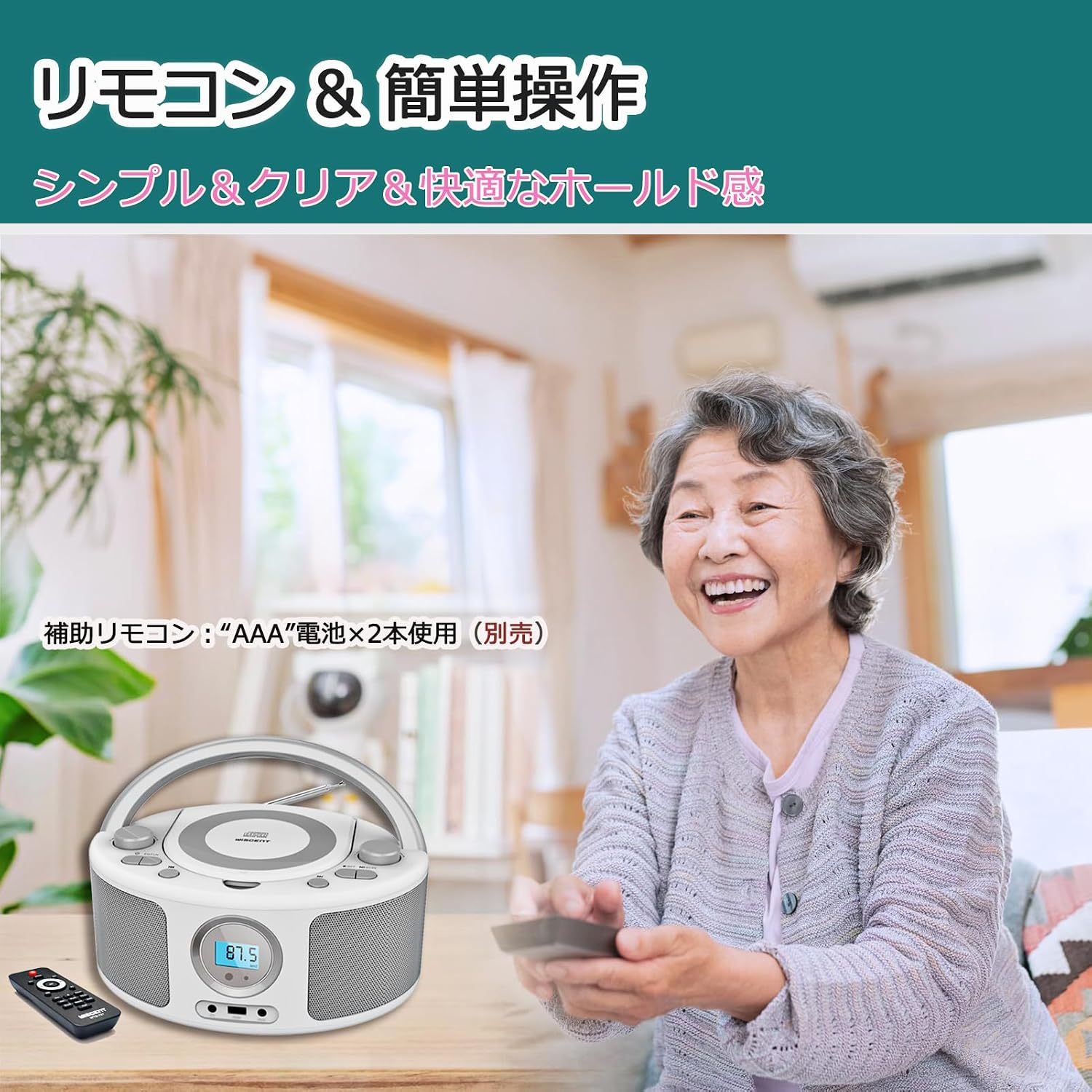
Image: The remote control for the WTB-791, demonstrating its ease of use.
4. Operating Instructions
4.1 Basic Operation
- Power On/Off: Press the POWER button to turn the unit on or off.
- Volume Control: Rotate the VOLUME dial on the unit or use the volume buttons on the remote control.
- Mode Selection: Press the MODE button to switch between CD, FM, Bluetooth, USB, and AUX modes.
4.2 CD Playback
- Open the CD compartment cover on the top of the unit.
- Place a CD (CD, CD-R/RW, MP3-CD, or audiobook CD) onto the spindle with the label side facing up.
- Close the CD compartment cover.
- Press the MODE button to select CD mode. The unit will begin playing automatically.
- Use the PLAY/PAUSE, STOP, PREVIOUS, and NEXT buttons on the unit or remote to control playback.
- To activate repeat function, press the REPEAT button.
- To change EQ mode, press the EQ button to cycle through ROCK, POP, FLAT, CLASS, JAZZ.
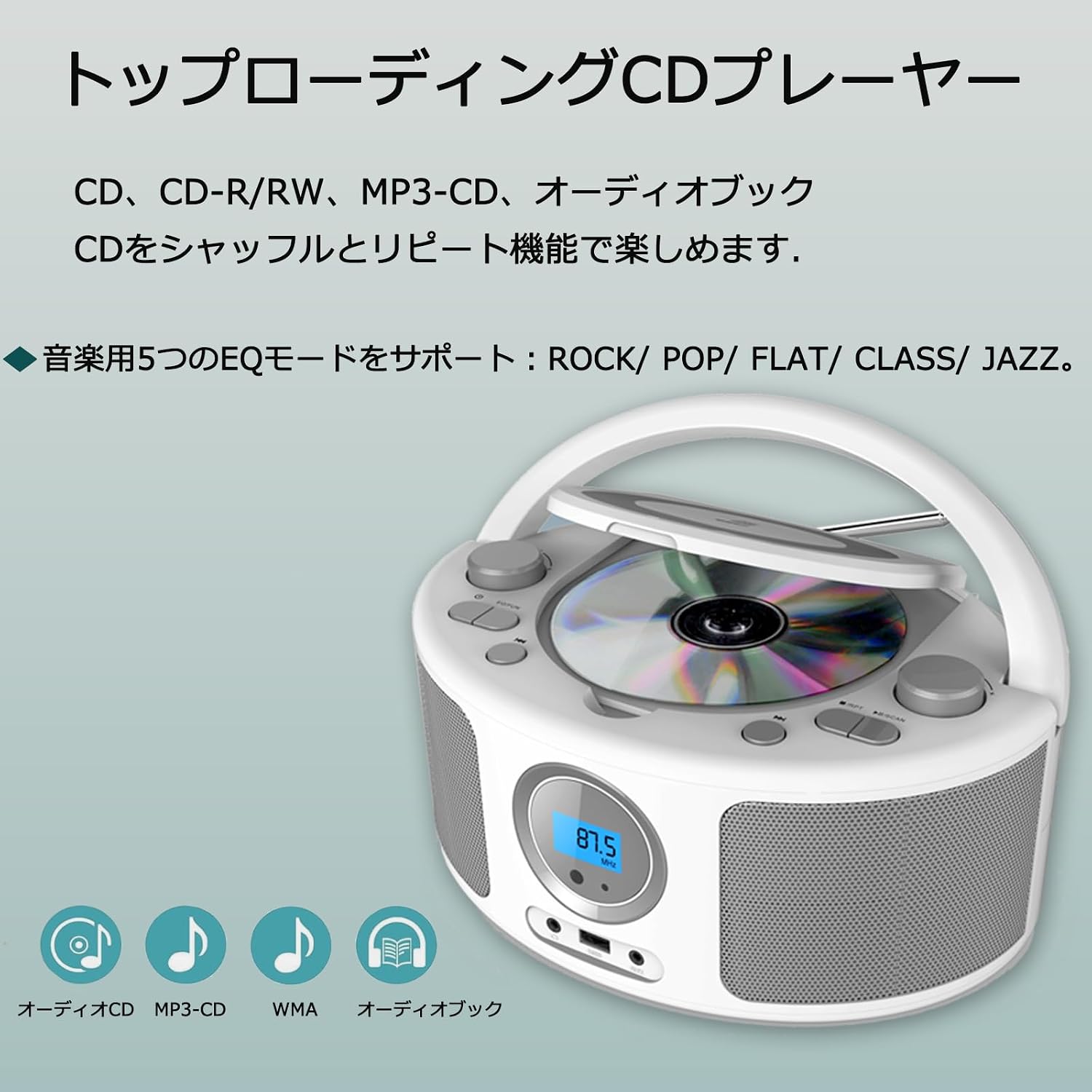
Image: The top-loading CD player in operation, showing a disc being inserted.
4.3 FM Radio Operation
- Extend the telescopic antenna for optimal reception.
- Press the MODE button to select FM radio mode.
- Rotate the TUNING dial to manually tune to a desired station.
- To auto-scan and save stations: Press and hold the SCAN button. The radio will scan and save available stations (up to 30 presets).
- To select a preset station: Use the PREVIOUS/NEXT buttons to cycle through saved stations.

Image: The unit displaying FM radio mode with the tuning dial.
4.4 Bluetooth Connectivity
- Press the MODE button to select Bluetooth mode. The display will show "bt" and the unit will enter pairing mode.
- On your Bluetooth-enabled device (smartphone, tablet, etc.), enable Bluetooth and search for available devices.
- Select "WISCENT WTB-791" from the list of devices.
- Once paired, the unit will emit a confirmation sound. You can now stream audio wirelessly from your device.
- Control playback (play/pause, skip tracks) from your connected device or using the unit's controls.
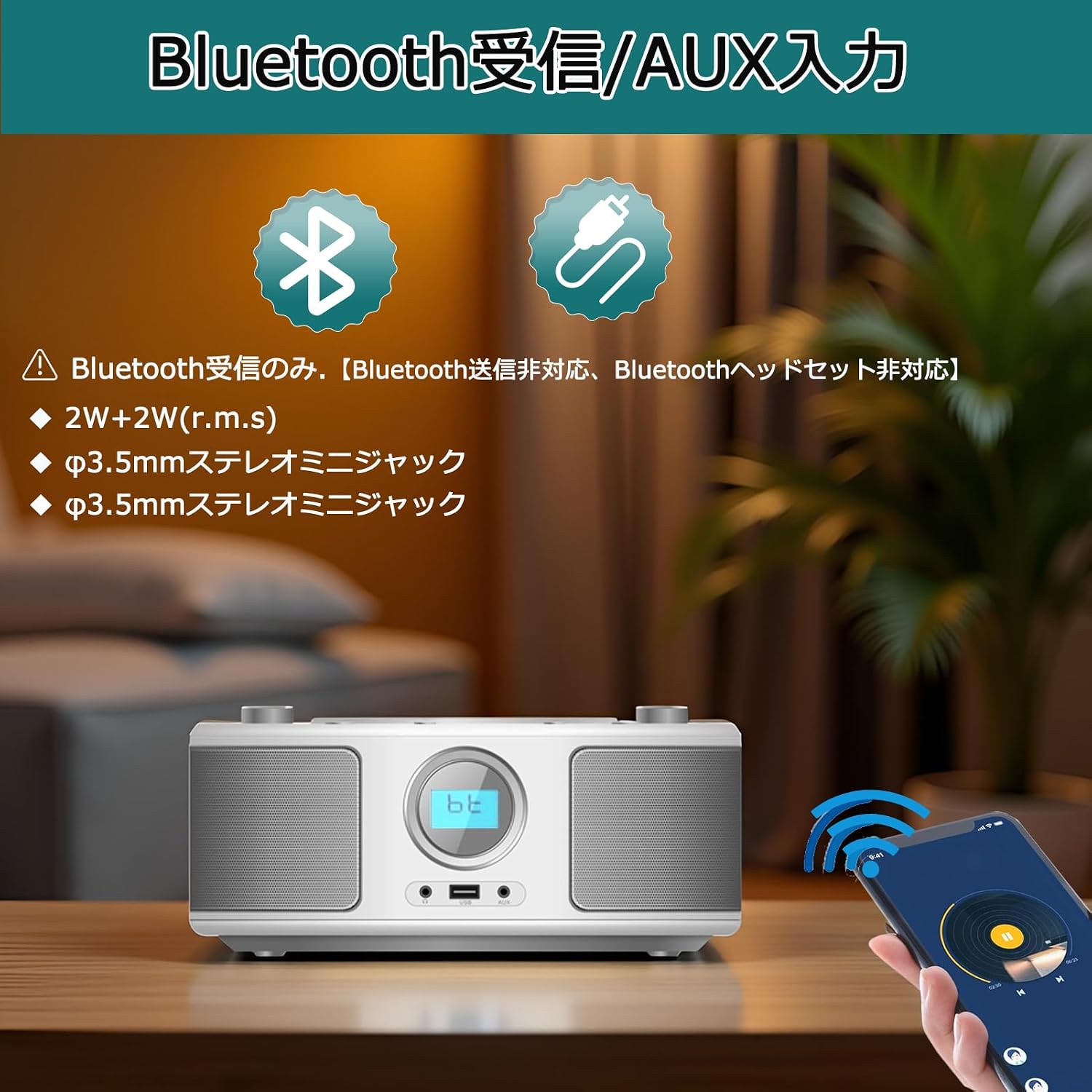
Image: The unit in Bluetooth mode, ready for pairing with a mobile device.
4.5 USB Playback
- Insert a USB flash drive (formatted to FAT32, max 64GB) containing MP3/WMA audio files into the USB port on the front of the unit.
- Press the MODE button to select USB mode. The unit will automatically detect and begin playing audio files.
- Use the PLAY/PAUSE, STOP, PREVIOUS, and NEXT buttons to control playback.
4.6 AUX Input
- Connect one end of the 3.5mm AUX cable to the AUX IN jack on the front of the unit.
- Connect the other end of the AUX cable to the headphone jack or audio output of your external audio device.
- Press the MODE button to select AUX mode.
- Start playback on your external audio device. The audio will be played through the WTB-791 speakers.
4.7 Headphone Use
To listen privately, plug 3.5mm headphones (not included) into the HEADPHONE jack on the front of the unit. The internal speakers will automatically mute.
5. Maintenance
5.1 Cleaning
- Always unplug the unit from the power source before cleaning.
- Use a soft, dry cloth to clean the exterior of the unit.
- For stubborn stains, lightly dampen the cloth with water or a mild detergent. Do not use abrasive cleaners or solvents.
- To clean the CD lens, use a specialized CD lens cleaning kit. Do not touch the lens directly.
5.2 Storage
- If storing the unit for an extended period, remove all batteries to prevent leakage.
- Store the unit in a cool, dry place away from direct sunlight and extreme temperatures.
6. Troubleshooting
If you encounter issues with your WISCENT WTB-791, please refer to the following common problems and solutions:
| Problem | Possible Cause | Solution |
|---|---|---|
| Unit does not power on. | No power connection or dead batteries. | Ensure AC power cord is securely plugged in, or replace batteries with fresh ones. |
| No sound. | Volume too low, incorrect mode, headphones connected. | Increase volume. Select correct mode (CD, FM, BT, USB, AUX). Disconnect headphones if sound is desired from speakers. |
| CD does not play or skips. | CD is dirty, scratched, or inserted incorrectly. | Clean the CD with a soft cloth. Try a different CD. Ensure the CD is placed correctly in the compartment. |
| FM radio reception is poor. | Antenna not extended, weak signal. | Fully extend the telescopic antenna. Reposition the unit for better reception. |
| Bluetooth device cannot pair. | Unit not in Bluetooth mode, device too far, or already paired. | Ensure unit is in Bluetooth mode ("bt" displayed). Move device closer. Disconnect from other Bluetooth devices. |
| USB drive not recognized. | Incorrect format, unsupported files, or drive size too large. | Ensure USB drive is FAT32 format and max 64GB. Check if files are MP3/WMA. Try a different USB drive. |
| Remote control not working. | Dead batteries, obstruction, or out of range. | Replace AAA batteries in the remote. Ensure no obstructions between remote and unit. Operate within range. |
7. Specifications
| Feature | Detail |
|---|---|
| Brand | WISCENT |
| Model Number | WTB-791 |
| Connectivity Technology | AUX, Bluetooth, USB |
| Color | White |
| Speaker Type | Built-in Stereo Speakers |
| Product Dimensions (LxWxH) | 30 x 24 x 15 cm (11.8 x 9.4 x 5.9 inches) |
| Power Source | AC Power Cord / 4 x UM2-C Batteries (not included) |
| Compatible Devices | CD, CD-RW, MP3-CD, USB devices, FM Radio |
| Output Wattage | 4 W (2 x 2W RMS) |
| Supported Disc Formats | CD, CD-R, CD-RW, MP3-CD |
| Supported Audio Formats (USB) | MP3, WMA |
| USB Drive Capacity | Max 64GB (FAT32 format only) |
| Signal-to-Noise Ratio (S/N) | 65 dB |
| Frequency Response | 20Hz-20KHz |
| Product Weight | 850 grams |
| Origin | China |
8. Warranty and Support
WISCENT provides the following support for your WTB-791 Portable CD Player:
- 1-Year Free Exchange Warranty: Your product is covered by a 1-year warranty for free exchange in case of manufacturing defects.
- Lifetime Technical Support: WISCENT offers lifetime technical support for this product.
- Customer Service: For any questions or issues, please contact WISCENT customer service via Amazon's messaging system.
Please retain your proof of purchase for warranty claims.

Image: Visual representation of customer support and warranty services.


