
1. Introduction
Welcome to the user manual for your Sony BRAVIA 2M2 Series 4K Ultra HD Smart LED Google TV, model K-55S25M2. This manual provides essential information for setting up, operating, and maintaining your television. Please read it thoroughly to ensure proper use and to maximize your viewing experience.
The Sony BRAVIA 2M2 Series offers a stunning 4K Ultra HD display, powered by the 4K Processor X1, delivering exceptional picture quality with vibrant colors and sharp details. With Google TV, you gain access to a vast world of entertainment, personalized recommendations, and smart home integration. Enjoy immersive sound with Dolby Atmos and DTS:X, and seamless connectivity with multiple HDMI and USB ports, Wi-Fi, and Bluetooth.
2. Safety Information
Before operating the television, please read all safety instructions carefully. Keep this manual for future reference.
- Power Source: Connect the TV only to the specified power supply.
- Ventilation: Ensure adequate ventilation around the TV to prevent overheating. Do not block ventilation openings.
- Water and Moisture: Do not expose the TV to rain or moisture. Avoid placing objects filled with liquids on the TV.
- Cleaning: Unplug the TV before cleaning. Use a soft, dry cloth. Do not use liquid cleaners or aerosol cleaners.
- Placement: Place the TV on a stable, level surface or mount it securely to a wall. Avoid placing it in direct sunlight or near heat sources.
- Servicing: Do not attempt to service the TV yourself. Refer all servicing to qualified service personnel.
3. What's in the Box
Verify that all components are present in the packaging:
- 1 x Sony BRAVIA LED TV Unit
- 1 x AC Power Cord
- 1 x Standard Remote Control
- 2 x AAA Batteries
Note: A tabletop stand is included for 43-inch, 50-inch, and 75-inch models. For other sizes, the Sony Service Team will provide either a free wall-mount bracket or a tabletop stand upon request during installation.
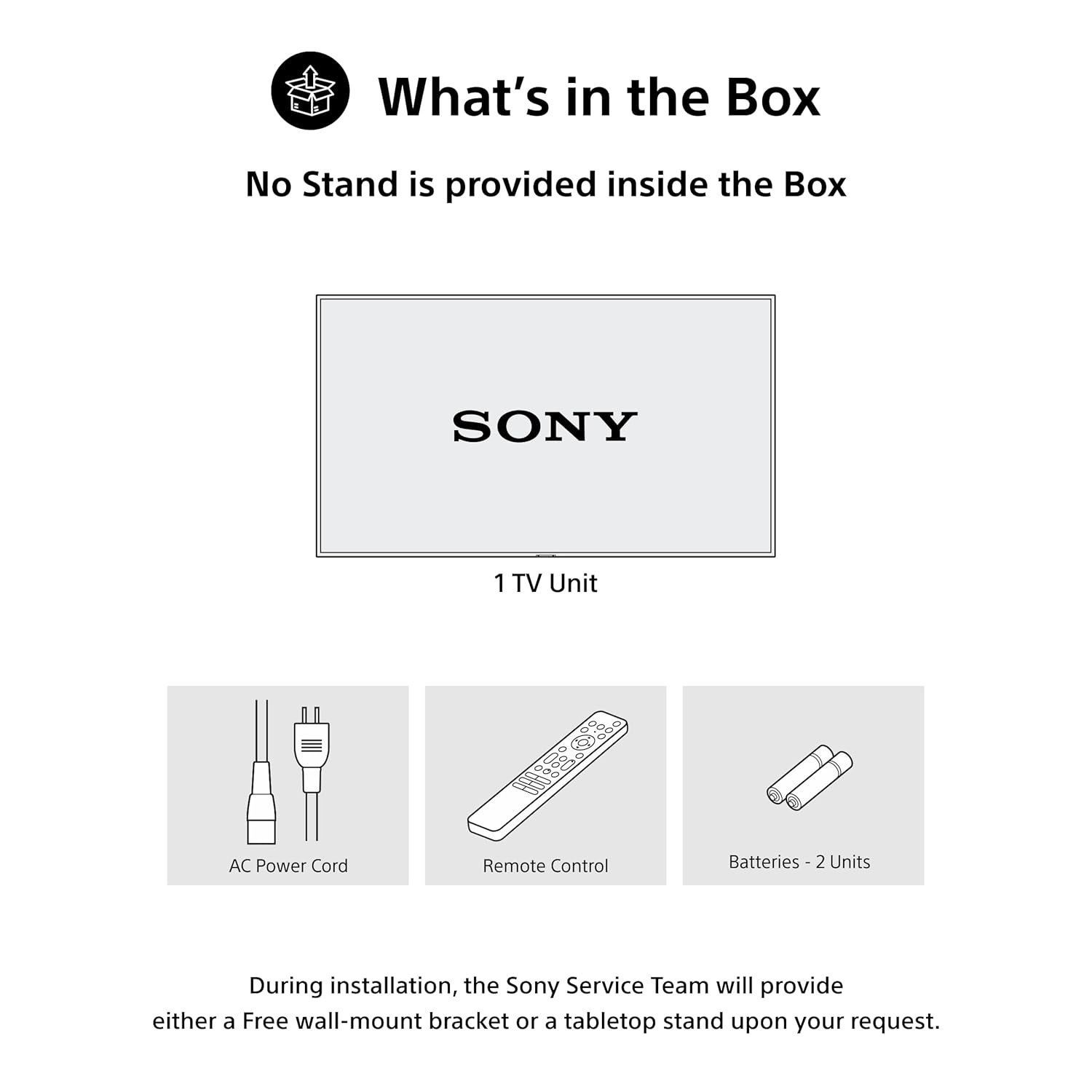
An illustration depicting the items included in the product packaging: one LED TV unit, one AC power cord, one standard remote control, and two AAA batteries. Note that the tabletop stand is provided separately by the service team upon request for certain sizes.
4. Physical Setup
4.1 Mounting Options
Your Sony BRAVIA TV can be set up using either a tabletop stand or a wall mount. The VESA mount standard is 300 x 300 mm.

A diagram illustrating the physical dimensions of the 55-inch Sony BRAVIA 2 II television. The screen measures 55 inches (139 cm) diagonally, with a width of 122.7 cm (48.30 inches) and a height of 72.4 cm (28.50 inches). A tabletop stand is optional.
4.2 Connecting Peripherals
Connect your external devices to the appropriate ports on the back of your TV:
- HDMI Ports (x4): Connect set-top boxes, Blu-ray players, gaming consoles, and other HDMI-compatible devices. HDMI 3 supports eARC/ARC for enhanced audio return.
- USB Ports (x2): Connect USB storage devices for media playback or external hard drives.
- LAN Port: For a wired internet connection.
- Antenna/Cable Input: Connect your antenna or cable TV feed.

A detailed image of the television's rear panel, illustrating the available connectivity ports: four HDMI inputs (one with eARC/ARC support), two USB ports, a LAN port for wired internet, and antenna/cable inputs.
5. Initial Setup
After physically setting up your TV and connecting necessary peripherals, follow these steps for initial power-on and configuration:
- Connect the AC power cord to the TV and a power outlet.
- Press the power button on the remote control or the TV.
- Follow the on-screen instructions to select your language, country/region, and connect to your Wi-Fi network.
- Sign in with your Google account to access Google TV features and personalize your experience.
6. Operating Your TV
6.1 Product Overview Video
This video provides a comprehensive overview of the Sony BRAVIA 2M2 Series 4K Ultra HD Smart LED Google TV, highlighting its key features, smart functionalities, and connectivity options.
6.2 Remote Control
The included remote control allows you to navigate the TV's interface, adjust settings, and access various features. It includes dedicated buttons for popular streaming services and voice control.

An image of the Sony BRAVIA Eco Remote, featuring clearly labeled buttons for power, menu navigation, voice search activation, and direct access to popular streaming services such as YouTube, Prime Video, Netflix, and Sony Pictures Core.
6.3 Google TV Interface
Google TV organizes your favorite content from across your apps and subscriptions into one central hub. Enjoy personalized recommendations, create a Watchlist, and easily discover new movies and shows.

A view of the Sony BRAVIA 2 II's Google TV home screen, displaying a personalized selection of movies, TV shows, and applications like YouTube, Netflix, Prime Video, and Disney+, emphasizing ease of content discovery.
6.4 Voice Control (Google Assistant & Alexa)
Use your voice to quickly find content, control playback, adjust volume, and manage smart home devices. Simply press the Google Assistant button on your remote or pair with an Alexa device.

An image depicting a user interacting with the television using voice commands via the remote control, highlighting the ease of finding content and controlling the TV through voice search.

An image showing the Sony BRAVIA TV seamlessly integrated with an Alexa smart speaker, demonstrating how users can control TV functions like channels, power, and volume using voice commands through Alexa.
6.5 Casting and Mirroring
Easily stream content from your mobile devices to your TV:
- Google Cast: Stream videos, photos, and apps from your Android devices.
- Apple AirPlay 2 & HomeKit: Stream content from your iPhone, iPad, or Mac, and integrate your TV into your Apple Home ecosystem.

A visual demonstrating the screen mirroring capabilities, where content from both an iOS device (via Apple AirPlay) and an Android device (via Google Cast) is wirelessly streamed and displayed on the Sony BRAVIA television.
6.6 Gaming Features
The BRAVIA 2M2 Series is designed to enhance your gaming experience:
- Game Menu: Access gaming-specific settings and adjustments for optimal performance.
- ALLM/eARC (HDMI 2.1 Compatible): Experience ultra-responsive gaming with minimal input lag.
- PlayStation 5 Features: Gaming devices are automatically detected for simplified setup and optimized settings.

A screenshot of the dedicated Game Menu on the Sony BRAVIA TV, providing quick access to gaming-specific settings such as motion blur reduction and audio equalizer adjustments for an optimized gaming experience.

An image of a person engaged in gaming on the Sony BRAVIA TV, emphasizing the benefits of HDMI 2.1, Auto Low Latency Mode (ALLM), and Enhanced Audio Return Channel (eARC) for ultra-responsive gameplay with minimal lag.

A child playing a PlayStation 5 game on the Sony BRAVIA TV, illustrating how the TV automatically detects gaming devices and optimizes settings for superior image quality, low input lag, and an enhanced gaming experience.
6.7 Sony Pictures Core
Access the Sony Pictures Core app to redeem movie credits and enjoy a curated selection of films, bringing cinematic brilliance directly to your home.

A screenshot of the Sony Pictures Core application on the TV, illustrating how users can redeem movie credits and access a curated library of films, enhancing the cinematic experience at home.
6.8 BRAVIA Connect App
Control your BRAVIA TV and BRAVIA Theater with the BRAVIA Connect app. Adjust volume, fine-tune settings, or check your setup directly from your smartphone.

A smartphone displaying the BRAVIA Connect App, which allows users to control their TV, adjust picture and sound settings, and check setup directly from their mobile device.
7. Picture and Sound Quality
7.1 4K Display Enhancements
- 4K Processor X1: Enhances lower-resolution content to near-4K clarity and minimizes noise.
- 4K X-Reality PRO: Upscales images to true 4K quality, enhancing detail and clarity.
- Live Color: Produces vibrant and lifelike colors.
- HDR10/HLG: Supports High Dynamic Range formats for vivid, detailed movies and games.

A visual representation of the Sony X1 4K Processor, depicted as a microchip on a circuit board, signifying its role in refining every scene for sharp and colorful picture quality.

A side-by-side comparison demonstrating the visual improvement offered by 4K X-Reality PRO. The left side shows a less detailed image from a conventional TV, while the right side displays the same scene with significantly enhanced clarity and detail on a 4K X-Reality PRO screen.

A visual comparison between Standard Dynamic Range (SDR) and High Dynamic Range (HDR) content. The HDR side exhibits a wider range of colors, deeper contrast, and more vivid details, particularly in bright and dark areas, delivering a more exciting viewing experience for movies and games.
7.2 MotionFlow XR 200
MotionFlow XR 200 technology ensures smooth and clear motion, allowing sports and movies to be seen with lifelike clarity by minimizing motion blur.

A side-by-side comparison illustrating the effect of Motionflow XR 200. The left image shows a blurred motorcycle rider on a conventional TV, while the right image displays the same rider with smooth, clear motion, enhancing the clarity of sports and movies.
7.3 Audio Features
- 20 Watts Output (2ch Open Baffle Speaker): Delivers clear and powerful sound.
- Dolby Atmos & Dolby Audio: Provides immersive, multi-dimensional sound that fills the room.
- DTS:X: Offers an enlivening theatre-quality sound experience.
- Clear Phase: Ensures precise and well-balanced audio by minimizing speaker resonance.
- Bluetooth (A2DP): Connect Bluetooth headphones for wire-free entertainment.

An illustration showing sound waves expanding from the television into a living room, representing the immersive surround sound experience provided by Dolby Atmos, which creates a multi-dimensional audio environment.

An image illustrating the DTS:X technology, which delivers an enlivening theatre-quality sound experience with remarkably realistic audio.

An image of a violin being played, accompanied by the 'Clear Phase' logo, symbolizing the technology's ability to deliver clear and precise audio, ensuring every sound is distinct and well-defined.

An image showing a person connecting Bluetooth headphones to the BRAVIA TV, enabling seamless, wire-free audio for private listening or enhanced sound.
8. Maintenance
8.1 Power Consumption Management
The Eco Dashboard 2 feature helps you monitor and control your TV's power consumption. It includes a light sensor that automatically optimizes brightness to your room's ambient light, contributing to energy savings.

A display of the Eco Dashboard 2 interface, which provides real-time power consumption data and options for optimizing energy usage, such as power saving modes and automatic picture adjustment based on ambient light.
8.2 Durability (X-Protection PRO)
The TV is designed with X-Protection PRO, offering long-term protection against various environmental factors:
- Dust Protection: Helps prevent dust accumulation that can affect performance.
- Lightning Protection: Shields the TV from lightning strikes.
- Surge Protection: Protects against power fluctuations and surges.
- Humidity Protection: Designed to withstand humid conditions.

An infographic illustrating the X-Protection PRO features, which provide enhanced durability and protection against environmental factors such as dust, lightning, power surges, and humidity, ensuring the TV's longevity.
9. Troubleshooting
If you encounter issues with your TV, refer to the following common troubleshooting steps:
- No Power: Check if the power cord is securely connected and the power outlet is functioning.
- No Picture/Sound: Verify that the correct input source is selected. Check all cable connections.
- Remote Not Working: Ensure batteries are correctly inserted and not depleted. Point the remote directly at the TV's IR sensor.
- Network Connection Issues: Restart your router and modem. Check Wi-Fi settings on the TV. For wired connections, ensure the LAN cable is properly connected.
- Picture Quality Issues: Adjust picture settings (brightness, contrast, color). Ensure the content source is high quality.
- Sound Issues: Check volume levels and mute settings. Ensure external audio systems are correctly connected and configured.
For more detailed troubleshooting or persistent issues, please contact Sony customer support.
10. Specifications
| Feature | Detail |
|---|---|
| Model Number | K-55S25M2 |
| Screen Size | 55 Inches (139 Centimetres) |
| Display Technology | LED |
| Resolution | 4K Ultra HD (3840 x 2160) |
| Refresh Rate | 60 Hertz |
| Processor | 4K Processor X1 |
| Picture Enhancement | 4K X-Reality PRO, Live Color, HDR10, HLG, MotionFlow XR 200 |
| Sound Output | 20 Watts (2ch Open Baffle Speaker) |
| Audio Technology | Dolby Atmos, Dolby Audio, DTS:X, Clear Phase |
| Operating System | Google TV |
| Connectivity | 4 HDMI ports (HDMI 2.1 compatible with ALLM/eARC), 2 USB ports, Ethernet, Wi-Fi, Bluetooth 5.3 |
| Smart Features | Google Assistant, Google Cast, Apple AirPlay 2, Apple HomeKit, Alexa, Game Menu, Sony Pictures Core, Watchlist |
| Power Consumption | 150 Watts (Annual Energy Consumption: 186.76 kWh) |
| Dimensions (D x W x H) | 8.2D x 122.7W x 72.4H Centimeters |
| Weight | 13200 Grams |
| Mounting Type | Wall Mount & Table Mount (VESA 300 x 300 mm) |
| Included Components | 1 LED TV, 1 AC Power Cord, 1 Remote Control, 2 Batteries |
11. Warranty and Support
Your Sony BRAVIA 2M2 Series TV comes with a 1-year comprehensive warranty on the product from the date of purchase, provided by the brand. This includes the remote control for technical issues.
To avail warranty service, please retain your purchase invoice. For any assistance or to contact brand support, please use the following details:
- Customer Care No.: 080 6500 6500
- Email: Sonyindia.care@ap.sony.com
- Website: Visit sonyindia.co.in for product recycling and further information.
Installation services are typically coordinated by Amazon with the brand within 48 hours of delivery. Please note that installation charges may apply in some cases, and scheduled delivery is available in select cities.


