
Introduction
Thank you for choosing the TALOYA 52-inch Modern Low Profile Ceiling Fan. This manual provides essential information for the safe installation, operation, and maintenance of your new ceiling fan. Please read all instructions carefully before beginning installation and retain this manual for future reference.
Product Features
- Large Air Volume: Designed with larger blade angles for efficient air movement, providing powerful cooling in summer and upward air circulation for warmth distribution in winter.
- Integrated LED Light: Features a 5.98-inch ceiling light with a 15W downlight and adjustable color temperatures (3000K Warm White, 4000K Neutral White, 5000K Cool White). Includes a color temperature memory function.
- Convenient Remote Control: Effortlessly operate the fan with the included remote, offering 3 light color temperatures, 6 fan speeds, and 3 timer settings (2/4/8 hours). A button to silence the beep is also included. (Note: Remote control requires 2 AAA batteries, not included).
- Quiet Reversible DC Motor: The fan features a quiet reversible DC motor, allowing seamless transition between downdraft mode for summer cooling and updraft mode for winter heat distribution. Operates at less than 35dB for minimal noise.
- Easy Installation: Designed for simple installation with detailed instructions and video guides available.

Image: Key features of the TALOYA Ceiling Fan, including its reversible DC motor, adjustable light, quiet operation, and multiple speed and timer settings.

Image: Illustration of the reversible DC motor, demonstrating downdraft airflow for summer cooling and updraft airflow for winter heat distribution.
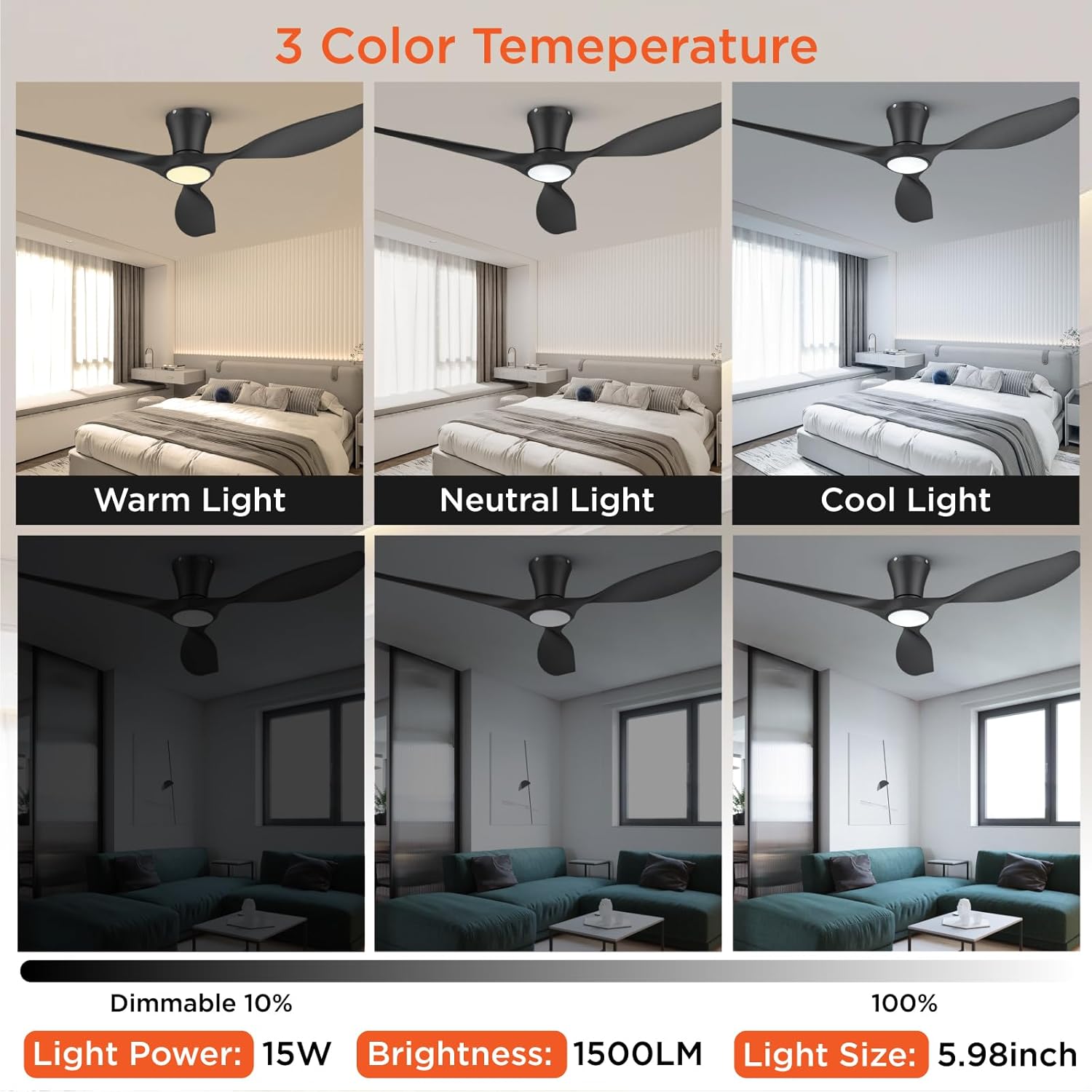
Image: Visual representation of the fan's 3-color temperature LED light, showcasing Warm (3000K), Neutral (4000K), and Cool (5000K) light options, along with its dimmable range.
Package Contents
Please verify that all components are present before beginning installation:
- Fan Motor Assembly
- Canopy
- 3 Blades
- Remote Control
- Remote Control Receiver
- Screw Pack (various screws, washers, wire nuts, anchors)

Image: An overview of all parts included in the TALOYA ceiling fan package, such as the motor, blades, canopy, remote, and hardware.
Safety Information
- Always disconnect power at the main circuit breaker before installation or servicing.
- Installation must be performed by a qualified electrician or a person with experience in electrical wiring.
- Ensure the mounting structure can support the weight of the fan (at least 35 lbs / 15.9 kg).
- Do not bend the blade holders during installation or cleaning.
- Ensure all electrical connections are secure and comply with local codes.
- The ceiling fan must be grounded. If a ground wire is not present at the installation site, immediately STOP installation and consult a qualified electrician.
Setup & Installation
Follow these steps for proper installation. For a visual guide, please refer to the installation video below.
- Prepare for Installation: Turn off power at the circuit breaker. Ensure the mounting location is suitable and secure.
- Attach Blades to Motor Assembly: Securely fasten each blade to the fan motor assembly using the provided screws.
- Install Mounting Bracket: Attach the mounting bracket to the ceiling junction box using the provided screws and anchors. Ensure it is firmly secured.
- Wire Connections: Connect the fan's electrical wires to your household wiring. Match the colors (e.g., green to ground, white to neutral, black to live). Use wire nuts to secure connections.
- Secure Canopy: Carefully lift the fan assembly and attach the canopy to the mounting bracket, ensuring all wires are tucked safely inside. Secure the canopy with screws.
- Final Checks: Double-check all connections and ensure the fan is securely mounted. Restore power at the circuit breaker.
Video: Detailed installation guide for the TALOYA 52-inch Ceiling Fan, demonstrating each step from assembly to final mounting and wiring connections.
Operating Instructions
Your TALOYA ceiling fan is operated via the included remote control.
Remote Control Functions:
- Power On/Off: Press the power button to turn the fan and light on or off.
- Fan Speed Control: Select from 6 fan speeds (1-6) to adjust airflow intensity.
- Light On/Off: Independently control the LED light.
- Light Color Temperature: Cycle through 3000K (Warm White), 4000K (Neutral White), and 5000K (Cool White) settings. The fan remembers your last setting.
- Light Dimming: Adjust the brightness of the LED light.
- Timer Settings: Set the fan to automatically turn off after 2, 4, or 8 hours.
- Reversible Motor: Use the dedicated button to switch between downdraft (summer) and updraft (winter) modes.
- Buzzer Mute: Press the buzzer button to silence the remote's audible feedback.

Image: Illustration of the 6-speed adjustable fan settings, recommending speeds for sleep, family enjoyment, and summer cooling.
Maintenance
- Cleaning: To avoid damage to the finish, clean the fan with a soft, damp cloth. Do not use abrasive cleaners or solvents.
- Blade Cleaning: Dust the fan blades regularly to prevent dust buildup, which can affect performance and balance.
- Tighten Screws: Periodically check all screws for tightness, especially those on the fan blades and mounting bracket.
- No Lubrication Needed: The fan's motor is permanently lubricated and does not require oiling.
Troubleshooting
| Problem | Possible Cause | Solution |
|---|---|---|
| Fan does not start | No power to the fan; Loose wire connections; Remote control battery low. | Check circuit breaker; Verify all wire connections are secure; Replace remote control batteries. |
| Fan wobbles | Loose blade screws; Improperly balanced blades; Loose mounting bracket. | Tighten all blade screws; Use balancing kit (if provided) to balance blades; Ensure mounting bracket is securely fastened. |
| Light does not work | Loose wire connection to light kit; Faulty LED driver. | Check light kit wiring connections; Contact customer support for replacement LED driver. |
| Remote control not working | Batteries are dead or incorrectly inserted; Remote not paired with fan. | Replace batteries and ensure correct polarity; Refer to remote pairing instructions in the full manual. |
Specifications
| Feature | Detail |
|---|---|
| Brand | TALOYA |
| Model Number | 90132 |
| Size | 52 inches |
| Color | Black |
| Material | Plastic (Blades) |
| Motor Type | Reversible DC Motor |
| Light Source | Integrated LED |
| Light Wattage | 15W |
| Brightness | 1500 Lumen |
| Color Temperature | 3000K / 4000K / 5000K (Adjustable) |
| Control Method | Remote Control |
| Fan Speeds | 6 |
| Timer Settings | 2H / 4H / 8H |
| Noise Level | Less than 35dB |
| Voltage | 120 Volts |
| Item Dimensions (L x W x H) | 52"L x 52"W x 8.67"H |
| Indoor/Outdoor Usage | Indoor |
| Room Type | Bedroom, Dining Room, Home Office, Kids Room, Living Room |
Warranty and Support
This product comes with a manufacturer's warranty. For specific warranty details, please refer to the documentation included in your product packaging or contact TALOYA customer support.
For technical assistance, troubleshooting, or replacement parts, please visit the TALOYA Store on Amazon or contact their customer service directly.