
Product Overview
This manual provides instructions for the Leadfan Car Stereo, an Android 12 system designed for Nissan Altima models from 2008 to 2012 equipped with manual A/C. It features a 9-inch 2.5D IPS touch screen, 4-Core processor, 2GB RAM, and 32GB ROM. Key functionalities include wireless Apple CarPlay, Android Auto, Mirror Link, GPS navigation (online and offline), Wi-Fi connectivity, Bluetooth 5.0, FM radio, and support for a backup camera.
Important Note: This car stereo does not support factory JBL amplifiers or factory cameras. It is specifically for vehicles with manual A/C controls.

Image: Leadfan Car Stereo after installation in a Nissan Altima dashboard.
Package Contents
Verify that all components are present in the package:
- Car Radio Unit
- Backup Camera
- Rear View Input Cable
- RCA Cable
- USB Cable (x2)
- Power Cable
- GPS Antenna
- User Manual
- Microphone (MIC)

Image: Detailed view of all included accessories and cables.
Setup and Installation
Professional installation is recommended. Ensure the vehicle's battery is disconnected before beginning installation.
1. Compatibility Check
Confirm your Nissan Altima (2008-2012) has manual A/C controls. This unit is not compatible with vehicles equipped with automatic climate control, factory JBL amplifiers, or factory navigation systems.

Image: Visual guide for compatible manual A/C dashboard vs. incompatible automatic A/C or factory navigation systems.
2. Wiring Connections
Connect the provided power cable, RCA cables, USB cables, GPS antenna, and microphone to the corresponding ports on the car stereo unit and the vehicle's wiring harness. Ensure all connections are secure.
- Power Cable: Connect to the vehicle's power harness.
- RCA Cables: For audio output (L/R), AUX input (L/R), subwoofer, and CVBS-IN-1.
- USB Cables: For connecting external devices or for CarPlay/Android Auto.
- GPS Antenna: Mount in a location with a clear view of the sky for optimal signal reception.
- Microphone: Connect for hands-free calling and voice commands.
- Reverse Input: Connect the reversing trigger cable for backup camera functionality.
3. Backup Camera Installation
The included backup camera requires proper wiring for functionality. Connect the camera's power wire to the vehicle's reverse light power source. The video signal cable connects to the "Reverse Input" on the stereo unit.

Image: Wiring diagram for backup camera installation.
Note: The white plug for the reverse input must be securely connected to the radio; otherwise, Bluetooth and Wi-Fi functionalities may be unavailable.
Operating Instructions
1. Wireless Apple CarPlay & Android Auto
Connect your smartphone wirelessly via Bluetooth and Wi-Fi to access Apple CarPlay or Android Auto. This allows integration of phone functions like navigation, music, calls, and messages directly on the stereo screen.
- Apple CarPlay: Supports wired and wireless connection. Use Siri voice assistant for commands.
- Android Auto: Supports wired and wireless connection. Use Google voice assistant for commands.
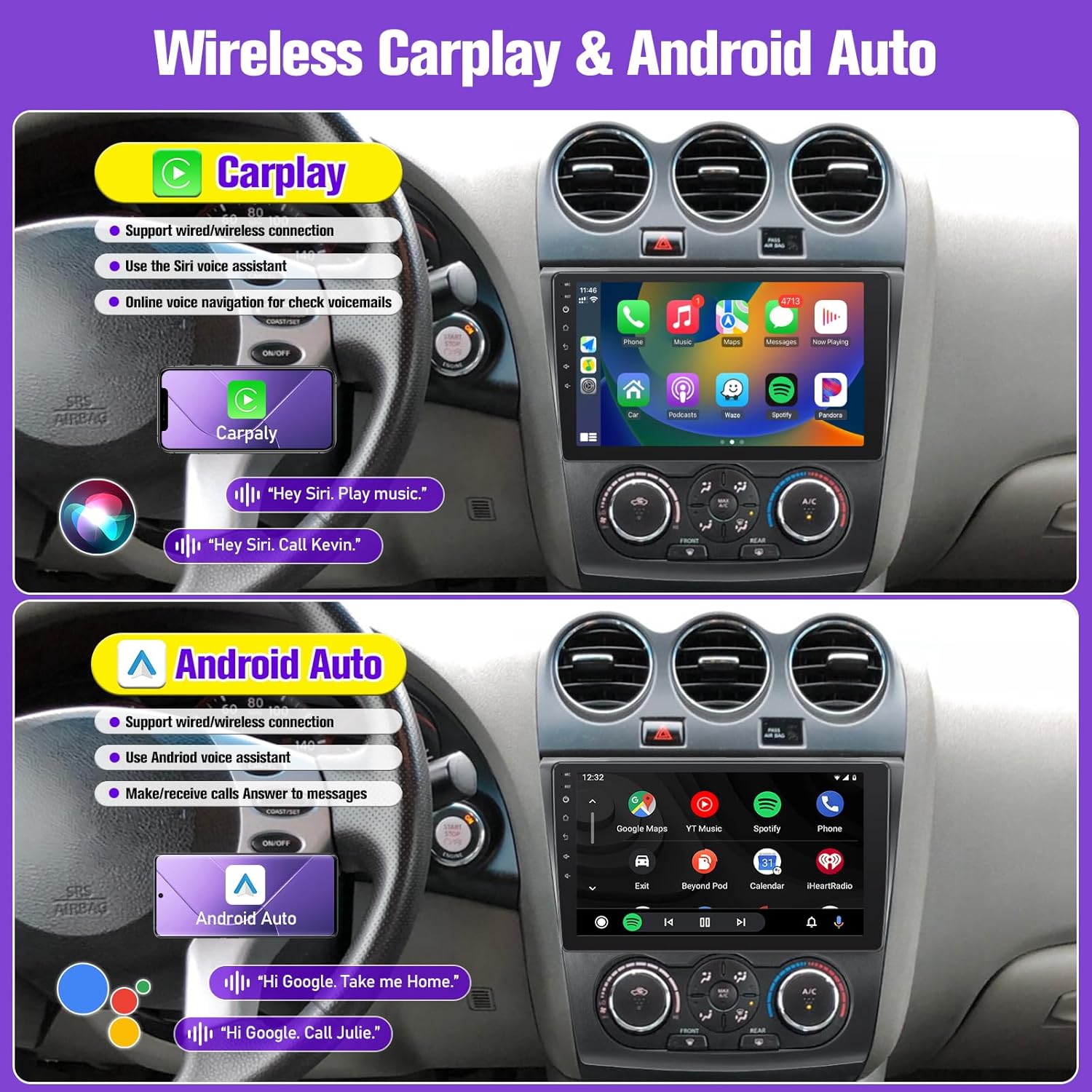
Image: Display of Apple CarPlay and Android Auto interfaces.
2. Mirror Link (IOS/Android)
Mirror your phone's screen onto the car stereo display. For Apple phones, this supports one-way control (from phone to stereo). For Android phones, it supports two-way control (from phone or stereo).

Image: Wireless Phone Mirror Link functionality.
3. GPS Navigation & Wi-Fi
The unit has a built-in GPS receiver for both online and offline navigation. Connect to a Wi-Fi hotspot to access online maps, browse the internet, and download applications from the app store (e.g., YouTube, TikTok).

Image: GPS Navigation and Wi-Fi connectivity features.
4. Bluetooth 5.0 & FM Radio
Pair your smartphone via Bluetooth 5.0 for hands-free calls, music streaming, and contact synchronization. The integrated FM radio allows access to local stations with manual and automatic search functions.

Image: Bluetooth 5.0 interface for calls and music.

Image: FM Radio interface and sound effects.
5. Steering Wheel Controls (SWC)
After correct wiring, the unit supports existing steering wheel controls, allowing you to manage calls, music playback, and mode switching without diverting attention from the road.

Image: Steering Wheel Controls functionality.
6. Split Screen Functionality
Utilize the split-screen feature to display two different applications simultaneously, such as navigation on one side and a music player on the other.

Image: Split Screen feature in use.
7. Audio Equalizer (EQ) Settings
Adjust the audio output using the built-in equalizer settings to customize the sound profile to your preference.

Image: Multiple EQ settings for audio customization.
8. Backup Camera Display
When the vehicle is shifted into reverse gear, the stereo screen will automatically switch to display the rear-view camera feed, providing a 170° wide-angle view for safer reversing.

Image: HD Night Version 1080p Backup Camera display.
Maintenance
To ensure the longevity and optimal performance of your Leadfan Car Stereo, follow these maintenance guidelines:
- Screen Cleaning: Use a soft, lint-free cloth to gently wipe the touchscreen. Avoid abrasive cleaners or solvents that could damage the display.
- Software Updates: Periodically check for available software updates to ensure the system runs efficiently and has the latest features.
- Environmental Conditions: Avoid exposing the unit to extreme temperatures, direct sunlight for prolonged periods, or excessive moisture.
- Cable Connections: Ensure all cables remain securely connected. Loose connections can lead to intermittent functionality.
Troubleshooting
If you encounter issues with your car stereo, refer to the following common troubleshooting steps:
| Problem | Possible Cause | Solution |
|---|---|---|
| Unit does not power on. | Loose power connection, blown fuse, vehicle battery issue. | Check power cable connections. Inspect vehicle fuses. Ensure vehicle battery is charged. |
| No sound or distorted audio. | Incorrect speaker wiring, volume too low, audio settings misconfigured. | Verify speaker wiring. Adjust volume. Check EQ settings and audio output mode. |
| Wireless CarPlay/Android Auto not connecting. | Bluetooth/Wi-Fi off, incorrect pairing, phone software issue, white plug for reverse input not connected. | Ensure Bluetooth and Wi-Fi are enabled on both devices. Re-pair the devices. Restart phone and stereo. Verify the white plug for reverse input is securely connected. |
| GPS signal weak or inaccurate. | GPS antenna obstructed or improperly installed. | Ensure GPS antenna has a clear view of the sky and is securely connected. |
| Backup camera not displaying. | Incorrect wiring, camera malfunction, vehicle not in reverse. | Check camera power and video signal connections. Ensure vehicle is in reverse. |
| System crashes or freezes. | Software issue, excessive background apps, insufficient memory. | Restart the unit. Close unnecessary applications. Perform a factory reset if issues persist (note: this will erase data). |
If these steps do not resolve the issue, please contact customer support.
Specifications
| Feature | Detail |
|---|---|
| Operating System | Android 12 |
| Processor | 4-Core |
| RAM | 2GB |
| ROM (Internal Storage) | 32GB |
| Display Size | 9 Inches |
| Display Type | 2.5D IPS Touch Screen |
| Resolution | 1280*720P (supports 1080P video) |
| Connectivity | Bluetooth 5.0, Wi-Fi, USB |
| Navigation | Built-in GPS (online/offline maps) |
| Radio | FM Radio |
| Special Features | Wireless CarPlay, Android Auto, Mirror Link, Steering Wheel Control (SWC), Split Screen, Voice Control, Backup Camera Input (AHD) |
| Vehicle Service Type | Car (Nissan Altima 2008-2012 with Manual A/C) |
| Item Weight | 2.92 pounds |
| Package Dimensions | 11.85 x 11.06 x 3.82 inches |
Warranty Information
The Leadfan Car Stereo comes with a 1-year warranty from the date of purchase. This warranty covers manufacturing defects and malfunctions under normal use. Please retain your proof of purchase for warranty claims.
Additionally, Leadfan offers a 30-day money-back guarantee and a 12-month replacement warranty, along with lifetime technical support.
Customer Support
For any questions regarding installation, operation, or technical support, please contact Leadfan customer service. You can typically find contact information by visiting the seller's page on the product platform and using the "Ask a question" or "Send message to seller" option.
Leadfan is committed to providing satisfactory after-sales service.


