1. Product Overview
The Okin Control Box CB.12.20.02 is an electronic control unit designed for precise automation and synchronization of motorized furniture components. It provides a robust output of 29V and 1.5A, delivering 52W of power to efficiently manage motor operations. Its sleek black housing features intuitive controls and clear labeling for various functions, ensuring straightforward and user-friendly operation. This control box is IP20-rated, indicating protection against solid objects larger than 12.5mm, making it suitable for indoor use.
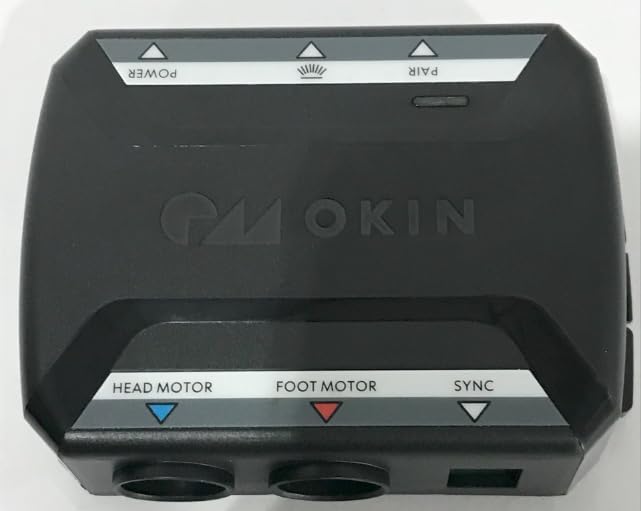
Figure 1: Top view of the Okin Control Box CB.12.20.02, showing the 'POWER', 'PAIR', 'HEAD MOTOR', 'FOOT MOTOR', and 'SYNC' labels.
Key Features:
- Control Box: CB.12.20.02 control box with 52W power output and 29V/1.5A specifications for precise motor control.
- Dual Motor Control: Features dedicated control interfaces for head motor and foot motor operations with synchronized movement capability.
- Connectivity: Multiple motor ports and sync functionality allow for coordinated movement control in automated furniture applications.
- Technical Specs: IP20 rated device with FCC ID certification.
- Design: Sleek black housing with intuitive control layout featuring clear labeling and LED indicators for easy operation.
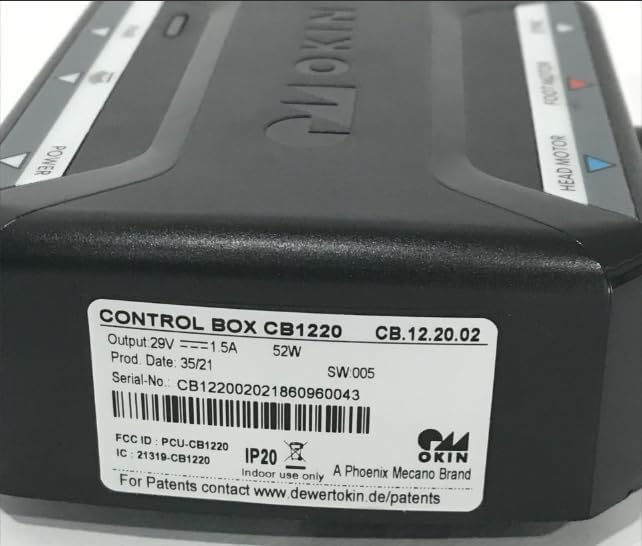
Figure 2: Side view of the control box displaying the product label with model number CB.12.20.02, output specifications, serial number, FCC ID, and IP20 rating.

Figure 3: Front view of the control box, highlighting the two circular motor ports and an additional rectangular port for connectivity.
Figure 4: Rear view of the control box, showing the power input port and other auxiliary connection points.
2. Setup Instructions
The Okin Control Box CB.12.20.02 is designed for straightforward replacement and installation. It is a plug-and-play component, meaning no complex installation procedures are typically required if replacing an identical unit.
- Compatibility Check: Ensure that the control box you are replacing is also a CB.12.20.02 model. This unit is specifically designed to replace only CB.12.20.02 models to ensure proper function and compatibility.
- Power Disconnection: Before beginning any installation, ensure that the power supply to the furniture or system is completely disconnected from the main power source.
- Remove Old Unit: Carefully disconnect all cables from the existing control box. Note the position and type of each connection (e.g., Head Motor, Foot Motor, Power, Sync).
- Install New Unit: Connect the corresponding cables from your furniture system to the new Okin Control Box CB.12.20.02. Refer to the labels on the control box for correct port identification:
- Connect the Head Motor cable to the designated port.
- Connect the Foot Motor cable to the designated port.
- Connect any Sync cables if your system utilizes synchronized movement.
- Connect the main power cable to the power input port.
- Secure Placement: Ensure the control box is securely placed in its intended location, away from moisture or excessive heat.
- Power Connection: Once all connections are secure, reconnect the power supply to the main power source.
3. Operating Instructions
The Okin Control Box CB.12.20.02 provides intuitive control over motorized furniture components. The control box itself does not have user-operable buttons but acts as the central processing unit for commands received from connected hand controls or other interfaces.
Functions:
- Head Motor Control: Manages the operation of the head motor, allowing for adjustment of the head section of the furniture.
- Foot Motor Control: Manages the operation of the foot motor, allowing for adjustment of the foot section of the furniture.
- Sync Functionality: Enables coordinated movement between multiple motors or synchronized operation with other connected components, if applicable to your furniture system.
- Power Indicator: An LED indicator on the control box typically illuminates when power is supplied, confirming operational status.
- Pairing: A 'PAIR' button or indicator may be present for establishing wireless connections with compatible hand controls, if your system supports this feature. Consult your hand control's manual for specific pairing instructions.
For detailed operation of your specific furniture's movements, refer to the user manual provided with your furniture's hand control or remote.
4. Maintenance
The Okin Control Box CB.12.20.02 is designed for durability and requires minimal maintenance. Following these guidelines will help ensure its longevity:
- Cleaning: Use a soft, dry cloth to wipe the exterior of the control box. Do not use liquid cleaners, abrasive materials, or solvents, as these can damage the housing or internal components.
- Environment: Ensure the control box is kept in a dry environment, away from direct sunlight, excessive heat, and moisture. The IP20 rating indicates it is not protected against water ingress.
- Cable Management: Periodically check all connected cables for any signs of wear, fraying, or damage. Ensure cables are not pinched or under excessive tension.
- Ventilation: Ensure that the control box has adequate ventilation and is not covered, to prevent overheating.
5. Troubleshooting
If you experience issues with your Okin Control Box CB.12.20.02, consider the following common troubleshooting steps:
- No Power/No Response:
- Check if the power cable is securely connected to both the control box and the wall outlet.
- Verify that the wall outlet is functional by plugging in another device.
- Ensure the power indicator LED on the control box is illuminated. If not, there may be a power supply issue.
- Motor Not Moving:
- Confirm that the motor cable is securely plugged into the correct port on the control box (Head Motor or Foot Motor).
- Check the motor cable for any visible damage.
- Ensure the hand control or remote is functioning correctly and has fresh batteries, if applicable.
- Intermittent Operation:
- Check all cable connections for looseness.
- Ensure there are no obstructions preventing motor movement.
- Unusual Noises:
- If the control box itself is making unusual noises, disconnect power immediately and contact customer support.
If these steps do not resolve the issue, it is recommended to contact Okin customer support or a qualified technician for further assistance. Do not attempt to open or repair the control box yourself, as this may void the warranty and pose a safety risk.
6. Specifications
| Attribute | Value |
|---|---|
| Model Number | CB.12.20.02 |
| Output Voltage | 29V |
| Output Current | 1.5A |
| Power Output | 52W |
| IP Rating | IP20 (Indoor use only) |
| FCC ID | PCU-CB1220 |
| IC | 21319-CB1220 |
| Item Weight | 1 pound |
| Package Dimensions | 8 x 6 x 3 inches |
| Date First Available | May 7, 2025 |
| Example Serial Number | CB122002021860960043 (Note: Actual serial number may vary) |


