
1. Introduction
The EJEAS E1 is a Bluetooth headset designed for motorcycle helmets, providing communication and entertainment for single riders. It features Bluetooth 5.3 technology for stable connections, DSP&CVC noise reduction for clear audio, and an IP65 waterproof rating for various weather conditions. This manual provides detailed instructions for installation, operation, and maintenance of your EJEAS E1 headset.

Image 1: EJEAS E1 Motorcycle Helmet Bluetooth Headset main unit.
2. Package Contents
Please verify that all items listed below are included in your package:
- 1x E1 Motorcycle Bluetooth Headset Unit
- 1x Ear Speaker and Microphone Set
- 1x Accessory Post and Accessory Clip
- 1x Type-C Charging Cable
- 1x User Manual
- 4x Adhesive Pads
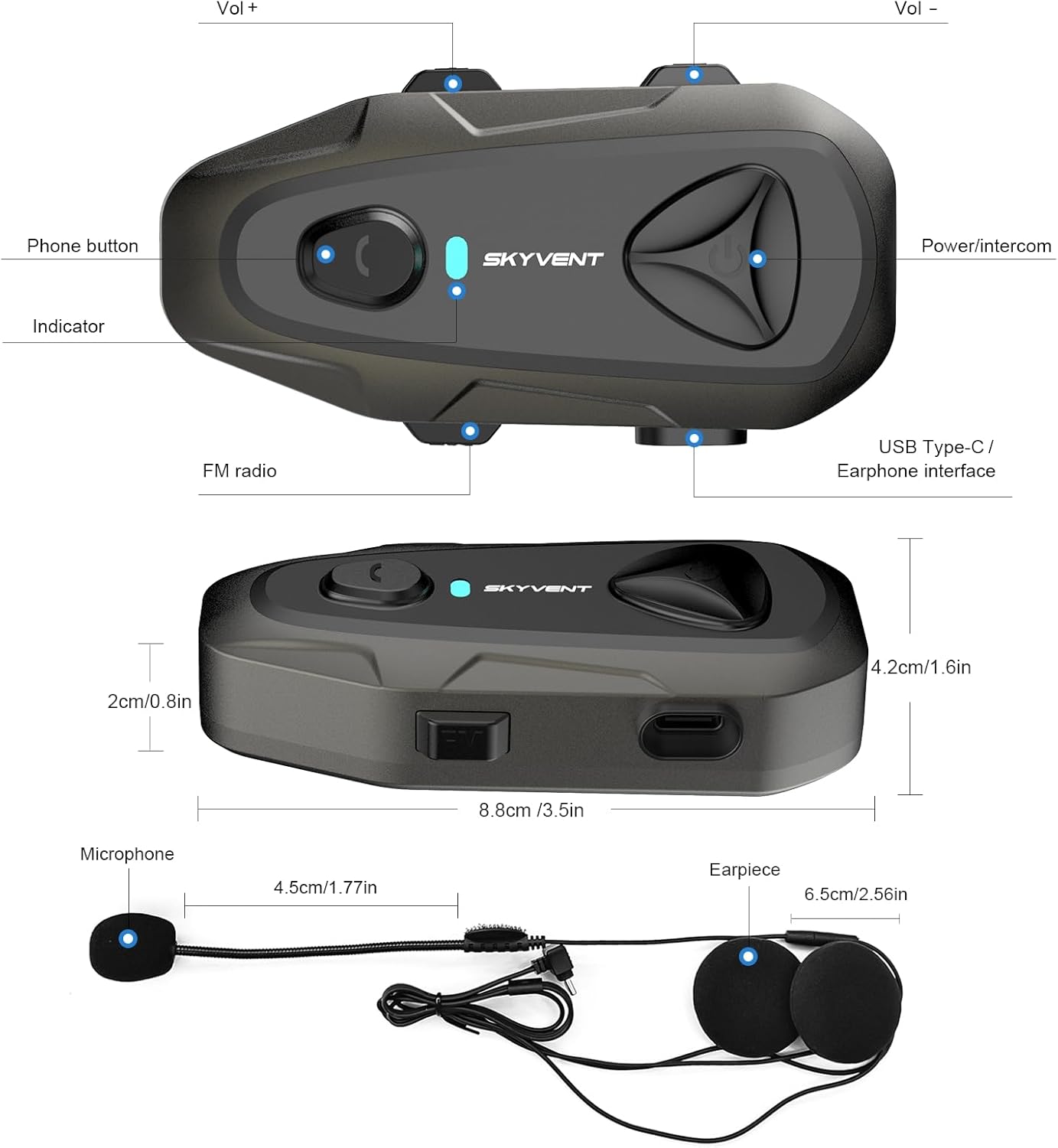
Image 2: Contents of the EJEAS E1 package, including the headset, speakers, microphone, mounting clips, charging cable, and user manual.
3. Product Overview
The EJEAS E1 headset integrates several features for an enhanced riding experience:
- Bluetooth 5.3: Provides faster data transmission and a more stable connection.
- DSP&CVC Noise Reduction: Reduces echo and ambient noise for clearer communication.
- 750mAh Battery: Offers up to 60 hours of working time and 360 hours of standby time.
- IP65 Waterproof: Ensures reliable performance in rain and other outdoor conditions.
- FM Radio: Built-in function with a frequency range of 60-108 MHz.
- Voice Assistant: Supports activation of your mobile phone's voice assistant.

Image 3: Illustration of the advanced Bluetooth 5.3 chip for faster and more stable connections.
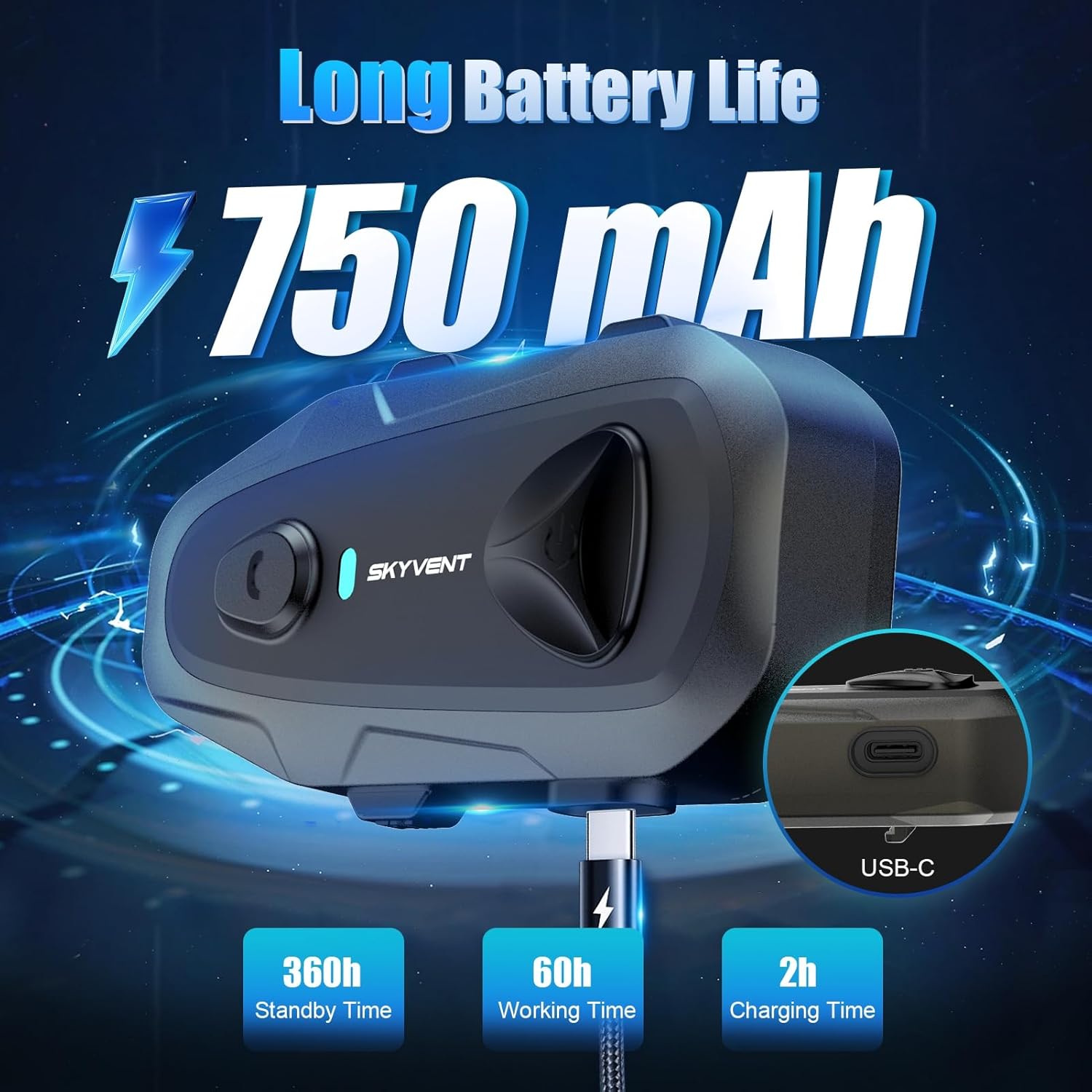
Image 4: Visual representation of DSP&CVC noise reduction technology for clear audio.

Image 5: Depiction of the IP65 waterproof and dustproof capabilities, suitable for various outdoor conditions.
4. Installation
Follow these steps to install the EJEAS E1 headset on your helmet:
- Attach the Mounting Clip: Insert the back clip into the edge of your helmet. Ensure it is securely fastened.
- Mount the E1 Unit: Slide the E1 main unit onto the clip slot until it clicks into place.
- Install Speakers and Microphone: Use the provided Velcro pads to stick the speakers and boom microphone inside your helmet, positioning them near your ears and mouth for optimal audio.
- Connect Speakers/Mic: Plug the speaker and microphone cable into the Type-C earphone interface on the E1 main unit.

Image 6: Step-by-step guide for installing the EJEAS E1 headset components onto a motorcycle helmet.
5. Setup
5.1 Charging the Device
Before first use, fully charge the E1 headset. Connect the provided Type-C charging cable to the charging port on the unit and a USB power source. The red indicator light will be on during charging and will turn off once fully charged. Charging time is approximately 2 hours.

Image 7: The EJEAS E1 headset connected to a USB-C charging cable, illustrating the charging process and battery life indicators.
5.2 Bluetooth Pairing
To connect your E1 headset to a mobile phone:
- Ensure the E1 headset is powered off.
- Press and hold the Power button until the indicator light flashes blue and red alternately, indicating pairing mode.
- On your mobile phone, go to Bluetooth settings and search for available devices.
- Select "EJEAS E1" from the list. Once connected, the indicator light will flash blue slowly.

Image 8: The EJEAS E1 headset wirelessly connecting to a mobile phone via Bluetooth 5.3.
6. Operating Instructions
Familiarize yourself with the buttons and their functions:
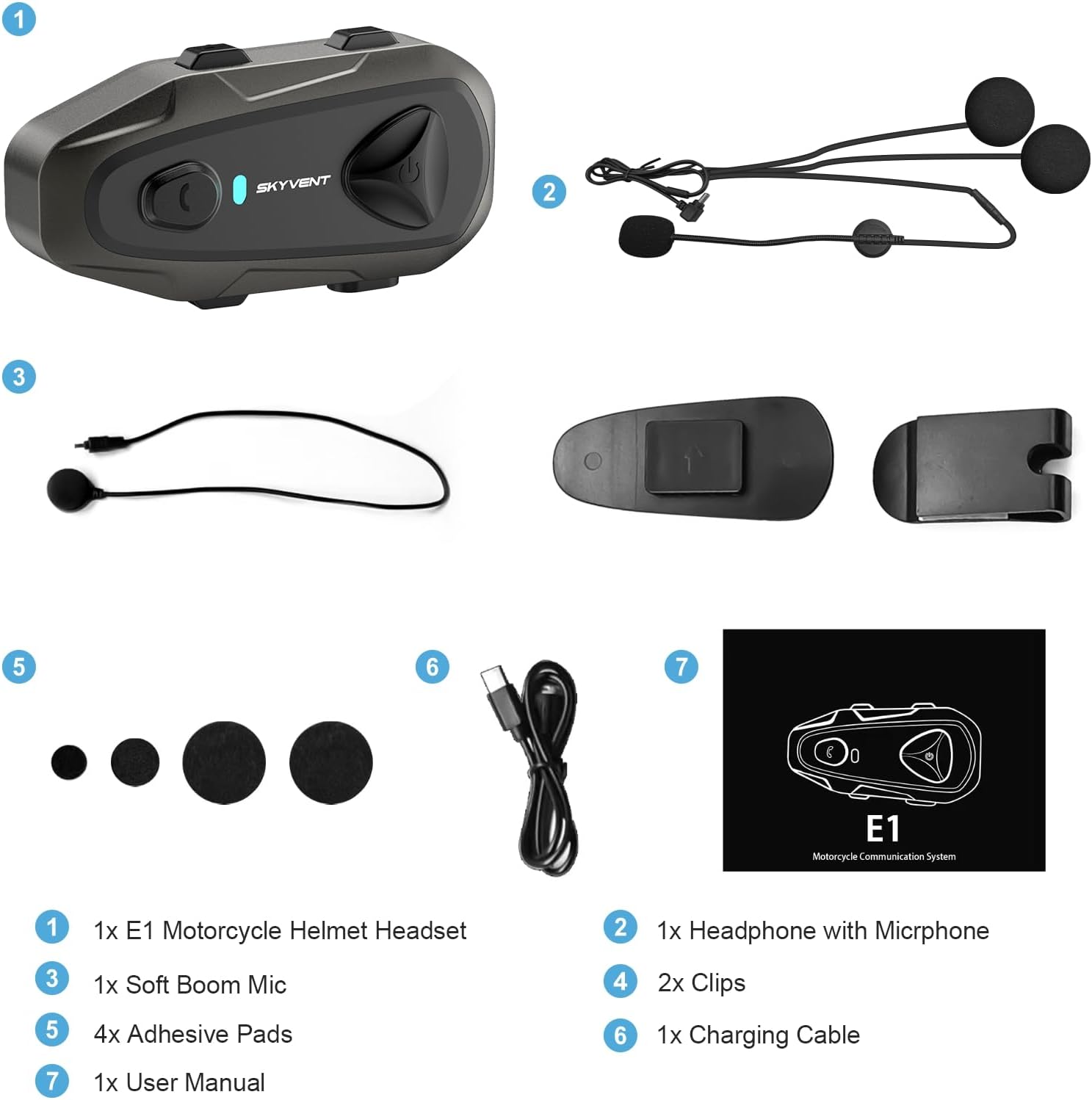
Image 9: Detailed diagram of the EJEAS E1 headset's buttons and interfaces.
- Power On/Off: Press and hold the Power button for 3 seconds.
- Volume Control: Press the 'Vol +' button to increase volume, 'Vol -' button to decrease volume.
- Music Playback:
- Press the Phone button once to Play/Pause music.
- Press 'Vol +' for 2 seconds for the next track.
- Press 'Vol -' for 2 seconds for the previous track.
- Phone Calls:
- Press the Phone button once to Answer/End a call.
- Press the Phone button for 2 seconds to Reject a call.
- Double-press the Phone button to Redial the last number.
- Voice Assistant: Press the Voice Assistant button once to activate your phone's voice assistant (e.g., Siri, Google Assistant).
- FM Radio:
- Press the FM Radio button once to turn on/off the FM radio.
- When FM is on, press 'Vol +' or 'Vol -' for 2 seconds to scan for the next/previous station.
7. Maintenance
To ensure the longevity and optimal performance of your EJEAS E1 headset:
- Cleaning: Use a soft, damp cloth to clean the headset unit. Avoid using harsh chemicals or abrasive cleaners.
- Storage: Store the device in a cool, dry place when not in use. Avoid extreme temperatures.
- Battery Care: For extended storage, charge the battery to approximately 50% every three months to prevent deep discharge.
- Water Exposure: While IP65 waterproof, avoid submerging the device in water. Ensure the Type-C port cover is securely closed during wet conditions.
8. Troubleshooting
If you encounter issues with your EJEAS E1 headset, refer to the following common problems and solutions:
- No Power: Ensure the battery is charged. Connect the charger and check if the red indicator light appears.
- Cannot Pair with Phone:
- Ensure the headset is in pairing mode (alternating blue and red light).
- Turn off and on your phone's Bluetooth.
- Try restarting both the headset and your phone.
- No Sound/Low Volume:
- Check the volume level on both the headset and your phone.
- Ensure the speakers are correctly plugged into the headset unit.
- Verify that the speakers are positioned correctly inside the helmet, close to your ears.
- Microphone Not Working: Ensure the microphone is correctly plugged in and positioned near your mouth.
- Intermittent Connection: Ensure there are no significant obstructions between the headset and your phone. Keep the phone within the effective Bluetooth range.
9. Specifications
| Model Name | E1 Motorcycle Helmet Headset |
| Bluetooth Version | 5.3 |
| Battery Capacity | 750mAh |
| Charging Time | Approximately 2 hours |
| Working Time | Up to 60 hours |
| Standby Time | Up to 360 hours |
| Water Resistance Level | IP65 Waterproof |
| Noise Control | Adaptive Noise Cancellation (DSP&CVC) |
| Connectivity Technology | Wireless (Bluetooth) |
| Headphones Jack | Type-C |
| Material | Acrylonitrile Butadiene Styrene (ABS) |
| Item Weight | 0.17 Kilograms (5.9 ounces) |
10. Warranty and Support
EJEAS products are designed for reliability and performance. For warranty information or technical support, please refer to the contact details provided with your purchase documentation or visit the official EJEAS website. Please retain your proof of purchase for warranty claims.


