
1. Introduction
Thank you for choosing the TECKNET Wireless Bluetooth Headset TK-HS012. This headset is designed for clear communication in various environments, featuring an AI noise-cancelling microphone, Bluetooth V5.2 connectivity, and extended battery life. This manual provides detailed instructions for setup, operation, maintenance, and troubleshooting to ensure optimal performance.
2. Package Contents
Please verify that all items are present in your package:
- TECKNET Wireless Bluetooth Headset (TK-HS012)
- USB-C Charging Cable (not explicitly listed but implied by USB-C Charging feature)
- User Manual (this document)
3. Product Overview
Familiarize yourself with the components and controls of your TECKNET TK-HS012 headset.

Image 3.1: Front view of the TECKNET Wireless Bluetooth Headset TK-HS012, showcasing its on-ear design and adjustable microphone.

Image 3.2: Diagram illustrating the control buttons on the headset, including Volume Up/Down, Power On/Off, Multifunction Button (MFB), Indicator Light, and Mute Button, along with the charging port and 270° rotatable microphone.
- Adjustable Headband: For a comfortable and secure fit.
- Soft Ear Cushions: Designed for extended wear comfort.
- 270° Rotatable Microphone: Allows for flexible positioning and can be worn on either side.
- Volume Buttons (+/-): Adjust audio output level.
- Power On/Off Button: Controls headset power.
- Multifunction Button (MFB): Manages calls and music playback.
- Mute Button: Mutes the microphone during calls.
- USB-C Charging Port: For recharging the headset battery.
- Indicator Light: Displays connection status and battery level.
4. Setup
4.1 Charging the Headset
Before first use, fully charge the headset. A full charge takes approximately 2 hours.
- Connect the USB-C charging cable to the headset's charging port.
- Connect the other end of the cable to a USB power source (e.g., computer, wall adapter).
- The indicator light will show charging status (refer to the product's specific light indications for charging).
- Once fully charged, disconnect the charging cable.
4.2 Powering On/Off
- Power On: Press and hold the Power On/Off button until the indicator light illuminates.
- Power Off: Press and hold the Power On/Off button until the indicator light turns off.
4.3 Bluetooth Pairing
The headset uses Bluetooth V5.2 for stable connections.
- Ensure the headset is powered off.
- Press and hold the Power On/Off button for approximately 5-7 seconds until the indicator light flashes blue and red alternately, indicating pairing mode.
- On your device (smartphone, tablet, PC), enable Bluetooth and search for available devices.
- Select "TK-HS012" from the list of found devices.
- Once connected, the indicator light will typically show a solid blue or slow blue flash.
4.4 Dual Connection
The headset supports connecting to two devices simultaneously.
- Pair the headset with the first device as described in Section 4.3.
- Disable Bluetooth on the first device. The headset will re-enter pairing mode.
- Pair the headset with the second device.
- Re-enable Bluetooth on the first device. The headset should automatically connect to both devices.
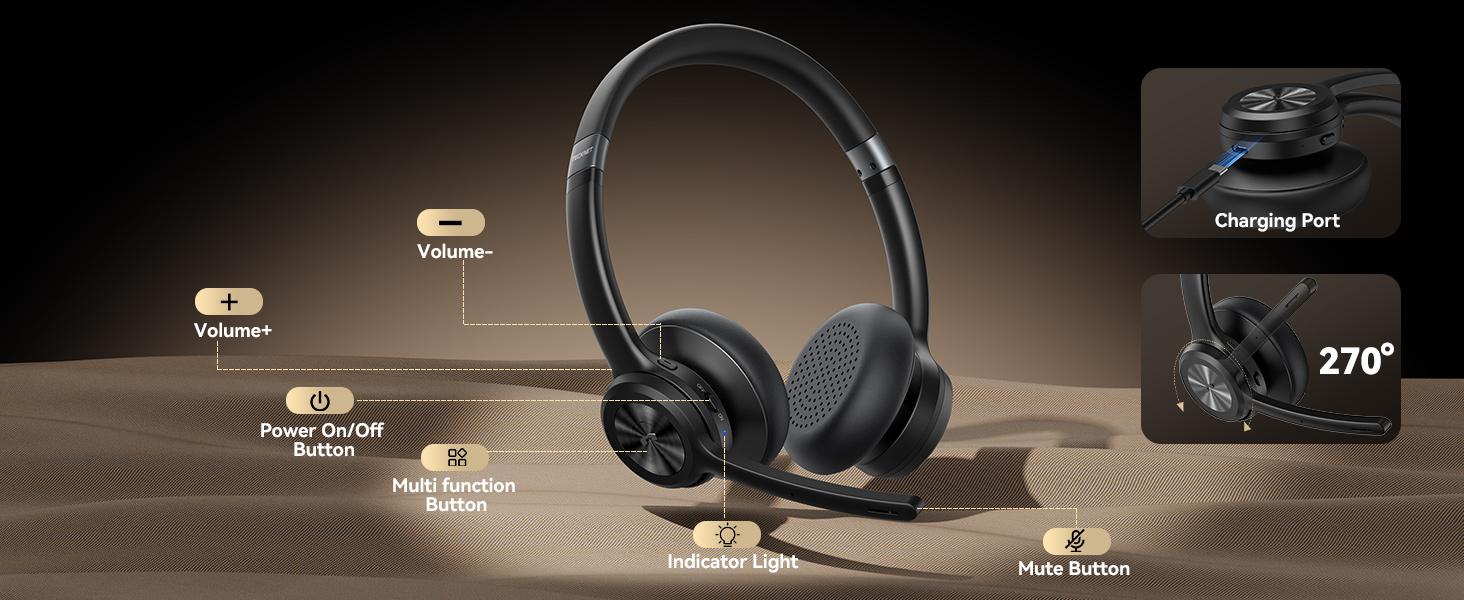
Image 4.1: Illustration of the headset simultaneously connected to a smartphone and a laptop, demonstrating the dual connection feature with a range of up to 49 feet.
5. Operating Instructions
5.1 Call Management
- Answer Call: Press the MFB once.
- End Call: Press the MFB once during a call.
- Reject Call: Press and hold the MFB for approximately 2 seconds.
- Mute Microphone: Press the Mute button once during a call. Press again to unmute.

Image 5.1: Depiction of the mute function, showing a user on a call and the microphone icon indicating privacy protection.
5.2 Music Playback
- Play/Pause: Press the MFB once.
- Next Track: Press and hold the Volume + button.
- Previous Track: Press and hold the Volume - button.
5.3 Volume Control
- Increase Volume: Press the Volume + button.
- Decrease Volume: Press the Volume - button.
5.4 AI Noise Cancelling Microphone
The integrated AI noise-cancelling microphone suppresses up to 96% of environmental noise, ensuring your voice is clear during calls. This feature is active automatically when the microphone is in use.

Image 5.2: Visual representation of the AI noise cancellation feature, showing sound waves being reduced around a person using the headset in a busy environment.
6. Maintenance
- Clean the headset regularly with a soft, dry cloth.
- Avoid exposing the headset to extreme temperatures, moisture, or corrosive substances.
- Store the headset in a cool, dry place when not in use.
- Do not attempt to disassemble or repair the headset yourself, as this will void the warranty.
7. Troubleshooting
If you encounter issues with your headset, refer to the following common problems and solutions:
| Problem | Possible Solution |
|---|---|
| Headset does not power on. | Ensure the headset is fully charged. Press and hold the Power On/Off button for a few seconds. |
| Cannot pair with a device. | Ensure the headset is in pairing mode (flashing blue/red). Disable and re-enable Bluetooth on your device. Move the headset closer to the device. |
| No audio or poor audio quality. | Check the volume levels on both the headset and your connected device. Ensure the headset is properly connected. Try re-pairing the headset. |
| Microphone not working. | Ensure the microphone is not muted. Check microphone settings on your connected device. |
| Intermittent connection. | Ensure the headset is within the 49-foot (15-meter) Bluetooth range. Avoid obstacles that may interfere with the signal. |
8. Specifications
Detailed technical specifications for the TECKNET Wireless Bluetooth Headset TK-HS012:
| Feature | Specification |
|---|---|
| Model Name | TK-HS012 |
| Connectivity Technology | Bluetooth, Wireless |
| Wireless Communication Technology | Bluetooth V5.2 |
| Bluetooth Range | 15 Meters (49 feet) |
| Noise Control | AI Noise Cancelling Microphone |
| Ear Placement | On Ear |
| Battery Life (Music Playback) | Up to 50 Hours |
| Battery Life (Talk Time) | Approximately 40 Hours (inferred from image) |
| Standby Time | 720 Hours |
| Charging Time | 2 Hours (approximately 1.5 hours inferred from image) |
| Frequency Range | 20Hz - 20,000Hz |
| Impedance | 32 Ohm |
| Material | PC+ABS |
| Item Weight | 10.5 ounces |
| Compatible Devices | PCs, MacBooks, smartphones, tablets, iPhones |
| Control Type | Media Control, Touch |

Image 8.1: Infographic detailing the headset's battery performance, including 40 hours talk time, 50 hours music time, 1.5 hours charging time, 720 hours standby time, and 49 ft Bluetooth range.
9. Warranty and Support
TECKNET provides a 36-month warranty for this product (registration required). If you encounter any issues or require assistance, please contact our professional customer service team. For more information, visit the official TECKNET website or refer to the contact details provided with your purchase.


