
Introduction
The VIAIM RecDot AI Voice Recorder Earbuds are designed to enhance productivity and communication through advanced AI features. This device offers real-time transcription, translation, smart summarization, and versatile recording capabilities for various scenarios including meetings, interviews, and lectures. With high-fidelity audio and active noise cancellation, the RecDot earbuds provide a comprehensive solution for professionals and students alike.

Image: The RecDot AI Voice Recorder Earbuds, their charging case, and a smartphone showing the transcription feature in action. The earbuds are silver, and the phone displays a recording interface with text being transcribed in real-time.
Setup
What's in the Box

Image: A visual representation of the items included in the RecDot AI Voice Recorder Earbuds package. It shows the packaging box, user manual, charging case, earbuds, four sizes of ear tips, and a USB-C cable.
Upon unboxing your RecDot AI Voice Recorder Earbuds, verify that all components are present:
- RecDot Earbuds (Left and Right)
- Charging Case
- USB-C Charging Cable
- Quick Start Guide
- Four (4) Sizes of Ear Tips (XS, S, M, L)
Initial Charging
Before first use, fully charge the RecDot earbuds and charging case.
- Place both earbuds into the charging case.
- Connect the USB-C charging cable to the charging port on the case and to a compatible power source.
- The indicator light on the case will show charging status. A full charge provides up to 36 hours of total use with the charging case, and 9 hours of single-use battery life for the earbuds.

Image: An illustration detailing the battery life of the RecDot earbuds, indicating 9 hours of single-use battery life and 36 hours total with the charging case. The charging case supports wireless charging.
Pairing with the viaim App
The RecDot earbuds require the viaim App for full functionality, including transcription, translation, and AI features.
- Download the "viaim" app from your device's app store (iOS/Android).
- Open the app and follow the on-screen instructions to create an account or log in.
- Ensure Bluetooth is enabled on your smartphone.
- Open the RecDot charging case. The earbuds will enter pairing mode.
- Select "RecDot" from the list of available Bluetooth devices in the viaim app to complete the pairing process.
Operating Instructions
FlashRecord: Instant Recording
The FlashRecord feature allows for quick audio capture without needing your phone or the app immediately.
- To start recording, simply tap the red dot on the charging case.
- The earbuds have built-in storage for recordings.
- Recordings can be live audio, phone calls, or video sound.
- For optimal performance and to ensure legal compliance, be aware of the mandatory alert tone during recording, which serves as an audible notification for privacy protection, especially in "two-party consent" states.

Image: A hand tapping the red dot on the RecDot charging case, illustrating the one-touch FlashRecord function for live calls or face-to-face meetings.

Image: An infographic illustrating the versatile recording capabilities of the RecDot earbuds, including call recording, audio/video recording, and meeting recording, compatible with platforms like Google Meet, Webex, Skype, Teams, Zoom, and standard phone calls.
AI Transcription & Translation
The viaim RecDot earbuds offer real-time transcription and translation in 17 languages through the viaim App.
- Open the viaim App during a call or meeting to see live transcription.
- Select your desired language for transcription and translation within the app.
- The app provides instant, accurate text conversion of spoken words.

Image: A person pointing towards a distant object while another person looks at a smartphone displaying real-time transcription and translation, highlighting the multilingual capabilities of the RecDot earbuds for travel and business.
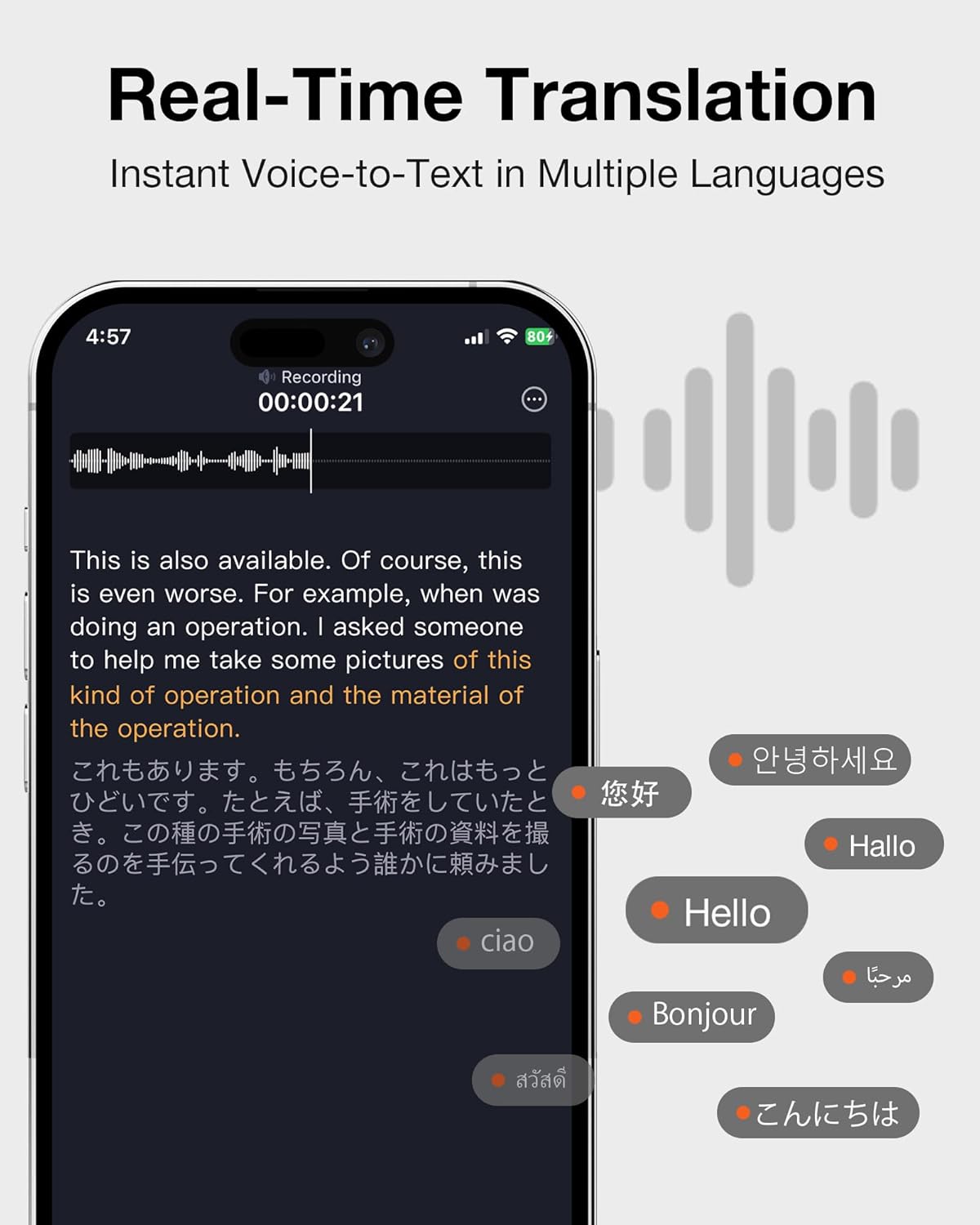
Image: A smartphone screen showing real-time voice-to-text translation, with text in English and various other languages like Korean, Chinese, German, French, Arabic, Thai, and Japanese, demonstrating the instant translation feature.
AI Note Taker: Summaries & To-Do Lists
Leverage viaim AI to automatically generate summaries and to-do lists from your recordings.
- After a recording, the viaim App can process the content to identify key points.
- Generated summaries provide concise overviews of discussions.
- To-do lists are automatically created based on actionable items mentioned.
- When using the charging case for recording, ensure the lid remains open for optimal performance, especially for capturing audio from a distance (up to 23 feet).

Image: Two individuals in a meeting setting, with a RecDot charging case on the table. An overlay shows AI-generated notes and key points, such as "Follow Up with Channel Partners" and "Procurement Coordination for New Order," demonstrating how VIAIM AI turns words into smart notes.
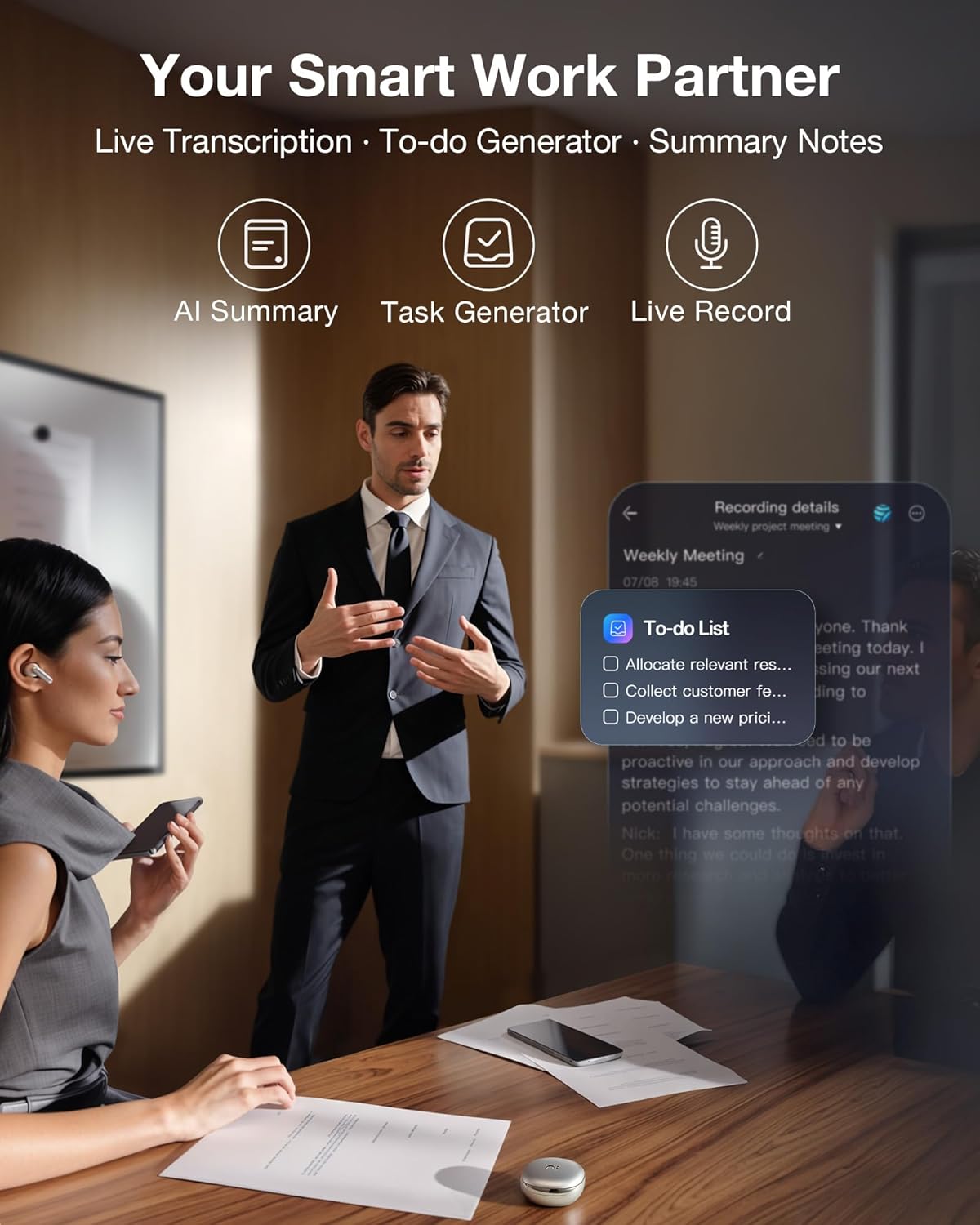
Image: A business meeting scene with an infographic highlighting the "Your Smart Work Partner" features: AI Summary, Task Generator, and Live Record. A smartphone screen shows a "To-do List" generated from a weekly meeting.
Audio Quality & Active Noise Cancellation (ANC)
The RecDot earbuds feature pro-tuned sound with powerful speakers and 48dB hybrid ANC for immersive listening and clear communication in noisy environments.

Image: A woman wearing RecDot earbuds on a subway, with "48dB" prominently displayed, illustrating the active noise cancellation feature designed to block distractions and boost clarity during calls and listening.
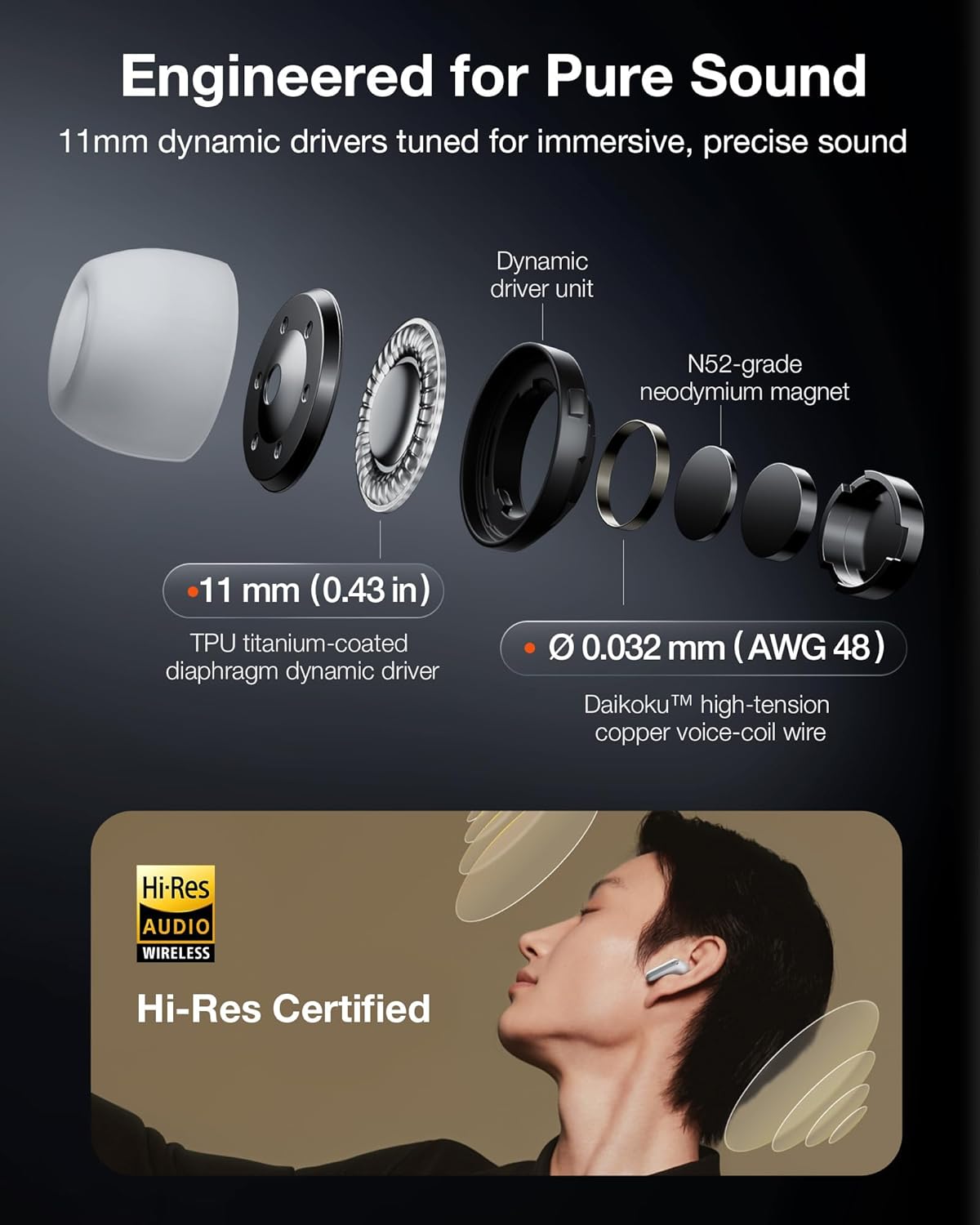
Image: A detailed diagram of the earbud's internal components, highlighting the 11mm dynamic drivers and N52-grade neodymium magnet, along with a "Hi-Res Certified" badge, indicating the earbuds are engineered for pure, precise sound.
Intuitive Touch Controls & Voice Commands
Control your RecDot earbuds with simple touch gestures or voice commands.

Image: A person demonstrating the intuitive touch controls on the RecDot earbud, with labels indicating actions like "Pinch to record," "Slide to adjust volume," "Press Play/pause," "Double-press to next," and "Long-press Start/stop recording."
- Pinch: Initiate recording.
- Slide: Adjust volume.
- Press: Play/pause audio.
- Double-press: Skip to the next track.
- Long-press: Start or stop recording.
- Voice commands can also be used for hands-free operation.
Privacy and Data Management
All recordings are secured with end-to-end encryption (AES-256/TLS).
- Recordings remain exclusively yours.
- Secure cloud backup is available.
- Cross-device access is supported.
- AI-powered transcription and summarization are processed only with your authorization.
- Files can be managed, shared, or permanently deleted at any time within the viaim App.
- No third-party sharing or ads are involved.
Bluetooth 5.2 + Dual-Device Pairing
The RecDot earbuds support Bluetooth 5.2 and can connect to two devices simultaneously.
- Seamlessly switch between connected devices (e.g., phone and laptop).
- Choose single or dual connection mode based on your needs.
Maintenance
Cleaning Your Earbuds and Case
Regular cleaning helps maintain optimal performance and hygiene.
- Use a soft, dry, lint-free cloth to wipe the earbuds and charging case.
- For ear tips, remove them from the earbuds and clean with a damp cloth and mild soap if necessary, then rinse and dry thoroughly before reattaching.
- Avoid getting moisture in any openings. Do not use abrasive materials or harsh chemicals.
Battery Care
To maximize battery lifespan:
- Avoid fully discharging the battery frequently.
- Store the device in a cool, dry place when not in use for extended periods.
- Charge the device regularly, even if not used daily, to prevent deep discharge.
Troubleshooting
If you encounter issues with your RecDot AI Voice Recorder Earbuds, refer to the following common solutions:
| Problem | Possible Cause | Solution |
|---|---|---|
| Poor transcription quality / Inaccurate results | Background noise, unclear speech, incorrect language selection, or app processing issues. |
|
| Recordings stuck at "Uploading, please try again later" | Unstable internet connection, app glitch, or server issues. |
|
| Earbuds stop recording unexpectedly | Accidental touch, low battery, or app/device synchronization issue. |
|
| No auto-language detection | This feature may not be available or requires manual selection. |
|
For further assistance, please refer to the official VIAIM support channels or the in-app help section.
Specifications
| Feature | Detail |
|---|---|
| Model Number | XFVI-A92 |
| Product Dimensions | 2.36 x 2.36 x 1.16 inches |
| Item Weight | 2.24 ounces |
| Batteries | 2 Nonstandard Battery batteries required (included) |
| Battery Life (Earbuds) | 9 hours (single use) |
| Battery Life (with Case) | Up to 36 hours |
| Digital Recording Time | 8 hours |
| Manufacturer | Hong Kong Future intelligent Technology Co., Ltd |
| Hardware Interface | Bluetooth 5.2 |
| Microphone Form Factor | Built-In |
| Audio Format | Digital |
| Noise Cancellation | 48dB Hybrid ANC |
| Transcription Languages | 17 Languages |
Warranty and Support
Standard Warranty
Information regarding the standard manufacturer's warranty period and terms can typically be found in the Quick Start Guide included with your product or on the official VIAIM website. Please retain your proof of purchase for warranty claims.
Extended Protection Plans
Extended protection plans are available for purchase separately to provide additional coverage beyond the standard warranty. These plans offer varying durations and benefits.
- 3-Year Protection Plan: Provides coverage for 36 months.
- 4-Year Protection Plan: Provides coverage for 48 months.
- Complete Protect: A monthly subscription plan covering eligible past and future purchases.
Details on purchasing and activating these plans are typically provided at the point of sale or through the retailer.
Customer Support
For technical support, product inquiries, or warranty claims, please visit the official VIAIM Store or contact their customer service.
Visit the Official VIAIM Store on Amazon
Note on Transcription Minutes: The viaim app includes 600 free transcription minutes per month. Upgrade options (Pro Plan for 1,800 minutes, Ultra Plan for unlimited minutes) are available for users requiring more.


