
TCL 65C7K
TCL PREMIUM 4K QD-Mini LED TV 65" C7K User Manual
Model: 65C7K
Introduction
This manual provides comprehensive instructions for setting up, operating, maintaining, and troubleshooting your new TCL PREMIUM 4K QD-Mini LED TV 65" C7K. Please read this manual thoroughly before using the television to ensure proper operation and to maximize your viewing experience. Keep this manual for future reference.

Figure 1: Front view of the TCL 65" C7K QD-Mini LED TV, showcasing its sleek design and vibrant display.
Setup
1. Unboxing and Package Contents
Carefully remove the TV from its packaging. Ensure all components are present:
- 01 TCL 65" Television
- 01 Remote Control
- 01 P2/RCA Adapter Cable
- Power Cable
- User Manual (this document)
- TV Stand components (if applicable)
2. Stand Installation / Wall Mounting
For stand installation, attach the provided stand components to the bottom of the TV using the designated screws. Ensure the stand is securely fastened and the TV is stable on a flat surface. If wall mounting, refer to your wall mount's instructions and ensure proper VESA compatibility and secure installation.
3. Connecting Your Devices
The TCL C7K TV offers a variety of ports for connecting external devices. Refer to the diagram below for port locations and types.
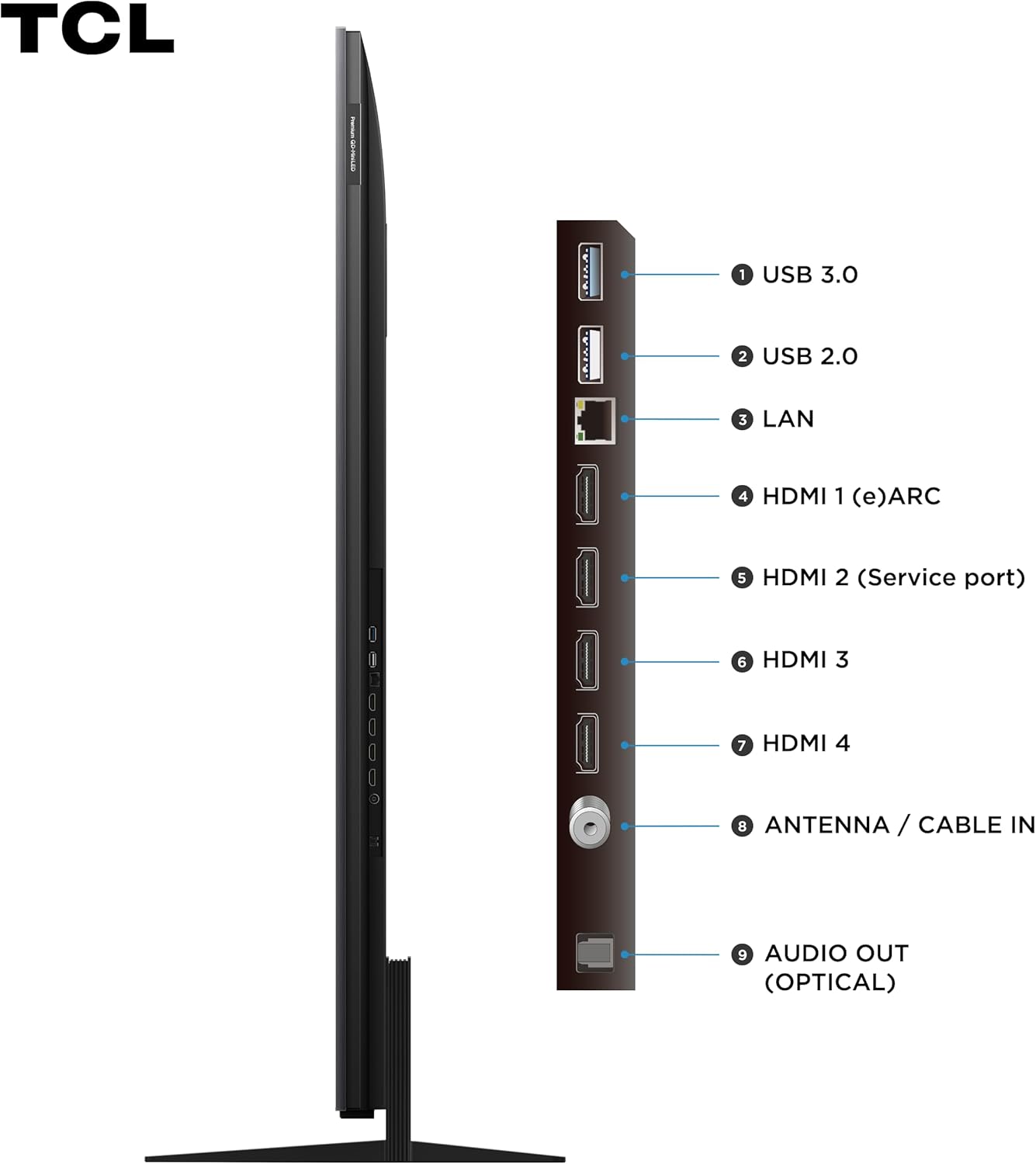
Figure 2: Side view of the TCL C7K TV, detailing the available connection ports.
- 1. USB 3.0: For high-speed data transfer from USB devices.
- 2. USB 2.0: For connecting USB devices like flash drives.
- 3. LAN: Ethernet port for wired internet connection.
- 4. HDMI 1 (eARC): High-Definition Multimedia Interface with Enhanced Audio Return Channel support.
- 5. HDMI 2 (Service port): HDMI input, also used for service.
- 6. HDMI 3: High-Definition Multimedia Interface input.
- 7. HDMI 4: High-Definition Multimedia Interface input.
- 8. ANTENNA / CABLE IN: For connecting an antenna or cable TV signal.
- 9. AUDIO OUT (OPTICAL): Digital optical audio output for soundbars or home theater systems.
Connect your power cable to the TV and a wall outlet. For internet access, connect an Ethernet cable to the LAN port or connect wirelessly via Wi-Fi during the initial setup.
4. Initial Power-On and Setup Wizard
Press the power button on the remote control. The TV will guide you through the initial setup wizard, including language selection, network connection, Google account sign-in, and channel scanning. Follow the on-screen prompts to complete the setup.
Operating Your TV
1. Remote Control Overview
The included remote control allows you to navigate the TV's interface, adjust settings, and access smart features. Familiarize yourself with the button layout for easy operation.
2. Google TV Interface
Your TCL C7K TV runs on Google TV, providing a personalized and intuitive user experience. Access your favorite streaming services, live TV, and apps from a single, organized home screen.

Figure 3: The Google TV interface, offering a centralized hub for all your entertainment.
3. Key Features
- 4K QD-Mini LED Display: Experience stunning clarity and vibrant colors with Quantum Dot Mini LED technology, offering precise local dimming and high brightness.
- Dolby Vision IQ & HDR10+: Enjoy enhanced contrast, brightness, and color detail with support for leading HDR formats, adapting to your room's lighting conditions.
- Audio by Bang & Olufsen: Immerse yourself in superior sound quality, engineered by Bang & Olufsen for a rich and dynamic audio experience.
- 144Hz VRR & 240Hz Game Accelerator: Achieve ultra-smooth gameplay with a high refresh rate and Variable Refresh Rate (VRR) support, optimized for gaming.
- Google Assistant: Use voice commands to control your TV, search for content, and manage smart home devices.
- ALLM (Auto Low Latency Mode): Automatically switches to a low-latency mode for a more responsive gaming experience.

Figure 4: Visual representation of the key features of the TCL C7K TV.
4. Gaming Features
The TCL C7K is designed for an exceptional gaming experience:
- 144Hz VRR: Ensures smooth, tear-free visuals by synchronizing the TV's refresh rate with your console or PC's frame rate.
- 240Hz Game Accelerator: Provides an even smoother experience for compatible games, reducing motion blur.
- AMD FreeSync Premium Pro: Eliminates stuttering and tearing for fluid gameplay.
- HDMI 2.1: Supports advanced gaming features like 4K@120Hz, VRR, and ALLM.

Figure 5: Experience immersive gaming with the TCL C7K's advanced gaming features.
5. Optimal Viewing Distance
For the best viewing experience, consider the recommended distance from your TV based on its size. For a 65-inch TV, an ideal viewing distance is approximately 2.0 to 2.5 meters (6.5 to 8.2 feet).

Figure 6: Recommended viewing distances for various TV sizes.
Maintenance
1. Cleaning Your TV
To clean the screen, gently wipe it with a soft, lint-free cloth. For stubborn marks, slightly dampen the cloth with water or a screen-specific cleaning solution. Avoid using harsh chemicals, abrasive materials, or direct spraying onto the screen. Clean the TV's frame and stand with a soft, dry cloth.
2. Software Updates
Your Google TV will periodically check for and download software updates automatically when connected to the internet. These updates improve performance, add new features, and enhance security. You can also manually check for updates in the TV's settings menu.
Troubleshooting
If you encounter issues with your TV, refer to the following common problems and solutions:
| Problem | Possible Cause / Solution |
|---|---|
| No Power | Ensure the power cable is securely plugged into the TV and a working electrical outlet. Check the power indicator light on the TV. Try a different outlet. |
| No Picture / Black Screen | Verify the correct input source is selected (e.g., HDMI 1, TV). Check cable connections from external devices. Restart the TV and connected devices. |
| No Sound | Check the volume level and ensure the TV is not muted. Verify audio cable connections to external sound systems. Check audio output settings in the TV menu. |
| Remote Control Not Working | Replace the batteries. Ensure there are no obstructions between the remote and the TV's IR sensor. Re-pair the remote if it's a Bluetooth remote. |
| Network Connection Issues | Restart your router and modem. Check Wi-Fi password. For wired connections, ensure the Ethernet cable is properly connected. Try connecting to a different network if possible. |
| Picture Quality Issues (Blurry, Distorted) | Check the resolution of the content being played. Ensure cables are securely connected. Adjust picture settings (brightness, contrast, sharpness) in the TV menu. |
If the problem persists after trying these solutions, please contact TCL customer support for further assistance.
Specifications
| Feature | Detail |
|---|---|
| Brand | TCL |
| Model | 65C7K |
| Screen Size | 65 inches |
| Display Technology | QD-Mini LED |
| Resolution | 4K (3840 x 2160) |
| Refresh Rate | 120 Hz (Native), 144Hz VRR, 240Hz Game Accelerator |
| Operating System | Google TV, Android |
| Special Features | Dolby Vision IQ, HDR10+, Google Assistant, ALLM, Audio by Bang & Olufsen, AiPQ Pro Processor, AMD FreeSync Premium Pro |
| Connectivity | Wi-Fi (Dual Band), Bluetooth, HDMI 2.1 (x4), USB 3.0 (x1), USB 2.0 (x1), LAN, Optical Audio Out, Antenna/Cable In |
| Audio Output | 2.1 Channel Surround Sound (with Subwoofer) |
| Power Source | Electrical Power |
| Product Dimensions (WxDxH) | 144.4 x 6 x 83.2 cm (without stand) |
| Product Weight | 27.4 Kilograms |
| Certification | 00738-24-06714 |
| Energy Efficiency | 100% (ENCE) |

Figure 7: Energy efficiency label for the TCL 65C7K TV.
Warranty and Support
Warranty Information
Your TCL 65C7K TV comes with a manufacturer's warranty. Please refer to the warranty card included in your package for specific terms and conditions, including coverage duration and what is covered. Keep your proof of purchase for warranty claims.
Extended warranty options may be available for purchase. For details, please check with your retailer or TCL's official website.
Customer Support
For technical assistance, troubleshooting beyond this manual, or warranty service, please contact TCL customer support. You can find contact information on the official TCL website or in your product documentation.
When contacting support, please have your TV's model number (65C7K) and serial number ready. The serial number is typically located on a sticker on the back of the TV.
Related documents65C7K


Ask a question about this manual
Ask about setup, troubleshooting, compatibility, parts, safety, or missing instructions. Manuals+ will review the question and use this page’s manual context to help answer it.