
1. Introduction
This manual provides detailed instructions for the setup, operation, and maintenance of your LMBGM AR2090 Mono UHF Dual Channel Wireless In-Ear Monitoring System. This system is designed to deliver high-quality audio monitoring for professional applications such as recording studios, churches, and live band performances.
Key Features:
- Wide bandwidth response from 50Hz to 20KHz for comprehensive audio.
- Ultra-low latency of less than 5 milliseconds for real-time audio control.
- Built-in limiter circuit to prevent distortion at high input levels.
- UHF band phase-locked PLL technology for improved performance, anti-frequency dropout, and anti-crosstalk.
- Frequency range of 550 MHz-580 Mhz with 16 switchable frequencies.
- Dynamic expansion circuit for enhanced signal-to-noise ratio.
- Clear LCD display panel and low battery indicator on receivers.
- Robust and durable metal casing.
- Wireless range of up to 300 feet (250 FT-350 FT normal range).
2. Setup Guide
2.1 Unpacking and Package Contents
Carefully unpack all components and verify that you have received the following items:
- 1 x Transmitter Unit
- 8 x Bodypack Receivers (with earphones)
- 2 x Antennas
- 2 x Audio Cable Lines
- 1 x Power Adapter
- 1 x User Manual (this document)
- Ear Cushions
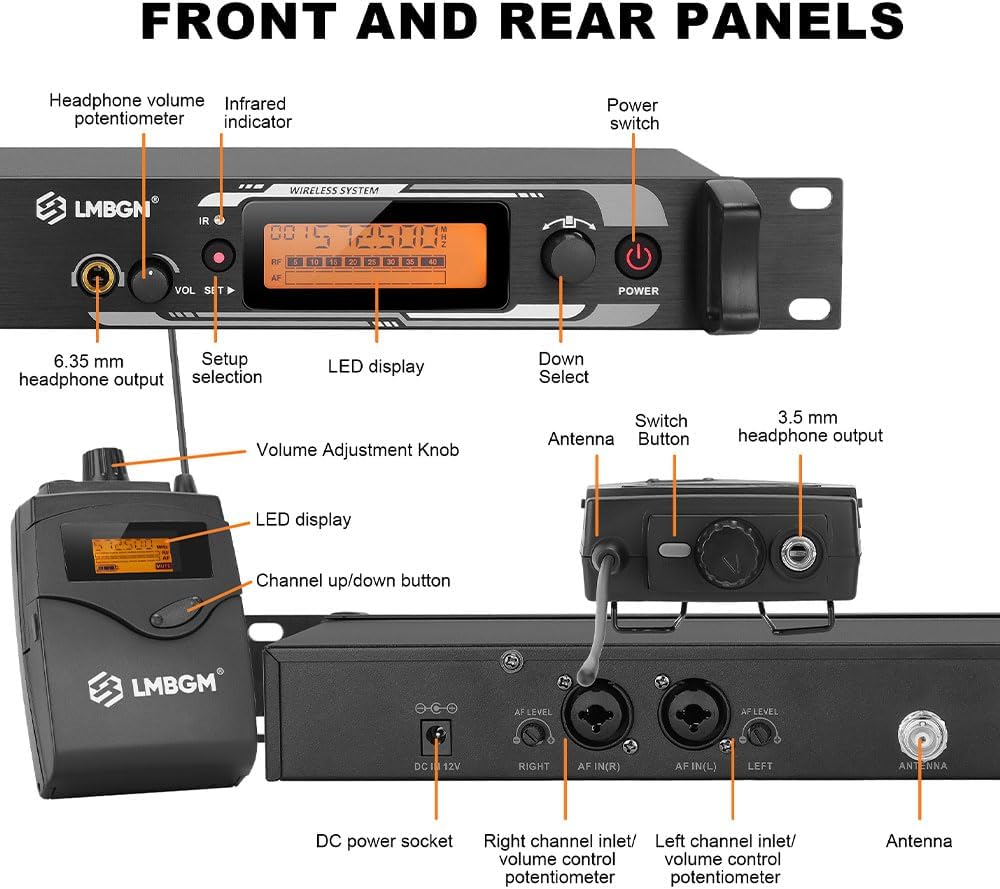
2.2 Component Identification
Familiarize yourself with the main components of your wireless in-ear monitoring system.

2.3 Connections
Connect the transmitter unit to your audio source and power supply. Ensure all connections are secure.
2.4 Initial Power-On and Frequency Pairing
Follow these steps to power on the system and pair the bodypack receivers with the transmitter:
- Connect the power adapter to the transmitter and plug it into an electrical outlet.
- Install two AA batteries (user-supplied) into each bodypack receiver.
- Power on the transmitter and each bodypack receiver.
- To pair, aim the infrared (IR) window of the transmitter at the IR window of the bodypack receiver. Press the 'SET' button on the bodypack receiver to initiate pairing. The frequency should synchronize automatically.

For a visual guide on setup and pairing, please refer to the video below:
3. Operation
3.1 Basic Controls
The transmitter features volume controls for each channel and a setup selection button. The bodypack receivers have a volume adjustment knob and channel up/down buttons. Refer to Figure 2.3.1 for control locations.
3.2 Channel Selection
The system offers 16 switchable frequencies. Use the channel selection controls on the transmitter and bodypack receivers to select the desired frequency. Ensure the transmitter and receiver are on the same channel for proper operation.
3.3 Battery Installation and Life
Each bodypack receiver operates on two AA batteries. The LCD display on the receiver includes a low battery indicator. Battery life is approximately 4-5 hours, depending on usage and battery type. Replace batteries as needed.

3.4 Real-time Monitoring
The system provides real-time audio monitoring with ultra-low latency, ensuring accurate pitch and rhythm, especially in noisy environments. The in-ear headphones are designed for comfort and a secure fit.


Observe the system in operation in the following video:
3.5 Application Scenarios
The AR2090 system is suitable for a variety of professional audio environments.

4. Maintenance
Proper maintenance ensures the longevity and optimal performance of your LMBGM AR2090 system.
- Cleaning: Use a soft, dry cloth to clean the exterior of the transmitter and bodypack receivers. Do not use liquid cleaners or solvents.
- Storage: When not in use, store the system in a cool, dry place away from direct sunlight and extreme temperatures. Remove batteries from bodypack receivers if storing for extended periods.
- Cable Care: Avoid sharp bends or kinks in the audio cables and antenna cables to prevent damage.
- Earphones: Clean earphones regularly with a mild disinfectant wipe. Replace ear cushions as needed for hygiene and comfort.
5. Troubleshooting
If you encounter issues with your LMBGM AR2090 system, refer to the following table for common problems and solutions.
| Problem | Possible Cause | Solution |
|---|---|---|
| No audio from earphones |
|
|
| Intermittent audio or static |
|
|
| Cannot pair receiver with transmitter |
|
|
| Low volume |
|
|
6. Technical Specifications
Detailed specifications for the LMBGM AR2090 Wireless In-Ear Monitoring System:
| Feature | Specification |
|---|---|
| Model Name | AR2090 |
| Brand | LMBGM |
| Connectivity Technology | Wireless (RF) |
| Wireless Communication Technology | RF |
| Noise Control | Active Noise Cancellation |
| Frequency Response | 50Hz - 20KHz (System), 15 KHz (Headphones) |
| Sensitivity | 78 dB |
| Impedance | 16 Ohms |
| Headphones Jack | 6.35 mm Jack (Transmitter), 3.5 mm Jack (Bodypack) |
| Control Type | Volume Control |
| Material | Metal (Chassis) |
| Color | Black |
| Item Weight | 6.38 pounds |
| Package Dimensions | 21.46 x 12.8 x 3.74 inches |
| Wireless Range | Up to 300 feet (250 FT-350 FT normal range) |
| Preset Channels | 16 Groups Of Channels Are Set Separately |
| Transmit Output Power | 100Mw |
| Audio Input | Xlr And 6.5mm Composite Socket |
| Headphone Output | 6.5 Stereo Socket, Volume Can Be Adjusted |
| Current Consumption | Dc12V/250Ma |
| Antenna Input Base | Tnc Socket |

7. Warranty and Support
LMBGM products are designed for reliability and performance. For warranty information, please refer to the documentation included with your purchase or contact LMBGM customer support directly. If you require technical assistance or have questions not covered in this manual, please visit the official LMBGM website or contact their customer service department.
