
1. Introduction
This manual provides detailed instructions for the installation, operation, and maintenance of the Xqscvqwfa D3663LUA V56 V59 Universal DVB-T2/DVB-T LCD Digital TV Driver Board Kit. This kit is designed to convert 14-inch and 15.4-inch LCD panels with 30-pin LVDS 1280x800 resolution into functional digital televisions. Please read this manual thoroughly before proceeding with installation or operation.
Safety Precautions
- Always disconnect power before making any connections or disconnections.
- Ensure proper polarity when connecting power. Incorrect polarity can damage the main integrated circuit.
- Avoid hot-plugging components while the board is powered.
- Keep the drive plate insulated from metal contact to prevent short circuits.
- Handle the LVDS cable with care to avoid damage.
- The inverter board contains high voltage components. Exercise extreme caution.
2. Setup and Installation
Package Contents
Verify that all components are present in your package:
- 1x LCD TV Controller Board (D3663LUA V56 V59)
- 1x LVDS Cable (FIX30pin 1CH /6bit compatible)
- 1x Keyboard and Cable
- 1x Inverter and Cable
- 1x Remote Control
Connection Instructions
- Connect the LVDS Cable: Carefully connect the provided LVDS cable to the corresponding port on the driver board and to your 14-inch or 15.4-inch 30-pin LVDS 1280x800 LCD panel. Ensure the cable is correctly oriented and securely seated.

Image: Detailed view of the 30-pin LVDS cable connector, essential for connecting the driver board to the LCD panel.
- Connect the Keyboard and Cable: Attach the keyboard cable to the designated port on the driver board. This keyboard provides essential control functions.
- Connect the Inverter and Cable: Connect the inverter board to the driver board using the provided cable. The inverter powers the LCD panel's backlight.

Image: The inverter board, showing a 'DANGER HIGH VOLTAGE' label, which powers the LCD backlight.
- Connect Power: Connect a DC 12V 4A power adapter to the DC IN port on the driver board. Important: Pay close attention to the positive and negative poles. Incorrect connection can cause damage.
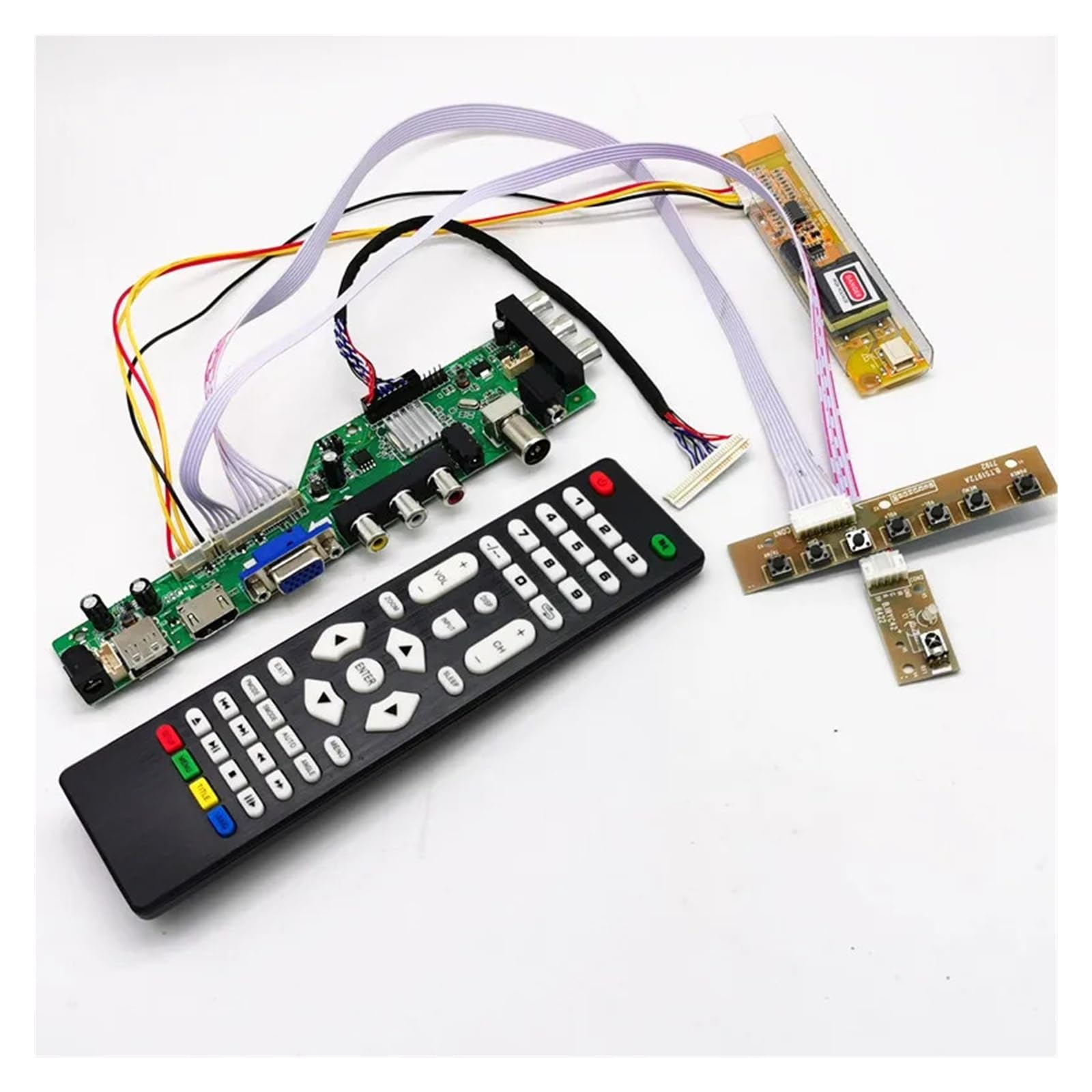
Image: The Xqscvqwfa D3663LUA V56 V59 Universal Driver Board with various cables connected, illustrating a typical setup.
3. Operating Instructions
Input/Output Ports
The driver board features a variety of input and output ports to connect to different devices and receive various signal types:

Image: A diagram illustrating the various input and output ports available on the D3663LUA V56 V59 driver board, including DC IN, USB IN, HDMI, VGA IN, CVBS IN, Audio IN, PC Audio IN, RF IN, EARPHONE, and YPbPr.
- DC IN: Power input (12V 4A).
- USB IN: For software updates and multimedia playback (Movie, MP3, JPEG).
- HDMI: High-Definition Multimedia Interface input.
- VGA IN: Video Graphics Array input for PC connection.
- CVBS IN (AV IN): Composite Video Broadcast Signal input (Yellow for video, Red/White for audio).
- YPbPr: Component video input.
- PC Audio IN: Audio input for PC connection.
- RF IN: Antenna input for DVB-T/T2, DVB-C, and Analog TV signals.
- EARPHONE: 3.5mm audio mini jack output.
Remote Control Functions
Use the provided remote control to navigate menus, change settings, and control media playback.

Image: The remote control unit for the D3663LUA V56 V59 driver board, featuring various buttons for power, channel, volume, input selection, and menu navigation.
- Power Button: Turns the device on or off.
- Number Buttons (0-9): Direct channel selection.
- CH+/CH-: Changes channels up or down.
- VOL+/VOL-: Adjusts volume up or down.
- INPUT/SOURCE: Selects input source (HDMI, VGA, AV, TV, YPbPr).
- MENU: Accesses the main menu for settings.
- Navigation Buttons (Up/Down/Left/Right/ENTER): Navigates through menus and confirms selections.
- EXIT: Exits the current menu or function.
- USB Playback Controls: Play, Pause, Stop, Fast Forward, Rewind for multimedia files.
4. Maintenance
General Care
- Keep the driver board in a clean, dry environment.
- Avoid exposing the board to excessive dust, moisture, or extreme temperatures.
- Ensure adequate ventilation around the board to prevent overheating.
Cleaning
To clean the board, gently wipe it with a soft, dry cloth. Do not use liquid cleaners or solvents, as these can damage components.
Software Updates
The USB slot can be used for updating the board's software. Refer to the manufacturer's website or support for specific instructions and available firmware updates.
5. Troubleshooting
This section addresses common issues you might encounter with your driver board kit.
| Problem | Possible Cause | Solution |
|---|---|---|
| No power/Board not turning on | Incorrect power connection; Faulty power adapter; Damaged board. | Verify DC 12V 4A power adapter is connected correctly with proper polarity. Test with a known good power adapter. Ensure no hot-plugging occurred during power connection. |
| No display on LCD panel | LVDS cable not connected properly; Inverter issue; Incorrect LCD panel resolution/type. | Check LVDS cable connection for secure fit and correct orientation. Ensure inverter is connected and functioning. Confirm your LCD panel is 14-inch/15.4-inch 30-pin LVDS 1280x800. |
| No audio | Incorrect audio input selected; Speaker connection issue; Volume too low. | Verify the correct audio input source is selected. Check speaker connections to the audio output ports. Increase volume using the remote or keyboard. |
| Remote control not working | Dead batteries; Obstruction; Remote sensor issue. | Replace remote control batteries. Ensure no obstructions between remote and board. |
| USB multimedia not playing | Unsupported file format; USB drive issue. | Ensure multimedia files are in supported formats (Movie, MP3, JPEG). Try a different USB drive. |
6. Specifications
Key technical specifications for the D3663LUA V56 V59 Universal Driver Board Kit:
- Controller Chip: LUA63A82
- TV Tuner Chip: R842
- Power Input: DC 12V 4A
- Audio Output Power: 2x8W
- Consumption: Operating mode <= 6W; Standby < 0.3W
- Video Input: TV (DVB-T/T2, DVB-C, ANALOG TV (ATV)), HDMI, VGA, AV IN, YPbPr
- Additional Inputs/Outputs: Audio mini jack 3.5mm, USB
- Supported LCD Panel: 14-inch / 15.4-inch 30-pin LVDS 1280x800 Notebook LCD Panel (FIX30pin 1CH /6bit)
- Model Number: AXY079
- Item Weight: 50 Grams
- Item Dimensions: 0.39 x 0.39 x 0.39 inches
7. Warranty and Support
Warranty Information
This product comes with a standard return policy. For specific details regarding warranty coverage and duration, please refer to your purchase documentation or contact the seller directly.
Technical Support
If you encounter any issues not covered in this manual or require further assistance, please contact the seller or manufacturer's customer support. Provide your product model number (D3663LUA V56 V59) and a detailed description of the problem for efficient support.