
Introduction
Thank you for purchasing the Jocoevol Queen Upholstered LED Bed Frame. This manual provides essential information for the safe assembly, operation, maintenance, and troubleshooting of your new bed frame. Please read all instructions carefully before beginning assembly and retain this manual for future reference.
Safety Information
- Do not exceed the maximum weight capacity of 1000 lbs. Overloading can cause structural damage and potential injury.
- Exercise caution with sharp edges and heavy components during assembly to prevent injury.
- Always unplug the charging station from the power source when not in use or during maintenance.
- Follow all local electrical safety guidelines when using the integrated charging station.
- Keep small parts and packaging materials away from children to prevent choking hazards.
Product Dimensions
Refer to the diagram below for detailed product dimensions to ensure proper placement and fit within your space.
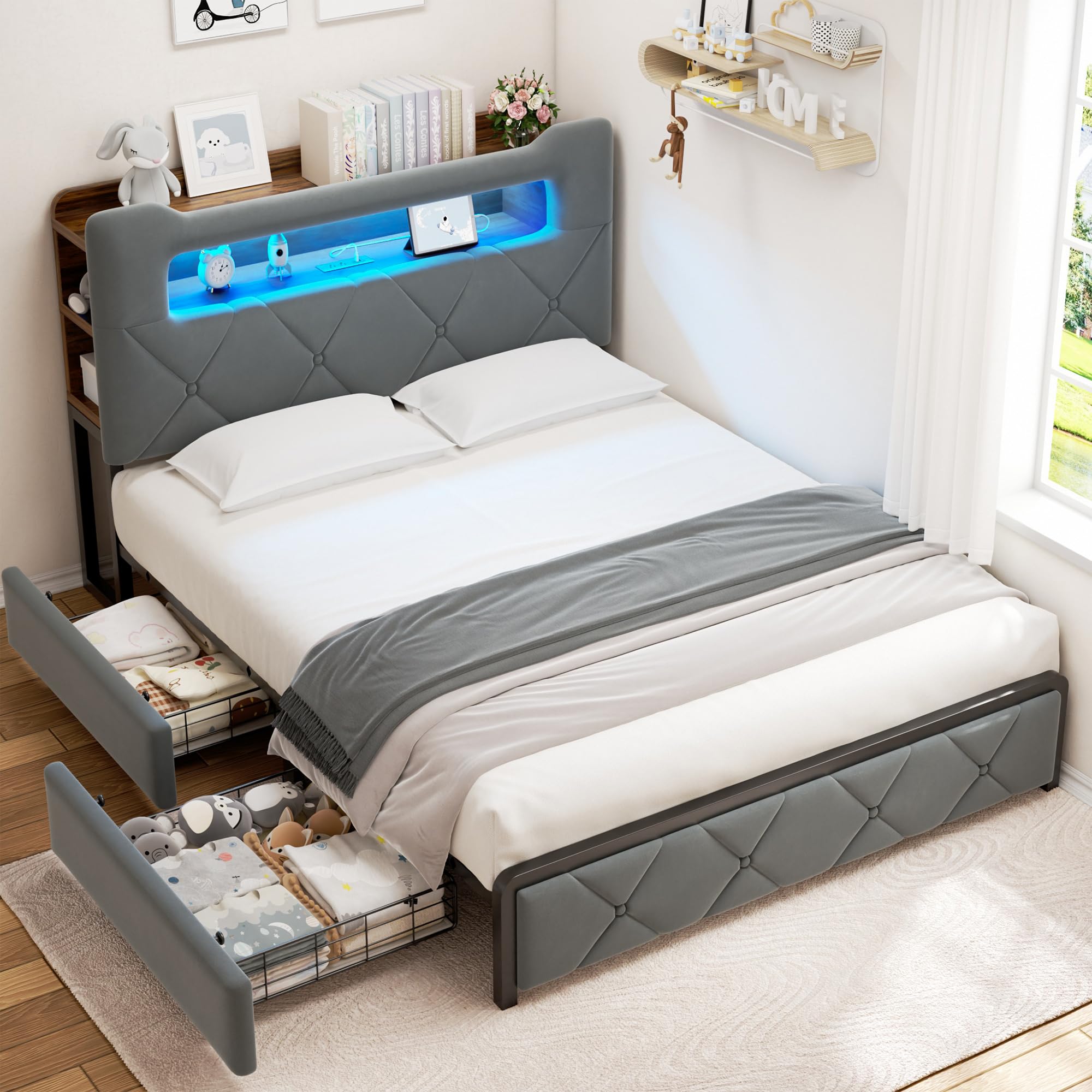
Image: Detailed dimensions of the Queen Upholstered LED Bed Frame. Overall dimensions are approximately 89.8" L x 62.2" W x 45.7" H.
Setup and Assembly
The Jocoevol Queen Bed Frame is designed for straightforward assembly. Please ensure all parts are present before beginning.
- Unpack Components: Carefully unpack all parts and hardware. Verify against the included parts list in your installation manual.
- Follow Instructions: Refer to the detailed installation manual provided in the packaging. It contains clear, step-by-step instructions with labeled parts and all necessary tools. Precision-drilled holes facilitate a fast and effortless process.
- Assemble Frame: Construct the main bed frame structure, ensuring all connections are secure. The heavy-duty metal structure and 12 thickened slats provide robust support.
- Attach Headboard: Secure the upholstered headboard to the frame.
- Install Drawers: Assemble the two storage drawers. These drawers feature a locking design and silent-glide mechanisms.
- Drawer Positioning: The drawers offer flexible positioning. They can be placed in any of the 4 side positions (two on each side) to best suit your room layout. Consider placing both near the footboard for more nightstand space, or on one side if the bed is against a wall.
- Connect Charging Station: Once the headboard is assembled, connect the power cord for the integrated charging station.
- LED Light Installation: Install the RGB LED light strip into the headboard as per the instructions.

Image: The Jocoevol Queen Bed Frame fully assembled, showcasing the storage drawers and the illuminated headboard.
Operating Instructions
A. Smart RGB LED Lights
The integrated RGB LED headboard offers customizable lighting to enhance your bedroom ambiance.
- Control Methods: The LED lights can be controlled via a dedicated mobile application (iOS/Android) or the included remote control.
- Color and Effects: Choose from over 16 million colors and 20+ dynamic lighting effects.
- Music Sync: Utilize the music sync feature to make the lights change rhythmically with your audio.
- Brightness and Timing: Adjust brightness levels and set timing functions for automatic on/off.

Image: The LED lights integrated into the headboard, demonstrating music synchronization and various control options.
B. Charging Station
The 2-tier headboard includes a convenient charging station for your electronic devices.
- Power Outlets: Features two AC outlets (125V/12A) for standard plugs.
- USB Ports: Includes two USB ports (5V/2A) for charging smaller devices.
- Type-C Port: One Type-C port (5V/3A) is available for compatible devices.
- Power Cord: The charging station is powered by a 6.5-foot power cord. Ensure it is securely plugged into a wall outlet.
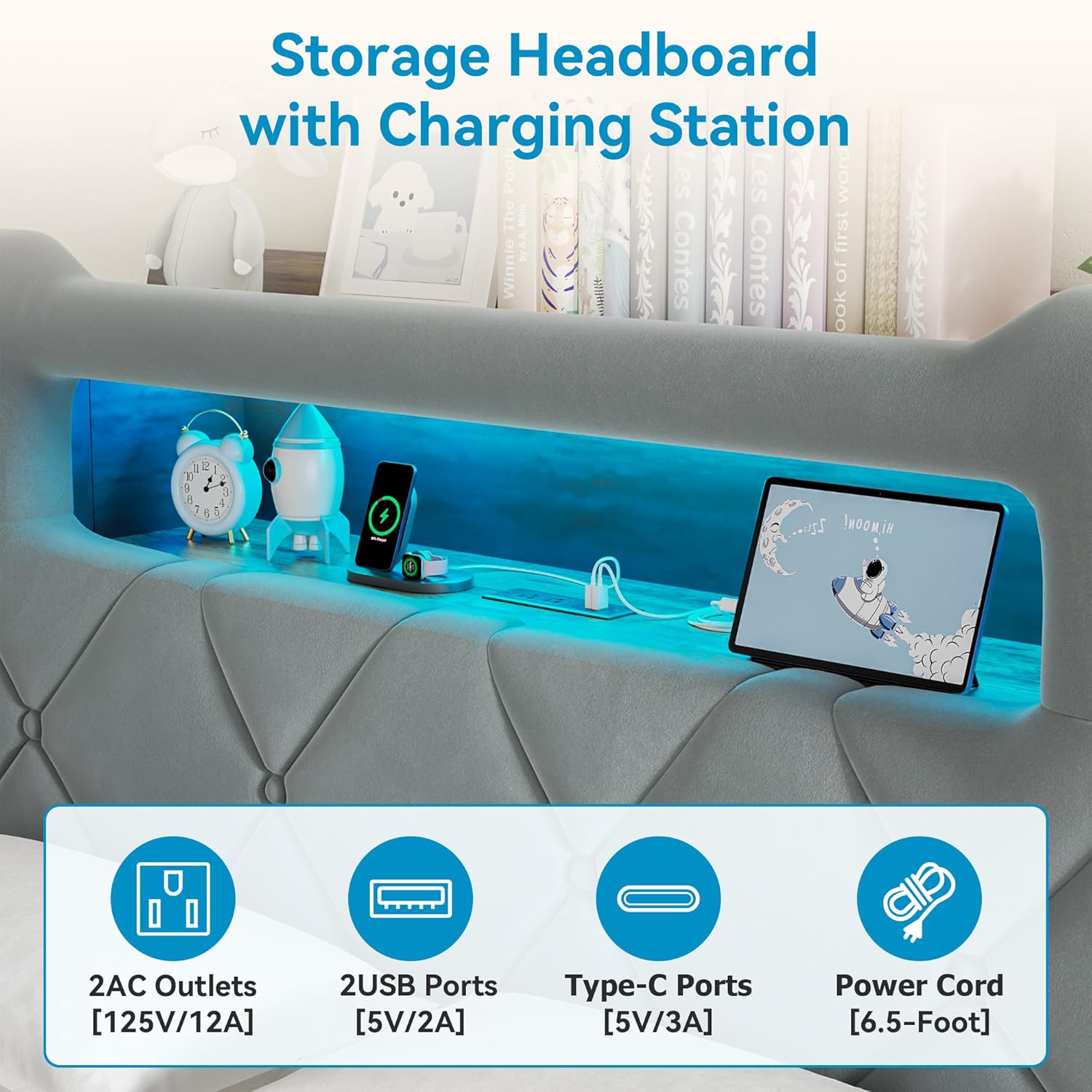
Image: Detailed view of the charging station on the headboard, highlighting the AC, USB, and Type-C ports.
C. Storage Drawers
The bed frame includes two large storage drawers for organizing your belongings.
- Access: Gently pull the drawers out from under the bed frame.
- Locking Mechanism: The drawers feature a locking design to keep them securely in place when not in use. Engage the lock by pushing the drawer fully in until it clicks.
- Dust Mats: Each drawer is equipped with bottom dust mats for cleaner storage and stronger support.

Image: The two lockable storage drawers, demonstrating their capacity and the dustproof pad feature.
D. 2-Tier Headboard Storage
The headboard provides additional storage and display space.
- Top Shelf: The 8.5" wide double-layer shelf is suitable for books, decorative items, or small electronics.
- Side Cubby: An 11.8" deep side cubby offers convenient access to essentials.

Image: Detailed view of the multifunctional headboard, highlighting the 2-tier shelves and side cubby for storage.
Maintenance
- Upholstery Cleaning: For the velvet upholstery, gently spot clean with a damp cloth and mild detergent. Avoid harsh chemicals or excessive moisture. Allow to air dry completely.
- Frame Cleaning: Wipe metal and wooden parts with a soft, dry cloth.
- Drawer Maintenance: Periodically check the drawer glides for any obstructions and ensure they operate smoothly. Clean dust mats as needed.
- LED Lights: The LED lights are designed for long-term use. If dust accumulates, gently wipe the light strip with a dry, soft cloth. Do not use liquid cleaners directly on the lights.
- Hardware Check: Periodically inspect all bolts and screws to ensure they remain tight. Re-tighten if necessary to maintain stability.
Troubleshooting
| Problem | Possible Cause | Solution |
|---|---|---|
| LED lights not turning on or flickering. | Loose connection, power issue, remote battery. | Check all power connections. Ensure the remote control has fresh batteries. Verify the power adapter is functioning. |
| Charging station not providing power. | Power cord unplugged, circuit breaker tripped. | Ensure the 6.5-foot power cord is securely plugged into a working wall outlet. Check your home's circuit breaker. |
| Drawers are difficult to open/close or make noise. | Obstruction in glide, misaligned, dust/debris. | Inspect the drawer glides for any obstructions. Ensure the drawers are properly aligned on their tracks. Clean any dust or debris from the glides and dust mats. |
| Bed frame makes creaking noises. | Loose hardware, mattress shifting. | Check and tighten all assembly bolts and screws. The silent strips are designed to minimize noise; ensure they are correctly installed and holding slats in place. |
Specifications
| Brand | Jocoevol |
| Model Number | FZZH24103001 |
| Size | Queen |
| Material | Velvet Upholstered, Metal Frame |
| Color | Grey |
| Product Dimensions (L x W x H) | 2.28L x 1.58W x 1.16H Meters (approx. 89.8" L x 62.2" W x 45.7" H) |
| Weight Capacity | 1000 lbs |
| Item Weight | 51 kg 500 g |
| Special Features | Bookcase Headboard, Charging Station (2 AC, 2 USB, 1 Type-C), Side Storage, Smart RGB LED, 2 Storage Drawers |
| Assembly Required | Yes |
| Included Components | Drawer, Headboard, Slats, Installation Manual |
Warranty and Support
Jocoevol is committed to providing quality products and customer satisfaction. While specific warranty details are not provided in this document, our dedicated support team is available to assist you with any questions or concerns before or after purchase. We aim to respond to inquiries within 24 hours.
For assistance, please refer to the contact information provided with your purchase or on the Jocoevol official website.