
1. Introduction
This manual provides comprehensive instructions for the installation, operation, and maintenance of your SIXWIN Android 13 Car Stereo. Please read this manual thoroughly before using the product to ensure proper functionality and safety. This unit is specifically designed for Renault Clio 3rd generation vehicles manufactured between 2005 and 2017.
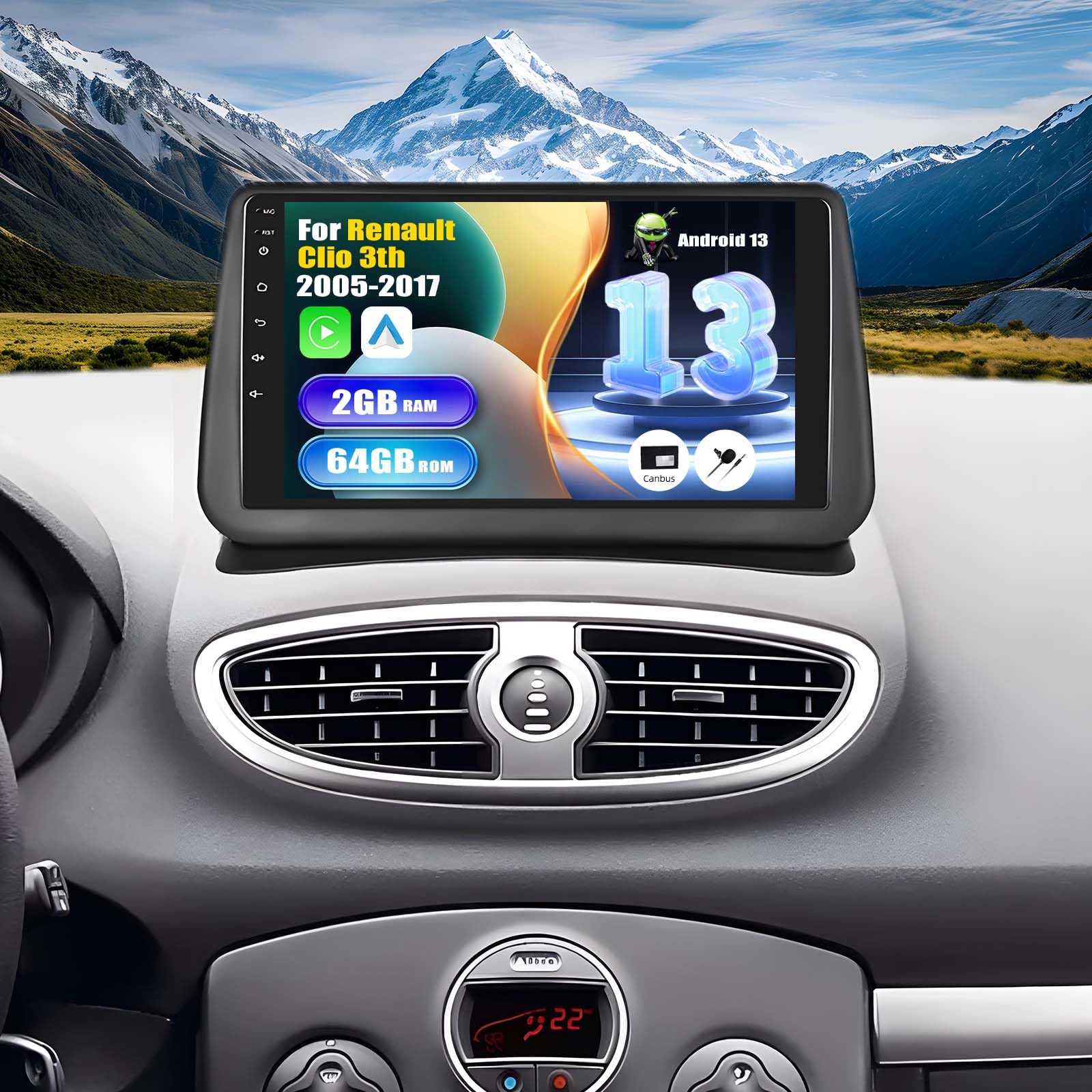
Figure 1: SIXWIN Android 13 Car Stereo Main Unit
2. What's in the Box
Verify that all components listed below are included in your package:
- 1 x Car Player + 1 x Canbus
- 1 x Power Cable + 1 x RCA Cable
- 1 x Rear Camera Input Cable + 2 x USB Cables
- 1 x GPS Antenna + 1 x Microphone
- 1 x Mounting Bracket + 1 x Screwdriver + 1 x Instruction Manual

Figure 2: Package Contents and Dimensions
3. Setup and Installation
Professional installation is recommended. Refer to the included detailed instruction manual for specific wiring diagrams and vehicle-specific installation steps. Ensure the vehicle's power is disconnected before beginning installation.
3.1. Installation Overview

Figure 3: Installation Display (Before and After)
3.2. Initial Power-Up and Configuration
After installation, power on the unit. The system will boot to the Android 13 interface. Navigate through the initial setup wizard to configure language, time, and network settings.

Figure 4: Android 13 Interface
4. Operating Instructions
4.1. Wireless CarPlay and Android Auto
The unit supports both Wireless CarPlay for iPhone and Wireless Android Auto for Android smartphones. Connect your phone via Bluetooth/WiFi for seamless integration. Use voice commands or the touchscreen for navigation, calls, messages, and music.
Video 1: How to connect Wireless CarPlay and Android Auto

Figure 5: Wireless/Wired Apple CarPlay

Figure 6: Wireless/Wired Android Auto
4.2. Mirror Link Functionality
Synchronize your smartphone screen with the car stereo display. Android phones can connect via USB/WiFi, and iOS phones via WiFi. This allows for easy video playback and app mirroring.

Figure 7: Mirror Link for Android & iOS Phones
4.3. GPS Navigation and WiFi
The unit features an integrated GPS receiver supporting online and offline maps for convenient navigation. Connect to WiFi or a mobile hotspot to access internet applications like YouTube, Spotify, and more.

Figure 8: GPS Navigation & WiFi
4.4. Bluetooth and FM/RDS Radio
Utilize the independent Bluetooth mode for hands-free calls, phone book synchronization, and music playback. The FM/RDS tuner provides real-time traffic, news, and weather updates.

Figure 9: Bluetooth Hands-Free

Figure 10: FM/RDS Radio
4.5. Steering Wheel Control
Maintain full control of the car stereo without removing your hands from the steering wheel. Easily adjust radio and music settings for a safer driving experience.

Figure 11: Steering Wheel Control Interface
4.6. Rear Camera Support
The included HD reversing camera activates automatically when the vehicle is put into reverse, providing a clear, wide-angle view for safer parking. The camera is built with IP67 waterproof protection.

Figure 12: Rear Camera View
5. Maintenance
To ensure the longevity and optimal performance of your car stereo, keep the screen clean using a soft, dry cloth. Avoid using harsh chemicals or abrasive materials. Regularly check for software updates to enhance functionality and security. Ensure all cables are securely connected.
6. Troubleshooting
6.1. Steering Wheel Control Issues
If your car's steering wheel buttons are not functioning correctly after installation, follow these steps:
- Keep your original car's small screen properly connected. Do not remove the original small screen from your vehicle.
- Connect the small yellow connector A (from the car) to B (on the power harness).
- Select the protocol as follows:
1) Navigate to: [Settings] -> [Factory Settings] (Password: 000000)
-> Select [Protocol Settings]
2) Select the corresponding protocol in this order:
- Manufacturer: Hiword
- Car Series: Renault-Dacia
- Car Model: Clio3

Figure 13: Troubleshooting Steering Wheel Control Issues
6.2. General Troubleshooting
For other issues, refer to the comprehensive troubleshooting section in the full instruction manual provided with your product. Ensure all connections are secure and the device has sufficient power. If problems persist, contact customer support.
7. Specifications
| Feature | Detail |
|---|---|
| Brand | SIXWIN |
| Model Number | P1=2+64G |
| Operating System | Android 13 |
| RAM + ROM | 2GB (RAM) + 64GB (ROM) |
| Screen Size | 9 Inches |
| Screen Resolution | 1024*600 |
| Processor | 4 Core |
| Connectivity Technology | Bluetooth, Wi-Fi |
| Special Features | Integrated Bluetooth, Wireless/Wired CarPlay, Wireless/Wired Android Auto, GPS, WiFi |
| Compatible Devices | iOS Smartphones, Android Smartphones |
| Audio Output Mode | Stereo |
| Surround Sound Channels | 5.1 |
| Video Encoding | H.264, MPEG-4, others |
| Internet Applications | YouTube, Spotify |
| Control Method | Touch |
| Audio Output Type | RCA, Bluetooth, FM/RDS |
| Supported Formats | AVI, WAV, WMA |
| Item Weight | 1.57 Kilograms |
| Country of Origin | China |
8. Warranty and Support
Your SIXWIN Car Stereo comes with a 2-year warranty and a 30-day return policy. We offer 24-hour customer service to assist with any inquiries or issues.
For further assistance or to obtain a digital copy of the user manual, please contact our support team at: SIXWINVIP@126.com

