
1. Introduction
This manual provides essential information for the safe and efficient operation of your Friedrich ZHP14DC 14000 BTU Portable Air Conditioner with Heat Pump. This unit is designed to offer year-round comfort through its cooling, heating, dehumidifying, and fan functions. Please read this manual thoroughly before installation and use, and retain it for future reference.
2. Safety Information
Always observe basic safety precautions when using electrical appliances to reduce the risk of fire, electric shock, or injury.
- Ensure the power supply matches the voltage specified on the unit's rating label.
- Do not operate the unit with a damaged power cord or plug.
- Do not block air inlets or outlets. Maintain adequate clearance around the unit.
- Do not insert fingers or foreign objects into the air vents.
- Keep the unit away from flammable materials and heat sources.
- Unplug the unit before cleaning or performing any maintenance.
- This appliance is not intended for use by persons (including children) with reduced physical, sensory or mental capabilities, or lack of experience and knowledge, unless they have been given supervision or instruction concerning use of the appliance by a person responsible for their safety.
3. Package Contents
Verify that all items are present in the packaging:
- Friedrich ZHP14DC Portable Air Conditioner Unit
- LCD Remote control
- Window kit (includes window slider, exhaust hoses, and adapters)
- User Manual
4. Product Overview
The Friedrich ZHP14DC is a versatile 4-in-1 unit offering cooling, heating, dehumidification, and fan-only operation. It features Precision Inverter Technology for energy efficiency and a Dual-Hose Design for enhanced performance.
Unit Components

Figure 4.1: Front view of the Friedrich ZHP14DC portable air conditioner. The unit is white with a silver top panel and the Friedrich logo centered on the front.
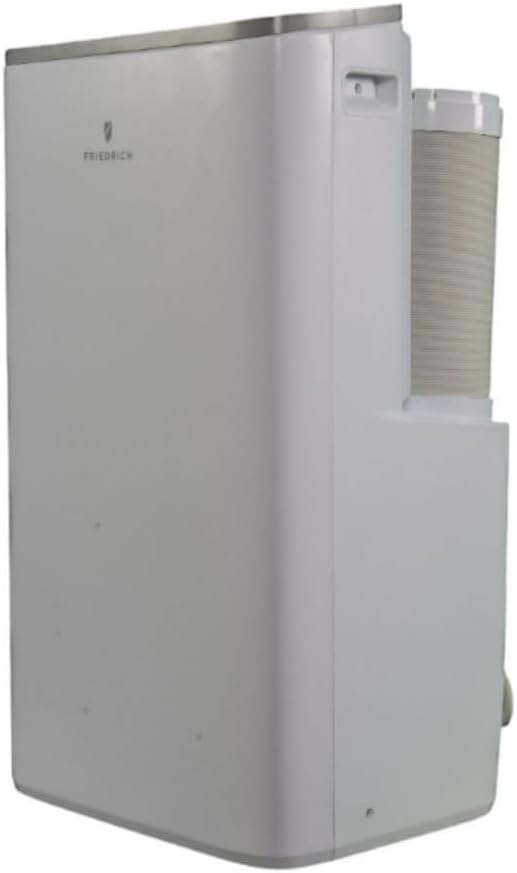
Figure 4.2: Side view of the Friedrich ZHP14DC, showing one of the dual exhaust hoses connected to the rear of the unit.

Figure 4.3: Rear view of the Friedrich ZHP14DC, illustrating the dual exhaust hose connections and the power cord management.

Figure 4.4: Top view of the Friedrich ZHP14DC, highlighting the integrated control panel and the adjustable air outlet louvers.
Remote Control

Figure 4.5: The LCD remote control for the Friedrich ZHP14DC, featuring buttons for LED, Swing, Speed, Sleep, Timer, Mode, and power.
5. Setup and Installation
Proper installation is crucial for optimal performance of your portable air conditioner.
5.1 Unit Placement
- Place the unit on a flat, stable surface.
- Ensure there is at least 20 inches (50 cm) of clearance around the unit for proper airflow.
- Position the unit near a window for exhaust hose installation and a grounded electrical outlet.
5.2 Window Kit Installation
- Assemble the window slider kit to fit your window opening. The kit is adjustable for various window sizes.
- Secure the window slider kit in the open window, ensuring a tight seal to prevent air leakage.
- Attach the exhaust hose adapters to both ends of the flexible exhaust hoses.
- Connect one end of each exhaust hose to the corresponding ports on the back of the portable AC unit.
- Connect the other end of each exhaust hose to the openings in the window slider kit. Ensure all connections are secure and airtight.
- For dehumidification mode, connect a drainage hose (not included) to the continuous drain port if continuous drainage is desired.
6. Operation
Your Friedrich ZHP14DC offers multiple operating modes and smart control options.
6.1 Control Panel and Remote Control
The unit can be controlled via the integrated touch display on the top of the unit or the included LCD remote control. The remote control provides full functionality.
6.2 Operating Modes
- Cool Mode: Provides cooling for spaces up to 700 sq. ft. Set your desired temperature using the up/down arrows.
- Heat Mode: Utilizes the heat pump function to provide heating. Set your desired temperature.
- Dehumidify Mode: Removes up to 65 pints of moisture per day. The fan operates at a low speed. Connect a drainage hose for continuous operation.
- Fan Mode: Circulates air without cooling or heating. Select from three fan speeds (High, Medium, Low).
6.3 Smart Features
- Wi-Fi Control: Connect the unit to the ComfortPro App for remote control via your smartphone.
- Voice Control: Compatible with Amazon Alexa and Google Home for convenient voice commands.
- Smart Scheduling: Program temperature changes and operating times to optimize energy use and comfort.
- Auto-Restart: The unit automatically resumes its last settings after a power outage.
7. Maintenance
Regular maintenance ensures the longevity and efficiency of your portable air conditioner.
7.1 Air Filter Cleaning
The air filter should be cleaned every two weeks or more frequently depending on usage and air quality.
- Unplug the unit from the power outlet.
- Locate and remove the air filter(s) from the back or side of the unit.
- Wash the filter with warm, soapy water. Rinse thoroughly.
- Allow the filter to air dry completely before reinstalling. Do not expose to direct sunlight.
7.2 Unit Cleaning
- Wipe the exterior of the unit with a soft, damp cloth. Do not use harsh chemicals or abrasive cleaners.
- Ensure the unit is completely dry before plugging it back in.
7.3 Storage
If storing the unit for an extended period:
- Drain any accumulated water from the unit.
- Clean the air filter.
- Store the unit in a dry, cool place, preferably in its original packaging.
8. Troubleshooting
Refer to the following table for common issues and their solutions.
| Problem | Possible Cause | Solution |
|---|---|---|
| Unit does not turn on | No power; Power cord not plugged in; Circuit breaker tripped | Check power connection; Reset circuit breaker |
| Unit not cooling/heating effectively | Air filter dirty; Exhaust hoses not properly installed; Room too large; Doors/windows open | Clean air filter; Ensure hoses are sealed; Close doors/windows; Check room size against unit capacity |
| Water leakage | Drain plug not secure; Unit not level; Drainage hose blocked (if applicable) | Check drain plug; Ensure unit is on a level surface; Clear drainage hose |
| Excessive noise | Unit not on a level surface; Obstruction in fan; Air filter dirty | Place on a level surface; Check for obstructions; Clean air filter |
9. Specifications
| Feature | Specification |
|---|---|
| Brand | Friedrich |
| Model Number | ZHP14DC |
| Cooling Power | 14000 BTU |
| Item Weight | 69 pounds |
| Product Dimensions | 18.23 x 33.3 x 15 inches |
| Noise Level | 53 Decibels |
| Voltage | 115 Volts |
| Wattage | 1360 watts |
| Refrigerant | R-32 |
| Special Features | Built-in Wi-Fi control (ComfortPro App), Smart home/voice command compatibility, Smart touch display |
10. Warranty and Support
This Friedrich product comes with a limited warranty. For detailed warranty information, please refer to the warranty card included with your product or visit the official Friedrich website. For technical support, service inquiries, or to purchase replacement parts, please contact Friedrich customer service.


