
1. Introduction
This manual provides essential information for the proper installation, operation, and maintenance of your Xqscvqwfa TP.MS3393.PB801 Three-in-one TV Motherboard. This board is designed to offer system stability, high-definition support, and includes anti-static and overvoltage protection. It is intended for use as a replacement or upgrade component in compatible display equipment, specifically for LSC320AN10 panels with 1366x768 resolution.

Figure 1: Overview of the TP.MS3393.PB801 TV Motherboard. This image displays the main components and layout of the circuit board.
2. Safety Information
Please read and understand all safety instructions before attempting installation or operation. Failure to follow these guidelines may result in electric shock, fire, or damage to the product or other equipment.
- Professional Installation Recommended: Installation of this TV motherboard requires technical expertise. It is highly recommended that installation be performed by a qualified technician.
- Power Disconnection: Always disconnect the power supply from the television and any connected devices before beginning installation or maintenance.
- Static Electricity: Electronic components are sensitive to static electricity. Use an anti-static wrist strap and work on an anti-static mat to prevent damage.
- Component Handling: Handle the motherboard by its edges. Avoid touching components directly.
- Ventilation: Ensure adequate ventilation around the television after installation to prevent overheating.
- Moisture: Keep the motherboard and television away from liquids and excessive moisture.
3. Package Contents
Verify that all items are present and in good condition upon opening the package.
- Xqscvqwfa TP.MS3393.PB801 Three-in-one TV Motherboard (1 unit)
- (Note: Additional accessories such as cables or mounting hardware may not be included and should be sourced separately if needed.)
4. Setup and Installation
This section outlines the general steps for installing the TP.MS3393.PB801 TV Motherboard. Due to the technical nature of this process, professional installation is strongly advised.
- Preparation: Disconnect the TV from all power sources and external devices. Place the TV face down on a soft, clean surface to protect the screen.
- Access the Motherboard: Remove the back cover of the TV to expose the internal components. Carefully identify the existing motherboard.
- Disconnect Cables: Systematically disconnect all cables connected to the old motherboard, including power, LVDS (panel cable), backlight, speakers, and input/output cables. Take photos or make notes to remember connection points.
- Remove Old Motherboard: Unscrew and carefully remove the old motherboard from the TV chassis.
- Install New Motherboard: Position the TP.MS3393.PB801 motherboard in the TV chassis, aligning it with the mounting holes. Secure it with the appropriate screws. Ensure all standoffs are correctly seated.
- Reconnect Cables: Reconnect all cables to the new motherboard. Pay close attention to the orientation of connectors, especially the LVDS cable. Ensure all connections are firm and secure.
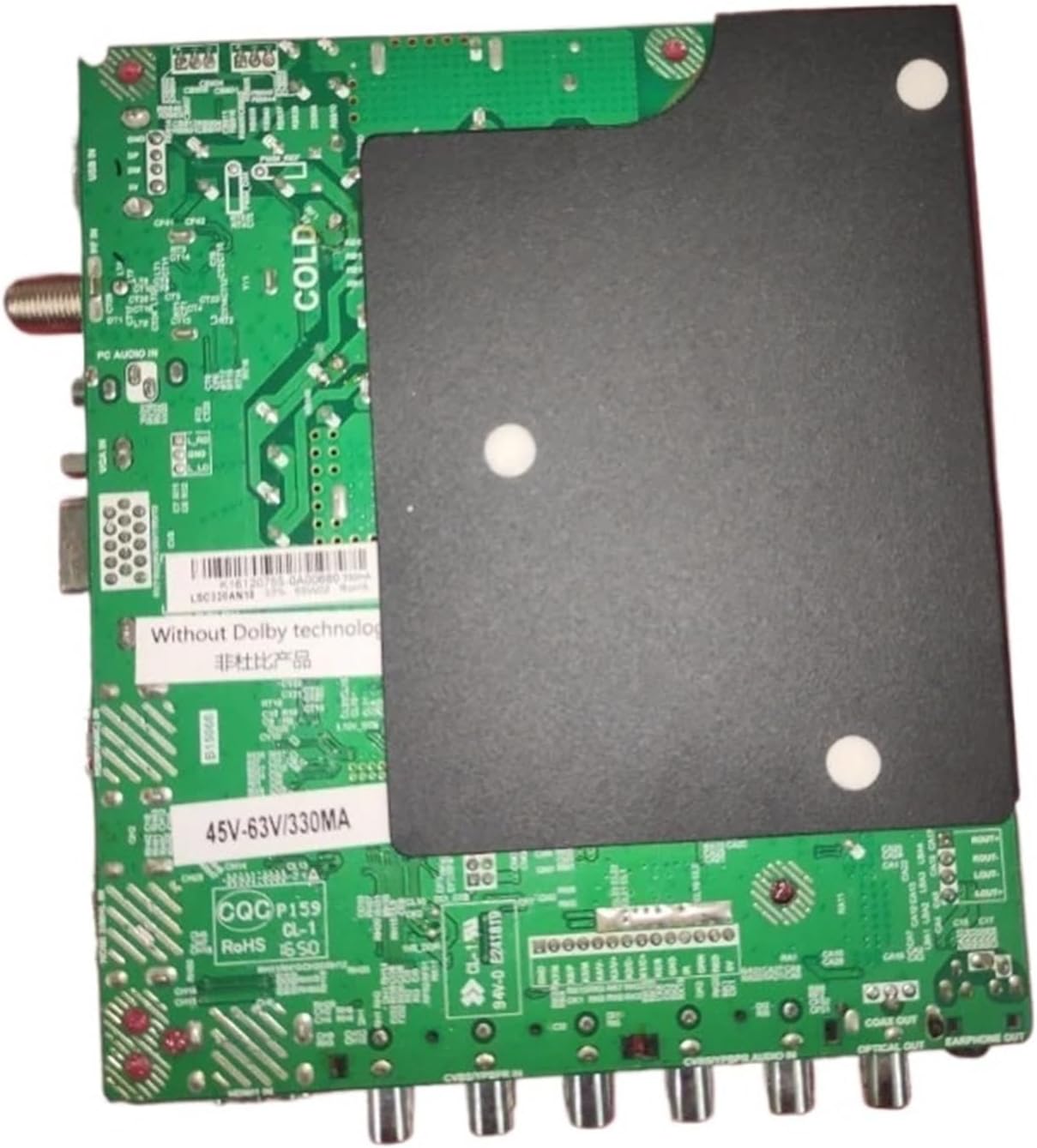
Figure 2: Rear view of the TP.MS3393.PB801 TV Motherboard. This shows the mounting points and the protective cover over sensitive components.
- Initial Power-Up: Before reattaching the back cover, connect the TV to power and perform a brief test to ensure basic functionality (e.g., power on, display backlight).
- Final Assembly: If the initial test is successful, disconnect power, reattach the TV's back cover, and secure all screws.
5. Operating Instructions
The TP.MS3393.PB801 motherboard functions as the central control unit for your television. Once installed, its operation is integrated with the TV's firmware and remote control. There are no direct user controls on the motherboard itself.
- Power On/Off: Use the TV's remote control or power button to turn the television on or off.
- Input Selection: Use the TV's remote control to select desired input sources (HDMI, VGA, USB, etc.) connected to the motherboard.
- Menu Navigation: Access and navigate the TV's on-screen display (OSD) menu using the remote control to adjust picture settings, sound, and other TV functions.
- Firmware Updates: If firmware updates are available for your specific TV model and this motherboard, follow the TV manufacturer's instructions for updating. This typically involves downloading firmware to a USB drive and inserting it into the TV's USB port.
6. Maintenance
Proper maintenance ensures the longevity and optimal performance of your TV motherboard.
- Cleaning: Periodically, with the TV disconnected from power, use a soft, dry cloth to gently wipe away dust from the TV's ventilation openings. Do not use liquid cleaners directly on the motherboard or inside the TV.
- Ventilation: Ensure that the TV's ventilation slots are not blocked by objects, walls, or furniture. Adequate airflow is crucial to prevent overheating of the motherboard and other components.
- Environmental Conditions: Operate the TV in a dry, well-ventilated area, away from direct sunlight, extreme temperatures, and high humidity.
7. Troubleshooting
If you encounter issues after installing the TP.MS3393.PB801 motherboard, refer to the following common troubleshooting steps. For complex problems, consult a qualified technician.
| Problem | Possible Cause | Solution |
|---|---|---|
| No Power | Loose power connection, faulty power supply, incorrect installation. | Check all power cable connections. Verify the TV's power supply unit is functioning. Re-check motherboard installation. |
| No Picture / Black Screen | Loose LVDS cable, incorrect panel settings, faulty backlight. | Ensure the LVDS cable is securely connected and correctly oriented. Verify panel type compatibility. Check backlight connections. |
| No Sound | Loose speaker cables, incorrect audio settings. | Check speaker connections to the motherboard. Ensure audio settings in the TV menu are correct. |
| Distorted Picture | Incorrect panel resolution setting, damaged LVDS cable. | Verify the TV's resolution settings match the panel (1366x768). Inspect LVDS cable for damage. |
| Remote Control Not Working | IR receiver not connected, remote batteries dead. | Ensure the IR receiver cable is properly connected to the motherboard. Replace remote control batteries. |
8. Specifications
Key technical specifications for the Xqscvqwfa TP.MS3393.PB801 TV Motherboard.

Figure 3: Detail of the TP.MS3393.PB801 motherboard label, indicating compatibility with LSC320AN10 and power specifications.
| Feature | Detail |
|---|---|
| Model Number | TP.MS3393.PB801 |
| Compatible Panel | LSC320AN10 |
| Resolution Support | 1366x768 |
| Power Output | 65W |
| Voltage Range | 45-65V |
| Current | 330mA |
| Product Dimensions | 0.39 x 0.39 x 0.39 inches (approximate) |
| Item Weight | 1.76 ounces |
| Features | System stability, High definition support, Anti-static and overvoltage protection |
9. Warranty and Support
For warranty information and technical support, please refer to the retailer or manufacturer's official website where the product was purchased. Keep your proof of purchase for any warranty claims.
If you require assistance with installation or troubleshooting beyond the scope of this manual, it is recommended to contact a professional television repair service.