
1. Introduction
Thank you for choosing the GRUSIGN End Table with Charging Station. This manual provides essential information for the safe assembly, operation, and maintenance of your new furniture. Please read these instructions carefully before use and retain them for future reference.
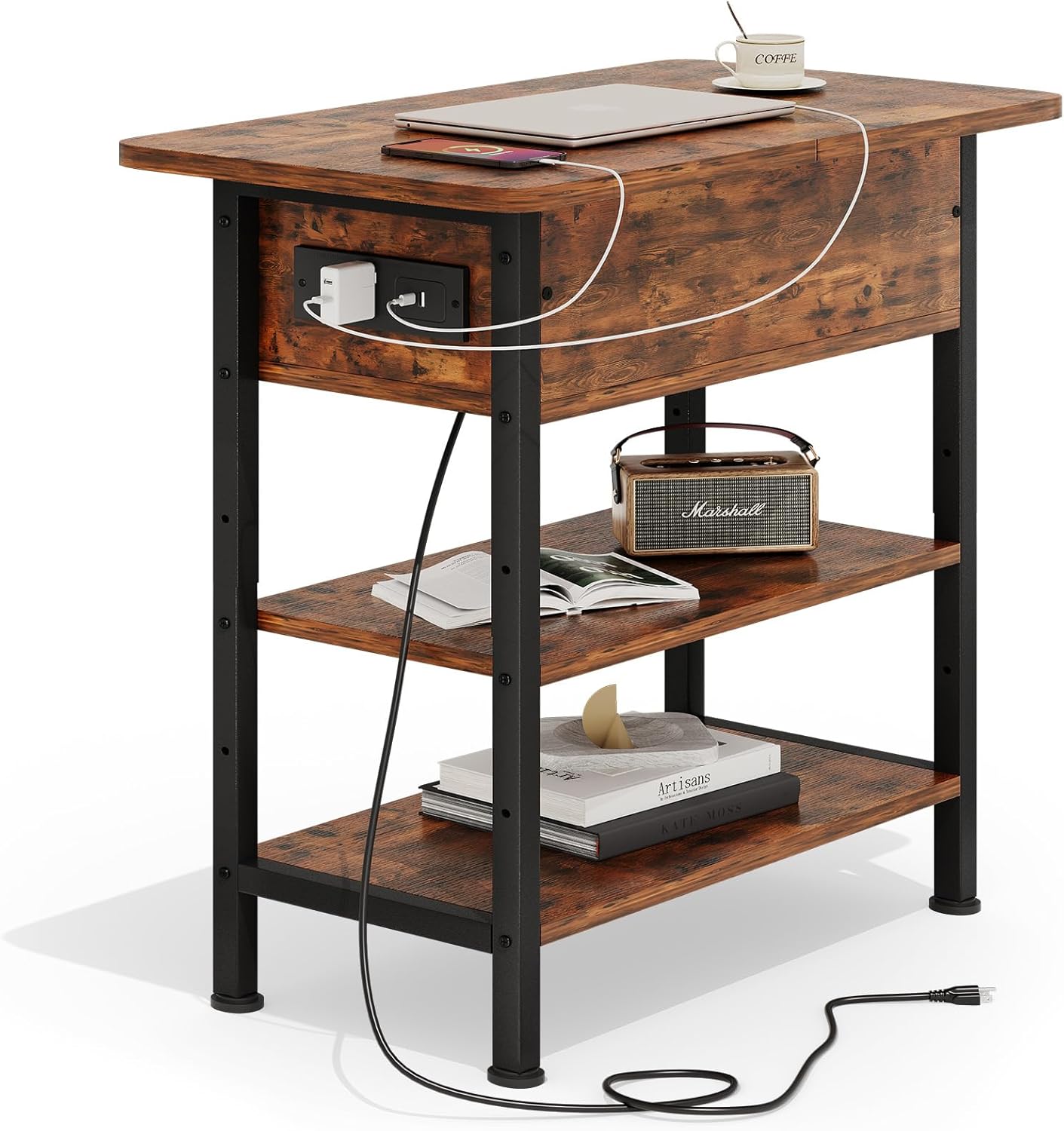
Image 1.1: The GRUSIGN End Table with Charging Station, showcasing its compact design and integrated power features.
2. Safety Information
- Electrical Safety: The charging station is designed on the left vertical side to minimize the risk of electric shock from accidental liquid spills. Ensure the power cord is not pinched or damaged during assembly or use. Do not overload the outlets.
- Injury Prevention: The narrow end table features rounded corners and smooth edges to prevent accidental injury. Handle all components with care during assembly.
- Stability: This table is equipped with four adjustable feet. Ensure all feet are properly adjusted to maintain stability on uneven surfaces and prevent wobbling.
- Weight Capacity: The tabletop has a weight capacity of 60 lb (27.2 kg). Each open shelf can bear up to 20 lb (9 kg). Do not exceed these limits to prevent damage or injury.
- Indoor Use Only: This product is designed for indoor residential use only.
3. Package Contents
Please verify that all components are present before beginning assembly. If any parts are missing or damaged, please contact customer support.
- MDF Wood Panels (various sizes for tabletop, shelves, and storage box)
- Metal Frame Components
- Charging Station (with 2 USB ports and 1 AC outlet)
- 4.9-foot Power Supply Cord
- Adjustable Feet (4x)
- Assembly Hardware (screws, bolts, etc.)
- Installation Tool (Allen wrench, screwdriver)
- Instruction Manual
4. Setup and Assembly
Assembly is straightforward with the provided instructions and tools. It is recommended to assemble the table on a soft, clean surface to prevent scratches.
4.1. Assembly Steps
- Identify all components and hardware by matching them with the parts list in the included manual.
- Assemble the inner storage box structure using the designated wood panels and screws.
- Attach the metal frame components to the assembled storage box and the bottom shelf.
- Secure the remaining shelves to the metal frame.
- Install the charging station into its designated slot on the side of the table.
- Attach the adjustable feet to the bottom of the table legs.
- Ensure all screws are tightened securely, but do not overtighten.
4.2. Visual Assembly Guide
For a visual guide, please refer to the official assembly video below:
Video 4.1: Official assembly guide for the GRUSIGN End Table, demonstrating step-by-step construction.

Image 4.2: Key features for assembly and use, including rounded corners, flip hinge mechanism, integrated USB and power outlets, and adjustable feet for stability.
5. Operating Instructions
5.1. Using the Charging Station
- Plug the table's 4.9-foot power cord into a standard wall outlet.
- The charging station, located on the left vertical side, provides 2 USB ports (5V/2A) and 1 AC outlet (120V/12A).
- Connect your devices (phones, tablets, lamps, etc.) to the appropriate ports for convenient charging.

Image 5.1: A detailed view of the integrated charging station, highlighting the USB and AC power options.
5.2. Utilizing Storage Features
- The tabletop features a flip-top section that reveals a hidden storage compartment, ideal for small items like remote controls, books, or charging cables.
- The two open shelves below provide additional space for displaying decorative items, books, or other essentials.

Image 5.2: The flip-top storage compartment is shown open, providing a discreet space for various items.
6. Maintenance
- Cleaning: Wipe the table surfaces with a soft, damp cloth. Avoid using harsh chemicals or abrasive cleaners, as these may damage the finish.
- Spill Management: In case of liquid spills, especially near the charging station, immediately unplug the table from the wall outlet and wipe the area dry.
- Regular Checks: Periodically check all screws and connections to ensure they remain tight. Retighten if necessary.
7. Troubleshooting
- Charging Station Not Working:
- Ensure the table's main power cord is securely plugged into a functional wall outlet.
- Check if the device you are trying to charge is properly connected to the USB port or AC outlet.
- Avoid overloading the charging station.
- Table Wobbles:
- Adjust the four leveling feet at the bottom of the table legs to stabilize it on uneven floors.
- Verify that all assembly screws are tightened.
- Missing Parts or Assembly Issues:
- If you encounter any quality problems, assembly difficulties, or missing parts, please contact GRUSIGN customer support for assistance.
8. Specifications
| Feature | Detail |
|---|---|
| Brand | GRUSIGN |
| Model Number | BJ-ZDG-BRN |
| Product Dimensions (L x W x H) | 24"D x 11.8"W x 23.8"H (61cm x 30cm x 60.5cm) |
| Item Weight | 14.3 Pounds (6.5 kg) |
| Tabletop Weight Capacity | 60 lb (27.2 kg) |
| Shelf Weight Capacity (each) | 20 lb (9 kg) |
| Frame Material | Metal |
| Top Material Type | Engineered Wood |
| Charging Station Output | 2x USB Ports (5V/2A), 1x AC Outlet (120V/12A) |
| Power Cord Length | 4.9 feet (1.5 meters) |
| Number of Drawers | 1 (flip-top storage compartment) |
| Included Components | Charging Station, Installation Tool |

Image 8.1: Detailed dimensions and weight capacities of the end table.
9. Warranty and Support
For any questions, concerns, or support regarding your GRUSIGN End Table with Charging Station, please contact GRUSIGN customer service. Refer to your purchase documentation for specific warranty details and contact information.
You can also visit the official GRUSIGN store for more information: GRUSIGN Store