
1. Safety Information
Please read and understand all instructions before beginning installation. Failure to follow these instructions may result in electric shock, fire, or personal injury.
- Electrical Safety: Ensure the power is turned off at the circuit breaker before installation or servicing. All wiring must be in accordance with national and local electrical codes. If you are unfamiliar with wiring, consult a qualified electrician.
- Mounting: The ceiling fan must be mounted to a structure capable of supporting the fan's weight (minimum 35 lbs). Use only the outlet box marked "Acceptable for Fan Support of 35 lbs (15.9 kg) or less."
- Blade Clearance: Ensure there is at least 7 feet (2.1 meters) of clearance from the floor to the fan blades and at least 30 inches (76 cm) from the wall to the blade tips.
- Bulb Installation: Always turn off power before installing or replacing bulbs. Use E26 base bulbs of appropriate size to prevent contact with fan blades.
- Remote Control: Keep the remote control away from water and extreme temperatures.
2. Package Contents
Verify that all components are present before proceeding with installation.
- Ceiling Fan Motor Housing with Light Kit and Caged Lampshade
- 5 Wooden Fan Blades
- Downrods (3.9-inch and 7.8-inch options)
- Remote Control with Wall Mount
- Mounting Bracket and Hardware (screws, wire nuts)
- Instruction Manual
Note: 5 E26 base bulbs are required but not included in the package.

This image displays the various components included with the fan, such as the motor housing, individual fan blades, two different length downrods (3.9 inches and 7.8 inches), and the remote control. Key dimensions of the assembled fan are also shown, including the 52-inch diameter and 23.2-inch height with the longer downrod. It also indicates that E26 bulbs are not included.
3. Product Features
- Industrial Design: Features a durable black metal frame, 5 wooden blades, and a vintage caged lampshade, blending traditional and industrial aesthetics.
- Reversible DC Motor: Equipped with a quiet DC motor that allows for 6 adjustable wind speeds and reversible airflow. The reverse function enables downward airflow for cooling in summer and upward airflow to circulate warm air in winter.
- Quiet Operation: The DC motor operates with minimal noise (less than 35dB), ensuring a peaceful environment for sleep or relaxation.
- Integrated Lighting: Includes a light kit designed for 5 E26 base bulbs (bulbs not supplied). Compatible with LED, CFL, or incandescent bulb types.
- Remote Control: Full-function remote control provides convenient operation of fan speeds, light on/off, natural wind mode, beep/mute, and a timer function (1, 2, or 4 hours).
- Adjustable Height: Comes with two downrod options (3.9 inches and 7.8 inches) to accommodate different ceiling heights.

This banner image visually summarizes the main features of the ceiling fan, such as remote control operation, 6 fan speeds, a reversible motor for seasonal use, low noise output, and a timer function.

This image demonstrates the quiet operation of the fan, depicting a child sleeping undisturbed. A graphic compares the fan's noise level (35dB) to other common sounds like a leaf fall (10dB), library (30dB), and normal talking (45dB), highlighting its low noise output.
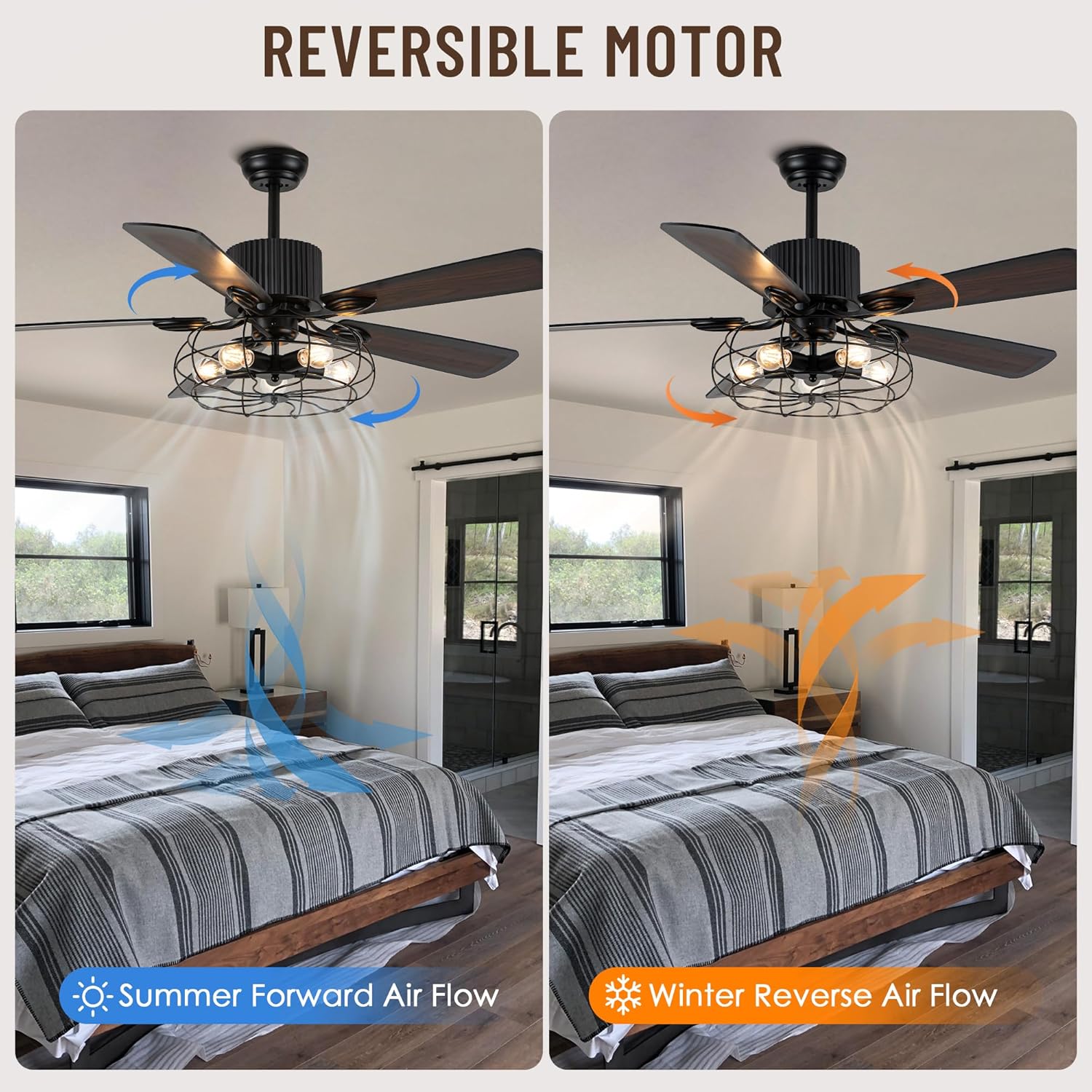
This image visually explains the reversible motor feature. One side shows 'Summer Forward Air Flow' with blue arrows indicating downward air movement for cooling. The other side shows 'Winter Reverse Air Flow' with orange arrows indicating upward air movement to circulate warm air.
4. Setup and Installation
The fan is designed for straightforward installation with many parts pre-assembled. Follow these general steps. Refer to the detailed diagrams in the included manual for specific instructions.
- Prepare for Installation: Turn off power at the main circuit breaker. Clear the installation area and ensure you have all necessary tools (screwdriver, wire strippers, ladder).
- Mounting Bracket Installation: Secure the mounting bracket to the ceiling outlet box. Ensure the outlet box is rated for fan support.
- Assemble Downrod: Choose the appropriate downrod length (3.9-inch or 7.8-inch) and attach it to the motor housing.
- Wiring: Carefully connect the fan's electrical wires to the household wiring according to the wiring diagram in the full manual. Use the provided wire nuts.
- Hang Fan: Lift the fan assembly and hang it on the mounting bracket.
- Attach Fan Blades: Securely attach the 5 wooden fan blades to the motor housing.
- Install Bulbs: Install 5 E26 base bulbs (not included) into the light kit sockets. Ensure bulbs are of appropriate size to avoid contact with the cage or blades.
- Final Checks: Double-check all connections and ensure the fan is securely mounted. Restore power at the circuit breaker.
This video demonstrates the unboxing and assembly process for the 52-inch Caged Ceiling Fan with Light. It provides a visual guide to help users understand how to put together the various components of the fan before installation.
5. Operating Instructions
Your Oaks Aura ceiling fan is controlled by the included remote. Ensure the remote has working batteries (not included) before use.

This image displays the remote control and its various functions. Each button is numbered and corresponds to a specific operation, such as turning lights and fans on/off, adjusting fan speeds, setting timers, and reversing fan direction.
Remote Control Functions:
- ALL OFF: Turns off both the fan and the light.
- Light On/Off: Toggles the light on or off.
- Natural Wind: Activates a mode that simulates a natural breeze by varying fan speeds.
- Beep/Mute: Toggles the audible beep sound from the fan when remote buttons are pressed.
- Fan Speeds (1-6): Selects one of six available fan speeds. Speed 1-2 for smooth sleep wind, 3-4 for steady and soft wind, and 5-6 for a strong breeze.
- Fan Off: Turns off only the fan.
- Fan Rotate Forward/Reverse (F/R): Changes the direction of the fan blade rotation for seasonal use.
- Timing (1H, 2H, 4H): Sets the fan to automatically turn off after 1, 2, or 4 hours.

This image illustrates the adjustable wind speed feature, suggesting optimal speed ranges for various activities: 'Smooth Sleep Wind' for speeds 1-2, 'Steady and Soft Wind' for speeds 3-4, and 'Bionic Breeze and Fresh' for speeds 5-6, accompanied by images of a sleeping child, a person working, and people exercising.
6. Maintenance
Regular maintenance ensures optimal performance and longevity of your ceiling fan.
- Cleaning: To prevent scratching the finish, clean the fan with a soft, damp cloth. Do not use abrasive cleaners or solvents. Dust the blades regularly to maintain balance and airflow efficiency.
- Bulb Replacement: Before replacing bulbs, ensure the power is turned off at the circuit breaker. Allow bulbs to cool completely before handling. Use only E26 base bulbs.
- Tighten Fasteners: Periodically check all screws and fasteners on the fan and mounting hardware to ensure they are secure.
7. Troubleshooting
If you experience issues with your fan, refer to the following common problems and solutions:
| Problem | Possible Cause | Solution |
|---|---|---|
| Fan does not start | No power to the fan; Loose wire connections; Remote control battery low or not paired. | Check circuit breaker and wall switch; Verify all wire connections are secure; Replace remote battery and re-pair if necessary. |
| Light does not work | Bulbs are faulty or loose; Incorrect wiring; Light switch on remote is off. | Replace or tighten bulbs; Check light kit wiring; Press the light on/off button on the remote. |
| Fan wobbles excessively | Loose fan blades or mounting screws; Unbalanced blades; Fan not securely mounted to ceiling. | Ensure all blade screws and mounting screws are tight; Use a blade balancing kit (not included) if needed; Verify mounting bracket is firmly attached to a suitable ceiling structure. |
| Remote control not responding | Remote battery is dead; Remote not paired with fan; Obstruction between remote and receiver. | Replace remote battery; Follow pairing instructions in the full manual; Ensure clear line of sight to the fan's receiver. |
8. Specifications

This image shows the Oaks Aura 52-inch Industrial Ceiling Fan with Light installed above a dining table, providing a visual representation of its size and aesthetic in a typical home setting.
| Feature | Detail |
|---|---|
| Brand | Oaks Aura |
| Model Number | MD-BD2011 |
| Size | 52 Inch |
| Material | Copper, Metal, Plastic (Blades: Plywood) |
| Motor Type | DC Motor |
| Fan Speeds | 6 |
| Control Method | Remote Control |
| Light Source | 5 x E26 Base (bulbs not included) |
| Voltage | 110 Volts |
| Indoor/Outdoor Usage | Indoor, Outdoor (covered porch) |
| Special Features | Reversible Motor, Quiet Operation, Adjustable Height, Timer |
| Item Dimensions (L x W x H) | 52"L x 52"W x 23.2"H (with longer downrod) |
| Item Weight | 20.3 Pounds |
9. Warranty and Support
This Oaks Aura ceiling fan (Model MD-BD2011) comes with a 2-year manufacturer warranty.
For warranty claims, technical assistance, or any questions regarding your product, please contact Oaks Aura customer service. Keep your purchase receipt as proof of purchase for warranty validation.


