1. Introduction
Welcome to the user manual for your Roborock Qrevo 2R3W Robot Vacuum and Mop. This advanced cleaning device is designed to provide comprehensive floor care, combining powerful vacuuming with efficient mopping capabilities. It features a multifunctional dock for automated maintenance, intelligent navigation, and app control for a seamless cleaning experience.

Image: The Roborock Qrevo 2R3W robot vacuum, its multifunctional dock, and a smartphone displaying the control app.
2. Important Safety Information
Before operating your Roborock Qrevo 2R3W, please read all safety instructions carefully to prevent injury or damage. Keep this manual for future reference.
- Do not allow children to operate the robot. Supervise children and pets when the robot is in operation.
- Ensure the power voltage matches the specifications on the charging dock.
- Do not use the robot in environments with open flames, flammable materials, or corrosive liquids.
- Avoid using the robot on wet surfaces or in areas with standing water, unless specifically designed for wet cleaning.
- Regularly inspect the power cable for damage. If damaged, contact customer support for replacement.
3. Package Contents
Verify that all components are present in your package:
- Roborock Qrevo 2R3W Robot Vacuum (1)
- Multifunctional Dock (1)
- Mop Cloth (2)
- Power Cable (1)
- User Manual (1)
4. Initial Setup
4.1 Unpacking
Carefully remove all packaging materials from the robot and the multifunctional dock. Ensure no protective films or shipping inserts remain on the device or its sensors.
4.2 Dock Placement
Place the multifunctional dock on a hard, level surface against a wall. Ensure there is at least 0.5 meters (1.6 feet) of clear space on both sides and 1.5 meters (4.9 feet) in front of the dock for optimal robot navigation and return. Connect the power cable to the dock and plug it into a power outlet.
4.3 Water Tank and Dustbin Setup
The multifunctional dock features separate clean and dirty water tanks, and an auto-emptying dustbin. Fill the clean water tank with clean tap water. Ensure the dust bag is correctly installed in the dock's dustbin compartment.
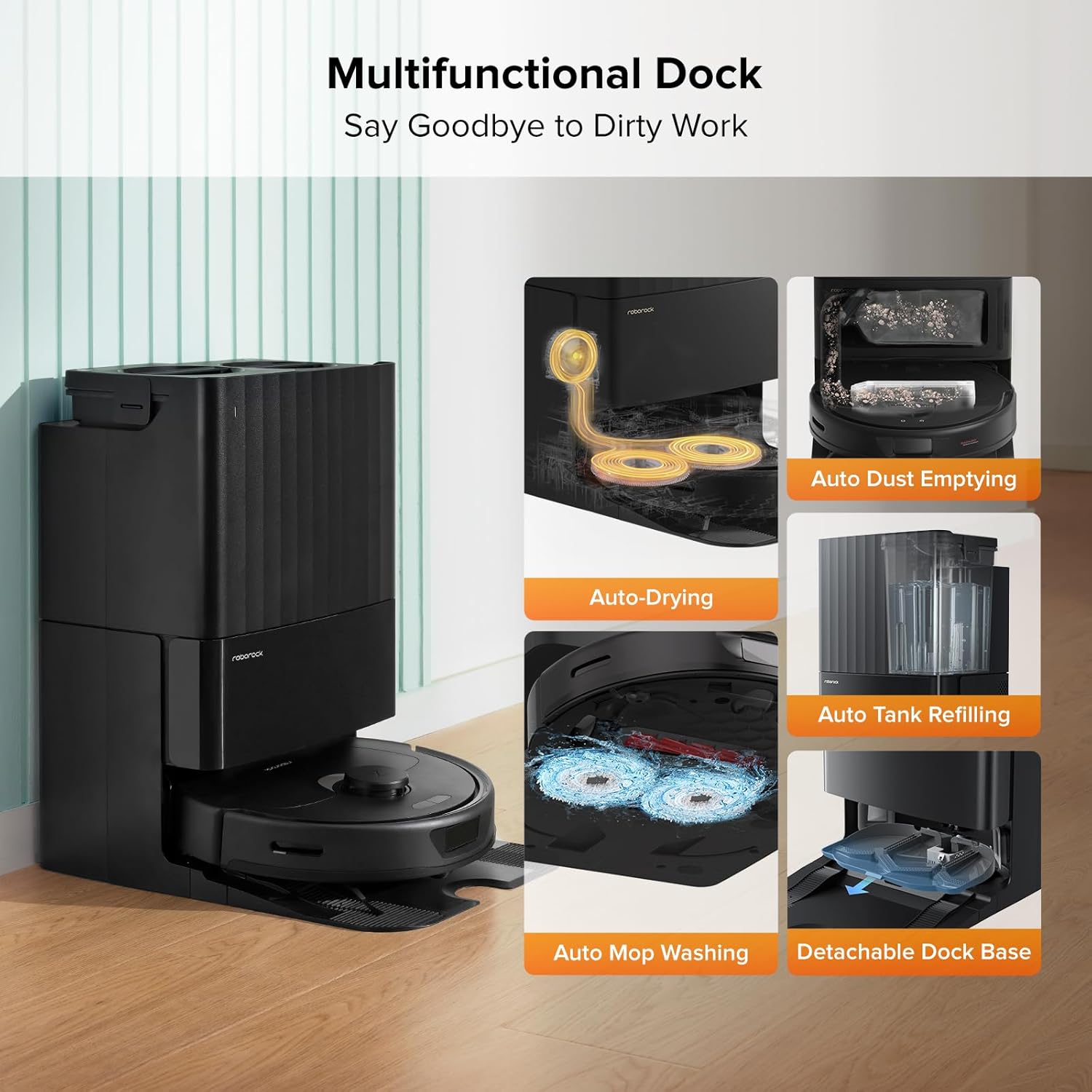
Image: The multifunctional dock highlighting its various automated features for convenience.
4.4 App Installation and Connection
Download the Roborock app from your mobile device's app store. Follow the in-app instructions to connect your robot to your home Wi-Fi network (2.4GHz only) and complete the initial mapping process. The app allows for customized cleaning routines, no-go zones, and real-time monitoring.
5. Operating Your Roborock Qrevo 2R3W
5.1 Power On/Off
Press and hold the power button on the robot to turn it on or off. The robot will emit a voice prompt indicating its status.
5.2 Cleaning Modes
The Roborock Qrevo 2R3W offers versatile cleaning modes:
- Vacuuming: Utilizes a powerful 5500Pa suction to effectively capture dust, dirt, and pet hair from various floor types. The all-rubber brush minimizes hair tangles.
- Mopping: Features dual spinning mops that rotate at 200 RPM with consistent downward pressure (up to 6N) to remove stubborn stains. You can adjust water flow levels via the app.
- Vacuum & Mop: Performs both functions simultaneously. The Auto Mop Lifting feature raises the mops by 7mm when carpets are detected, preventing wetting and allowing seamless transition between hard floors and carpets.

Image: The robot vacuum showcasing its dual spinning mops in action, effectively cleaning a stained floor.

Image: An illustration demonstrating the powerful 5500 Pa suction of the robot vacuum, lifting debris from the floor.

Image: The robot vacuum demonstrating its auto mop lifting capability, showing the mops raised by 7mm.
5.3 Navigation and Obstacle Avoidance
The robot uses PreciSense LiDAR Navigation to quickly scan your home and create precise maps. This allows it to plan optimal cleaning routes. Reactive Tech Obstacle Avoidance detects and avoids potential hazards with precision, ensuring smooth and efficient cleaning without collisions.

Image: A visual representation of the robot vacuum using LiDAR navigation to map a room and plan its cleaning path.

Image: The robot vacuum detecting and avoiding obstacles on the floor using its reactive technology.
5.4 App Control and Features
The Roborock app provides comprehensive control over your robot. Features include:
- 3D Mapping: View your home's layout in 3D and customize cleaning areas.
- Custom Routines: Set specific cleaning schedules and modes for different rooms or times.
- Smart No-Go Zones: Define areas the robot should avoid, such as pet bowls or delicate furniture.
- Multi-Level Mapping: Supports mapping up to 4 levels, automatically recognizing the floor it's on.
- Voice Control: Compatible with Amazon Alexa and Google Home for hands-free operation.

Image: A smartphone screen displaying the Roborock app interface, showing various control options and mapping features.
6. Maintenance and Care
Regular maintenance ensures optimal performance and extends the lifespan of your Roborock Qrevo 2R3W.
6.1 Multifunctional Dock Maintenance
- Auto Mop Washing: The dock automatically washes the mop pads during and after cleaning.
- Hot Air Drying: After cleaning, the mops are dried with 45°C hot air to prevent odors and mildew.
- Auto Tank Refilling: The dock automatically refills the robot's water tank for continuous mopping.
- Auto Dust Emptying: The robot's dustbin is automatically emptied into a 2.7L dust bag in the dock, providing up to 7 weeks of hands-free dust disposal.
- Detachable Dock Base: The base of the dock is easily detachable for convenient cleaning of accumulated dirt.
Image: The multifunctional dock highlighting its various automated features for convenience, including the detachable base for easy cleaning.
6.2 Robot Maintenance
- Main Brush: Regularly remove hair and debris from the all-rubber main brush.
- Side Brush: Check and clean the side brush for tangled hair or debris.
- Mop Pads: Wash or replace mop pads as needed.
- Filter: The filter is washable. Rinse it under running water and allow it to air dry completely before reinstallation.
- Sensors: Wipe all sensors (cliff sensors, wall sensor, charging contacts) with a soft, dry cloth.
6.3 Maintenance Schedule
| Component | Frequency | Action |
|---|---|---|
| Main Brush | Weekly | Clean hair and debris |
| Side Brush | Monthly | Clean/Replace if worn |
| Mop Pads | After each use | Wash/Replace |
| Filter | Bi-weekly | Wash and air dry |
| Sensors & Charging Contacts | Monthly | Wipe clean |
| Dust Bag (Dock) | Every 7 weeks (approx.) | Replace |
| Water Tanks (Dock) | As needed | Clean and refill |
7. Troubleshooting Common Issues
If you encounter problems with your Roborock Qrevo 2R3W, refer to the following table for solutions:
| Problem | Possible Cause | Solution |
|---|---|---|
| Robot does not power on | Low battery; Power cable not connected | Place robot on dock to charge; Ensure power cable is securely connected to dock and outlet |
| Robot cannot return to dock | Dock is blocked or moved; No-go zone near dock | Clear obstacles around dock; Ensure dock is in an open area; Check app for virtual walls/no-go zones |
| Poor vacuuming performance | Full dustbin; Clogged brush; Dirty filter | Empty dustbin/replace dust bag; Clean main brush; Clean/replace filter |
| Poor mopping performance | Dirty mop pads; Empty water tank; Clogged water nozzle | Wash/replace mop pads; Refill clean water tank; Clean water nozzle |
| Robot gets stuck frequently | Loose cables; Small objects; Complex furniture layout | Tidy up cables; Remove small objects; Use no-go zones in problematic areas |
| App connection issues | Incorrect Wi-Fi password; Router issues; Robot offline | Re-enter Wi-Fi password; Restart router; Restart robot and try connecting again |
For issues not listed here, please refer to the official Roborock app's help section or contact customer support.
8. Technical Specifications
| Feature | Specification |
|---|---|
| Brand | roborock |
| Model Name | Qrevo 2R3W |
| Product Dimensions | 19.2"L x 13.4"W x 22"H |
| Item Weight | 26.9 pounds |
| Color | Black |
| Suction Power | 5500Pa |
| Mop Spinning Speed | 200 RPM |
| Auto Mop Lifting Height | 7mm |
| Clean Water Tank Capacity | 5 Liters |
| Dust Bag Capacity (Dock) | 2.7 Liters (up to 7 weeks hands-free) |
| Battery Life | 180 minutes |
| Voltage | 120 Volts |
| Filter Type | Washable |
| Navigation System | PreciSense LiDAR Navigation |
| Obstacle Avoidance | Reactive Tech Obstacle Avoidance |
| Compatible Devices | Smartphones, Amazon Echo, Google Home |
| Country of Origin | China |
| UPC | 195043003030 |
9. Warranty and Support
9.1 Warranty Information
Your Roborock Qrevo 2R3W comes with a manufacturer's warranty. Please refer to the warranty card included in your product packaging or visit the official Roborock website for detailed warranty terms and conditions.
9.2 Customer Support
For technical assistance, troubleshooting, or spare parts, please contact Roborock customer support. You can find contact information on the official Roborock website or within the Roborock app. An electronic version of this user manual is also available for download at https://manuals.plus/m/5ea668d6a9c41cec6f1de788a2ed23fdce00a37b98b3e79b286a7b82e4e12a81.


