
1. Introduction
This manual provides essential information for the safe and efficient operation of your RDYMONKEY ZLPOWER LW 6000W-24V Pure Sine Wave Inverter Charger. Please read all instructions carefully before installation and use.
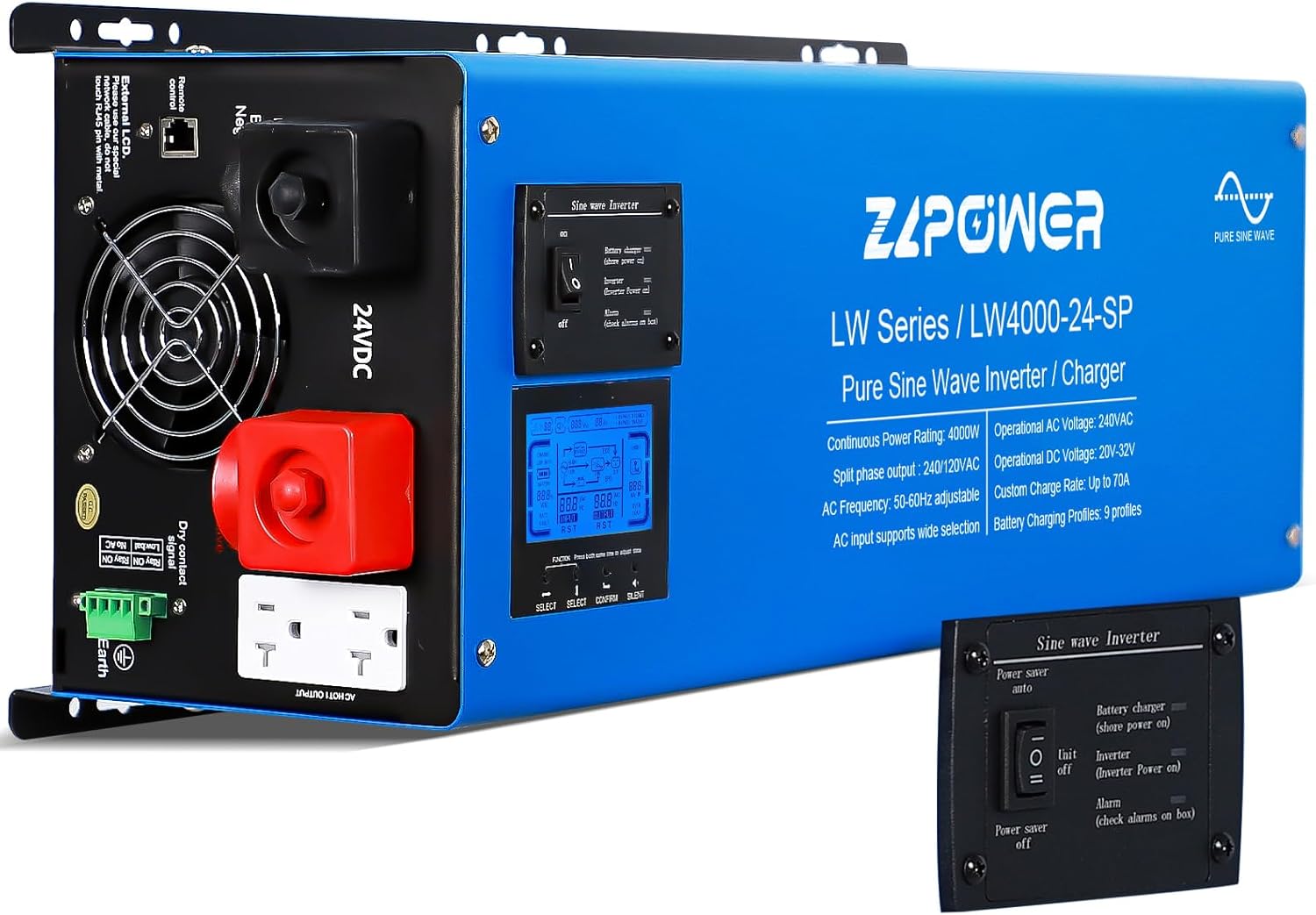
Figure 1: Front view of the ZLPOWER LW 6000W-24V Pure Sine Wave Inverter Charger.
2. Specifications
- Continuous Power Rating: 6000W
- Peak Power: 18000W (for 20 seconds)
- DC Input Voltage: 24V
- AC Output Voltage: 120/240V Split Phase
- Frequency: 50Hz/60Hz (adjustable)
- Charging Current: 0-100% (adjustable)
- Battery Compatibility: Supports 7 types including LiFePO4, lead-acid, gel, and car batteries.
- Product Dimensions: 25.6 x 7.48 x 8.7 inches
- Item Weight: 59 pounds
- Model Name: LW6000-24V

Figure 2: Product dimensions of the ZLPOWER LW 6000W-24V Inverter.
3. Setup
3.1. Battery Connection
The ZLPOWER LW 6000W-24V Inverter Charger requires a 24V DC battery system. Ensure you use appropriate gauge cables for the power rating. Connect the positive (red) cable to the inverter's positive terminal and the battery's positive terminal. Connect the negative (black) cable to the inverter's negative terminal and the battery's negative terminal. Always ensure correct polarity to prevent damage to the inverter and batteries.

Figure 3: Diagram illustrating a typical application setup, including battery connection.
3.2. AC Input/Output Connection
Connect your AC input source (grid or generator) to the designated AC input terminals. Connect your appliances to the AC output terminals. This inverter supports 120V and 240V split-phase output. Ensure all connections are secure and free of looseness to prevent overheating or fire.
3.3. Polarity and Connection Warning
WARNING: Always ensure correct polarity when connecting batteries. Reversing polarity will cause severe damage to the inverter. Loose connections can cause severe overheating or even fire. Double-check all connections before powering on the unit.
Video 1: Visual guide for connecting the LW series low frequency inverter.
4. Operating Instructions
4.1. LCD Display and Controls
The inverter features an LCD display that shows real-time information about voltage, load, and battery status. Use the navigation buttons (ESC, Up, Down, Enter/Menu) to navigate through settings and monitor parameters.

Figure 4: Detailed view of the LCD screen display and control buttons.
4.2. Operating Modes
- Mains Priority Mode: The inverter prioritizes AC input. When mains power is restored, the battery is disconnected. If mains power is disconnected, it switches to battery mode.
- Battery Priority Mode: The inverter prioritizes battery power. If the battery voltage drops below a set threshold, it switches to mains mode. Upon battery voltage recovery, it switches back to battery mode.
- Unattended Mode: In this mode, the inverter will shut down if the battery voltage is low and enter standby. It will resume normal operation once the battery voltage is restored to a safe level.
4.3. Charging and Battery Management
- Adjustable Charging Current: The charging current can be adjusted from 0-100% to suit your battery's needs.
- 5-Step Progressive Charging: Optimizes battery charging for longevity and efficiency.
- Battery Compatibility: Supports up to 7 types of batteries, including LiFePO4, lead-acid, gel, and car batteries.
- Depleted Battery Start: The inverter can start and maintain power even with depleted batteries.

Figure 5: The inverter is compatible with multiple battery types, including Gel, AGM, Lithium, Sealed Lead Acid, LiFePO4, and Flooded batteries.
Video 2: Demonstrates how to use the low frequency solar hybrid inverter, including setting operating modes.
5. Maintenance
5.1. Storage
When the inverter is not in use for extended periods, store it in a dry location and disconnect all connections to the battery to prevent discharge and ensure longevity.
6. Troubleshooting
6.1. Common Protections
The inverter is equipped with multiple protection features to ensure safe and reliable performance:
- Overload Protection: Automatically shuts down if the connected load exceeds the inverter's capacity.
- Over-temperature Protection: Prevents damage due to excessive heat.
- Overcharge Protection: Safeguards batteries from overcharging.
- Low Battery Safeguards: Protects batteries from deep discharge.
- Output Voltage Stability: Adjusts output voltage to prevent fluctuations when the load changes, ensuring safe operation for sensitive appliances.
6.2. Display Troubleshooting
Symptom: Screen appears completely white after power-on, but output remains normal.
Root Cause: Poor contact between the display cable and the motherboard connector. Realign the ribbon cable and ensure it is securely inserted horizontally into the card slot, pressing the clasp firmly to secure it in place.
7. Warranty & Support
Your ZLPOWER LW 6000W-24V Inverter Charger comes with a 24-month warranty. ZLPOWER, a manufacturer with over 15 years of expertise, provides lifetime technical support for peace of mind and quality service. For any quality-related issues or technical assistance, please contact ZLPOWER customer support.


