
1. Introduction
Thank you for choosing the Voluas 4L Automatic Cat Feeder and 309B Stainless Steel Cat Water Fountain. This product is designed to provide consistent feeding and hydration for your cat, ensuring their well-being even when you are away. Please read this manual thoroughly before use to ensure proper setup and operation.

Image 1: Voluas 4L Automatic Cat Feeder and 309B Stainless Steel Cat Water Fountain.
This image displays the complete product, featuring the white automatic cat feeder on the left and the stainless steel cat water fountain on the right, both ready for use.
2. Package Contents
Please check the package for the following items:
- 1 x Voluas 4L Automatic Cat Feeder
- 1 x 309B Stainless Steel Cat Water Fountain
- 1 x USB Power Adapter (for feeder)
- 1 x User Manual
- 1 x Desiccant Bag (for feeder)
- 1 x Stainless Steel Food Bowl (for feeder)
3. Automatic Feeder Setup
3.1 Powering the Feeder
The feeder can be powered in two ways:
- USB Adapter: Connect the provided USB cable to the feeder and plug it into a wall outlet.
- Batteries: For backup power or cordless operation, insert 3 D-cell batteries (not included) into the battery compartment at the bottom of the feeder.
3.2 Filling the Food Container
- Unlock the top cover by pressing the safety button.
- Remove the top cover.
- Pour dry cat food into the 4-liter capacity container. Ensure kibble size is between 2-10mm for optimal dispensing.
- Place the desiccant bag inside the designated slot under the lid to maintain food freshness.
- Replace the top cover and ensure it is securely locked.

Image 2: Automatic Feeder Capacity and Recommended Kibble Size.
This image illustrates the feeder's capacity of 4 liters, supporting up to 4 meals per day with up to 40 portions per meal, and recommends a kibble size between 2-10mm.

Image 3: Feeder Anti-Clog Design and Safety Button Lock.
This image highlights the anti-clog design of the feeder, which prevents food blockages, and shows the safety button lock on the lid to prevent pets from opening it.
3.3 Setting Feeding Schedule and Portions
Use the user-friendly LCD screen and buttons to program feeding times:
- Press the 'SET' button to enter programming mode.
- Use the arrow buttons (up/down) to adjust the current time.
- Set up to 4 meals per day. For each meal, specify the time and the number of portions (0-40).
- Confirm each setting by pressing 'SET' again or the checkmark button.
3.4 Personalized Voice Recording
Record a short message to call your pet to mealtime:
- Press and hold the microphone button on the control panel.
- Record your voice message (e.g., "Time to eat!").
- Release the button to save the recording. The message will play automatically at each scheduled mealtime.

Image 4: Personalized Voice Recording Feature.
This image demonstrates the feeder's personalized voice recording feature, showing a cat eating from the feeder with a speech bubble indicating a custom message.
4. Cat Water Fountain Setup
4.1 Filling the Water Fountain
The 309B Stainless Steel Cat Water Fountain has a capacity of 3.2 liters (108 oz).
- Ensure the fountain is clean before first use.
- Fill the reservoir with fresh water.
- Assemble the pump and filter according to the separate fountain instructions (if provided).
- Place the filled reservoir onto the base, ensuring it is seated correctly.
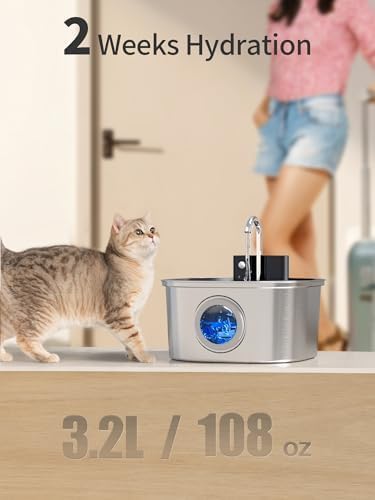
Image 5: Water Fountain Hydration Capacity.
This image highlights the water fountain's capacity, providing up to 2 weeks of hydration with its 3.2L (108 oz) reservoir.
4.2 Operating Modes
The water fountain offers three operating modes:
- Sensor Mode: Water runs for 15 seconds when a pet is approached.
- Continuous Mode: Water flows 24/7. This mode is only supported when connected to external power.
- Timed Mode: Water runs for 15 seconds every 15 minutes.
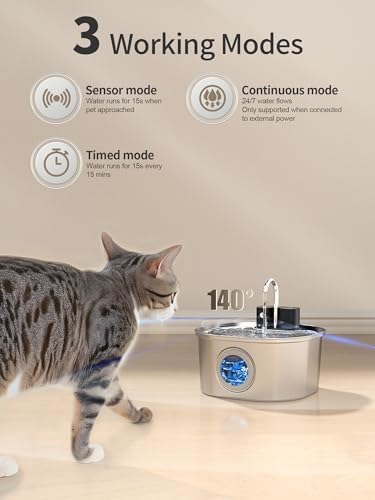
Image 6: Water Fountain with 3 Working Modes.
This image displays the water fountain and a cat, illustrating the three available working modes: Sensor mode, Continuous mode, and Timed mode.
4.3 Cordless Placement
The water fountain is designed for cordless operation, allowing flexible placement anywhere in your home without the need for a nearby power outlet. This enhances safety by eliminating potential tripping hazards or chewing risks from cables.

Image 7: Cordless Water Fountain for Flexible Placement.
This image shows the cordless water fountain placed in various locations like the living room, kitchen, and play room, emphasizing its flexible and safer placement due to the absence of wires.
5. Operating Instructions
Once both the feeder and fountain are set up, they will operate automatically according to your programmed schedules. You can manually dispense food from the feeder by pressing the manual feed button on the control panel if needed.
6. Maintenance
6.1 Feeder Cleaning
The stainless steel food bowl is removable and washable. The food container can be wiped clean with a damp cloth. Ensure all parts are completely dry before reassembling.
6.2 Water Fountain Cleaning
The water fountain features a detachable design for easy assembly and cleaning. The stainless steel components and reservoir should be cleaned regularly to prevent bacterial growth and maintain water quality. Note: The battery part of the fountain should not be immersed in water.
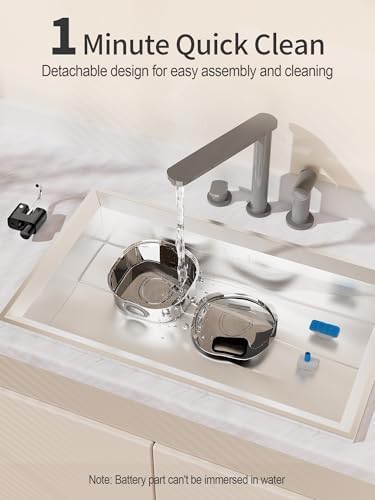
Image 8: Water Fountain 1-Minute Quick Clean.
This image demonstrates the detachable design of the water fountain, allowing for quick and easy cleaning under running water. A note reminds users that the battery component should not be immersed.
7. Troubleshooting
| Problem | Possible Cause | Solution |
|---|---|---|
| Feeder not dispensing food. | Food container empty; kibble size too large; food clog; low battery/no power. | Refill food container; ensure kibble is 2-10mm; check for clogs in dispenser mechanism; replace batteries or connect to USB power. |
| Water fountain not flowing. | Water reservoir empty; pump clogged; incorrect mode; low battery (if applicable). | Refill reservoir; clean pump and filter; select appropriate mode; replace batteries. |
| Feeder schedule not saving. | Settings not confirmed. | Ensure to press 'SET' or the checkmark button after each adjustment. |
8. Specifications
| Feature | Detail |
|---|---|
| Brand | Voluas |
| Feeder Capacity | 4 Liters |
| Feeder Meals/Day | Up to 4 meals |
| Feeder Portions/Meal | 0-40 portions |
| Recommended Kibble Size | 2-10mm |
| Feeder Power Options | USB Adapter, 3 x D-cell batteries (not included) |
| Feeder Special Features | Moisture-control, Timer, Personalized Voice Recording, Anti-clog Design |
| Water Fountain Capacity | 3.2 Liters (108 oz) |
| Water Fountain Material | Stainless Steel |
| Water Fountain Modes | Sensor, Continuous, Timed |
| Water Fountain Features | Cordless operation, 1-minute quick clean, Detachable design |
| Target Species | Cat |
9. Warranty and Support
For warranty information or technical support, please refer to the contact details provided on the product packaging or visit the official Voluas website. Keep your purchase receipt as proof of purchase.
For more products from Voluas, visit their Amazon Store.