
1. Introduction
The PetJoy 3-Dog Training Collar system is designed to assist in training up to three dogs simultaneously or individually. It features both remote-controlled training modes (beep, vibration, and static stimulation) and an automatic bark control mode. This manual provides detailed instructions for safe and effective use of your device.

Image 1.1: The PetJoy 3-Dog Training Collar system, including the remote transmitter and three receiver collars in orange, pink, and purple stripes.
2. Important Safety Guidelines
- Not for Aggressive Dogs: Do not use this product on aggressive dogs. Consult a professional trainer for such cases.
- Skin Irritation: Avoid leaving the collar on the dog for more than 12 hours per day. Reposition the collar every 1 to 2 hours to prevent pressure sores.
- Proper Fit: Ensure the collar fits snugly but not too tightly. Two fingers should fit comfortably between the collar and the dog's neck.
- Supervision: Always supervise your dog during initial training sessions.
- Age and Health: This training system is recommended for dogs older than 6 months and in good health.
- Water Safety: While receivers are waterproof, ensure charging ports are dry before charging.
3. Package Contents
Verify that all items listed below are included in your package:
- Remote Control Transmitter (1)
- Receiver Collars (3)
- Collar Straps (3)
- Charging Wires (2)
- Lanyard (1)
- Contact Points (various sizes)
- Test Light Tool (1)
- User Manual (this document)
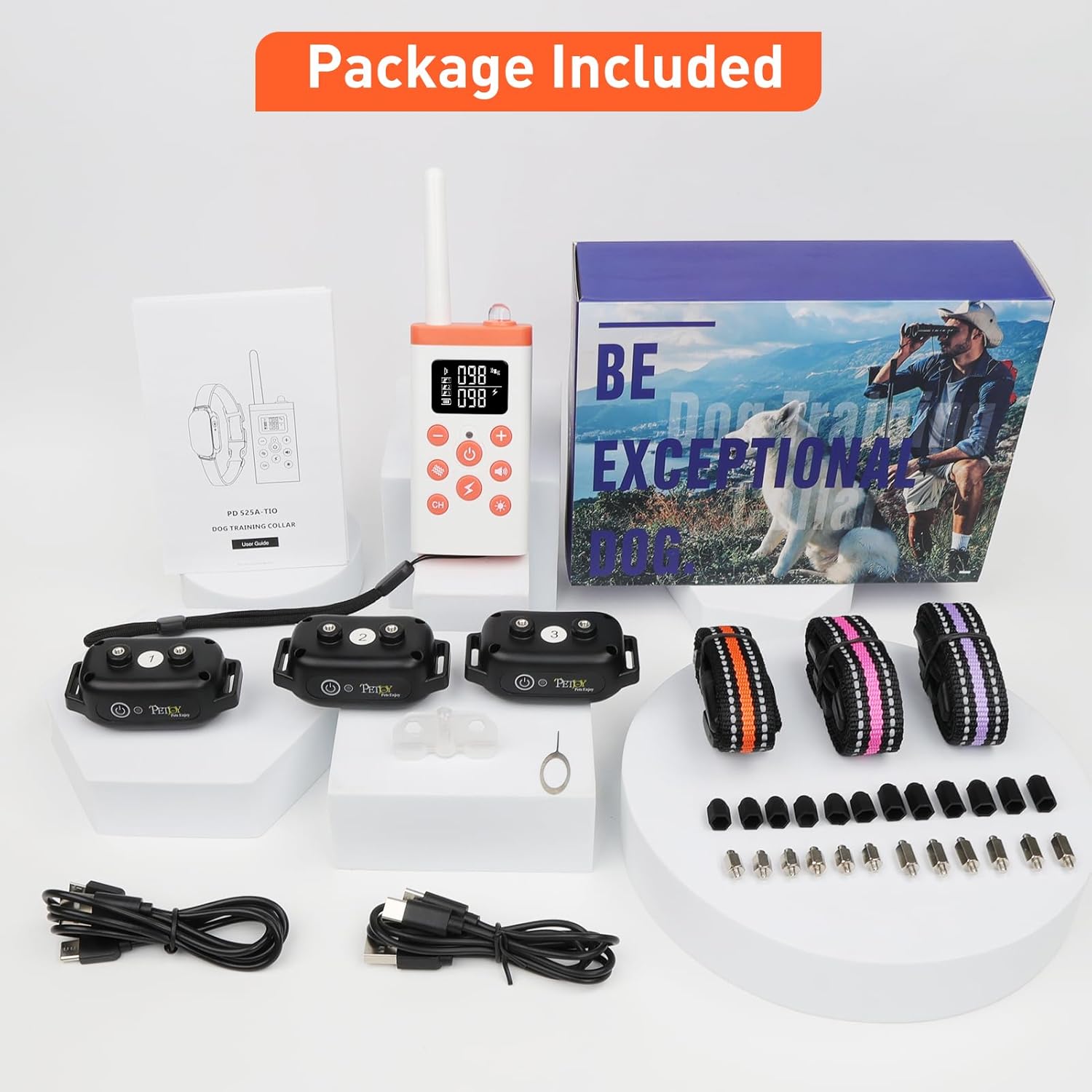
Image 3.1: All components included in the PetJoy 3-Dog Training Collar package, neatly arranged on a white display.
4. Setup Guide
4.1 Charging the Devices
Before first use, fully charge the remote control and all receiver collars. The remote control has a work time of approximately 90 days, and receivers have a work time of approximately 30 days on a full charge.
- Connect the charging cables to the charging ports on the remote and receivers.
- Plug the USB ends of the cables into a USB power adapter, computer, or power bank.
- The indicator lights will show charging status (refer to device indicators for specific details).
- Once fully charged, disconnect the devices.

Image 4.1: Illustration of charging the remote and receiver collars using USB cables, highlighting the long battery life.
4.2 Attaching Contact Points
Select the appropriate length of contact points based on your dog's coat thickness. For dogs with thicker coats, longer contact points may be necessary to ensure proper contact with the skin.
- Screw the chosen contact points into the threaded holes on the underside of the receiver collar.
- Ensure they are securely fastened.
4.3 Fitting the Collar
Proper collar fit is essential for both effectiveness and your dog's comfort and safety.
- Place the receiver collar around your dog's neck, ensuring the contact points are positioned underneath, making contact with the skin.
- Adjust the strap so it is snug but not tight. You should be able to fit two fingers comfortably between the collar and your dog's neck.
- Trim any excess strap length if necessary, leaving a few inches for adjustment.

Image 4.2: Product dimensions for the remote and receiver, along with instructions for cutting excess collar strap, indicating it fits 8-27 inch dog necks.
4.4 Pairing Remote and Receivers
The system allows control of up to three collars. Each collar must be paired to a specific channel on the remote.
- Turn on the remote control.
- Select a channel (1, 2, or 3) using the "CH" button on the remote.
- With the receiver collar turned off, press and hold its power button until the indicator light flashes rapidly.
- Within 10 seconds, press any stimulation button (Beep, Vibration, or Shock) on the remote.
- If pairing is successful, the receiver will beep and its light will stop flashing.
- Repeat for additional collars on different channels.

Image 4.3: A visual representation of controlling multiple dogs separately or simultaneously using the remote control.
5. Operation Modes
5.1 Remote Control Training Mode
The remote offers four stimulation modes: Beep, Vibration, and Static Shock, each with adjustable intensity, plus an Auto Mode toggle.
- Beep Mode: Emits an audible tone. Default setting.
- Vibration Mode: Provides a physical vibration. Adjustable levels 1-100.
- Static Shock Mode: Delivers a static stimulation. Adjustable levels 1-100.
- Adjusting Intensity: Use the '+' and '-' buttons on the remote to adjust vibration and static shock levels.
5.2 Automatic Bark Control Mode
The receiver collars can operate independently as automatic bark collars, detecting and correcting barking without remote input.
5.2.1 Activating/Deactivating Auto Mode
To enable or disable the automatic bark control mode on a receiver collar:
- Ensure the receiver collar is paired with the remote.
- Press and hold the remote's power button (usually the central button) for approximately 3 seconds.
- You will hear the receiver beep once to confirm Auto Mode is ON, or twice to confirm Auto Mode is OFF.

Image 5.1: Instructions on how to activate the automatic bark mode by pressing and holding the remote's power button, indicated by a single beep from the collar.
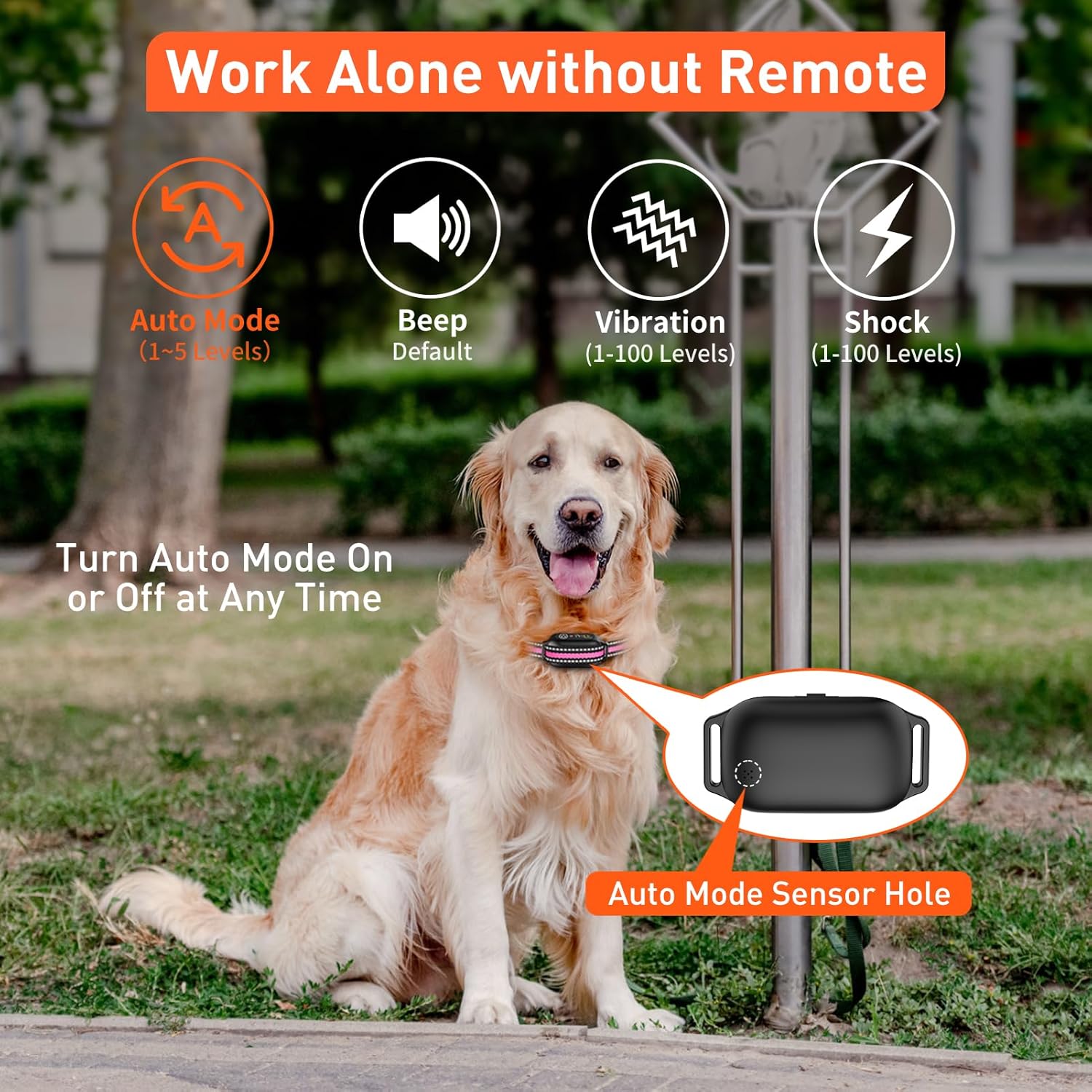
Image 5.2: A visual demonstrating the collar's ability to function in automatic bark mode without the remote, showing the auto mode sensor hole.
5.2.2 Adjusting Auto Mode Sensitivity (5 Levels)
The automatic bark mode has 5 sensitivity levels to suit different dog breeds and barking behaviors.
- With the receiver collar turned on, press its power button 3 times in quick succession.
- Each sequence of 3 presses will cycle through the 5 sensitivity levels. The collar will indicate the current level (e.g., by flashing a certain number of times or a specific beep pattern).
- Choose a lower sensitivity for less frequent barking and higher sensitivity for more persistent barking.

Image 5.3: Visual guide for adjusting the 5 sensitivity levels of the automatic bark mode by pressing the receiver button three times.
5.2.3 Auto Mode Activation Sequences (7 Sequences)
When in automatic bark mode, the collar will progress through a sequence of stimulations if barking continues.
| Sequence | Stimulation |
|---|---|
| 1 | Beep (Default) |
| 2 | Beep + Vibration (Level 10) |
| 3 | Beep + Vibration (Level 40) |
| 4 | Beep + Vibration (Level 80) |
| 5 | Beep + Vibration (Level 80) + Static Shock (Level 10) |
| 6 | Beep + Vibration (Level 80) + Static Shock (Level 40) |
| 7 | Beep + Vibration (Level 80) + Static Shock (Level 80) |

Image 5.4: A visual chart explaining the 7 progressive activation sequences for the automatic bark mode, from beep only to combined high-level vibration and shock.
6. Maintenance
- Regular Cleaning: Clean the receiver collar and contact points regularly with a damp cloth. Ensure no dirt or debris accumulates around the contact points.
- Inspect for Irritation: Regularly check your dog's neck for any signs of skin irritation, redness, or sores. If irritation occurs, discontinue use and consult a veterinarian.
- Battery Care: Recharge the devices when the battery indicator is low. Avoid fully draining the battery frequently to prolong its lifespan.
- Storage: Store the system in a cool, dry place when not in use.
- Waterproof Integrity: The receiver collars are IPX7 waterproof. However, always ensure the charging port cover is securely closed when the collar is in use or exposed to water. Do not charge if the port is wet.
7. Troubleshooting
| Problem | Possible Cause | Solution |
|---|---|---|
| Collar not responding to remote. | Not paired, out of range, low battery. | Re-pair the collar. Check battery levels. Ensure within 3300 ft control range. |
| Auto bark mode not activating. | Auto mode off, low sensitivity, improper fit. | Activate auto mode (single beep). Increase sensitivity. Adjust collar fit. |
| Dog shows signs of skin irritation. | Collar too tight, left on too long, contact points rubbing. | Loosen collar, reposition regularly, ensure proper fit. Discontinue use if irritation persists and consult a vet. |
| Collar not charging. | Faulty cable, dirty port, charger issue. | Try a different charging cable or USB port. Clean charging port. Contact support if issue persists. |
8. Product Specifications
- Brand: PetJoy
- Model: B0F5PXQ6J8
- Control Range: Up to 3300 feet
- Training Modes: Beep, Vibration (1-100 levels), Static Shock (1-100 levels), Automatic Bark Control (5 sensitivity levels)
- Waterproof Rating: IPX7 (Receiver Collars)
- Remote Battery Life: Up to 90 days (standby)
- Receiver Battery Life: Up to 30 days (standby)
- Collar Strap Length: Fits 8-27 inches dog necks
- Target Audience: Dogs (All Breed Sizes)
- Included Components: Remote Control, 3 Receivers, 3 Collar Straps, 2 Charging Wires, Lanyard, Contact Points, Test Light Tool
9. Warranty and Customer Support
PetJoy products are manufactured with quality and reliability in mind. For specific warranty information, please refer to the warranty card included in your product packaging or visit the official PetJoy website.
If you encounter any issues or have questions regarding your PetJoy 3-Dog Training Collar, please contact our customer support team. Contact details can typically be found on the product packaging or the PetJoy brand store on Amazon.
Online Support: Visit the PetJoy Store on Amazon


