
Introduction
Thank you for choosing the ODK 48-Inch Gaming Desk. This manual provides essential information for the safe assembly, operation, and maintenance of your new desk. Please read these instructions carefully before beginning assembly and retain them for future reference.

Image: The ODK 48-inch gaming desk featuring LED lights, a monitor stand, and storage shelves.
Safety Information
- Always follow the assembly instructions provided to ensure structural integrity.
- Do not overload the desk or shelves beyond their recommended weight capacity.
- Keep electrical components (LED strip, power outlet) away from liquids to prevent electric shock.
- Ensure all connections for the power outlet and LED lights are secure before use.
- Place the desk on a level surface to prevent tipping.
- Keep small parts and packaging materials away from children.
Package Contents
Before assembly, verify that all components listed below are present. If any parts are missing or damaged, please contact customer support.
- Desk Frame Components
- Carbon Fiber Textured Tabletop
- Monitor Stand/Shelf
- Reversible Display Storage Shelf Components
- 2 Fabric Drawers
- LED Light Strip with Controller
- Built-in Power Outlet (2 USB ports, 3 AC outlets)
- Headphone Hook
- Assembly Hardware (screws, bolts, etc.)
- Assembly Tools (e.g., Allen wrench)
- Instruction Manual
Setup and Assembly
The ODK Gaming Desk requires assembly. All necessary tools and detailed instructions are included in the package. Please follow the step-by-step guide provided with your product for proper assembly.
Key Assembly Points:
- Reversible Storage Shelf: The side storage shelf can be assembled on either the right or left side of the desk to suit your space and preference.
- Adjustable Shelf Height: The display storage shelf can be adjusted to a lower position to accommodate larger PC towers or other equipment.
- Fabric Drawers: The two fabric drawers are designed for easy assembly and insertion into the desk frame.

Image: Detailed dimensions of the ODK 48-inch gaming desk, including the main desktop, monitor shelf, and side storage unit.

Image: Visual guide demonstrating the simple three-step assembly process for the fabric drawers.
Operating Instructions
LED Lights
The gaming desk is equipped with an LED light strip located under the monitor shelf. This strip offers 10 static colors and 10 dynamic modes to customize your lighting ambiance.

Image: The ODK gaming desk illuminated by its integrated RGB LED light strip, showcasing various color options.

Image: Close-up of the LED light strip controller, detailing buttons for static color, dynamic mode, speed, brightness, and power.
Controller Functions:
- Static Color Button (C): Press once to switch to static color mode. Each subsequent press changes the color.
- Dynamic Mode Button (M): Press once to switch to dynamic effect mode. Each subsequent press changes the dynamic mode. Press and hold for 3 seconds to enter demo mode, which cycles through various dynamic modes automatically.
- Speed & Brightness & Power Button (S/B/Power):
- In static mode, press to adjust brightness levels.
- In dynamic mode, press to adjust dynamic mode speed.
- Press and hold to turn off the strip when it is on. Press to turn it on when off.
- Power-off Memory: The strip will restore the last color, brightness, and mode settings upon next power-on.
Built-in Power Outlet
The desk features an integrated power outlet with 2 USB ports and 3 AC outlets for convenient device charging and power access.

Image: Close-up of the built-in power outlet on the desk, showing 3 AC outlets and 2 USB ports in use for charging a smartphone.
Reversible Display Storage Shelf
The large side shelf can be positioned on either the right or left side of the desk during assembly. It provides ample space for displaying items or storing a PC tower.

Image: The adjustable storage shelf shown in two configurations, demonstrating its reversibility and ability to accommodate different items like a PC tower or decorative models.
Fabric Drawers
Two fabric drawers are included for organized storage of small items such as gamepads, CDs, or office supplies. They are designed for easy pulling and pushing.
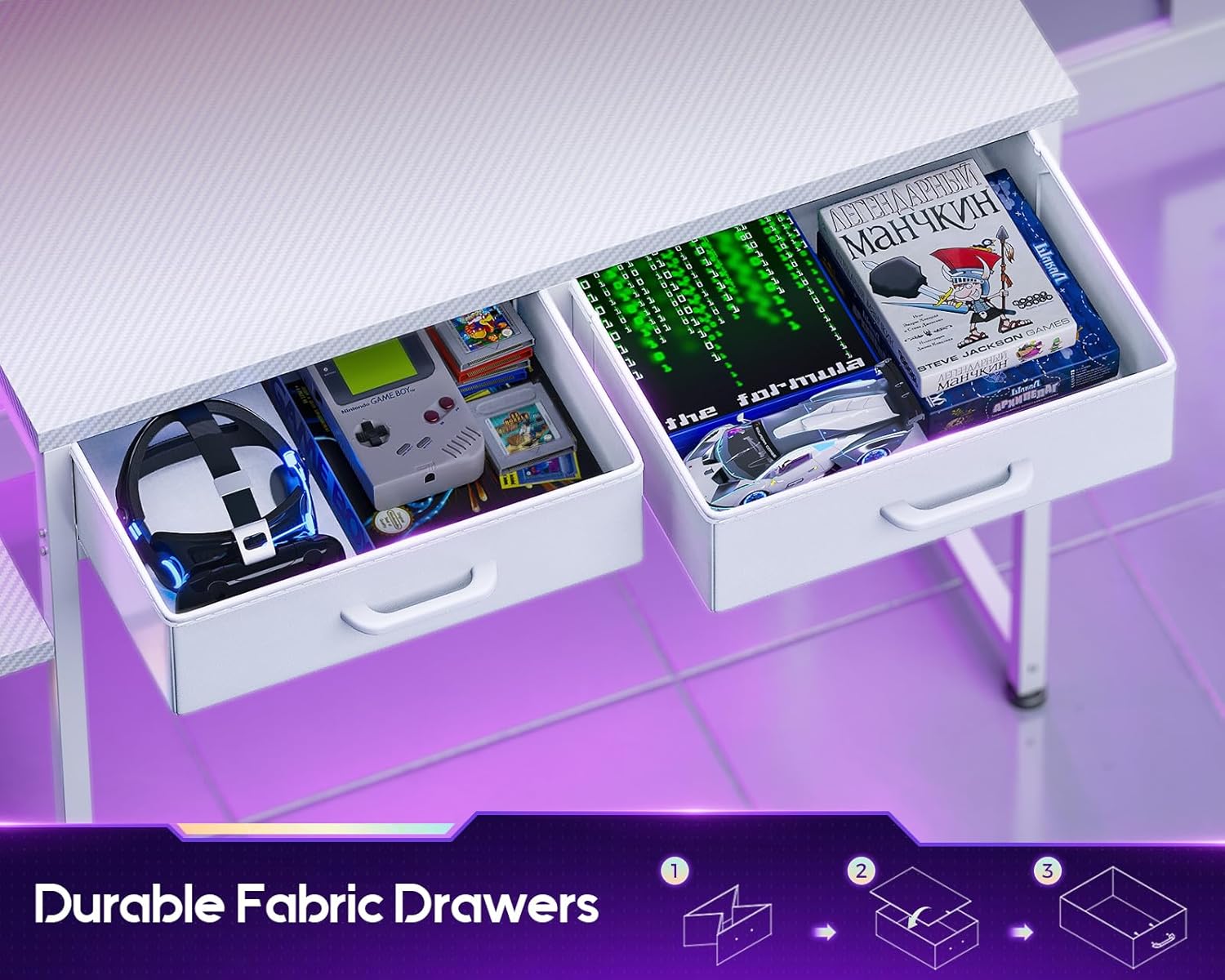
Image: The desk's two fabric drawers pulled open, revealing storage space for gaming accessories and other small items.
Headphone Hook
A convenient headphone hook is integrated into the desk design, allowing you to keep your headphones within reach and your workspace tidy.
Official Product Video
Video: An official product video showcasing the ODK Gaming Desk's features, including the adjustable shelf, LED lights, power outlet, fabric drawers, and carbon fiber surface. This video demonstrates the desk's versatility and design.
Maintenance
- Cleaning: Wipe the carbon fiber tabletop and metal frame with a soft, damp cloth. Avoid abrasive cleaners or harsh chemicals that could damage the finish.
- Spills: Immediately wipe up any spills to prevent staining or damage to the carbon fiber surface.
- Hardware: Periodically check all screws and bolts to ensure they remain tight. Retighten as necessary to maintain stability.
- Electrical Components: Ensure the power outlet and LED strip connections are clean and free from dust. Do not attempt to repair electrical components yourself.
Troubleshooting
| Problem | Possible Cause | Solution |
|---|---|---|
| LED lights not turning on. | Power connection loose or disconnected. Controller malfunction. | Check all power connections. Ensure the power button on the controller is pressed. If issues persist, contact support. |
| Power outlets not working. | Desk power cord unplugged. Circuit breaker tripped. | Verify the desk's main power cord is securely plugged into a functional wall outlet. Check your home's circuit breaker. |
| Desk feels unstable. | Loose assembly hardware. Uneven floor. | Retighten all screws and bolts. Adjust the leveling feet on the desk legs if applicable. |
| Drawers do not slide smoothly. | Improper assembly of drawers or frame. Obstruction. | Ensure fabric drawers are correctly folded and inserted. Check for any obstructions in the drawer slots. |
Specifications
| Feature | Detail |
|---|---|
| Brand | ODK |
| Model Number | B01171801001 |
| Product Dimensions (D x W x H) | 18.9" x 47.2" x 35" |
| Color | Carbon Fiber White |
| Top Material Type | Carbon Fiber |
| Base Material | Metal |
| Number of Drawers | 2 (Fabric Drawers) |
| Special Features | Built-In USB Outlet, Monitor Stand, Reversible Storage Shelf, LED Lights |
| Included Components | Built-in Outlet, Built-in USB Port, Headphone Hook |
| Assembly Required | Yes (Tools and instructions included) |
Warranty and Support
For warranty information, please refer to the documentation included with your purchase or contact the retailer. If you encounter any issues or have questions regarding your ODK Gaming Desk, please reach out to ODK customer support for assistance.
You can often find support contact details on the manufacturer's official website or through your purchase platform.


