
Introduction
Welcome to the user manual for your new VAIO SX-R Laptop. This document provides essential information to help you set up, operate, maintain, and troubleshoot your device. Please read this manual thoroughly to ensure optimal performance and longevity of your laptop.
Product Overview
The VAIO SX-R is a high-performance laptop designed for productivity and creative tasks. It features an Intel Core Ultra 7 processor, a vibrant 14-inch WQXGA Touch Display, ample memory, and fast storage.
Key Features
- Processor: Intel Core Ultra 7 (16-Core, AI-Boosted) for enhanced speed and responsiveness.
- Display: 14-inch WQXGA Touch Display (2560x1600) offering high resolution and wide color gamut.
- Memory: 32GB LPDDR5 RAM for superior multitasking.
- Storage: 1TB PCIe NVMe SSD for fast data access and ample storage.
- Operating System: Windows 11 Pro with enterprise-grade security and productivity features.
- Security: Integrated IR Camera and Fingerprint Reader for secure login.
- Chassis: Durable Carbon Fiber construction.
Laptop Components and Ports

Figure 1: VAIO SX-R Laptop, illustrating the overall design.
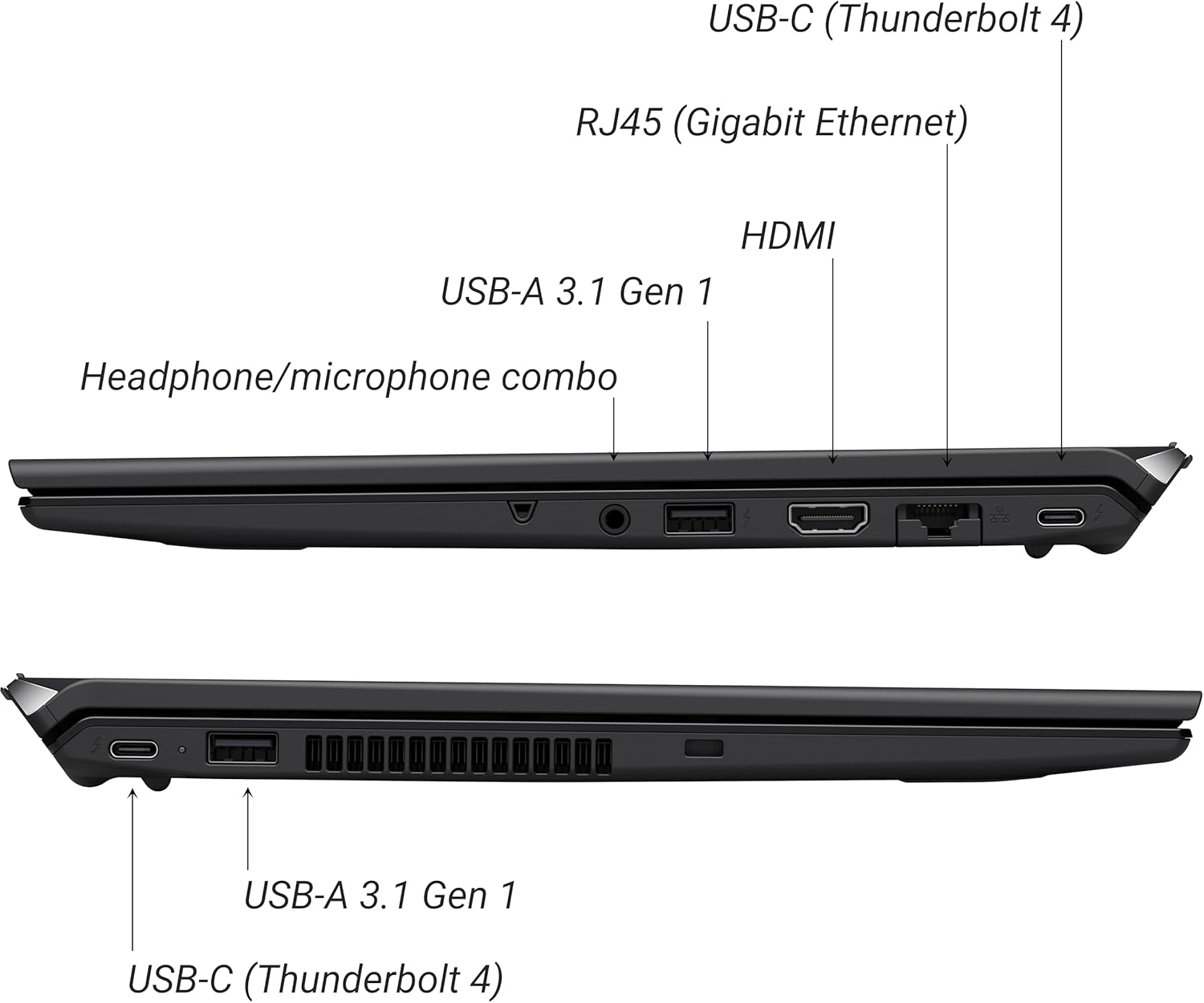
Figure 2: Port layout of the VAIO SX-R Laptop. The left side includes a headphone/microphone combo jack, USB-A 3.1 Gen 1, HDMI, RJ45 (Gigabit Ethernet), and USB-C (Thunderbolt 4). The right side features another USB-C (Thunderbolt 4) and USB-A 3.1 Gen 1 port.
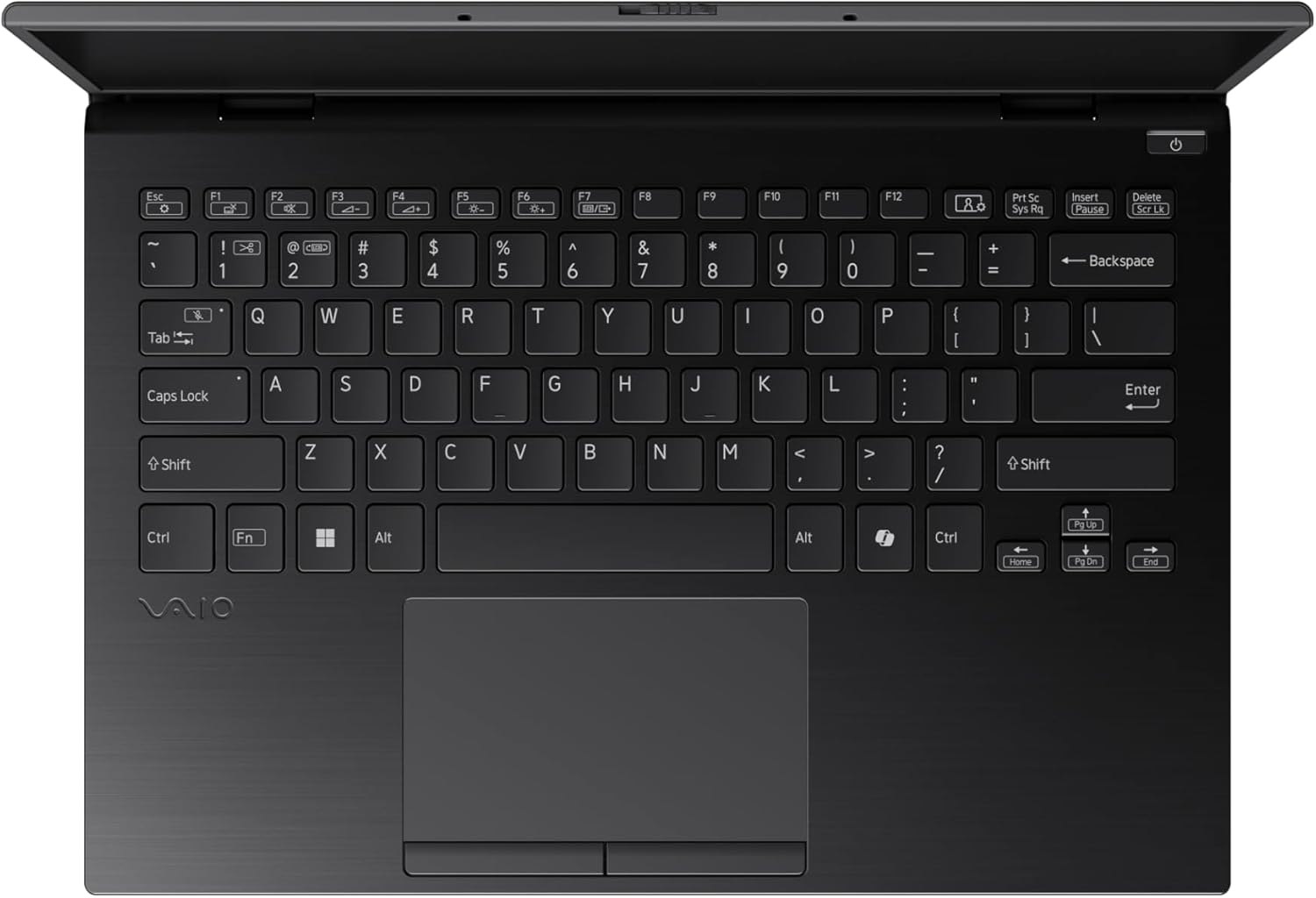
Figure 3: The VAIO SX-R Laptop keyboard and touchpad, featuring a backlit keyboard and integrated fingerprint sensor.
Setup
1. Initial Power On
- Connect Power: Plug the AC adapter into the laptop's power port and then into a wall outlet.
- Open Laptop: Carefully open the laptop lid.
- Power On: Press the power button, typically located on the top right of the keyboard deck. The power indicator light will illuminate.
2. Windows 11 Pro Setup
Follow the on-screen instructions to complete the initial Windows 11 Pro setup. This includes:
- Selecting your region and keyboard layout.
- Connecting to a Wi-Fi network.
- Accepting the license agreement.
- Creating or logging in with a Microsoft account.
- Setting up your PIN, fingerprint, or facial recognition (IR Camera).
3. Connecting Peripherals
You can connect external devices such as mice, keyboards, external monitors, and USB drives to the available ports as shown in Figure 2.
Operating
1. Basic Usage
- Keyboard: Use the integrated backlit keyboard for typing. Function keys (F1-F12) often have secondary functions accessible via the 'Fn' key.
- Touchpad: The precision touchpad supports multi-touch gestures for navigation.
- Touchscreen: Interact directly with the 14-inch WQXGA display using touch gestures.
2. Security Features
- Fingerprint Reader: Enroll your fingerprints through Windows Settings > Accounts > Sign-in options for quick and secure login.
- IR Camera: Utilize Windows Hello facial recognition for convenient and secure access. Set this up in Windows Settings > Accounts > Sign-in options.
3. Power Management
- Sleep Mode: Close the lid or press the power button briefly to put the laptop to sleep.
- Shut Down: Go to Start > Power > Shut down to turn off the laptop completely.
- Restart: Go to Start > Power > Restart to reboot the system.
Maintenance
1. Cleaning
- Screen: Use a soft, lint-free cloth slightly dampened with water or a screen cleaner. Avoid harsh chemicals.
- Keyboard and Chassis: Use a soft cloth. For stubborn dirt, a slightly damp cloth with mild soap can be used, ensuring no liquid enters openings.
- Ports: Use compressed air to gently clear dust from ports.

Figure 4: The VAIO SX-R features a water-resistant keyboard, designed to withstand minor spills.
2. Software Updates
Regularly update your Windows operating system and device drivers to ensure optimal performance, security, and compatibility. Access updates via Windows Settings > Windows Update.
3. Battery Care
- Avoid extreme temperatures.
- Do not fully discharge the battery frequently.
- For long-term storage, charge the battery to about 50-60%.
Troubleshooting
This section addresses common issues you might encounter.
1. Laptop Does Not Power On
- Ensure the AC adapter is securely connected to both the laptop and a working power outlet.
- Check if the power outlet is functional by plugging in another device.
- If the battery is completely drained, allow it to charge for at least 30 minutes before attempting to power on.
2. Display Issues
- No Display: Connect an external monitor to the HDMI port to check if the issue is with the laptop's internal display.
- Flickering/Distorted Display: Update your graphics drivers. Adjust display resolution and refresh rate in Windows Settings > System > Display.
3. Wi-Fi Connectivity Problems
- Ensure Wi-Fi is enabled in Windows Settings > Network & internet > Wi-Fi.
- Restart your router and modem.
- Run the Windows Network Troubleshooter.
4. Slow Performance
- Close unnecessary applications running in the background.
- Check Task Manager (Ctrl+Shift+Esc) for resource-intensive processes.
- Ensure your system is up to date and free from malware.
Specifications
Below are the detailed specifications for the VAIO SX-R Laptop (Model: VJS4R1X0511B).
| Feature | Specification |
|---|---|
| Brand | VAIO |
| Model Name | VAIO SX-R |
| Item Model Number | VJS4R1X0511B |
| Operating System | Windows 11 Pro |
| Processor | Intel Core Ultra 7 (1.4 GHz) |
| RAM Memory | 32 GB LPDDR5 |
| Hard Drive | 1 TB PCIe NVMe SSD |
| Screen Size | 14 Inches |
| Screen Resolution | 2560 x 1600 pixels (WQXGA) |
| Graphics Card | Integrated Intel Graphics |
| Wireless Type | 802.11bgn |
| USB 3.0 Ports | 3 |
| Average Battery Life | 10 Hours |
| Item Weight | 3.1 pounds |
| Product Dimensions | 14.2 x 15 x 3.3 inches |
| Special Features | Backlit Keyboard, Fingerprint Reader, HD Audio, Memory Card Slot, Webcam |
Warranty and Support
1. Warranty Information
Your VAIO SX-R Laptop is covered by a manufacturer's warranty. Please refer to the warranty card included with your product packaging for specific terms, conditions, and duration. Keep your proof of purchase for warranty claims.
2. Technical Support
For technical assistance, troubleshooting beyond this manual, or service inquiries, please contact VAIO customer support. You can typically find contact information on the official VAIO website or in the documentation provided with your laptop.
- Online Support: Visit the official VAIO support website for FAQs, driver downloads, and contact options.
- Phone Support: Refer to your product documentation for regional support phone numbers.