
BLUETTI AORA100-JP
BLUETTI Portable Power Station AORA 100 User Manual
Model: AORA100-JP
1. Introduction
Thank you for choosing the BLUETTI AORA 100 Portable Power Station. This manual provides essential information for the safe and efficient operation of your device. The AORA 100 is a Japan-exclusive model designed for intuitive operation and high safety, featuring a 1152Wh LiFePO4 battery, 1800W rated AC output (up to 2700W with Power Lift), ultra-fast charging, and UPS functionality. It is ideal for various applications including disaster preparedness, camping, and car living.
2. Safety Information
Please read all safety instructions carefully before use to prevent injury or damage to the device. Keep this manual for future reference.
- Do not disassemble, repair, or modify the unit.
- Keep the device away from heat sources, direct sunlight, and flammable materials.
- Ensure proper ventilation during use and charging.
- The casing uses UL94V-0 certified flame-retardant material for enhanced safety.
- The BLUETOPUS BMS (Battery Management System) monitors overcharge and overheating in real-time.
- Avoid exposure to water or high humidity.
- Use only BLUETTI-approved accessories and cables.
3. Product Overview
The BLUETTI AORA 100 is a compact yet powerful portable power station designed for versatility and ease of use. Its intuitive interface and robust construction make it suitable for both indoor and outdoor applications.
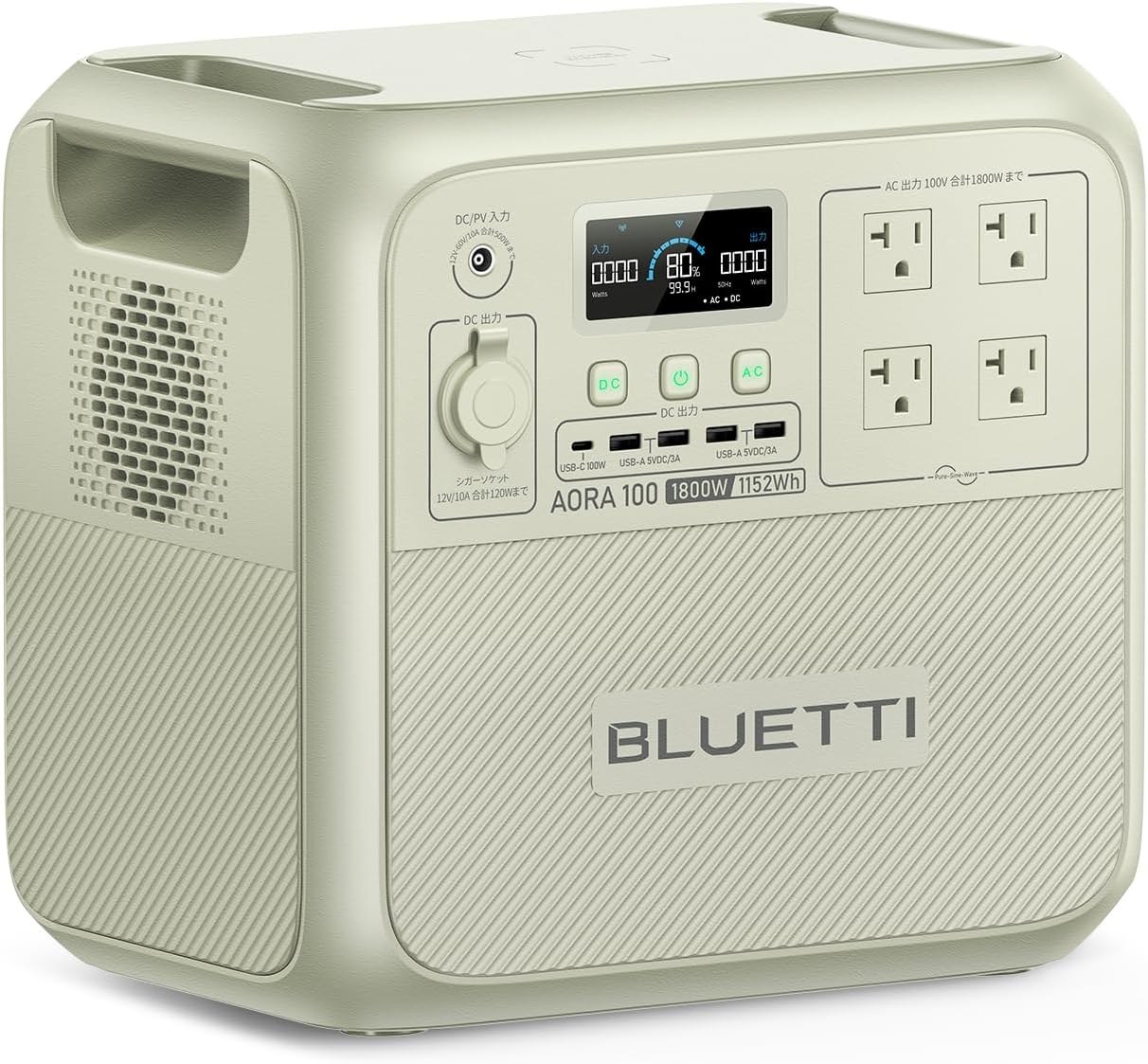
Figure 3.1: Front view of the BLUETTI AORA 100 Portable Power Station, showing the display, control buttons, and various output ports.
3.1 Components and Ports
- Color LCD Screen: Displays battery status, input/output power, and error indicators. Fully in Japanese for the Japan-exclusive model.
- DC Input/Output: For charging the unit and powering DC devices.
- AC Output Ports (x4): 100V AC, rated 1800W (2700W Power Lift).
- USB-A Ports (x4): 18W output each.
- USB-C Port (x1): PD3.0/100W output.
- Cigarette Lighter Socket (x1): 150W output.
- 15W Qi Wireless Charging Pad: Located on the top surface for compatible devices.

Figure 3.2: The BLUETTI AORA 100 showcasing its 11 versatile output ports, including AC, USB-A, USB-C, cigarette lighter, and a wireless charging pad.
4. Setup
4.1 Initial Charging
Before first use, fully charge your AORA 100. The unit supports 7 charging methods, including AC, solar, and car charging.
- AC Charging: Connect the included AC charging cable to a standard household outlet. The TurboBoost 1440W mode can charge the unit to 80% in approximately 45 minutes.
- Solar Charging: Connect compatible solar panels (sold separately) to the DC input. MPPT technology ensures up to 97% charging efficiency even on cloudy days. A 500W solar input can fully charge the unit in about 3.4 hours.
- Car Charging: Use the car charging cable (included with some bundles) to charge from your vehicle's cigarette lighter port. With BLUETTI Charger1 (500W), a full charge can be achieved in 2.5 hours.

Figure 4.1: The BLUETTI AORA 100 connected to an AC outlet for rapid charging, reaching 80% in 45 minutes.
4.2 App Control
Download the BLUETTI app to remotely control your AORA 100. The app allows you to monitor usage data, control output on/off, and perform wireless firmware updates (OTA).
5. Operating Instructions
5.1 Powering On/Off
Press and hold the main power button for a few seconds to turn the unit on or off. The LCD screen will illuminate, indicating the device is ready for use.
5.2 Using AC/DC Outputs
Press the respective AC or DC button to activate the desired output ports. The LCD screen will show the current power consumption. The AORA 100 can power 99% of home appliances, including high-power devices like microwave ovens, smartphones, PCs, and refrigerators simultaneously.
5.3 Power Lift Mode (2700W)
The Power Lift mode allows the AORA 100 to power resistive load appliances with heating elements exceeding its 1800W rated output, up to 2700W. This enables simultaneous use of devices like a toaster (1000W) and a dryer (1200W).
5.4 UPS Function (0.02s)
In the event of a power outage, the AORA 100's UPS (Uninterruptible Power Supply) function detects the outage in an industry-leading 0.02 seconds and automatically switches to battery power. This protects sensitive electronics like computers from data loss or damage.
5.5 Wireless Charging
Place your Qi-compatible device on the 15W wireless charging pad located on the top of the unit to begin charging.
5.6 Pass-through Charging
The AORA 100 supports pass-through charging, allowing you to power devices from the unit while it is simultaneously being charged. This is particularly useful in situations where continuous power is required, such as during disasters or at work sites.
6. Maintenance
6.1 Battery Care
The AORA 100 uses a highly safe LiFePO4 battery, designed for a long lifespan. To maximize battery longevity:
- Avoid fully discharging the battery frequently.
- Store the unit in a cool, dry place when not in use.
- For long-term storage, charge the unit to 50-80% every 3-6 months.
- The battery maintains over 80% capacity after 3500 charge/discharge cycles, providing a lifespan of over 10 years with daily use.

Figure 6.1: Illustration of the BLUETTI AORA 100's internal LiFePO4 battery structure, highlighting the UltraCell technology and 8-layer BMS protection for safety and longevity.
6.2 Cleaning
Wipe the exterior with a soft, dry cloth. Do not use abrasive cleaners or solvents.
7. Troubleshooting
If you encounter issues with your AORA 100, please refer to the following common problems and solutions:
| Problem | Possible Cause | Solution |
|---|---|---|
| Unit does not turn on. | Battery is completely discharged. | Connect to an AC outlet and charge for at least 30 minutes. |
| AC output not working. | AC output not activated; Overload protection. | Press the AC button to activate. Reduce connected load if overloaded. |
| Fan noise is loud. | Normal operation during high load or charging; Unit is hot. | Ensure adequate ventilation. Fan speed adjusts based on temperature and load. This is normal behavior. |
| App connection issues. | Bluetooth/Wi-Fi interference; App not updated. | Ensure Bluetooth/Wi-Fi is enabled on your device. Restart the app and the power station. Update the app to the latest version. |
If the problem persists, please contact BLUETTI customer support.
8. Specifications
| Feature | Detail |
|---|---|
| Model Number | AORA100-JP |
| Battery Capacity | 1152Wh |
| Battery Type | LiFePO4 (Lithium Iron Phosphate) |
| AC Output | 100V AC, 1800W Rated (2700W Power Lift) |
| USB-A Output | 4 x 18W |
| USB-C Output | 1 x PD3.0/100W |
| Cigarette Lighter Output | 1 x 150W |
| Wireless Charging | 1 x 15W Qi Pad |
| UPS Function | 0.02s Switchover |
| Charging Methods | AC, Solar, Car, Generator, Lead-acid battery |
| Lifespan | 3500+ cycles to 80% capacity (10+ years with daily use) |
| Operating Temperature | -20°C to 45°C |
| Certifications | UL94V-0 (Flame Retardant Casing) |
9. Warranty and Support
The BLUETTI AORA 100 comes with an industry-leading 5-year warranty from the date of purchase. This warranty covers defects in materials and workmanship under normal use.
9.1 Environmental Commitment
BLUETTI is committed to environmental protection. Based on the "BLUE LIFE" environmental philosophy, BLUETTI implements a free recycling program for its products in Japan, re-utilizing over 95% of disassembled parts. This initiative actively contributes to waste reduction and global environmental protection.
9.2 Customer Support
For technical support, warranty claims, or any inquiries regarding your BLUETTI AORA 100, please visit the official BLUETTI website or contact their customer service team. Please have your model number (AORA100-JP) and purchase details ready when contacting support.
Related documentsAORA100-JP


Ask a question about this manual
Ask about setup, troubleshooting, compatibility, parts, safety, or missing instructions. Manuals+ will review the question and use this page’s manual context to help answer it.