
j Junsun JS-US-DCDQ326TM-D
j Junsun Level 1&2 EV Charger (Model JS-US-DCDQ326TM-D) User Manual
Comprehensive instructions for safe and efficient operation.
1. Introduction
This manual provides essential information for the installation, operation, and maintenance of your j Junsun Level 1&2 EV Charger, Model JS-US-DCDQ326TM-D. Please read this manual thoroughly before using the product to ensure safe and optimal performance.
2. Important Safety Instructions
WARNING: Failure to follow these instructions may result in electric shock, fire, or serious injury.
- Always connect the charger to a properly grounded outlet.
- Do not use the charger if the cable or plug is damaged.
- Do not attempt to open, disassemble, or modify the charger.
- Keep the charger away from water, moisture, and extreme temperatures. The charger is rated IP65 for water resistance, but avoid submerging it.
- Ensure the charging cable is not pinched, stepped on, or subjected to damage.
- Supervise children and pets when the charger is in use.
- Disconnect the charger from the power source before cleaning or maintenance.
- Use only the provided NEMA 14-50 or NEMA 5-15 plugs.
- If using the NEMA 5-15 adapter for Level 1 charging, ensure the circuit can handle the 16A load. Lowering the amperage to 10A may be necessary for some circuits to prevent breaker trips.
3. Package Contents
Verify that all items are present in the package:
- 1x j Junsun Level 1&2 EV Charger (with integrated SAE J1772 connector and cable)
- 1x NEMA 14-50 Plug (pre-attached or included)
- 1x NEMA 5-15 Adapter Plug
- 1x Carrying Case
- 1x User Manual (this document)
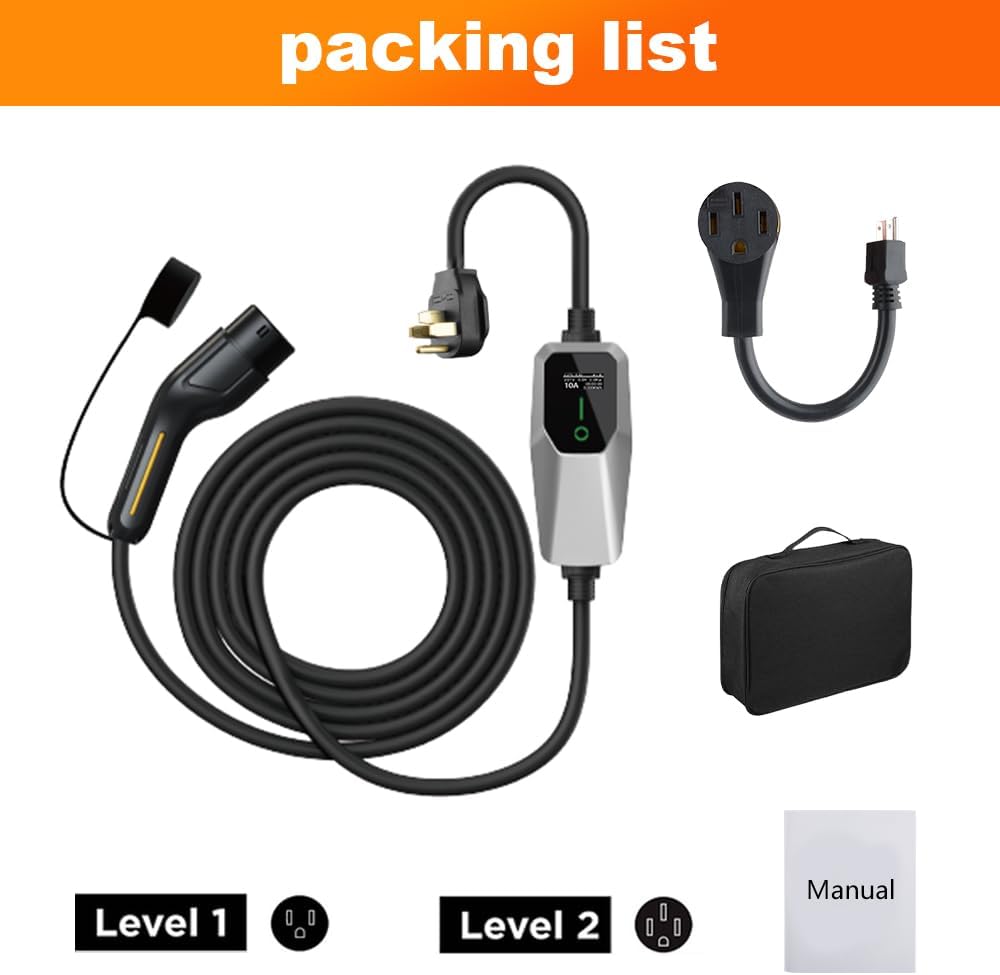
Figure 3.1: Package Contents. This image displays the main EV charger unit with its attached cable and J1772 connector, the NEMA 14-50 plug, the NEMA 5-15 adapter, a black carrying case, and a small manual booklet.
4. Product Overview

Figure 4.0: j Junsun Level 1&2 EV Charger. This image provides an overall view of the charger components, including the main control unit, the J1772 charging handle, the NEMA 14-50 and NEMA 5-15 power plugs, and the included carrying case.
The j Junsun Level 1&2 EV Charger is a portable charging solution designed for electric vehicles compatible with the SAE J1772 standard. It offers flexible charging options with both Level 1 (110V) and Level 2 (240V) capabilities.
4.1 Components
- Control Box: Houses the intelligent charging circuitry and display.
- Charging Cable: 20-foot cable connecting the control box to the vehicle connector.
- SAE J1772 Connector: Standard connector for most electric vehicles.
- Power Plugs: Interchangeable NEMA 14-50 (for Level 2) and NEMA 5-15 (for Level 1) plugs.
4.2 LED Display and Indicators
The control box features an LCD screen and LED indicators to provide real-time charging status and information.
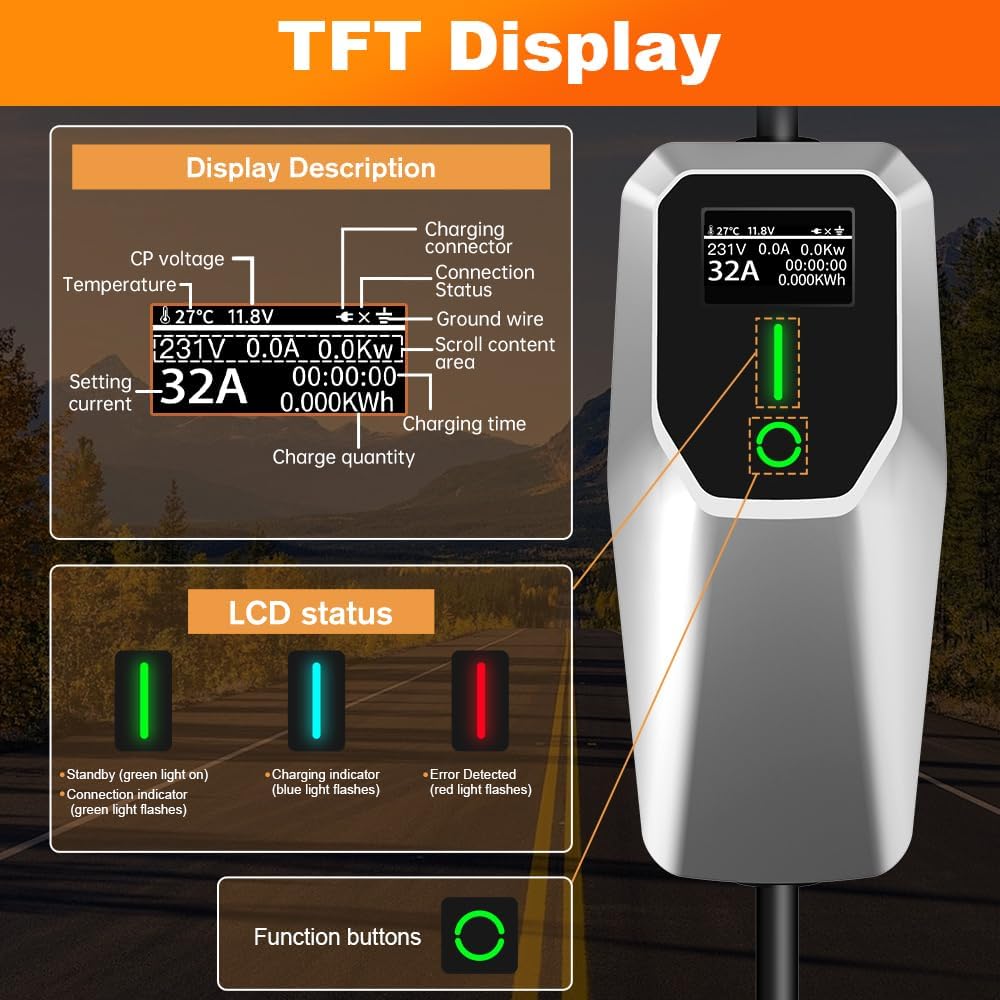
Figure 4.1: Control Box Display Details. This image illustrates the various elements of the charger's LCD screen, including temperature, CP voltage, charging connector, connection status, ground wire status, real-time current, voltage, power, charging time, and charge quantity. It also shows the LED status indicators: green for standby/connection, blue for charging, and red for error detection.
- LCD Screen: Displays temperature, CP voltage, charging connector status, connection status, ground wire status, real-time current, voltage, power (KW), charging time, and total charge quantity (KWh).
- LED Status Indicators:
- Green Light On: Standby mode.
- Green Light Flashing: Connection indicator (connected to vehicle).
- Blue Light Flashing: Charging in progress.
- Red Light Flashing: Error detected.
- Function Button: Used to adjust charging current (amperage).
5. Setup and Installation
The j Junsun EV Charger is designed for portable use. Ensure you have access to a compatible electrical outlet.
5.1 Choosing the Right Outlet
- For Level 2 Charging (Faster): Use the NEMA 14-50 plug with a 240V outlet. This typically requires a dedicated 50-amp circuit.
- For Level 1 Charging (Standard): Use the NEMA 5-15 adapter with a standard 110V/120V household outlet. This typically requires a 15-amp or 20-amp circuit.

Figure 5.1: NEMA 14-50 and NEMA 5-15 Plugs. This image displays the two types of power plugs included with the charger and their respective compatible wall outlets.
5.2 Connecting the Charger
- Ensure your vehicle is parked in a safe location and turned off.
- Select the appropriate power plug (NEMA 14-50 or NEMA 5-15 adapter) for your available outlet.
- Plug the charger's power plug securely into the wall outlet. The control box display should illuminate, and the green LED should be on (standby).
- Open your vehicle's charging port cover.
- Insert the SAE J1772 connector firmly into your vehicle's charging port. You should hear a click, indicating it is locked in place. The green LED on the control box may flash.

Figure 5.2: Charger Connected to Vehicle and Outlet. This image shows the EV charger's control box mounted on a wall, with its 20-foot cable extending to an electric vehicle's charging port, illustrating a typical setup.

Figure 5.3: Indoor and Outdoor Installation Examples. This image illustrates the flexibility of installing the EV charger in various environments, such as an indoor garage setting or an outdoor wall-mounted setup.
6. Operating Instructions
6.1 Starting a Charge
Once the charger is connected to both the power outlet and your vehicle, charging should begin automatically. The blue LED on the control box will flash, and the LCD screen will display real-time charging data.
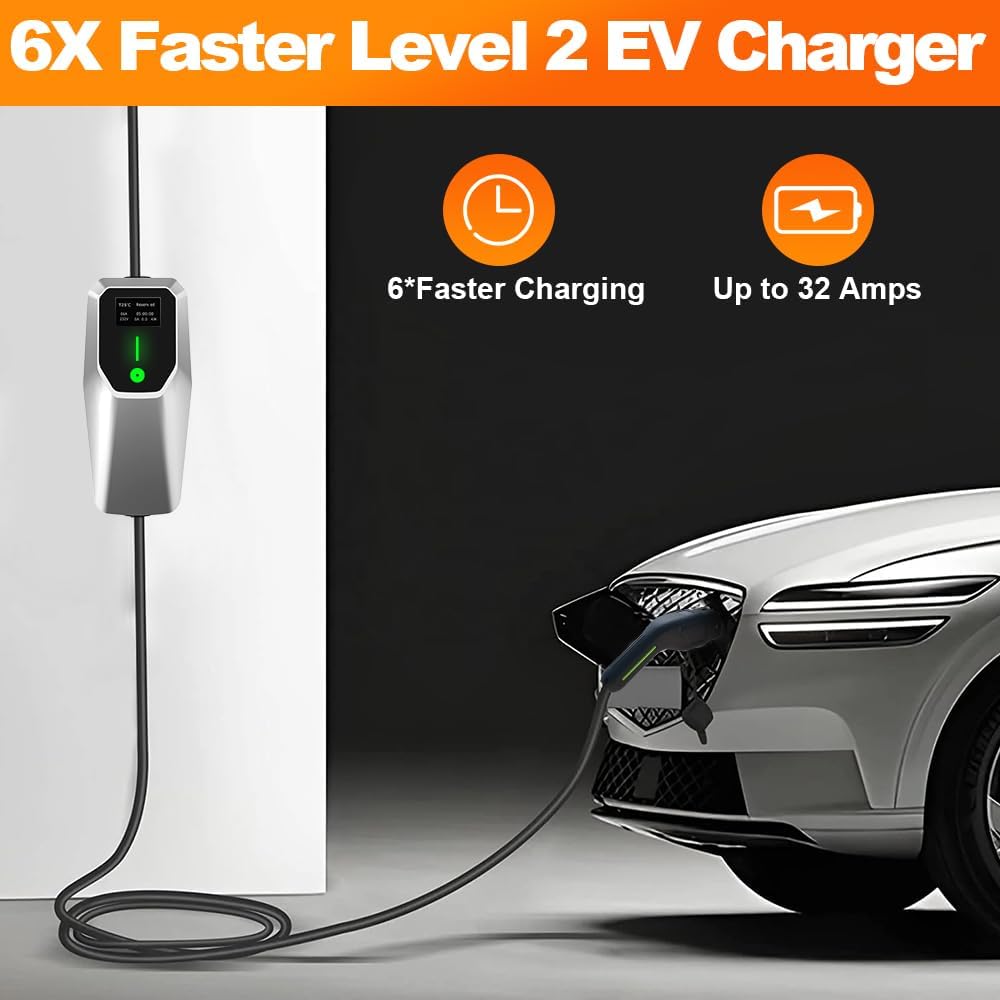
Figure 6.1: Charging in Progress. This image depicts the EV charger connected to a white electric vehicle, with the control box displaying charging information, indicating active charging.
6.2 Adjusting Charging Current (Amperage)
The charger allows you to adjust the charging current. This can be useful for managing power consumption or when using a circuit with lower capacity (e.g., 10A for a 15A household circuit).
- While the charger is in standby mode (connected to power, but not to the vehicle, or before charging starts), press the function button on the control box.
- Each press will cycle through available amperage settings (e.g., 10A, 16A, 20A, 24A, 32A).
- Select the desired amperage. The setting will be saved.
- Connect the charger to your vehicle to begin charging at the selected amperage.
Note: The maximum amperage available depends on the power plug used (16A max for NEMA 5-15, 32A max for NEMA 14-50) and the capabilities of your electrical circuit.
6.3 Stopping a Charge
- Most electric vehicles allow you to stop charging from within the vehicle's infotainment system or app.
- Alternatively, disconnect the SAE J1772 connector from your vehicle's charging port.
- Unplug the charger from the wall outlet.
7. Maintenance and Care
- Cleaning: Disconnect the charger from all power sources before cleaning. Wipe the control box and cables with a soft, dry cloth. Do not use abrasive cleaners or solvents.
- Storage: When not in use, store the charger in a dry, cool place, preferably in its carrying case. Avoid coiling the cable too tightly.
- Inspection: Regularly inspect the charging cable, plugs, and connector for any signs of damage, wear, or corrosion. If any damage is found, discontinue use immediately and contact customer support.
- The charger is designed to operate in temperatures from -13°F to 131°F (-25°C to 55°C).

Figure 7.1: Environmental Durability. This image demonstrates the charger's IP65 waterproof rating in a wet environment and its ability to function in cold temperatures, highlighting its robust design.
8. Troubleshooting
If you encounter issues with your charger, refer to the table below for common problems and solutions.
| Problem | Possible Cause | Solution |
|---|---|---|
| Charger not powering on. | No power from outlet, loose connection, or internal fault. |
|
| Charging not starting. | Vehicle not ready to charge, connector not fully inserted, or charger error. |
|
| Red LED indicator is on/flashing. | Error detected (e.g., overcurrent, undervoltage, leakage, overheating). |
|
| Circuit breaker trips during Level 1 charging. | Overload on the circuit. |
|
9. Specifications
| Feature | Detail |
|---|---|
| Model Number | JS-US-DCDQ326TM-D |
| Brand | j Junsun |
| Connector Type | SAE J1772 |
| Input Voltage | 110V-240V AC |
| Output Voltage | 240V DC (for Level 2), 110V AC (for Level 1) |
| Amperage (Adjustable) | 10A / 16A / 20A / 24A / 32A |
| Maximum Power | 7 KW (Level 2), 1.7 KW (Level 1) |
| Cable Length | 20 feet |
| Power Plugs | NEMA 14-50, NEMA 5-15 Adapter |
| Protection Features | Leakage Protection, Overcharge Protection, Under Voltage Protection, Overcurrent Protection, Overheating Protection, Ground Protection, Lightning Protection (IP66 Waterproof Rating) |
| Operating Temperature | -13°F to 131°F (-25°C to 55°C) |
| Product Dimensions | 7.87 x 3.15 x 2.36 inches (Control Box) |
| Item Weight | 9.39 pounds |
10. Warranty and Customer Support
For warranty information or technical assistance, please contact j Junsun customer support. Refer to the product packaging or the seller's website for the most current contact details.
Manufacturer: j Junsun
Model: JS-US-DCDQ326TM-D
Ask a question about this manual
Ask about setup, troubleshooting, compatibility, parts, safety, or missing instructions. Manuals+ will review the question and use this page’s manual context to help answer it.