1. Introduction
Thank you for choosing the Lacidoll 4.2Gal/16L Humidifier and 118oz Dehumidifier Bundle. This comprehensive user manual provides detailed instructions for the safe operation, setup, maintenance, and troubleshooting of both devices. Please read this manual thoroughly before use and retain it for future reference.

Image 1.1: The Lacidoll 4.2Gal/16L Humidifier (left) and 118oz Dehumidifier (right) bundle.
2. Important Safety Instructions
To reduce the risk of fire, electric shock, or injury, always follow these basic safety precautions:
- Read all instructions before using the appliances.
- Do not operate any appliance with a damaged cord or plug.
- Place appliances on a firm, level surface away from direct sunlight and heat sources.
- Keep the power cord away from heated surfaces.
- Do not immerse the power cord, plug, or appliance in water or other liquids.
- Unplug the appliance from the power outlet when not in use, before cleaning, or before moving.
- Do not block air vents or exhaust openings.
- Supervise children when appliances are in use.
- Use only clean, cool tap water in the humidifier. Do not add essential oils or other additives to the humidifier water tank unless specifically designed for it.
- Ensure the dehumidifier's water tank is correctly installed before operation.
3. Package Contents
Upon opening your Lacidoll bundle, please verify that all items listed below are present and in good condition:
- 1 × Lacidoll 4.2Gal/16L Large Humidifier
- 1 × Lacidoll 118oz Small Dehumidifier
- 1 × Power Adapter for Humidifier
- 1 × Power Adapter for Dehumidifier
- 1 × 5ft Long Drain Hose (for Dehumidifier continuous drainage)
- 1 × User Manual (this document)
4. Product Overview
4.1. Lacidoll 4.2Gal/16L Large Humidifier
This humidifier is designed for large rooms, offering a substantial 4.2-gallon (16-liter) water capacity. It features a smart humidistat for automatic humidity control and operates quietly, making it suitable for bedrooms.

Image 4.1.1: The Lacidoll humidifier highlighting its 4.2-gallon (16-liter) capacity, suitable for covering areas up to 2000 sq. ft.

Image 4.1.2: The humidifier's smart humidistat feature, allowing preset humidity levels from 40% to 90% for various needs (e.g., pets, family, plants).

Image 4.1.3: The humidifier operating quietly at 35dB, suitable for bedroom use, along with features like a 12-hour timer and waterless auto-off protection.
4.2. Lacidoll 118oz Small Dehumidifier
This compact dehumidifier is designed to efficiently remove moisture from smaller spaces, featuring a 118oz (3.5L) water tank. It offers two operating modes and flexible drainage options.
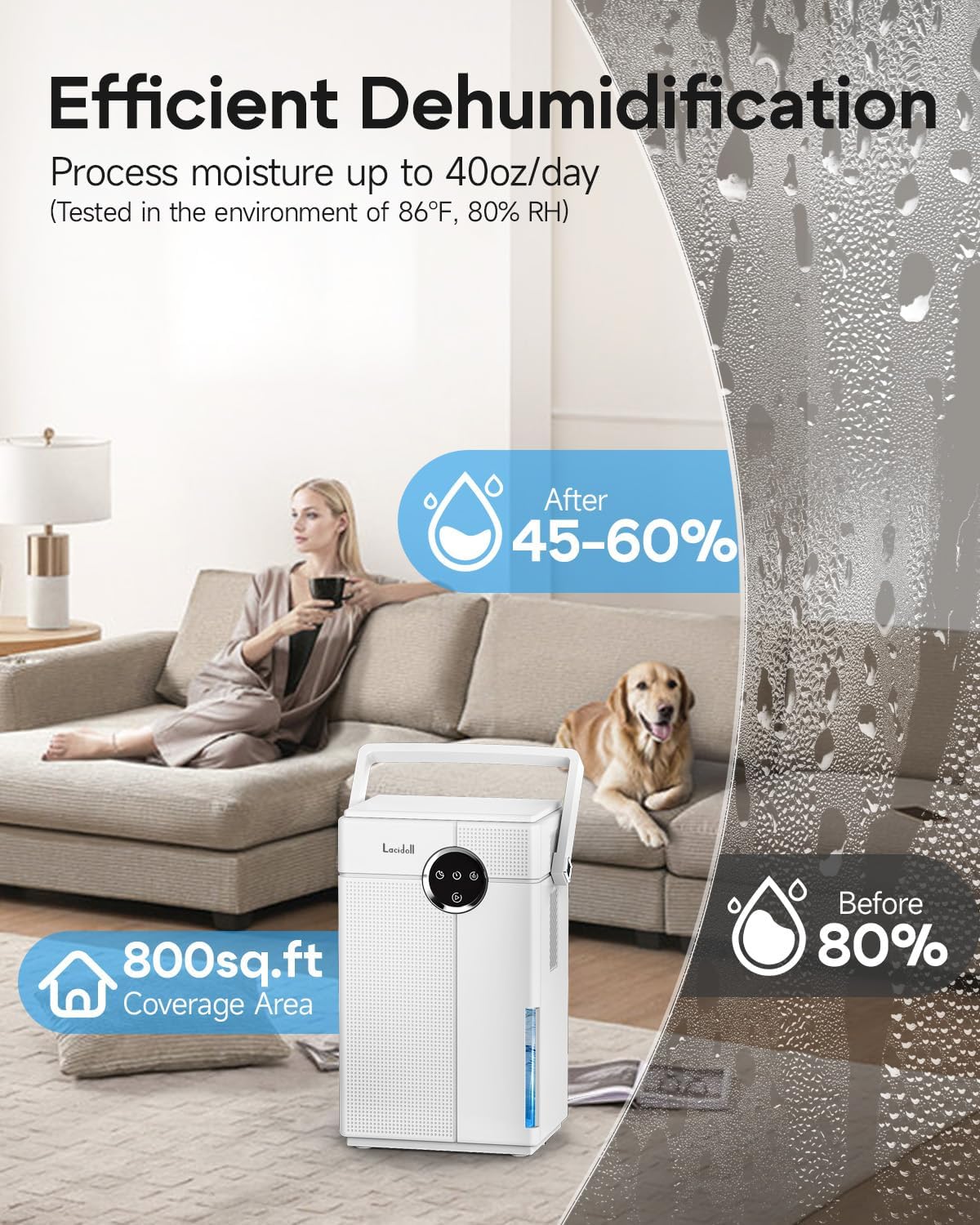
Image 4.2.1: The dehumidifier's efficient moisture removal capability, processing up to 40oz per day and covering an area of 800 sq. ft.

Image 4.2.2: The dehumidifier offers two modes: Turbo Mode for powerful moisture removal (30dB-40dB) and Sleep Mode for quiet operation (<30dB).

Image 4.2.3: The dehumidifier supports both continuous drainage with an included 5ft hose and manual drainage using its detachable 3.5L large tank.

Image 4.2.4: The dehumidifier features a 7-color night light and a timer function (8/16/24 hours).
5. Setup Instructions
5.1. Humidifier Setup
- Unpack: Carefully remove the humidifier from its packaging.
- Placement: Place the humidifier on a flat, stable, and water-resistant surface at least 6 inches (15 cm) away from walls and furniture. Ensure it is not placed directly on carpet or near heat sources.
- Fill Water Tank: Remove the water tank from the base. Unscrew the tank cap, fill the tank with clean, cool tap water. Do not overfill. Securely replace the cap and place the tank back onto the base.
- Connect Power: Plug the power adapter into the humidifier and then into a standard electrical outlet.
5.2. Dehumidifier Setup
- Unpack: Carefully remove the dehumidifier from its packaging.
- Placement: Place the dehumidifier on a flat, stable surface in the area where moisture removal is desired. Ensure there is at least 8 inches (20 cm) of space around the air inlets and outlets for proper airflow.
- Water Tank: Ensure the water tank is correctly inserted into the dehumidifier.
- Continuous Drainage (Optional): If you prefer continuous drainage, remove the rubber stopper from the drainage port on the back of the unit. Connect the provided 5ft drain hose firmly to the port and route the other end to a suitable drain or larger container, ensuring a downward slope for gravity drainage.
- Connect Power: Plug the power adapter into the dehumidifier and then into a standard electrical outlet.
6. Operating Instructions
6.1. Humidifier Operation
- Power On/Off: Press the Power button to turn the humidifier on or off.
- Mist Level Adjustment: Use the Mist Level button to cycle through different mist output settings (e.g., Low, Medium, High).
- Humidity Setting (Humidistat): Press the Humidity button to set your desired humidity level (e.g., 40% to 90%). The unit will automatically adjust mist output to maintain this level.
- Timer Function: Press the Timer button to set an operating duration (e.g., 1-12 hours). The humidifier will automatically turn off after the set time.
- Sleep Mode: Activate Sleep Mode for quieter operation and dimmed display lights, ideal for nighttime use.
- Waterless Auto-Off: The humidifier will automatically shut off when the water tank is empty and indicate a low water warning. Refill the tank to resume operation.
6.2. Dehumidifier Operation
- Power On/Off: Press the Power button to turn the dehumidifier on or off.
- Mode Selection: Press the Mode button to switch between:
- Turbo Mode: For maximum moisture removal. The fan operates at a higher speed.
- Sleep Mode: For quieter operation and dimmed display lights, suitable for bedrooms.
- Timer Function: Press the Timer button to set an operating duration (e.g., 8, 16, or 24 hours). The dehumidifier will automatically turn off after the set time.
- 7-Color Night Light: Press the Light button to cycle through the 7-color night light options or turn it off.
- Full Water Tank Indicator: The dehumidifier will stop operating and an indicator light will illuminate when the water tank is full. Empty the tank to resume operation.
7. Maintenance
Regular cleaning and maintenance ensure optimal performance and longevity of your appliances.
7.1. Humidifier Maintenance
- Daily: Empty and rinse the water tank and water basin with fresh water.
- Weekly: Clean the water tank and basin thoroughly. Use a soft brush or cloth to remove any mineral deposits or buildup. For stubborn deposits, a solution of white vinegar and water (1:1 ratio) can be used. Rinse thoroughly after cleaning.
- Storage: If storing for an extended period, ensure the unit is completely dry. Clean all components, empty the water tank, and store in a cool, dry place.
7.2. Dehumidifier Maintenance
- Emptying Water Tank: When the 'Full Tank' indicator lights up, carefully pull out the water tank. Dispose of the collected water. Rinse the tank with clean water and reinsert it firmly until it clicks into place.
- Cleaning Air Filter (Monthly): The dehumidifier has an air filter to prevent dust from entering. Gently pull out the filter from its slot. Clean it with a vacuum cleaner or wash it with warm, soapy water. Ensure the filter is completely dry before reinserting.
- Exterior Cleaning: Wipe the exterior of the unit with a soft, damp cloth. Do not use abrasive cleaners or solvents.
- Storage: If storing for an extended period, ensure the water tank is empty and the unit is dry. Clean the air filter and store the dehumidifier in a cool, dry place.
8. Troubleshooting
Before contacting customer support, please refer to the following common issues and solutions:
8.1. Humidifier Troubleshooting
| Problem | Possible Cause | Solution |
|---|---|---|
| No mist output | No water in tank; Tank not properly seated; Power not connected. | Refill water tank; Re-seat tank correctly; Check power connection. |
| Unusual odor | Stagnant water; Mineral buildup. | Clean tank and basin thoroughly; Use fresh water daily. |
| White dust around unit | Hard water. | Use distilled or demineralized water. |
8.2. Dehumidifier Troubleshooting
| Problem | Possible Cause | Solution |
|---|---|---|
| Dehumidifier not turning on | No power; Water tank full or not properly inserted. | Check power connection; Empty and re-insert water tank correctly. |
| Little to no water collected | Room humidity too low; Air filter clogged; Room temperature too low. | Dehumidifier may not be needed; Clean air filter; Ensure room temperature is above 41°F (5°C). |
| Unit is noisy | Unit not on a level surface; Air filter clogged. | Place on a level surface; Clean air filter. |
9. Specifications
9.1. Lacidoll 4.2Gal/16L Large Humidifier
- Model: B0F547BL1V (Part of bundle)
- Water Tank Capacity: 4.2 Gallons (16 Liters)
- Coverage Area: Up to 2000 sq. ft.
- Noise Level: <35dB
- Features: Smart Humidistat, 12H Timer, Waterless Auto-off
9.2. Lacidoll 118oz Small Dehumidifier
- Model: B0F547BL1V (Part of bundle)
- Water Tank Capacity: 118 oz (3.5 Liters)
- Moisture Removal: Up to 40 oz/day (at 86°F, 80% RH)
- Coverage Area: Up to 800 sq. ft.
- Noise Level: <30dB (Sleep Mode), 30-40dB (Turbo Mode)
- Features: Turbo/Sleep Modes, 8/16/24H Timer, 7-Color Night Light, Continuous Drainage Option
10. Warranty and Support
Lacidoll products are manufactured to high-quality standards. For specific warranty details, please refer to the warranty card included with your product packaging. If you encounter any issues or require technical assistance, please contact Lacidoll customer support through the retailer's platform or the official Lacidoll website.


