
1. Introduction
This user manual provides essential information for the safe and efficient operation, assembly, and maintenance of your DEEPOWER A2 Electric Bicycle. Please read this manual thoroughly before your first ride and keep it for future reference.

2. Safety Guidelines
Your safety is paramount. Always wear a helmet and appropriate safety gear when riding. Familiarize yourself with local traffic laws and regulations. Perform a pre-ride inspection before each use, checking brakes, tire pressure, and battery level.
- Always wear a certified helmet.
- Ensure all bolts and quick releases are securely tightened.
- Check tire pressure before each ride.
- Test brakes to ensure proper function.
- Do not ride under the influence of alcohol or drugs.
- Be aware of your surroundings and traffic.
3. Product Overview
3.1 Key Components
- 750W Rear Brushless Motor: Provides powerful and quiet assistance.
- 48V 12/20Ah Removable Battery: Offers extended range and flexible charging.
- 20" x 4.0 Fat Tires: Designed for various terrains, providing excellent traction.
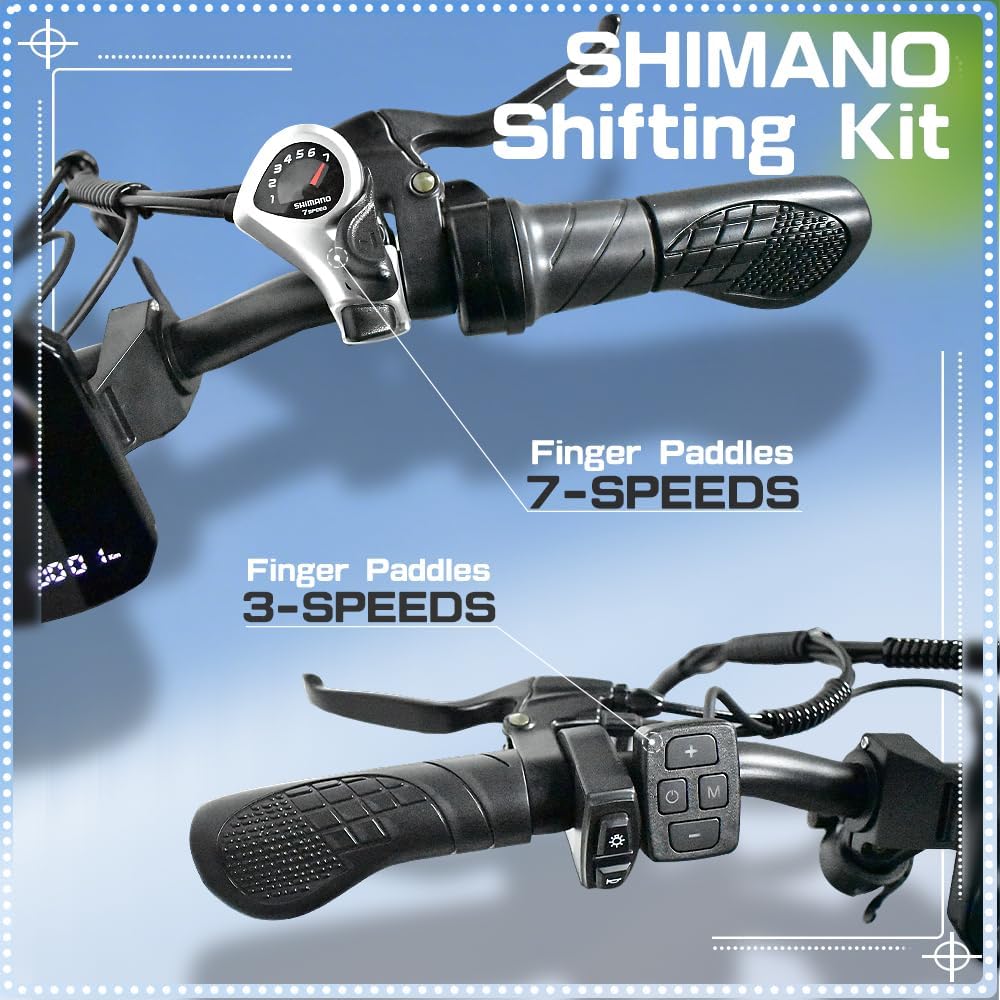
- 7-Speed Gears: Allows for customizable riding experience.
- Mechanical Disc Oil Brakes: Ensures reliable and stable stopping power.
- LCD Display: Shows speed, battery level, distance, and other vital information.
- Adjustable Suspension Fork: Improves ride comfort by absorbing shocks.



3.2 Specifications
| Specification | Value |
|---|---|
| Bike Type | Electric Bike |
| Age Range (Description) | Adult |
| Brand | DEEPOWER |
| Number of Speeds | 7 |
| Color | Black |
| Wheel Size | 20 Inches |
| Frame Material | Aluminum |
| Suspension Type | Front |
| Special Feature | Digital Display, Multi-Speed, Adjustable Handlebars, Foldable, Adjustable Seat |
| Included Components | Horn, Kickstand, Mudguard, Cargo Rack, Tool Kit |
| Item Weight | 68.12 Pounds |
| Model Name | A2 |
| Power Source | Electric motor (rechargeable battery-powered) |
| Lithium Battery Energy Content | 48 Watt Hours |


Product Overview Video
An overview video showcasing the features and functionality of the DEEPOWER A2 Electric Bicycle, including its folding mechanism and fat tires.
4. Setup and Assembly
4.1 Unboxing
Carefully remove all components from the packaging. Ensure all parts listed in the packing list are present before proceeding with assembly.
Unpacking Video
This video provides a comprehensive guide to unboxing and initial assembly of the DEEPOWER A2 Electric Bicycle.
4.2 Initial Assembly
- Install the Riser Tube: Insert the riser tube into the frame and secure it. Ensure the quick release is tightened.
- Install the Front Wheel: Align the front wheel with the fork and secure it using the provided quick release skewer. Ensure the brake rotor is correctly positioned within the caliper.
- Install the Front Fender: Attach the front fender to the fork using the screws provided.
- Install the Front Light: Mount the front light to the designated bracket on the front fork and connect its wiring.
- Install the Saddle: Insert the saddle post into the seat tube and adjust to your preferred height. Secure with the quick release lever.
- Install the Foot Pedals: Identify the left (L) and right (R) pedals. Screw them into the crank arms by hand, then tighten securely with a wrench. Note: The left pedal tightens counter-clockwise.
- Install the Kickstand: Attach the kickstand to the designated mounting points on the frame and tighten the screws.
5. Operating Instructions
5.1 Powering On/Off
To power on the bicycle, insert the key into the battery lock and turn it to the 'ON' position. Then, press and hold the power button on the LCD display until it lights up. To power off, press and hold the power button on the display until it turns off, then turn the key to the 'OFF' position and remove it.
5.2 Riding Modes
The DEEPOWER A2 Electric Bicycle offers three riding modes:
- Electric-only Mode: Use the throttle for propulsion without pedaling.
- Pedal-assist Mode: The motor provides assistance as you pedal. Adjust the assist level using the display controls.
- Pedal-only Mode: Ride the bicycle like a traditional bike without motor assistance.
5.3 Speed Control
The speed is controlled by the throttle and the plus (+) and minus (-) keys on the display. To unlock the maximum speed, ensure the display is off. Twist the throttle to the bottom while squeezing the right brake. Turn on the display, leave it for 5-8 seconds, then release the throttle and brake. Set the gear to the 5th gear (highest gear) to reach maximum speed.
Unlocking Maximum Speed Video
Instructions on how to unlock the maximum speed setting of the DEEPOWER A2 Electric Bicycle, as per manufacturer guidelines.
5.4 Lights and Horn
The DEEPOWER A2 is equipped with an LED headlight and taillight for improved visibility. The horn provides an audible warning for safety.
Light and Horn Operation Video
This video illustrates how to operate the front light and horn of the DEEPOWER A2 Electric Bicycle for enhanced safety.
5.5 Folding and Unfolding
The DEEPOWER A2 features a foldable design for easy storage and transport. Follow the steps below to fold and unfold your bicycle.

Folding and Taking Out the Battery Video
This video demonstrates the process of folding the DEEPOWER A2 Electric Bicycle and safely removing its battery.
6. Maintenance
6.1 Battery Care
To maximize battery life, charge it regularly, even when not in use. Avoid completely draining the battery. Store the battery in a cool, dry place. Charging typically takes 6-7 hours for a full charge.
6.2 Brake Adjustment
If your bike wheels make a rustling sound, you may need to adjust the brake pads. Slightly loosen the two screws on the brake clamp, then adjust the brake clamp so that it does not contact the brake disc. Spin the wheel until you no longer hear a rustling sound, then tighten the two screws you just loosened.
Adjusting the Brake Pads Video
A step-by-step guide on how to adjust the brake pads of the DEEPOWER A2 Electric Bicycle to ensure optimal braking performance and prevent rustling sounds.
6.3 Fork Maintenance
Regularly check the front suspension fork for any signs of damage or leaks. Keep the fork stanchions clean to ensure smooth operation. The fork can be locked or unlocked depending on riding conditions.
Locking and Unlocking the Fork Video
Learn how to properly lock and unlock the front suspension fork of your DEEPOWER A2 Electric Bicycle for different riding conditions.
6.4 General Cleaning
Clean your e-bike regularly with a damp cloth and mild soap. Avoid using high-pressure washers directly on electrical components. Lubricate the chain periodically to ensure smooth gear changes and prevent rust.
7. Troubleshooting
- Bike not turning on: Check if the battery is properly inserted and locked, and if the key is turned to the 'ON' position. Ensure the battery is charged.
- Motor not assisting: Verify that you are in pedal-assist mode and not pedal-only mode. Check the battery level. Ensure all connections are secure.
- Brakes squeaking: This may indicate dirty brake pads or rotor, or misalignment. Refer to the brake adjustment section.
- Gears not shifting smoothly: The derailleur may need adjustment. Consult a professional bike mechanic if unsure.
8. Warranty and Support
8.1 Warranty Information
The DEEPOWER A2 Electric Bicycle comes with a 1-year limited warranty from the date of purchase. This warranty covers manufacturing defects in materials and workmanship. It does not cover normal wear and tear, misuse, accidents, or unauthorized modifications.
8.2 Customer Support
For any questions, technical assistance, or warranty claims, please contact DEEPOWER customer support. Refer to your purchase documentation or the DEEPOWER official website for contact details.
