
1. Introduction
Thank you for choosing the Lumisilk Luminia IPL Epilator. This device utilizes advanced Intense Pulsed Light (IPL) technology to provide a safe, effective, and convenient solution for permanent hair reduction and skin rejuvenation in the comfort of your home. With regular use, you can achieve smooth, hair-free skin and an improved complexion.
Please read this manual thoroughly before first use to ensure proper operation, maximize results, and minimize risks. Keep this manual for future reference.
2. Important Safety Information
Always follow these safety precautions to reduce the risk of injury or damage to the device.
General Warnings:
- This device is intended for hair reduction and skin rejuvenation. Do not use it for any other purpose.
- Keep out of reach of children.
- Do not use on damaged or irritated skin, open wounds, moles, tattoos, or permanent makeup.
- Consult a doctor before use if you have any underlying medical conditions, are pregnant, breastfeeding, or taking photosensitive medications.
- Do not use the device near water or in damp environments.
- Always wear the provided protective glasses during treatment to protect your eyes from the intense pulsed light.
- Do not look directly into the light window when the device is flashing.
- Ensure the skin is clean, dry, and free of any lotions, creams, or deodorants before treatment.
Skin Tone and Hair Color Compatibility:
IPL technology is most effective on lighter skin tones with darker hair. It is not suitable for very dark skin tones or very light (white, grey, blonde, red) hair, as it may not be effective or could cause skin damage. Refer to the skin tone chart in the full manual for detailed compatibility.
Areas Not to Treat:
- Around the eyes (eyebrows, eyelids).
- Genitals (male).
- Nipples, inner labia.
- Any areas with skin conditions, infections, or recent sun exposure/tanning.
3. Product Components
Your Lumisilk Luminia IPL Epilator kit includes the following items:
- Lumisilk Luminia IPL Epilator Device
- Power Adapter
- Protective Glasses
- User Manual (this document)

Image: The complete Lumisilk Luminia IPL Epilator kit, showing the device, power adapter, protective glasses, and a storage pouch.
4. Setup
- Unpack the Device: Carefully remove all components from the packaging. Inspect the device and accessories for any signs of damage.
- Connect Power: Plug the power adapter into the device's power port, then plug the adapter into a suitable electrical outlet. The device will enter standby mode.
- Wear Protective Glasses: Before turning on the device, put on the provided protective glasses to shield your eyes from the intense light flashes.
5. Operating Instructions
5.1. Preparation for Treatment
- Shave the Area: For hair removal, shave the desired treatment area thoroughly before each session. Do not wax, pluck, or use depilatory creams, as the hair follicle needs to be intact for IPL to be effective.
- Clean and Dry Skin: Ensure the skin is clean, dry, and free of any lotions, oils, or makeup.
5.2. Power On/Off
- Power On: Press and hold the power button (usually located on the handle) for a few seconds until the display screen illuminates.
- Power Off: Press and hold the power button again until the device turns off.
5.3. Selecting Intensity Levels
The device features 6 adjustable intensity levels to suit different skin sensitivities and treatment areas. Always start with the lowest intensity level (Level 1) and gradually increase it as your skin tolerates it, ensuring comfort and avoiding irritation.
- Press the power button briefly to cycle through the intensity levels (1 to 6). The selected level will be displayed on the screen.
- Level 1 is the lowest intensity, suitable for sensitive areas or first-time users.
- Level 6 is the highest intensity, for areas with thicker hair or higher tolerance.
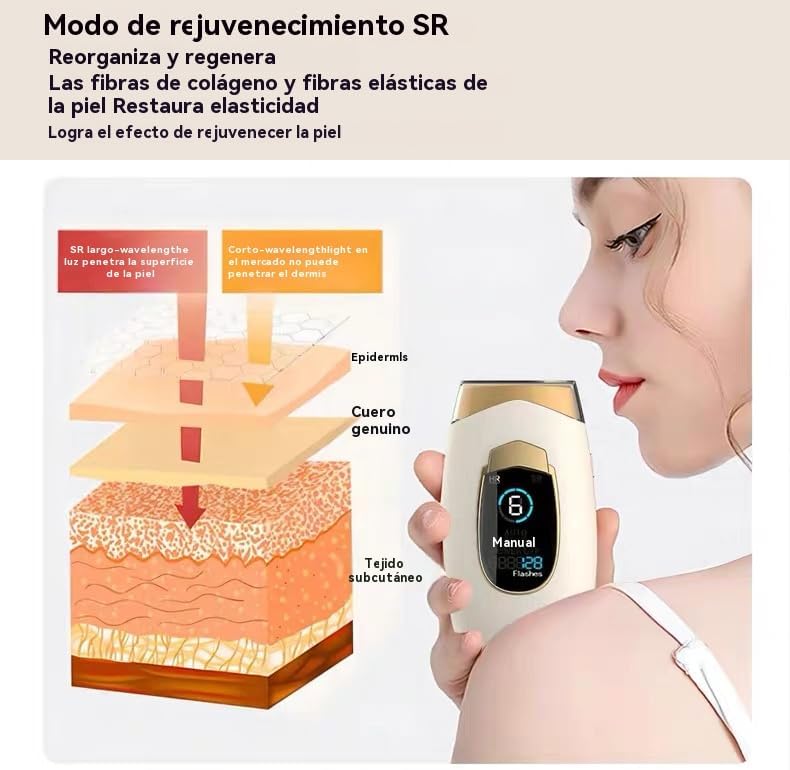
Image: Diagram illustrating the six adjustable intensity levels (gears) of the IPL epilator, ranging from low to high intensity.
5.4. Treatment Modes (HR/SR)
Your device offers two primary modes:
- HR (Hair Removal) Mode: This is the standard mode for targeting hair follicles to reduce hair growth.
- SR (Skin Rejuvenation) Mode: This mode uses a different light spectrum to stimulate collagen production and improve skin elasticity, leading to skin rejuvenation.
To switch between modes, press the mode button (often labeled 'HR'/'SR' or a similar icon) briefly. The active mode will be indicated on the LCD screen.

Image: Diagram illustrating the Skin Rejuvenation (SR) mode, explaining how long-wavelength light penetrates the skin to reorganize and regenerate collagen and elastic fibers, restoring skin elasticity.
5.5. Application Technique
- Positioning: Place the light window firmly against your skin, ensuring full contact. The device will not flash if there is insufficient skin contact.
- Flashing: Once the device detects full skin contact, press the flash button to emit a pulse of light.
- Manual vs. Auto Mode:
- Manual Mode: Press the flash button for each pulse. Ideal for small or curved areas like the face, underarms, or bikini line.
- Auto Mode: Press and hold the flash button for a few seconds to activate auto mode. The device will automatically emit continuous flashes when in full contact with the skin. This mode is suitable for larger areas like legs or arms. Move the device slowly and continuously over the skin.
- Coverage: Treat each area once per session. Avoid overlapping flashes to prevent excessive exposure.
5.6. Recommended Treatment Schedule
For optimal hair reduction results, follow this general schedule:
- Weeks 1-4: Use 2-3 times per week.
- Weeks 5-8: Use 1-2 times per week.
- After Week 8: Use once every 2-4 weeks for maintenance, or as needed, until desired results are achieved.
Visible hair reduction can be observed within 3-4 weeks, with permanent reduction typically achieved after 8-12 sessions.

Image: The Lumisilk Luminia IPL Epilator demonstrating its use on various body areas: arms, legs, underarms, bikini line, and face.
6. Maintenance
6.1. Cleaning the Device
- Always unplug the device before cleaning.
- Use a soft, dry cloth to wipe the device body.
- Gently clean the light window with a cotton swab or a soft cloth dampened with a small amount of alcohol. Ensure no liquid enters the device.
- Do not use abrasive cleaners, brushes, or harsh chemicals.
- Ensure the device is completely dry before storing or next use.
6.2. Storage
- Store the device in a cool, dry place, away from direct sunlight and moisture.
- Keep the device in its original packaging or a protective pouch to prevent damage.
7. Troubleshooting
| Problem | Possible Cause | Solution |
|---|---|---|
| Device does not turn on. | Not properly connected to power; power button not pressed correctly. | Ensure the power adapter is securely plugged into both the device and the outlet. Press and hold the power button for a few seconds. |
| Device does not flash. | Light window not in full contact with skin; device in standby mode; low flash count. | Ensure the light window is pressed firmly and completely against the skin. Press the power button briefly to exit standby. Check the flash count on the display. |
| Skin feels too hot or irritated. | Intensity level is too high for your skin type; overlapping flashes. | Reduce the intensity level. Ensure you are not treating the same area multiple times in one session. Apply a cool compress if irritation persists. |
| No visible results after several sessions. | Incorrect usage; hair/skin type not suitable for IPL; inconsistent treatment schedule. | Review operating instructions. Ensure your skin tone and hair color are compatible with IPL. Maintain a consistent treatment schedule. Increase intensity if comfortable. |
8. Specifications
- Model: B0F53PC537
- Brand: Genérico
- Technology: Intense Pulsed Light (IPL)
- Intensity Levels: 6 adjustable levels
- Modes: HR (Hair Removal), SR (Skin Rejuvenation)
- Flash Count: Approximately 888,828 flashes (as indicated on device display)
- Power: 99W
- Wavelength: 550-1200nm
- Lamp Type: Quartz lamp
- Display: LCD Screen

Image: Overview of the multifunctional configuration, highlighting features like 6-speed energy adjustment, 99W power, 550-1200nm wavelength, HR/SR modes, and LCD display.
9. Warranty and Support
For warranty information and customer support, please refer to the documentation provided with your purchase or contact the retailer/manufacturer directly. Keep your proof of purchase for any warranty claims.