
1. Introduction
The Bloepum FM225 is a sophisticated 3D face recognition module designed for integration into various smart systems. It combines a face algorithm motherboard, a binocular camera, and an infrared LED light to provide reliable face recognition capabilities. This module supports deep learning infrared face recognition algorithms, ensuring high accuracy and robust live detection.
Key functionalities include face liveness detection, face capture, feature extraction, comparison, and user information storage. It facilitates face recognition and viewing functions through UART/USB communication and video transmission, making it suitable for applications such as smart door locks, access control systems, and smart home devices.

Figure 1: Bloepum FM225 3D Face Recognition Module. This image displays the compact circuit board of the FM225 module, featuring two camera lenses and an infrared LED in the center, along with various electronic components.
2. Setup and Installation
2.1 Module Components
The FM225 module integrates the following core components:
- Face Algorithm Motherboard: Processes facial data.
- Binocular Camera: Captures visible light and infrared images for 3D recognition.
- Infrared LED Light: Provides illumination for infrared imaging and liveness detection.

Figure 2: Diagram illustrating the internal components of the FM225 module, including the algorithm motherboard, dual camera, LED light, and light blocking foam.
2.2 Power Supply Requirements
The module requires a stable DC power supply:
- Voltage: DC 5.5V to 9V
- Current: 1A
2.3 Communication Interfaces
The FM225 module supports UART and USB communication for integration with host systems.

Figure 3: Pinout diagram for the UART and USB communication interfaces on the FM225 module, showing pin assignments for connection.
Interface Type: 1.25mm x 4-pin/5-pin socket
UART Pin Assignments:
- 1: GND (Ground)
- 2: UART_RX (Receive Data)
- 3: UART_TX (Transmit Data)
- 4: VCC (Power Supply)
USB Pin Assignments:
- 1: VCC (Power Supply)
- 2: NC (No Connection)
- 3: DM (Data Minus)
- 4: DP (Data Plus)
- 5: GND (Ground)
2.4 Installation Recommendations
For optimal performance and protection, consider the following recommendations for the camera cover plate (e.g., outer lock shell panel):
- Material: Glass or acrylic
- Transmittance: ≥90%
- Thickness: 0.55mm
Light Insulation: The integrated LED light should be isolated from the camera using a U-shaped foam to prevent interference.
3. Operating Instructions
3.1 Face Recognition Process
The FM225 module performs face recognition through the following steps:
- Face Detection: The binocular camera captures images of the subject.
- Liveness Detection: Multi-modal anti-counterfeiting algorithms analyze the captured data to verify the presence of a live person, effectively resisting attacks from photos, videos, and 3D models.
- Feature Extraction: Key facial features are extracted from the live image.
- Comparison: Extracted features are compared against stored user information.
- Recognition: If a match is found within the configured accuracy threshold, the recognition is successful.

Figure 4: Illustration of the module's liveness detection capability, showing a wireframe representation of a face being scanned for authenticity.
3.2 Offline Recognition
The module supports offline recognition, meaning it can perform face verification without a constant connection to a network or external server, relying on its internal storage of face features.
- Number of Face Features: Up to 100 face features can be stored.
- Recognition Accuracy: 98.85%
- False Recognition Rate (FAR): Less than 0.0001% (one millionth)
- False Rejection Rate (FRR): Less than 1%
3.3 Recognition Parameters
- Recognition Distance: 0.3m to 1.1m
- Recognizable Height: 1.35m to 2.20m (at 20°~23° inclination angle)
- Recognition Angle: Approximately ±20° (left, right, up, and down). Supports multi-angle face input to expand the recognition range.
4. Maintenance
The Bloepum FM225 module is designed for low maintenance. To ensure optimal performance and longevity:
- Keep Clean: Ensure the camera lenses and infrared LED are free from dust, dirt, or obstructions. Use a soft, dry cloth for cleaning.
- Environmental Conditions: Operate and store the module within the specified temperature and humidity ranges to prevent damage.
- Power Supply: Use a stable power supply that meets the specified voltage and current requirements.
- Firmware Updates: Periodically check with the manufacturer or your system integrator for any available firmware updates that may improve performance or add new features.
5. Troubleshooting
This section provides basic troubleshooting steps for common issues. For more complex problems, consult the system integrator or technical support.
| Problem | Possible Cause | Solution |
|---|---|---|
| Module not powering on | Incorrect power supply voltage or current; loose power connection. | Verify power supply meets DC 5.5V-9V @ 1A. Check all power connections for secure fit. |
| Face recognition failure or low accuracy | Obstructed camera lenses; subject outside recognition distance/angle; insufficient lighting; incorrect face data enrollment. | Clean camera lenses. Ensure subject is within 0.3m-1.1m and facing the module directly. Check ambient lighting. Re-enroll face data if necessary. |
| Communication issues (UART/USB) | Incorrect wiring; driver issues on host system; incorrect communication parameters. | Verify pin connections according to Section 2.3. Ensure correct drivers are installed on the host system. Check baud rates and other communication settings. |
| False rejections (FRR) too high | Changes in appearance (e.g., new glasses, beard); poor lighting during recognition. | Re-enroll face data with current appearance. Ensure consistent lighting conditions. |
| False acceptances (FAR) too high | Compromised liveness detection; module misconfiguration. | Ensure liveness detection is active and properly configured. Consult technical documentation for security settings. |
6. Specifications
| Parameter | Value |
|---|---|
| Product Model | FM225 |
| Communication Interface | UART & USB |
| Face Algorithm | Deep learning infrared face recognition algorithm |
| Recognition Accuracy | 98.85% |
| Number of Face Features Stored | 100 |
| False Recognition Rate (FAR) | < 0.0001% (one millionth) |
| False Rejection Rate (FRR) | < 1% |
| Recognition Distance | 0.3m ~ 1.1m |
| Recognizable Height | 1.35m ~ 2.20m (@20°~23° inclination angle) |
| Recognition Angle | Left, right, up and down ~ 20° |
| Power Supply Requirements | DC 5.5V ~ 9V @ 1A |
| Working Temperature | -20℃ ~ +60℃ |
| Storage Temperature | -30℃ ~ +70℃ |
| Environmental Humidity | 10% ~ 93% (non-condensing) |
| Product Dimensions | 1.57 x 0.79 x 0.39 inches |
| Item Weight | 0.088 ounces |
| Manufacturer | Bloepum |
| Model Number | 500722993 |
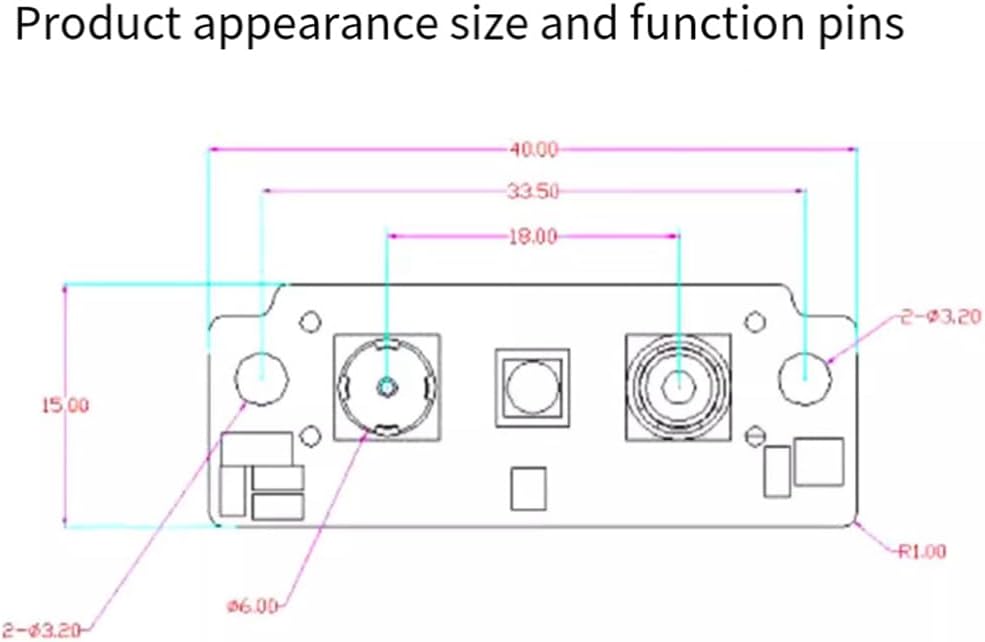
Figure 5: Technical drawing showing the physical dimensions and layout of the FM225 module, including measurements in millimeters.
7. Warranty Information
Specific warranty details for the Bloepum FM225 module are typically provided by the point of purchase or the system integrator. Please refer to your purchase documentation for information regarding warranty periods and terms of service. Generally, products are covered against manufacturing defects for a limited period from the date of purchase.
This warranty typically does not cover damage resulting from:
- Improper installation or use
- Unauthorized modifications or repairs
- Accidents, abuse, or neglect
- Operation outside the specified environmental conditions
8. Technical Support
For technical assistance, integration guidance, or advanced troubleshooting, please contact your system integrator or the Bloepum customer support channel. When contacting support, please have your product model (FM225) and any relevant purchase information ready.
For general inquiries, you may visit the Bloepum official website or refer to the documentation provided by your supplier.