
1. Introduction
This manual provides detailed instructions for the operation and maintenance of your KUAIQU DC Power Supply, Model SPPS-K305. This variable power supply is designed for precision control of voltage and current, featuring a 5-digit TFT display, microampere-level current resolution, and advanced protection mechanisms. It is suitable for various applications including laboratory research, development, battery testing, and electronic DIY projects.

Figure 1: KUAIQU DC Power Supply SPPS-K305
2. Package Contents
Verify that all items are present in the package:
- 1 x KUAIQU DC Power Supply Variable 30V 5A (SPPS-K305)
- 1 x Output Power Cable
- 1 x AC Power Cord
- 1 x User Manual (English)
3. Setup Instructions
- Power Connection: Connect the supplied AC power cord to the power input socket on the rear panel of the power supply and then to a suitable AC power outlet (110V).
- Output Cable Connection: Connect the output power cables to the output terminals on the front panel. The red cable connects to the positive (+) terminal, the black cable to the negative (-) terminal, and the green cable to the Ground (GND) terminal. Ensure connections are secure.
- Initial Power On: Press the POWER button on the front panel to turn on the device. The TFT display will illuminate.
4. Operating Instructions
4.1. Display Features
The 2.8-inch TFT color LCD provides a 5-digit display for precise measurement data. It offers both numerical and curve display modes.
- Numerical Display: Shows voltage with 1mV (0.001V) resolution and current with 0.01mA (10µA) resolution. The display automatically switches to mA when the current is below 0.1A.
- Curve Display: Real-time plots of output voltage and current allow visual observation of fluctuations. Press the CURVE button to activate this mode.
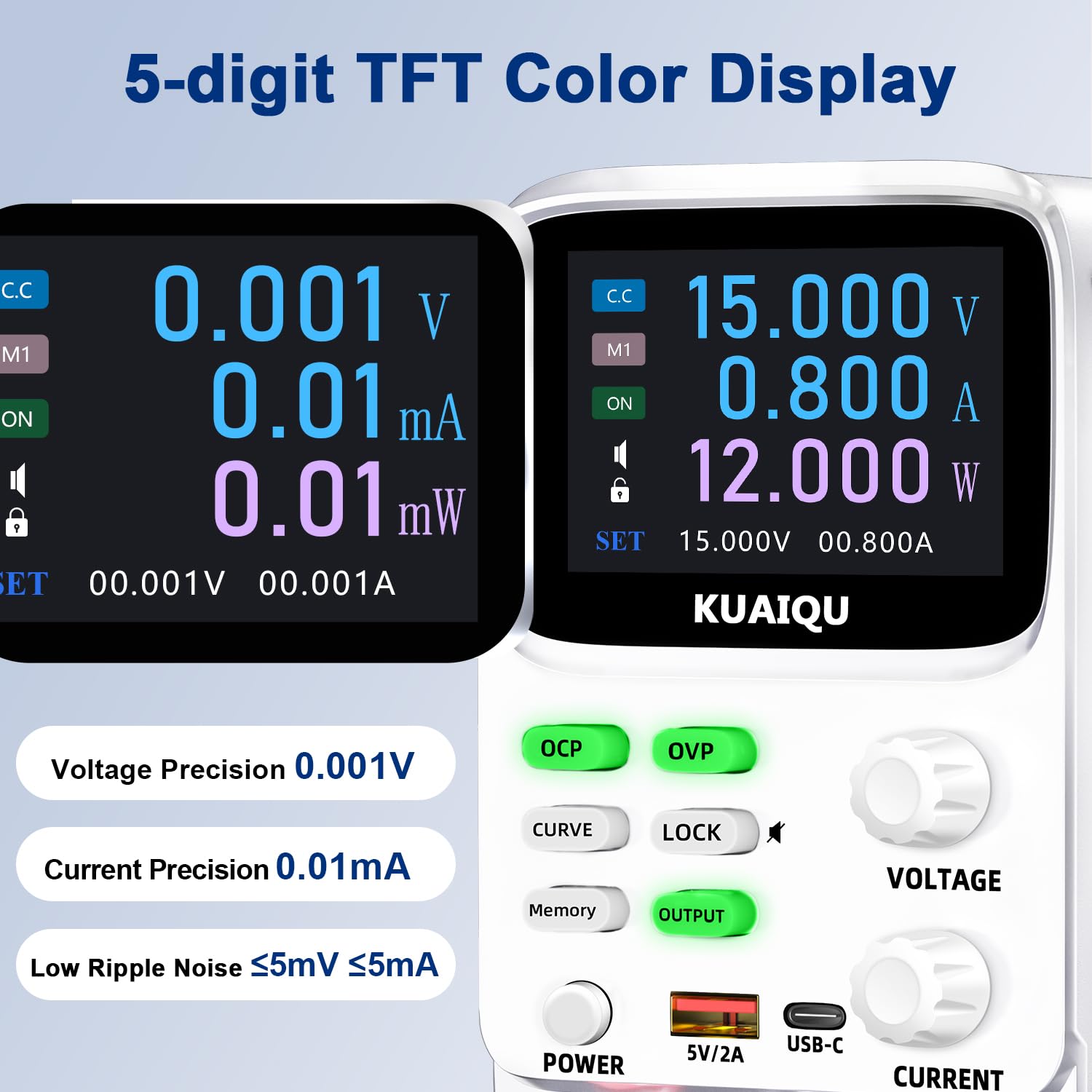
Figure 2: High-Precision 5-Digit TFT Display

Figure 3: Dual Output Curve Display
4.2. Adjusting Voltage and Current
The device uses encoder knobs for precise adjustments:
- Select Parameter: Rotate the VOLTAGE or CURRENT knob to select the desired parameter for adjustment.
- Switch Digits: Press the knob to cycle through the digits (e.g., units, tenths, hundredths) for finer control.
- Set Value: Rotate the knob to change the value of the selected digit.

Figure 4: Encoder Precision Adjustment Knob
4.3. Memory Function (4 Groups of Storage)
The power supply supports storing and recalling up to 4 groups of frequently used voltage and current parameters:
- Enter Settings: Press the Memory button to enter the memory settings interface.
- Select Group: Rotate the VOLTAGE knob to select a memory group (M1-M4).
- Set Values: Long press the VOLTAGE knob to enter setting mode. Short press and rotate the VOLTAGE or CURRENT knob to set the desired values. Long press VOLTAGE again to save the settings.
- Recall Group: Rotate and short press the VOLTAGE knob to select and activate a stored memory group.

Figure 5: 4-Group Data Storage
4.4. Output Control
The OUTPUT button acts as a one-key switch to enable or disable the power output. This allows you to preset voltage and current values before applying power to your circuit, preventing unexpected high voltage or current surges.
4.5. Protection Features (OVP, OCP, SCP)
The power supply includes advanced safety protections:
- OVP (Over-Voltage Protection): Prevents output voltage from exceeding a preset limit.
- OCP (Over-Current Protection): Prevents output current from exceeding a preset limit.
- SCP (Short-Circuit Protection): Automatically cuts off output in case of a short circuit.
To set OVP/OCP limits, long press the respective OVP or OCP button, adjust the value using the knobs, and then short press to save. If an OVP, OCP, or short circuit event occurs, the power supply will stop output, and the display will flash a warning.
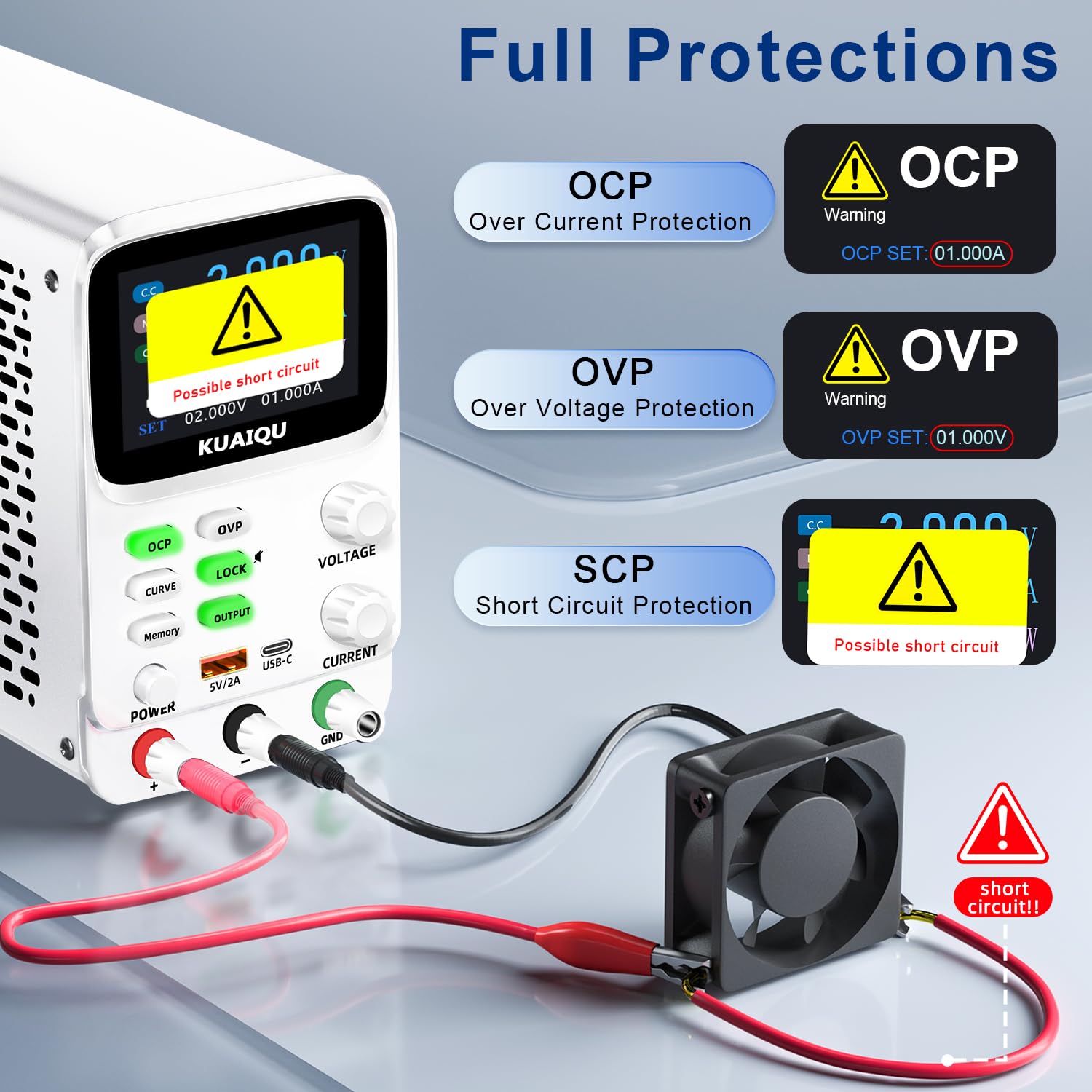
Figure 6: Full Protection Alarms
4.6. Lock Function
The LOCK button prevents accidental changes to settings during operation. Long press the LOCK button to activate or deactivate the lock. This function also controls the encoder knob adjustment beeping sound; long press to mute or unmute.
4.7. USB Charging Ports
The front panel includes USB-A and Type-C ports (5V/2A) for convenient charging of electronic devices.
5. Maintenance
- Cleaning: Use a soft, dry cloth to clean the exterior of the power supply. Do not use abrasive cleaners or solvents.
- Ventilation: Ensure the ventilation openings on the sides and rear of the unit are not obstructed. The intelligent temperature-controlled cooling fan will activate as needed to maintain optimal operating temperature.
- Storage: Store the device in a dry, dust-free environment when not in use.
6. Troubleshooting
- No Power: Check the AC power cord connection and ensure the power outlet is functional. Verify the POWER button is pressed.
- No Output: Ensure the OUTPUT button is activated. Check for OVP/OCP/SCP warnings on the display. If a protection is triggered, address the cause (e.g., short circuit, excessive load) and reset the output.
- Incorrect Readings: Verify output cable connections are secure and correctly polarized. Ensure the device is not in a locked state if adjustments are not registering.
- Display Flashing OVP/OCP/Possible Short Circuit: This indicates a protection mechanism has been triggered. Disconnect the load, identify and resolve the issue (e.g., reduce voltage/current settings, fix short circuit), then re-enable output.
7. Specifications
| Feature | Specification |
|---|---|
| Model Name | SPPS-K305 |
| Brand | KUAIQU |
| Output Voltage | 0-30V |
| Output Current | 0-5A |
| Output Wattage | 150 Watts |
| Voltage Resolution | 0.001V (1mV) |
| Current Resolution | 0.01mA (10µA) |
| Display | 2.8-inch TFT Color LCD, 5-digit |
| Cooling Method | Intelligent temperature-controlled cooling fan |
| Product Dimensions | 3.4 x 7.6 x 5.5 inches |
| Item Weight | 2.5 Pounds |
| UPC | 768351109345 |
8. Warranty and Support
KUAIQU is committed to providing high-quality products and customer satisfaction. This product undergoes thorough inspection before shipment to ensure quality.
For any questions regarding your KUAIQU DC Power Supply, including technical support or after-sales service, please refer to the contact information provided with your purchase documentation or visit the official KUAIQU website. Our professional service team is available to assist you.


