
1. Introduction
This manual provides essential instructions for the safe and efficient operation of your EF ECOFLOW River 3 Plus Portable Power Station and its accompanying EB300 Extra Battery. Please read this manual thoroughly before use and retain it for future reference.
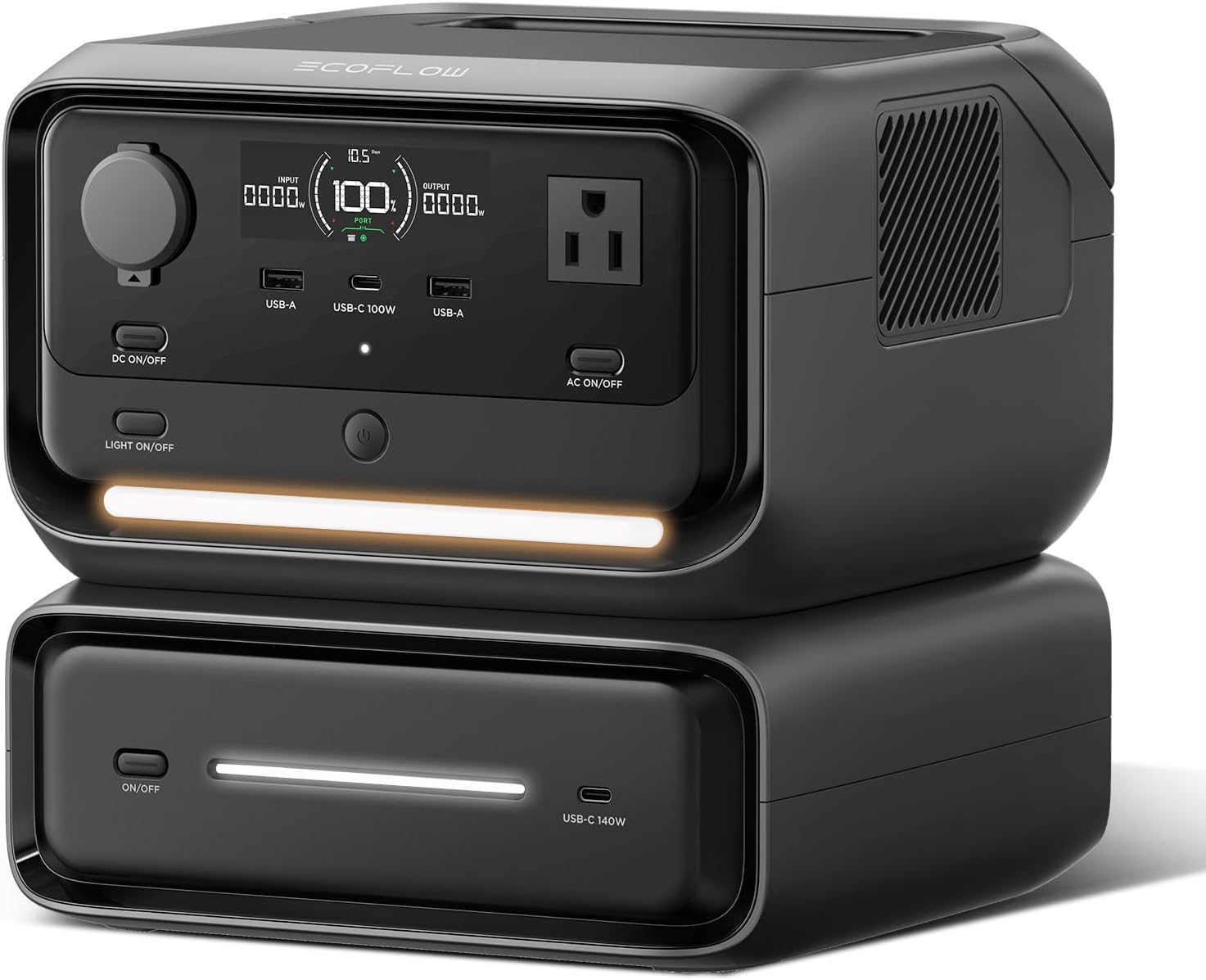
Image 1.1: The EF ECOFLOW River 3 Plus Portable Power Station with the EB300 Extra Battery connected.
2. Package Contents
Verify that all items are present in your package:
- RIVER 3 Plus 286Wh Portable Power Station
- EB300 286Wh Extra Battery
- AC Charging Cable
- Car Charging Cable
- EcoFlow USB-B to USB-A UPS Communication Cable
- User Manual
3. Product Features
3.1. Expandable Capacity
The River 3 Plus offers a base capacity of 286Wh. By connecting the EB300 Extra Battery, the total capacity expands to 572Wh. The connection utilizes Pogo Pin technology for a secure and wireless attachment.

Image 3.1: The River 3 Plus and EB300 Extra Battery combined to double the power capacity.
3.2. Power Output
The River 3 Plus provides a continuous AC output of 600W and can surge up to 1200W with X-Boost technology. It features 7 output ports:
- 3 x AC Outlets
- 2 x USB-A Ports
- 1 x High-Speed USB-C Port
- 1 x Car Charger Output

Image 3.2: The River 3 Plus connected to and powering seven different appliances simultaneously.
3.3. Uninterruptible Power Supply (UPS)
The River 3 Plus offers a switchover time of less than 10 milliseconds, providing protection for sensitive electronics during power outages. It provides LED, app, and software alerts, and supports automatic data saving on low battery via its PC/NAS-compatible interface.

Image 3.3: The River 3 Plus acting as a UPS for a computer and other devices in a home office environment.
3.4. Fast Charging
The unit can be recharged from 0% to 100% in approximately 1 hour using X-Stream AC charging technology (380W input). Vehicle-grade cells and trickle charge technology help prevent battery damage.

Image 3.4: Visual representation of the River 3 Plus achieving a full charge in 1 hour via AC input.
3.5. Solar Charging
Harness solar energy to recharge the River 3 Plus in as little as 1.5 hours with a 220W solar input.

Image 3.5: The River 3 Plus connected to and charging from solar panels outdoors.
3.6. LiFePO4 Battery Technology
The River 3 Plus features a LiFePO4 battery with a lifespan of over 3000 charging cycles before its capacity drops to 80%. This translates to approximately 10 years of daily use. The battery pack is IP54 rated for protection against dust and splashing water, and housed in a robust fire-retardant shell. It is also designed to withstand drops from up to 3 feet (1.5 meters).

Image 3.6: An illustration highlighting the long-lasting LiFePO4 battery with 3000+ cycles and 10-year lifespan.
3.7. Quiet Operation
Equipped with X-Quiet technology, the River 3 Plus operates at a noise level below 30 dB, ensuring minimal disturbance, even in quiet environments.

Image 3.7: The River 3 Plus positioned next to a bed, demonstrating its quiet operation.
3.8. Smart App Control
Control and monitor your River 3 Plus remotely via Bluetooth and Wi-Fi using the EcoFlow app. The app provides real-time status, battery health insights, and customizable settings such as charging speed, timed charging, power-saving mode, and low-battery notifications.

Image 3.8: A smartphone screen showing the EcoFlow app with various control and monitoring options for the power station.
3.9. Portability
With dimensions of 9.2 x 9.1 x 5.8 inches and a weight of 10.4 lbs (main unit), the River 3 Plus is designed for easy storage and transport.

Image 3.9: A person easily carrying the compact and lightweight River 3 Plus power station.
4. Setup
4.1. Unpacking and Inspection
- Carefully remove all components from the packaging.
- Inspect the power station and extra battery for any visible damage. If damage is found, contact customer support immediately.
- Ensure all accessories listed in Section 2 are present.
4.2. Connecting the EB300 Extra Battery
To expand the capacity of your River 3 Plus:
- Align the River 3 Plus unit directly on top of the EB300 Extra Battery.
- The units will connect wirelessly via Pogo Pin technology. Ensure they are securely clipped together.
- Once connected, the River 3 Plus display will indicate the combined battery capacity.
4.3. Initial Charge
It is recommended to fully charge the River 3 Plus and EB300 Extra Battery before first use. Connect the AC charging cable to the unit and a standard wall outlet. The display will show the charging status.
5. Operating Instructions
5.1. Powering On/Off
- To power on the unit, press and hold the main power button until the display illuminates.
- To power off, press and hold the main power button until the display turns off.
5.2. Using AC Outlets
- Press the AC ON/OFF button to enable or disable the AC outlets.
- Plug your AC-powered devices into the available outlets. Ensure the total wattage does not exceed 600W (or 1200W with X-Boost).
5.3. Using DC and USB Outputs
- Press the DC ON/OFF button to enable or disable the DC (car charger) and USB outputs.
- Connect your USB-A, USB-C, or 12V car-powered devices. The EB300 Extra Battery also provides an additional 140W USB-C port for charging.
5.4. Charging the Power Station
The River 3 Plus can be charged via multiple methods:
- AC Charging: Connect the AC charging cable to a wall outlet. The unit supports X-Stream fast charging.
- Solar Charging: Connect compatible solar panels (up to 220W) to the solar input port.
- Car Charging: Use the car charging cable to charge from your vehicle's 12V outlet.
5.5. UPS Mode
When connected to an AC wall outlet and powering devices, the River 3 Plus automatically functions as a UPS. In case of a power outage, it will seamlessly switch to battery power within 10 milliseconds.
5.6. Smart App Control
Download the EcoFlow app from your device's app store. Follow the in-app instructions to connect your River 3 Plus via Bluetooth or Wi-Fi. The app allows for remote monitoring, control of output ports, and customization of charging parameters.
6. Maintenance
6.1. Battery Care
- Avoid leaving the battery at 0% charge for extended periods. Recharge promptly after use.
- For long-term storage, charge the unit to approximately 50-80% and store in a cool, dry place. Recharge every 3-6 months to maintain battery health.
6.2. Cleaning
Use a dry, soft cloth to clean the exterior of the power station. Do not use harsh chemicals or immerse the unit in water.
6.3. Environmental Considerations
While the battery pack is IP54 rated for splash resistance, the entire device is not fully waterproof. Avoid exposing the unit to heavy rain or submerging it in water.
7. Troubleshooting
If you encounter issues, refer to the following common solutions:
- Unit Not Turning On: Ensure the battery is charged. Press and hold the power button for a few seconds.
- No Output from Ports: Check if the respective AC or DC/USB output buttons are enabled. Verify that the connected device's power consumption does not exceed the unit's limits.
- Slow Charging: Ensure you are using the original charging cables. Check the power source for adequate output. Solar charging efficiency depends on sunlight intensity and panel angle.
- App Connectivity Issues: Ensure Bluetooth and Wi-Fi are enabled on your smartphone and the power station. Try restarting both devices.
For persistent issues, consult the EcoFlow app for diagnostic information or contact customer support.
8. Specifications
| Feature | Specification |
|---|---|
| Model | RIVER 3 Max |
| Brand | EF ECOFLOW |
| Product Dimensions | 9.2 x 8.8 x 5.7 inches |
| Item Weight | 18.48 pounds (8.4 kg) |
| Battery Type | LiFePO4 (Lithium Iron Phosphate) |
| Base Capacity | 286Wh |
| Expandable Capacity (with EB300) | 572Wh |
| AC Output (Continuous) | 600W |
| AC Output (X-Boost Surge) | 1200W |
| Total Outlets | 7 (3x AC, 2x USB-A, 1x USB-C, 1x Car Charger) |
| AC Charging Input | 380W (X-Stream) |
| AC Charging Time (0-100%) | 1 hour |
| Solar Charging Input (Max) | 220W |
| Solar Charging Time (0-100%) | 1.5 hours (with 220W solar input) |
| UPS Switchover Time | <10 ms |
| Noise Level | <30 dB |
| Battery Lifespan | 3000+ cycles to 80% capacity |
| Battery Protection | IP54 (battery pack), Fire-retardant, Drop-proof (3 ft) |
| Connectivity | Bluetooth, Wi-Fi |
9. Warranty and Support
The EF ECOFLOW River 3 Plus and EB300 Extra Battery come with a 5-year service warranty. For technical support, warranty claims, or further assistance, please contact EF ECOFLOW customer service through their official website or the contact information provided in your product packaging.


