
1. Important Safety Instructions
Please read all instructions carefully before using this appliance. Failure to follow these instructions may result in electric shock, fire, or serious injury.
- General Safety: Do not use this vacuum cleaner for any purpose other than its intended use. Keep the appliance away from children.
- Electrical Safety: Use only the provided Type-C charging cable. Do not attempt to modify the charger or battery. Avoid charging in extremely hot or cold environments.
- Battery Safety: The vacuum contains a rechargeable lithium-ion battery. Do not expose the battery to fire or high temperatures. Do not disassemble, crush, or puncture the battery.
- Usage Restrictions: Do not vacuum flammable or combustible materials (e.g., lighter fluid, gasoline). Do not vacuum hot ashes, broken glass, or sharp objects. This vacuum is designed for dry and small wet messes; avoid large liquid spills.
- Maintenance: Ensure the appliance is turned off and unplugged before cleaning or performing any maintenance. Regularly clean the HEPA filter to maintain optimal suction and prevent clogging.
2. Product Overview
The BELIBUY YACQ-1308 is a versatile 4-in-1 portable cordless vacuum cleaner designed for efficient cleaning in various environments, including cars, homes, and offices. It functions as a vacuum cleaner, air duster, and air inflator.
Included Components:
- Portable Vacuum Cleaner Unit
- Crevice Tool
- Brush Nozzle
- Floor Brush
- Blow Nozzles (various sizes)
- HEPA Filters (2 included)
- Type-C Charging Cable
- User Manual

Figure 2.1: The BELIBUY YACQ-1308 Portable Car Vacuum Cleaner shown with all included accessories, including various nozzles, filters, and charging cable.
Key Features:
- Powerful Suction: Equipped with an advanced motor providing up to 17000Pa suction for effective cleaning.
- Cordless & Portable: Lightweight (approximately 400g) and compact design for easy handling and storage.
- LCD Display: Monitors battery level and operational status.
- Multi-functional: Functions as a vacuum cleaner, air duster, and air inflator.
- Rechargeable Battery: Built-in 4000mAh battery (2x2000mAh) with a protective plate for safe charging and use, offering 20-30 minutes of continuous operation.
- Washable HEPA Filter: Ensures effective filtration and can be cleaned for reuse.
3. Setup and Charging
3.1 Initial Charging
Before first use, fully charge the vacuum cleaner. The device comes with a Type-C charging port for convenience.
- Connect the provided Type-C charging cable to the charging port on the vacuum cleaner.
- Plug the other end of the cable into a compatible USB power source (e.g., car charger, adapter charger, power bank, computer USB port).
- The LCD display will indicate charging status. When fully charged, the prompt light will turn green.
- A full charge typically takes approximately 2 hours.

Figure 3.1: The vacuum cleaner being charged using the USB-C cable, illustrating various compatible power sources such as a car charger, adapter, power bank, and computer.
3.2 Attaching Nozzles
The vacuum cleaner supports various nozzles for different functions. Ensure the vacuum is off before attaching or detaching accessories.
- For Vacuuming: Attach the desired nozzle (e.g., crevice tool, brush nozzle, floor brush) to the front suction port of the vacuum cleaner.
- For Air Duster/Inflator: Attach the appropriate blow nozzle to the rear exhaust port of the vacuum cleaner.
4. Operating Instructions
The BELIBUY YACQ-1308 offers multiple cleaning modes. Familiarize yourself with the controls before operation.
4.1 Power On/Off
Press and hold the power button to turn the vacuum cleaner on or off. The LCD display will activate upon power-on.
4.2 Vacuuming Function
Use this function for cleaning dust, debris, and small particles from surfaces.
- Ensure a suitable nozzle is attached to the front suction port.
- Press the power button to turn on the vacuum.
- Direct the nozzle towards the area to be cleaned.
- Move the vacuum slowly over the surface to pick up debris.
4.3 Air Duster Function
This function is ideal for blowing away dust from delicate surfaces or hard-to-reach areas.
- Attach a blow nozzle to the rear exhaust port.
- Press the power button to turn on the device.
- Direct the airflow towards the dust or debris you wish to remove.
4.4 Air Inflation Function
The device can also be used for air inflation with specific nozzles.
- Attach the appropriate inflation nozzle to the rear exhaust port.
- Press the power button to activate the airflow.
- Use for inflating small items as needed.
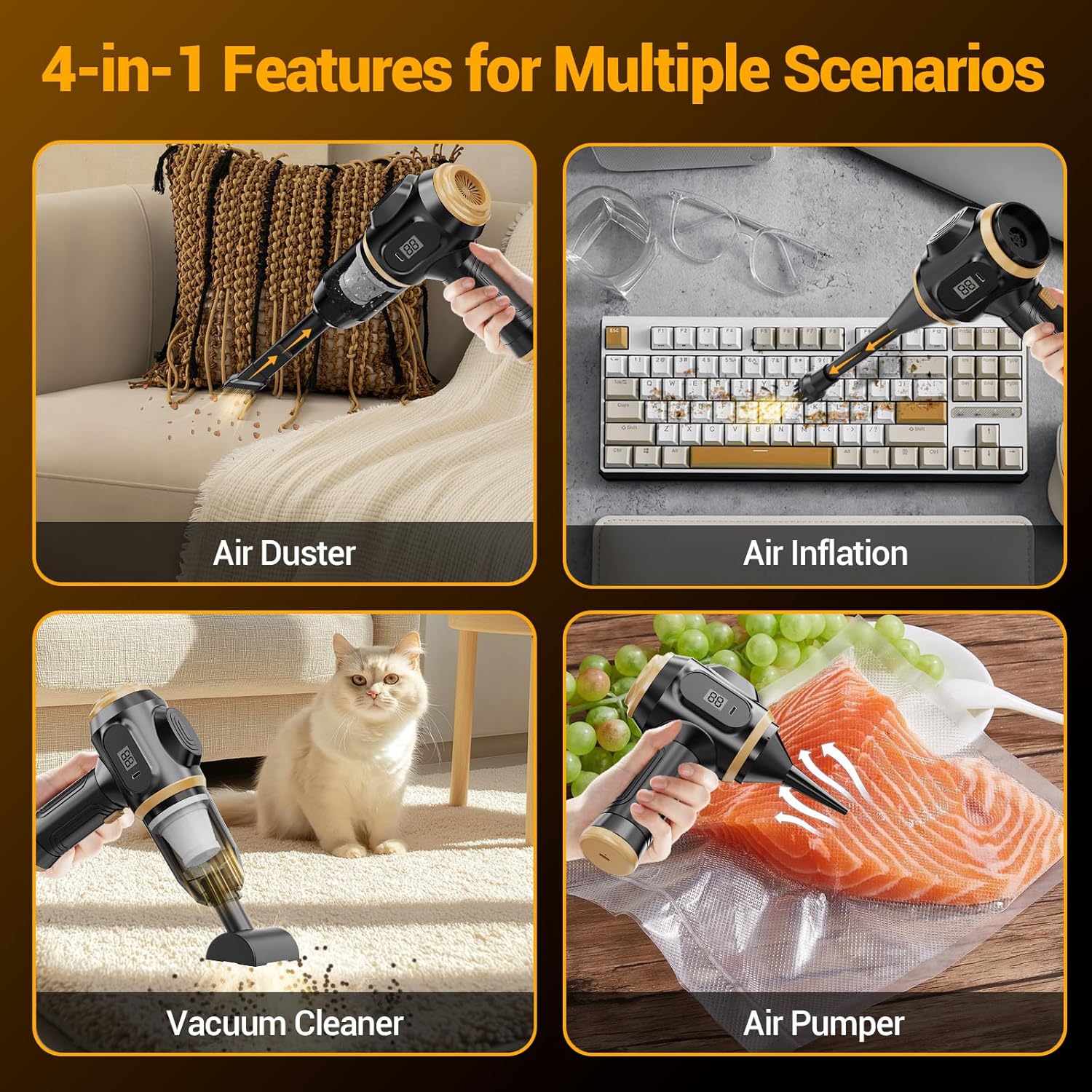
Figure 4.1: The 4-in-1 functionality of the vacuum cleaner, showing its use as an air duster for keyboards, an air inflator, a vacuum cleaner for upholstery, and an air pumper for vacuum sealing.
4.5 Using Different Nozzles
- Crevice Tool: Ideal for narrow gaps, corners, and hard-to-reach areas like between sofa cushions or car seats.
- Brush Nozzle: Effective for cleaning upholstery, pet hair, and dislodging stubborn dirt from surfaces.
- Floor Brush: Suitable for larger flat surfaces such as car floors, trunks, or small rugs.
- Blow Nozzles: Various sizes for dusting keyboards, electronics, or inflating small items.

Figure 4.2: Illustration of various nozzles and their specific uses, including the HEPA filter and waste bin, suction nozzle for crevices, blow nozzle for dusting, and floor brush for larger areas.
5. Maintenance
Regular maintenance ensures optimal performance and extends the lifespan of your vacuum cleaner.
5.1 Emptying the Dustbin
The semi-transparent dust bowl allows you to monitor the dirt level. Empty it when it appears full or after each significant use.
- Ensure the vacuum cleaner is turned off.
- Twist or unlatch the dustbin from the main unit (refer to product diagram for specific mechanism).
- Empty the collected debris into a trash receptacle.
5.2 Cleaning the HEPA Filter
The HEPA filter is washable and reusable. Clean it regularly to maintain strong suction.
- Remove the dustbin as described above.
- Carefully remove the HEPA filter from the dustbin.
- Rinse the HEPA filter under running water until clean. Do not use detergents or hot water.
- Allow the filter to air dry completely for at least 24 hours before reinserting it into the dustbin. Do not use the vacuum with a wet filter.
- Reassemble the filter and dustbin, then attach them back to the main unit.
Figure 5.1: The HEPA filter and waste bin assembly, indicating how fine dust is filtered and stored.
6. Troubleshooting
If you encounter issues with your BELIBUY YACQ-1308, refer to the following common problems and solutions:
| Problem | Possible Cause | Solution |
|---|---|---|
| Vacuum does not turn on. | Battery is depleted. | Charge the vacuum cleaner fully. |
| Weak suction power. | Dustbin is full. | Empty the dustbin. |
| HEPA filter is clogged or wet. | Clean and thoroughly dry the HEPA filter. Replace if necessary. | |
| Nozzle or hose is blocked. | Remove any obstructions from the nozzle or suction path. | |
| Vacuum not charging. | Charging cable or adapter faulty. | Try a different Type-C cable or USB power adapter. Ensure connections are secure. |
| Unusual noise during operation. | Obstruction in the motor or fan. | Turn off and inspect for any foreign objects. If noise persists, contact support. |
7. Specifications
| Feature | Specification |
|---|---|
| Model Name | YACQ-1308 |
| Brand | BELIBUY |
| Maximum Suction | 17000 Pa |
| Wattage | 45 watts |
| Battery Capacity | 4000 mAh (2x2000mAh) |
| Battery Type | Rechargeable Lithium-ion |
| Charging Time | Approx. 2 hours |
| Run Time | 20-30 minutes (continuous) |
| Filter Type | HEPA Filter |
| Dustbin Capacity | 0.5 Liters |
| Product Dimensions | 7.5"L x 3"W x 7.5"H |
| Item Weight | 8 ounces (approx. 400g) |
| Noise Level | 65 dB |
| Connectivity Technology | Wireless |
8. Warranty and Support
BELIBUY products are manufactured to high-quality standards. This product comes with a standard manufacturer's warranty against defects in materials and workmanship under normal use.
For warranty claims, technical support, or any questions regarding your BELIBUY YACQ-1308 Portable Car Vacuum Cleaner, please contact our customer service team through the retailer's platform or visit the official BELIBUY store on Amazon:
Visit the BELIBUY Store on Amazon
Please have your model number (YACQ-1308) and purchase information ready when contacting support.
