
Introduction
This manual provides essential instructions for the safe and efficient operation of your Bonsaii Large Safe Box. Please read this manual thoroughly before installation and use, and retain it for future reference. This safe is designed to protect your valuables, documents, and personal items with its robust construction and advanced digital locking system.
What's in the Box
Carefully unpack your safe and ensure all components are present. If any items are missing or damaged, please contact customer support.
- 1 x Bonsaii Large Safe Box
- 2 x Emergency Keys
- 1 x Removable Shelf
- 4 x Shelf Support Pegs
- 4 x Expansion Bolts
- 1 x Floor Mat
- 1 x User Manual
Note: Batteries are not included and must be purchased separately.

Image: All components included with the Bonsaii Large Safe Box.
Product Features
- Capacity: 1.8 Cubic Feet, suitable for important documents, electronic devices, jewelry, cash, and passports.
- Construction: Made from SPHC steel with a scratch-resistant coating for enhanced durability.
- Security: Reinforced door panel with 4 live bolts for anti-prying and anti-theft protection.
- Locking System: Electronic lock with 3-8 digit code or key access. Features a Type-C port for external power in case of battery depletion.
- Interior: Includes a removable shelf for flexible storage space and a floor mat to prevent scratching of contents.
- Mounting: Pre-drilled holes on the back and bottom allow for wall or floor mounting.

Image: Internal dimensions and capacity of the 1.8 cubic feet safe.
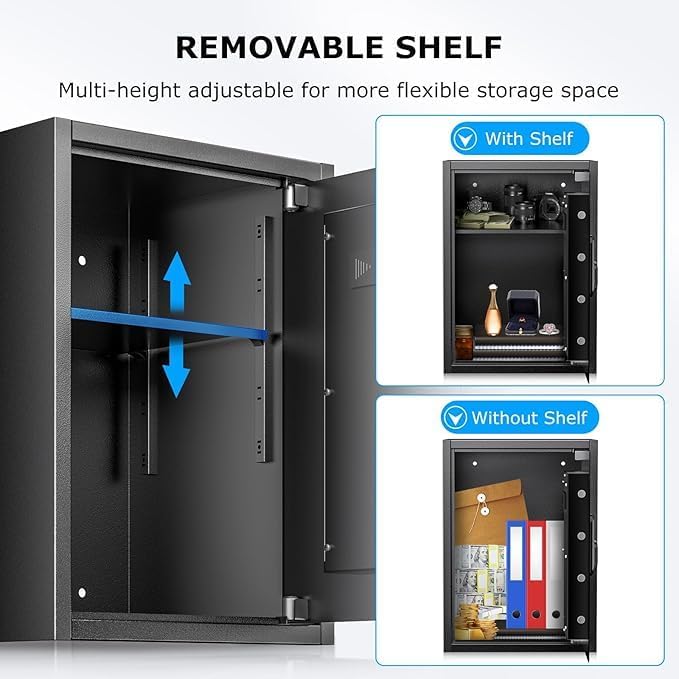
Image: Removable shelf for flexible storage.

Image: Durable and sturdy material construction details.
Setup
1. Battery Installation
Open the safe using the emergency key. Locate the battery compartment on the inside of the door. Insert 4 AA batteries (not included) according to the polarity markings. Close the battery compartment cover.

Image: Battery compartment for power.
2. Setting Your Digital Code
With the safe door open, press the red reset button located on the inside of the door. The yellow light on the keypad will illuminate. Enter your desired 3-8 digit code, then press the '#' button to confirm. The yellow light will turn off, indicating the code is set.
3. Emergency Key Usage
In case of battery failure or forgotten code, the safe can be opened using the emergency key. Remove the keyhole cover on the keypad panel. Insert the emergency key and turn it counter-clockwise while simultaneously turning the knob clockwise to open the safe.

Image: Removing the keyhole cover for emergency access.

Image: Operating the safe with the emergency key.
Operating Instructions
Opening the Safe with Digital Code
- Enter your 3-8 digit personal code on the keypad.
- Press the '#' button. The green light will illuminate.
- Within 5 seconds, turn the knob clockwise to open the safe door.

Image: Three methods for opening the safe.
Closing the Safe
Close the safe door and turn the knob counter-clockwise until it locks securely. Ensure the door is fully closed and the bolts are engaged.
Mounting Instructions
Your Bonsaii safe can be mounted to a wall or floor for added security. The safe features 4 pre-drilled holes on both the back and bottom panels.
Wall or Floor Mounting Steps:
- Choose a suitable location for mounting.
- Mark the drilling points through the pre-drilled holes on the safe's back or bottom panel onto the wall or floor.
- Drill holes at the marked points using an appropriate drill bit for your wall/floor material.
- Insert the expansion bolts into the drilled holes.
- Align the safe with the bolts and secure it tightly using the provided nuts or by tightening the expansion bolts.
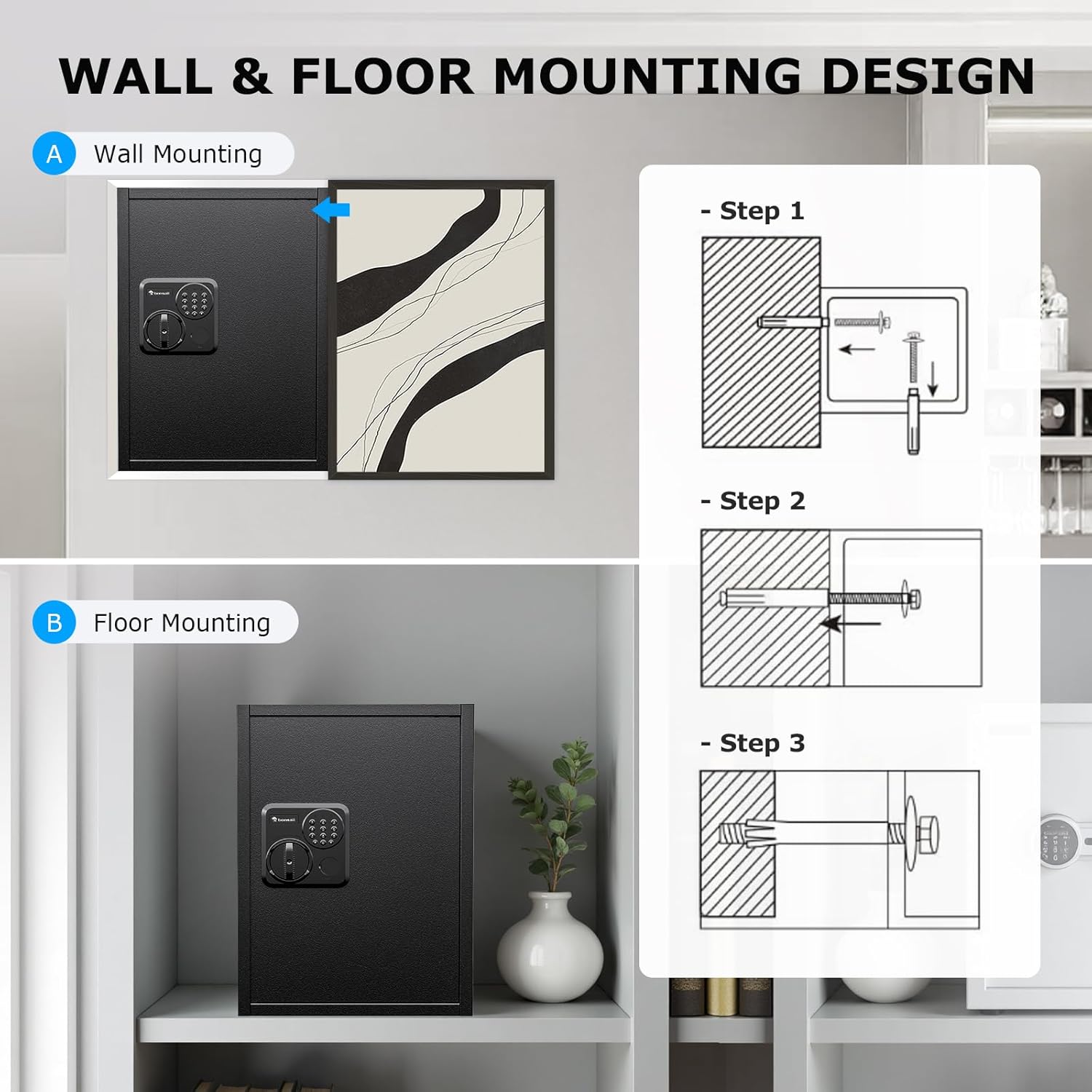
Image: Wall and floor mounting design with installation steps.
Maintenance
- Cleaning: Wipe the exterior with a soft, damp cloth. Avoid abrasive cleaners.
- Battery Replacement: Replace batteries when the low battery indicator light appears (usually a red light on the keypad). Always use new, high-quality alkaline batteries. Do not mix old and new batteries.
- Key Storage: Store emergency keys in a secure location away from the safe.
Troubleshooting
Safe will not open with digital code:
- Incorrect Code: Ensure you are entering the correct 3-8 digit code.
- Low Battery: If the batteries are low, the keypad may not respond or the indicator light may flash red. Replace the batteries or use the external Type-C power port.
- External Power: If batteries are dead and keys are not found, connect a Type-C power bank (5V) to the Type-C port on the keypad to temporarily power the lock.

Image: Emergency power supply via Type-C port.
Forgotten Code:
Use the emergency key to open the safe. Once open, you can reset the digital code by pressing the red reset button and following the code setting instructions.
Specifications
| Feature | Detail |
|---|---|
| Brand | bonsaii |
| Model Number | SF006 |
| Product Dimensions (D x W x H) | 14.2"D x 19.7"W x 12.99"H |
| Capacity | 1.8 Cubic Feet |
| Material | SPHC Steel |
| Lock Type | Electronic Combination Lock |
| Mounting Type | Floor / Wall Mount |
| Item Weight | 21.32 Kilograms |
| Water Resistance Level | Not Water Resistant |
| Control Type | Touchpad Control |
Warranty and Support
Bonsaii provides professional support for its products. If you encounter any issues or have questions regarding your safe, please contact customer service. We offer one year of protection for quality-related concerns.
For assistance, please refer to the contact information provided in your product packaging or visit the official Bonsaii website.

